1. Introduction
Thank you for choosing the Dhiedas MD1 WiFi Smart Deadbolt Lock. This manual provides detailed instructions for the installation, operation, and maintenance of your new smart lock. Please read this manual carefully before installation and keep it for future reference.
2. Product Overview
The Dhiedas MD1 Smart Deadbolt Lock offers advanced security and convenience for your home. It integrates multiple unlocking methods and smart features for seamless access control.
Key Features:
- Built-in WiFi APP Remote Control: Unlock from anywhere, get real-time notifications, and view unlock records via the free eSmartlock APP. No gateway required.
- Auto-Lock & Door Sensor: Automatically locks after each door closure. Receive real-time APP notifications when the door is opened or closed.
- Exclusive Screen Display: Industry-first deadbolt smart lock with a screen displaying time, battery level, lock status, and auto-lock countdown.
- 10000mAh Long-lasting Battery: Built-in large rechargeable battery provides up to 365 days of standby time.
- 7-in-1 Smart Deadbolt Door Lock: Offers 7 unlocking methods: fingerprint, password, RFID, APP, voice (Alexa), Apple Watch, and physical key.
- Durability & Easy DIY: Designed for easy installation on US standard doors without drilling. Includes a screwdriver for convenience.

Figure 2.1: The Dhiedas MD1 Smart Door Lock, showcasing its sleek design, integrated keypad, fingerprint sensor, and accompanying RFID cards.
3. What's in the Box
Upon opening the package, you will find the following components:
- Smart Deadbolt Lock (All Accessories)
- 1* 10000 Lithium battery
- 4* RFID Cards
- 2* Keys
- 1* Door sensor
- 1* Manual
- 1* Screwdriver

Figure 3.1: All components included in the Dhiedas MD1 Smart Lock package, neatly organized in protective foam.
4. Setup Guide
4.1 Pre-Installation Checklist
- Ensure the included 10000mAh lithium battery is fully charged before beginning installation.
- Verify your door's compatibility: The lock fits US standard doors with a door backset of 2-3/8" (60mm) or 2-3/4" (70mm), a door hole diameter of 2-1/8" (54mm) or 1-1/2" (38mm), and a door thickness of 1-3/8" (35mm) to 2-1/8" (55mm).
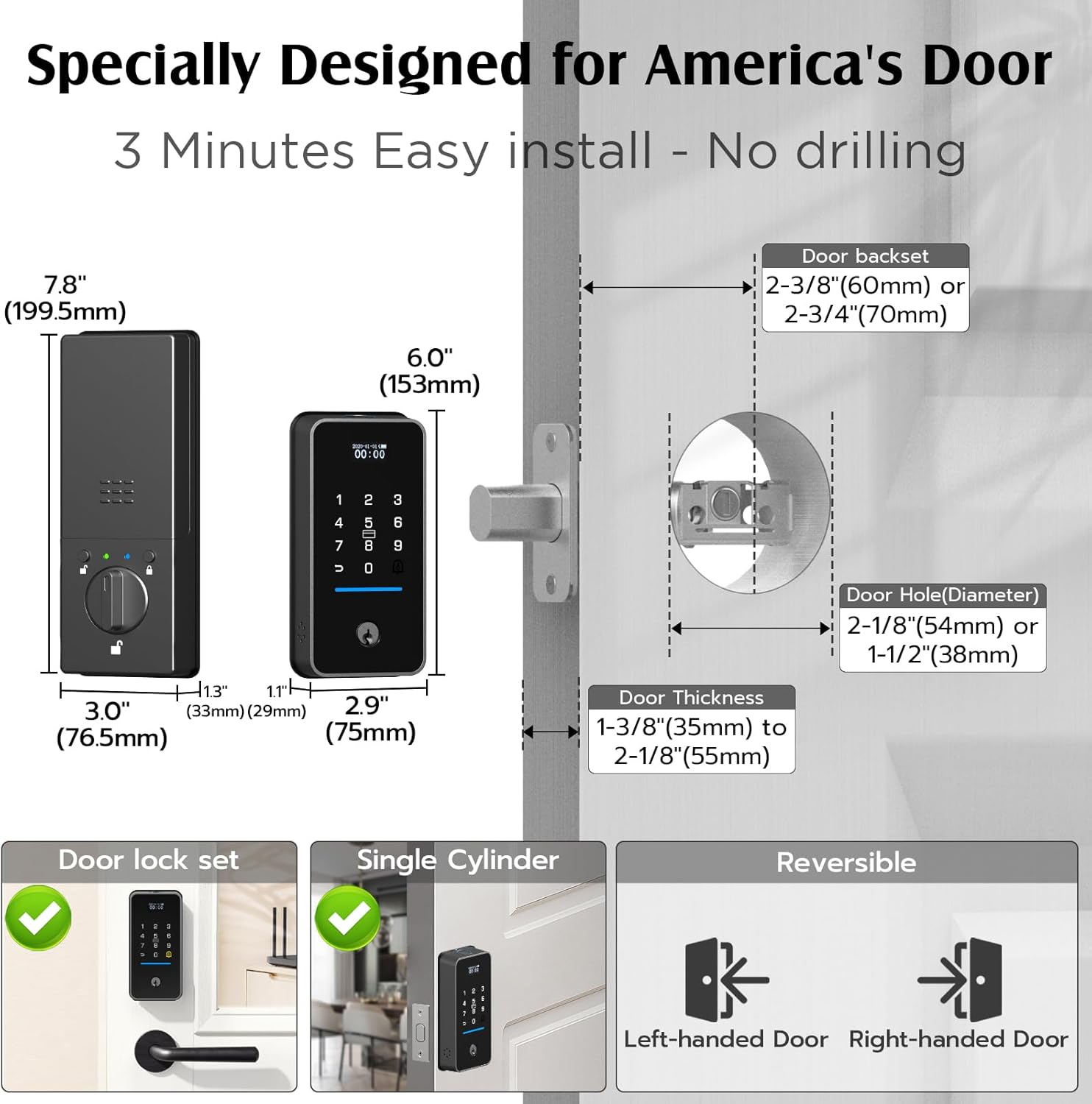
Figure 4.1: Detailed door dimensions and compatibility requirements for the Dhiedas MD1 Smart Lock.
4.2 Installation Steps
The Dhiedas MD1 is designed for easy DIY installation without the need for drilling. Follow these general steps:
- Remove your existing deadbolt lock from the door.
- Insert the new deadbolt mechanism into the door. Ensure it is correctly oriented for your door's handing (left-handed or right-handed).
- Attach the exterior keypad unit to the door, aligning it with the deadbolt mechanism.
- Connect the internal wiring from the exterior unit to the interior unit.
- Mount the interior unit to the door, securing it with the provided screws using the included screwdriver.
- Insert the fully charged 10000mAh battery into the interior unit.
- Close the battery cover. The lock should power on and indicate its status.
For detailed visual instructions, please refer to the installation video provided by the manufacturer.
5. Operating Your Smart Lock
5.1 Unlocking Methods
The Dhiedas MD1 offers versatile unlocking options:
- Fingerprint: Place your registered fingerprint on the sensor located at the top of the keypad unit. The lock will verify and unlock.
- Keypad Code: Enter your programmed passcode on the touchscreen keypad. The lock supports anti-peeping passwords, allowing you to enter random digits before or after your actual code for added security.
- RFID Card: Simply tap a registered RFID card against the keypad unit to unlock. The lock comes with 4 RFID cards.
- eSmartlock APP: Use the eSmartlock app on your smartphone (iOS or Android) to remotely unlock the door from anywhere with a Wi-Fi connection. The app also provides real-time notifications and access logs.
- Voice Control (Amazon Alexa): Integrate your lock with Amazon Alexa for convenient voice-activated unlocking.
- Apple Watch: Unlock your door directly from your Apple Watch for quick access.
- Physical Key: Two physical keys are included for traditional manual unlocking, serving as a reliable backup in any situation, including power outages.

Figure 5.1: Visual representation of the seven different ways to unlock your Dhiedas MD1 Smart Lock.
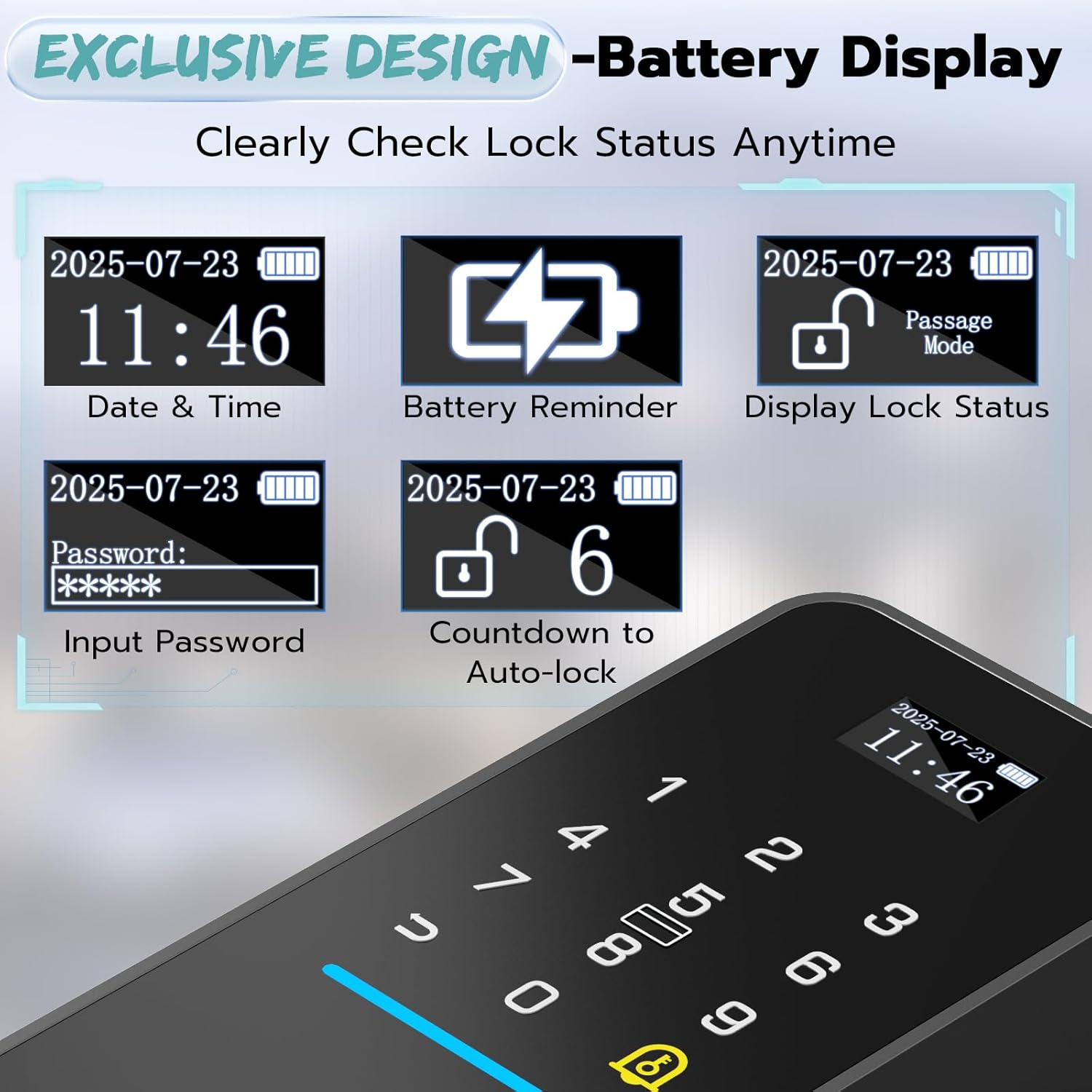
Figure 5.2: The exclusive screen display provides clear information on date, time, battery, lock status, password input, and auto-lock countdown.

Figure 5.3: Remote unlocking via the eSmartlock app and voice control compatibility with Amazon Alexa.
5.2 Lock Modes
The lock supports various modes to suit your needs:
- Normal Mode (Auto-Lock): The lock automatically engages after a set period (e.g., 9 seconds) once the door is closed.
- Passage Mode: Keeps the lock continuously unlocked, ideal for high-traffic periods or when you want unrestricted access.
- Privacy Mode: Restricts access to only the administrator, enhancing security when you need complete privacy.

Figure 5.4: Illustration of Normal Mode (Auto-lock), Passage Mode (Keep unlocked), and Privacy Mode (Admin can unlock).
6. Maintenance
6.1 Battery Management
The Dhiedas MD1 is equipped with a powerful 10000mAh rechargeable lithium battery, providing extended usage. To charge, use the USB-C port located on the lock. The screen display will show the battery level, and the app will provide low battery reminders to ensure you are never locked out.
Figure 6.1: Features related to the 10000mAh rechargeable battery, including USB-C emergency power and low battery reminders.
6.2 Cleaning
To maintain the appearance and functionality of your smart lock, wipe the exterior surfaces with a soft, damp cloth. Avoid using abrasive cleaners or solvents that could damage the finish or electronic components.
7. Troubleshooting
If you encounter any issues with your Dhiedas MD1 Smart Lock, please refer to the following common problems and solutions:
| Issue | Possible Cause | Solution |
|---|---|---|
| Lock not responding to any input. | Low or dead battery. | Charge the battery via the USB-C port or use the physical key to unlock. |
| Fingerprint not recognized. | Fingerprint sensor is dirty or fingerprint not registered correctly. | Clean the fingerprint sensor. Re-register your fingerprint through the eSmartlock app. |
| App connectivity issues. | Weak Wi-Fi signal or app malfunction. | Ensure the lock is within Wi-Fi range (2.4Ghz only). Restart the eSmartlock app and/or the lock. |
| Keypad not lighting up. | Battery issue or sleep mode. | Tap the screen to wake it up. Check battery level and recharge if necessary. |
If the issue persists, please contact Dhiedas customer support for further assistance.
8. Specifications
| Feature | Value |
|---|---|
| Brand | Dhiedas |
| Model Name | MD1 |
| Lock Type | Biometric, Deadbolt, Combination Lock, Keypad |
| Material | Alloy Steel, Zinc |
| Item Dimensions L x W x H | 7 x 2 x 2 inches |
| Item Weight | 3.61 pounds |
| Color | Black |
| Connectivity Protocol | Wi-Fi (2.4Ghz) |
| Controller Type | Amazon Alexa, iOS, Android |
| Battery Cell Type | Lithium Ion (10000mAh) |
| Special Features | Touchscreen, Built-in WiFi and Doorbell door sensor, Display Screen, 3 Mode: Auto-lock, Passage mode, Privacy mode, 10000mAh Rechargeable Battery, Weather Resistant |
9. Warranty and Support
Dhiedas provides a 1-year trusted aftercare and lifetime technical support for your smart lock. For answers to frequently asked questions, troubleshooting, and technical support, please refer to the contact information provided in your product packaging or visit the official Dhiedas website.


