
1. Introduction
The LMBGM SEM100 Stereo Wireless In-Ear Monitor System is designed for professional audio monitoring in live performance and studio environments. This system provides high-fidelity sound quality and flexible control, ensuring a stable and immersive monitoring experience. It features UHF band phase-locked loop (PLL) technology for improved performance, anti-frequency dropout, and anti-crosstalk capabilities. The system supports both stereo and mono modes to adapt to various performance scenarios.
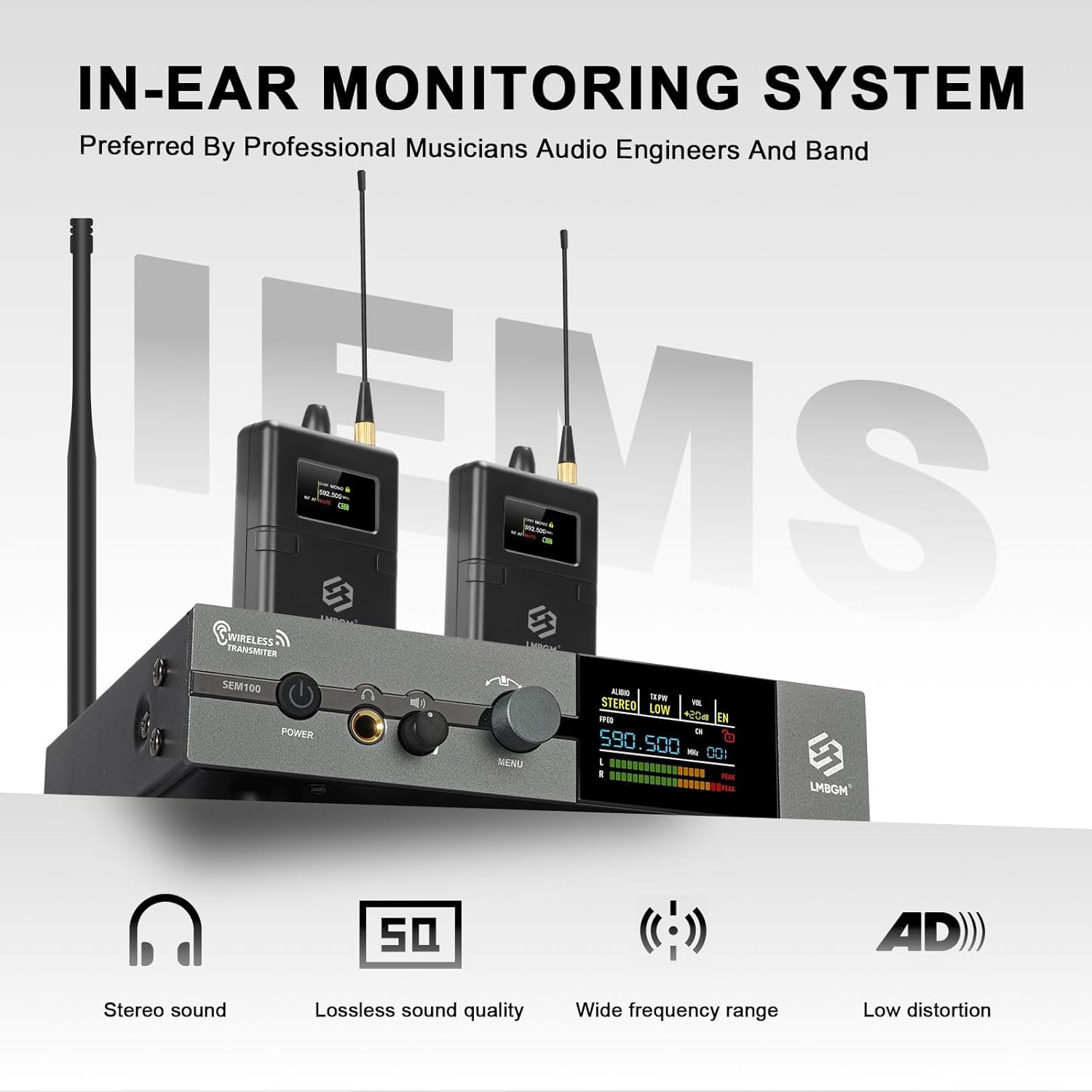
Figure 1.1: LMBGM SEM100 System Overview
This manual provides detailed instructions for setting up, operating, and maintaining your SEM100 system. Please read it thoroughly before use to ensure optimal performance and longevity of your equipment.
2. Package Contents
Verify that all items listed below are included in your package:
- 1 x Transmitter Unit
- 2 x Bodypack Receivers (with earphones)
- 2 x Antennas
- 2 x Cable Lines
- 1 x Power Adapter
- 1 x User Manual (this document)
3. Product Overview
3.1 Transmitter Unit
The transmitter unit is the central component of the SEM100 system, responsible for sending audio signals wirelessly to the bodypack receivers. It features a TFT HD LCD color display panel for easy monitoring and control of settings.

Figure 3.1: Transmitter Unit Controls and Display
- Power Switch: Turns the unit on or off.
- 6.35mm Earphone Output Socket: For direct monitoring from the transmitter.
- Earphone Volume Potentiometer: Adjusts the volume for the earphone output.
- Menu Adjustment Keys: Used to navigate and select options on the TFT display.
- TFT Display: Shows current frequency, channel, audio mode (mono/stereo), transmit power, volume, and lock status.
- DC Input Jack: For connecting the power adapter.
- Input 1 & 2 (XLR/TRS Combo Jacks): For connecting audio sources. Features PAD buttons for input attenuation.
- Outputs 1(R) & 2(L) (TRS Jacks): Loop out for sending audio to other devices.
- ANT Jack: For connecting the antenna.
3.2 Bodypack Receiver
The bodypack receiver is a compact, portable unit that receives the wireless audio signal from the transmitter and delivers it to the connected in-ear earphones. It also features a display for monitoring status.

Figure 3.2: Bodypack Receiver
3.3 In-Ear Earphones
The included high-fidelity in-ear earphones are designed to provide clear and precise sound monitoring, essential for live performances and studio sessions.

Figure 3.3: In-Ear Monitor Earphones
4. Setup Instructions
4.1 Transmitter Setup
- Connect the Antenna: Screw the provided antenna onto the ANT jack at the rear of the transmitter unit. Ensure it is securely fastened.
- Connect Audio Inputs: Connect your audio source (e.g., mixing console, audio interface) to the INPUT 1 and/or INPUT 2 XLR/TRS combo jacks on the rear of the transmitter. If the input signal is too strong, press the PAD button next to the input to attenuate the signal.
- Connect Power: Plug the power adapter into the DC INPUT jack on the rear of the transmitter, then plug the adapter into a power outlet.
- Power On: Press the POWER button on the front panel to turn on the transmitter. The TFT display will illuminate.

Figure 4.1: Transmitter Rear Panel Connections
4.2 Bodypack Receiver Setup
- Install Batteries: Open the battery compartment on the bodypack receiver and insert two fresh 1.5V batteries (not included). Ensure correct polarity.
- Connect Earphones: Plug the in-ear earphones into the 3.5mm earphone jack on the bodypack receiver.
- Power On: Press and hold the power button on the bodypack receiver to turn it on. The display will show the current channel and battery status.

Figure 4.2: Bodypack Receiver Battery Installation
5. Operating Instructions
5.1 Transmitter Operation
- Frequency and Channel Selection: Use the MENU knob on the transmitter to navigate through settings. Rotate to select 'FREQ' or 'CH' and press to confirm. Rotate again to change the frequency or channel. The system operates in the 550 MHz-580 MHz range with 16 switchable frequencies.
- Mono/Stereo Mode Switching: From the main display, rotate the MENU knob to select 'AUDIO' mode. Press the knob to toggle between 'MONO' and 'STEREO'.

Figure 5.1: Mono/Stereo Mode Selection
- Transmit Power Adjustment: Select 'TX PW' from the menu. Press the knob to cycle through 'HIGH', 'MEDIUM', and 'LOW' transmit power settings. Higher power provides greater range but consumes more energy.
- Volume Adjustment: Adjust the 'VOL' setting on the transmitter using the MENU knob. This controls the input level to the system.
- Locking Operation: To prevent accidental changes, select the 'EN' (lock) option and press the MENU knob to lock the transmitter settings. A lock icon will appear on the display. Repeat to unlock.
5.2 Bodypack Receiver Operation
- Volume Control: Use the volume knob on the bodypack receiver to adjust the listening volume of your earphones.
- Channel Matching: Ensure the bodypack receiver is tuned to the same frequency/channel as the transmitter. Use the navigation buttons on the bodypack to adjust the channel if necessary.
- Stereo Left/Right Balance: In stereo mode, some bodypack receivers allow adjustment of the left/right balance. Refer to the bodypack display and controls for this feature.
Video 5.1: Demonstrating SEM100 System Features and Operation
This video provides a visual guide to the key features and operational steps of the LMBGM SEM100 In-Ear Stereo Monitoring System, including channel adjustment, mono/stereo switching, transmit power, volume control, and locking operations on both the transmitter and bodypack receiver.
6. Maintenance
6.1 Cleaning
Regular cleaning helps maintain the performance and appearance of your system.
- Use a soft, dry cloth to wipe the surfaces of the transmitter and bodypack receivers.
- For stubborn dirt, slightly dampen the cloth with water or a mild, non-abrasive cleaner. Avoid harsh chemicals.
- Clean the ear tips of the earphones regularly with a soft, damp cloth. Replace ear tips if they become worn or damaged.
- Ensure all jacks and ports are free of dust and debris. Use a soft brush or compressed air if necessary.
6.2 Battery Care
For bodypack receivers, use high-quality batteries. Remove batteries if the unit will not be used for an extended period to prevent leakage and damage.
6.3 Storage
Store the system in a cool, dry place away from direct sunlight, extreme temperatures, and high humidity. Use the original packaging or a protective case for transport.
7. Troubleshooting
If you encounter issues with your LMBGM SEM100 system, refer to the following common problems and solutions:
- No Sound from Earphones:
- Ensure the bodypack receiver is powered on and has fresh batteries.
- Verify the earphones are securely plugged into the bodypack.
- Check the volume level on both the bodypack and the transmitter.
- Confirm the bodypack receiver is tuned to the same channel/frequency as the transmitter.
- Ensure the audio source is connected correctly to the transmitter and is sending a signal.
- Interference or Poor Sound Quality:
- Change the operating frequency/channel on the transmitter and bodypack to avoid local interference.
- Ensure the transmitter antenna is properly connected and positioned for optimal line-of-sight with the receiver.
- Check the transmit power setting on the transmitter; increase if necessary (within legal limits).
- Move the transmitter and receiver away from other wireless devices, Wi-Fi routers, or large metal objects that may cause interference.
- Ensure the input signal to the transmitter is not overdriven (check PAD button).
- Short Operating Range:
- Increase the transmit power on the transmitter to 'HIGH'.
- Ensure there are no obstructions between the transmitter and receiver.
- Check the antenna connection on the transmitter.
- Replace bodypack batteries if they are low.
8. Specifications
The following table lists the technical specifications for the LMBGM SEM100 system:
| Feature | Specification |
|---|---|
| Model Name | SEM100 |
| Item Model Number | SEM100-2 |
| Brand | LMBGM |
| Connectivity Technology | Wireless (RF) |
| Wireless Communication Technology | RF |
| Frequency Range | 550 MHz - 580 MHz (UHF band) |
| Number of Frequencies | 16 (switchable) |
| Operating Distance | Up to 200 feet (approx. 60 meters) |
| Audio Driver Type | Balanced Armature Driver (Earphones) |
| Frequency Response | 20 Hz - 20,000 Hz |
| Sensitivity | 98 dB |
| Impedance | 16 Ohms |
| Headphones Jack | 6.35 mm Jack (Transmitter), 3.5mm Jack (Receiver) |
| Noise Control | Active Noise Cancellation (Earphones) |
| Material | Metal |
| Special Features | TFT Color LCD Display, Dual-Channel Switch, UHF Band PLL, Dynamic Expansion Circuit |
| Item Weight | 4.29 pounds |
| Package Dimensions | 15.94 x 12.4 x 3.15 inches |
9. Warranty and Support
9.1 Warranty Information
LMBGM products are manufactured to high-quality standards. This product is covered by a limited warranty against defects in materials and workmanship. Please retain your proof of purchase for warranty claims. Specific warranty terms and duration may vary by region and retailer. For detailed warranty information, please refer to the warranty card included with your product or contact LMBGM customer support.
9.2 Customer Support
If you have any questions, require technical assistance, or need to report an issue with your LMBGM SEM100 system, please contact our customer support team. Contact details can typically be found on the LMBGM official website or on your product packaging.
For the most up-to-date support information, please visit the official LMBGM website or the retailer's support page where you purchased the product.


