
Furnivado VVB002
Furnivado Vanity Desk with Mirror and Lights (Model VVB002) User Manual
Brand: Furnivado | Model: VVB002
1. Introduction
This manual provides detailed instructions for the assembly, operation, maintenance, and troubleshooting of your Furnivado Vanity Desk with Mirror and Lights, Model VVB002. Please read this manual thoroughly before assembly and use to ensure safe and optimal performance of your product.

Image 1.1: The Furnivado Vanity Desk with Mirror and Lights, featuring a white finish and integrated lighting.
2. Safety Information
Please observe the following safety precautions to prevent injury or damage to the product:
- Keep all small parts and packaging materials away from children.
- Assemble the product on a soft, clean surface to prevent scratches.
- Ensure all screws and fasteners are securely tightened before use. Periodically check and re-tighten as necessary.
- Do not overload drawers or shelves.
- Use only the provided power adapter for the lighting and charging station.
- Avoid exposing the product to excessive moisture or direct sunlight.
3. Package Contents
Verify that all components are present before beginning assembly. If any parts are missing or damaged, please contact customer support.
- Vanity Desk components (panels, drawers, hardware)
- Mirror with integrated LED lights
- Power adapter for lights and charging station
- Assembly hardware (screws, dowels, cam locks, etc.)
- Assembly tools (e.g., Allen wrench, screwdriver)
- Upholstered Stool components
- Instruction Manual
4. Setup and Assembly
Follow the detailed step-by-step instructions provided in the included assembly guide. It is recommended to have two people for certain assembly steps. Ensure you have adequate space and a clean, soft surface for assembly.
- Unpack all components and verify against the package contents list.
- Identify each part using the labels in the assembly guide.
- Assemble the main desk frame according to the diagrams.
- Install the drawers and shelving units.
- Attach the mirror unit to the desk.
- Assemble the stool.
- Connect the power adapter for the mirror lights and charging station.

Image 4.1: Detailed dimensions of the vanity desk and stool, useful for planning placement and assembly.
5. Operating Instructions
5.1. Mirror Lighting System
The vanity mirror is equipped with 12 adjustable LED bulbs, offering three color lighting modes and adjustable brightness.
- Power On/Off: Locate the touch sensor on the mirror surface to turn the lights on or off.
- Adjust Color Mode: Tap the touch sensor to cycle through the three lighting modes: Warm Yellow (3000K), Natural White (4000K), and Cold White (6000K).
- Adjust Brightness: Press and hold the touch sensor to increase or decrease the brightness within the selected color mode. Release when the desired brightness is achieved.
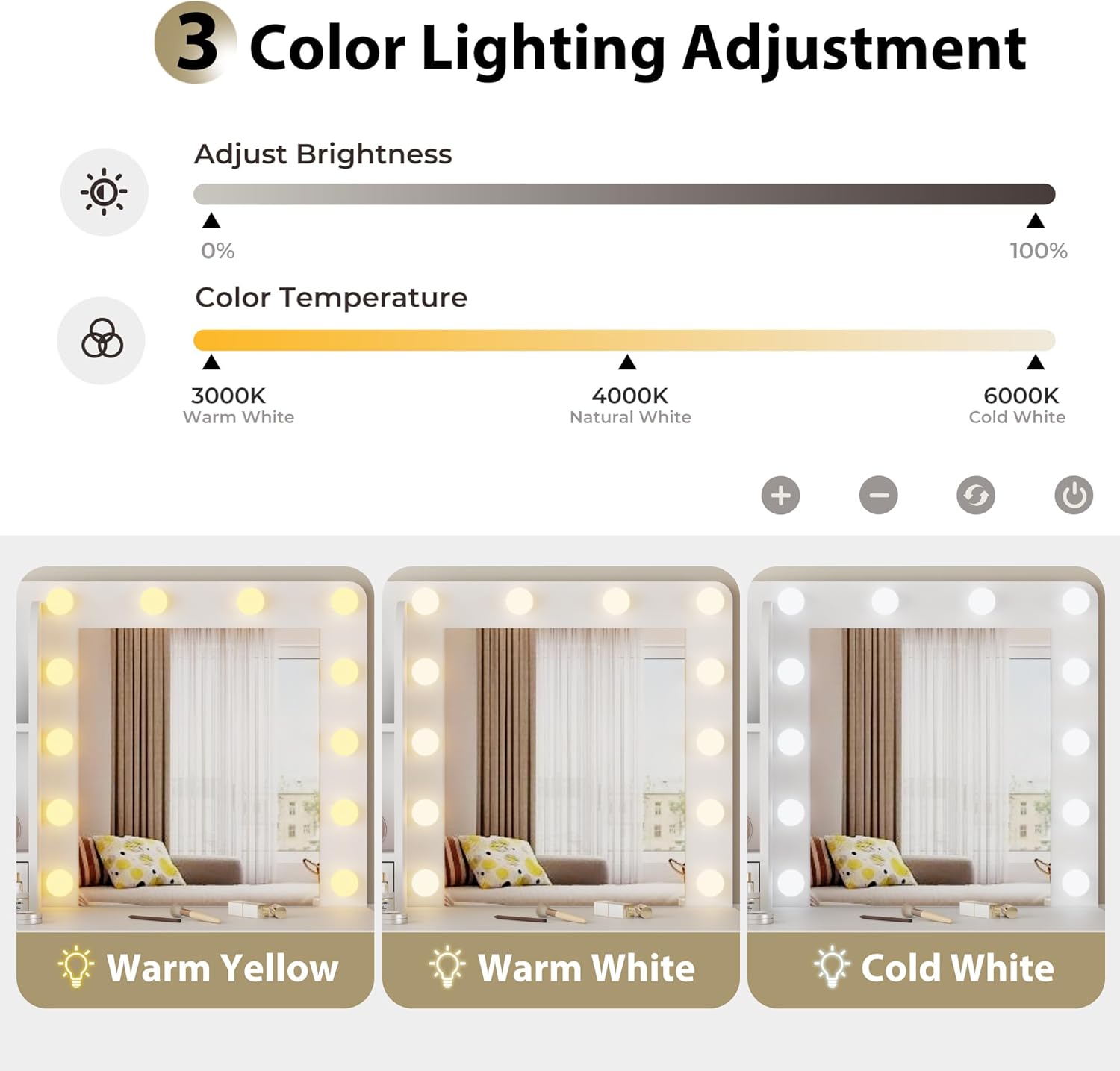
Image 5.1: Illustration of the three color lighting modes (Warm Yellow, Warm White, Cold White) and brightness adjustment range (0% to 100%).
5.2. Integrated Charging Station
The vanity desk includes a built-in charging station for convenience.
- AC Outlets: Two standard 125V/12A AC outlets are provided for powering devices such as hair dryers or other small appliances.
- USB Ports: Two 5V/2A USB ports are available for charging mobile devices like smartphones and tablets.
- Ensure the vanity desk is properly plugged into a wall outlet for the charging station to function.

Image 5.2: Close-up view of the integrated power strip, showing two AC outlets and two USB ports for device charging.
5.3. Storage Features
The vanity desk offers various storage solutions to keep your items organized.
- Drawers: Utilize the five drawers of varying capacities for cosmetics, accessories, and other personal items.
- Open Shelves: The three open shelves provide easy access and display space for frequently used items or decorative pieces.
- Stool Storage: The upholstered stool features a hidden storage compartment, ideal for larger items like a hair dryer or extra towels.
- Hair Dryer Rack: A dedicated rack is located on the side of the desk for convenient storage of your hair dryer.

Image 5.3: An overview of the vanity desk highlighting its storage features, including open shelves, sliding drawers, and the upholstered stool with hidden storage.

Image 5.4: The upholstered stool revealing its internal storage compartment, suitable for a hair dryer or other items.

Image 5.5: A close-up of the hair dryer rack attached to the side of the vanity desk, providing a dedicated spot for the appliance.
5.4. Product Video Overview
For a visual guide to the product's features and functionality, please watch the official product video below.
Video 5.1: An official product video from Furnivado showcasing the vanity desk's features, including the adjustable lighting, storage options, and charging station.
6. Maintenance
Proper care will extend the life of your vanity desk.
- Cleaning: Wipe surfaces with a soft, damp cloth. Avoid harsh chemicals or abrasive cleaners.
- Mirror Care: Clean the mirror with a glass cleaner and a lint-free cloth. Do not spray cleaner directly onto the mirror to avoid liquid seeping into the light fixtures.
- Hardware: Periodically check and tighten all screws and fasteners to ensure stability.
- Spills: Clean up spills immediately to prevent staining or damage to the wood finish.
7. Troubleshooting
If you encounter any issues, refer to the following common troubleshooting steps:
| Problem | Possible Cause | Solution |
|---|---|---|
| Mirror lights do not turn on. | Power cable not connected; power outlet not active; touch sensor malfunction. | Ensure the power cable is securely plugged into the desk and a working wall outlet. Check the wall outlet with another device. Try tapping the touch sensor multiple times. |
| Charging station (AC/USB) is not working. | Power cable not connected; power outlet not active; device not compatible. | Verify the desk's power cable is connected. Test the wall outlet. Ensure your device is compatible with standard AC or 5V/2A USB charging. |
| Drawers are difficult to open/close. | Overloaded drawer; misaligned slides; debris in slides. | Reduce the load in the drawer. Check if the drawer slides are properly aligned and free of obstructions. Lubricate slides if necessary. |
| Desk feels unstable. | Loose fasteners; uneven floor. | Check and re-tighten all assembly screws. Place the desk on a level surface or use furniture pads to stabilize. |
8. Specifications
| Feature | Detail |
|---|---|
| Brand | Furnivado |
| Model Number | VVB002 |
| Product Dimensions | 15.7"D x 35.4"W x 53.9"H (40cm D x 90cm W x 137cm H) |
| Item Weight | 90 pounds (40.8 kg) |
| Frame Material | Engineered Wood |
| Color | White |
| Assembly Required | Yes |
| Mirror Lighting | 12 adjustable LED bulbs, 3 color modes (Warm Yellow 3000K, Natural White 4000K, Cold White 6000K), adjustable brightness. |
| Charging Station | 2x 125V/12A AC Outlets, 2x 5V/2A USB Ports, 5-foot power cord. |
| Storage | 5 drawers, 3 open shelves, upholstered stool with storage, hair dryer rack. |
9. Warranty and Support
Furnivado is committed to providing high-quality products and excellent customer service. If you have any questions or concerns regarding your vanity desk, including missing parts, assembly issues, or operational problems, please do not hesitate to contact our friendly service team.
Our customer support team aims to respond within 24 hours to assist you. Please refer to your purchase documentation or the seller's platform for specific contact details.
For warranty information, please consult the terms and conditions provided at the time of purchase or contact customer support for details specific to your region.
Ask a question about this manual
Ask about setup, troubleshooting, compatibility, parts, safety, or missing instructions. Manuals+ will review the question and use this page’s manual context to help answer it.