
1. Introduction and Overview
The TAKSTAR PRO 82 Over-Ear Monitor Headphones are designed for professional audio monitoring, recording, and high-fidelity music appreciation. Featuring a robust build and advanced acoustic technology, these headphones deliver clear, balanced sound with customizable bass response for various listening preferences.

Figure 1.1: TAKSTAR PRO 82 Headphones and Accessories
This image displays the TAKSTAR PRO 82 headphones in black, accompanied by their protective aluminum alloy carrying case, a soft muslin bag for portability, and various connecting cables, including a 3.5mm to 6.3mm adapter.
2. Product Features
- High-Performance Drivers: Equipped with Ø40mm NdFeB drivers, offering high sensitivity, a wide frequency response range, and large dynamic characteristics for precise audio reproduction.
- Superior Sound Quality: Utilizes a polymer-coated diaphragm and a fully enclosed design, ensuring pure bass, penetrating midrange, and refined treble.
- Three-Level Bass Adjustment: Features a unique three-level bass adjustment function, allowing users to customize the bass response according to music style or personal preference.
- Ergonomic and Comfortable Design: Designed for extended wear with soft and comfortable ear cushions. The headband, filled with memory-protein cotton, is stretchable to fit various head sizes, ensuring a user-friendly experience.
- Broad Compatibility: Wired connectivity ensures compatibility with a wide range of audio devices including iPads, iPods, iPhones, Android devices, PCs, and amplifiers.

Figure 2.1: PRO 82 Monitor Headphone Key Features
This image showcases the PRO 82 headphones and lists their core features: Ø40mm NdFeB driver, polymer coating diaphragm, soft and comfortable headband/ear pads, ergonomic design, and 3-level bass adjustment function.
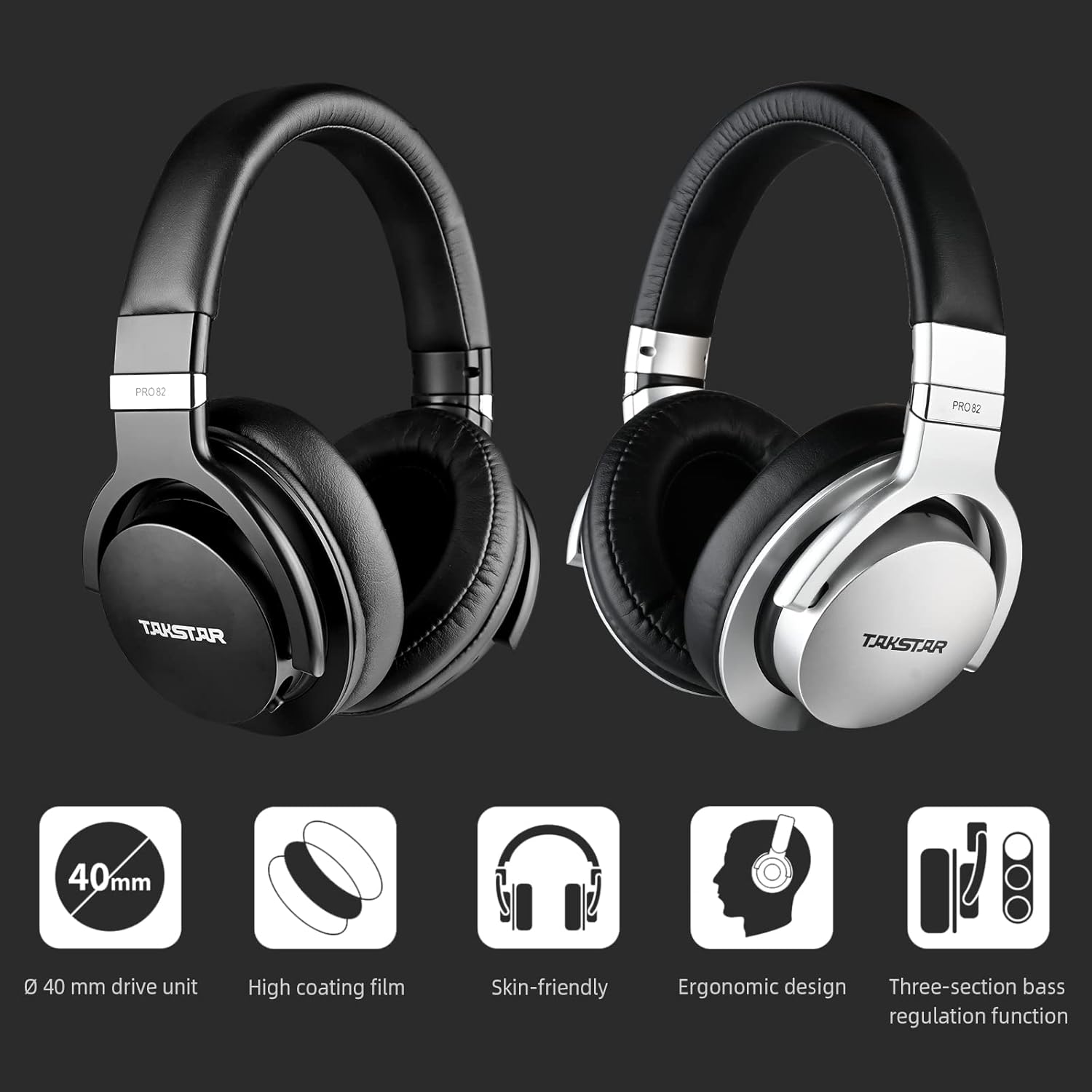
Figure 2.2: PRO 82 Design and Feature Highlights
This image presents both black and silver versions of the PRO 82 headphones, accompanied by icons representing their key attributes: Ø40mm drive unit, high coating film, skin-friendly ear pads, ergonomic design, and three-section bass regulation function.
3. What's in the Box
Upon opening your TAKSTAR PRO 82 package, you will find the following components:
- PRO82 Monitor Headphone (1 pc)
- Portable Muslin Bag (1 pc)
- Connecting Cable (1 pc)
- Aluminum Alloy Case (1 pc)
- User Manual (1 pc)
- Certificate of Quality (1 pc)

Figure 3.1: Product Content
This image illustrates the complete contents of the PRO 82 package, showing the headphones, their durable aluminum alloy case, the connecting cable, and accompanying documentation.
4. Setup
Setting up your TAKSTAR PRO 82 headphones is straightforward due to their wired design. Follow these steps to begin using your headphones:
- Unpack: Carefully remove all components from the packaging.
- Connect Cable: Locate the connecting cable. Insert one end of the cable firmly into the audio input jack on the left earcup of the headphones.
- Connect to Device: Insert the other end of the cable into the 3.5mm (or 6.3mm with adapter) audio output jack of your desired audio source (e.g., computer, audio interface, smartphone, amplifier).
- Adjust Fit: Place the headphones over your ears. Adjust the headband by sliding the earcups up or down until they fit comfortably and securely. The earcups can swivel for optimal positioning.

Figure 4.1: Strong Compatibility
This image highlights the wide compatibility of the PRO 82 headphones, showing them connected to various devices such as smartphones, tablets, laptops, and desktop computers, supporting Android, iOS, and Windows platforms.
5. Operating Instructions
The TAKSTAR PRO 82 headphones are designed for simple plug-and-play operation. The primary adjustable feature is the bass response.
5.1 Bass Adjustment Function
The PRO 82 features a three-level bass adjustment switch located on the earcup. This allows you to tailor the low-frequency response to suit different music genres or monitoring needs.
- Gear 1 (BASS1): Standard sound pressure for low frequencies (20-200Hz). This setting provides a neutral bass response, ideal for critical monitoring.
- Gear 2 (BASS2): Low frequencies (20-200Hz) increased by 3dB. This offers a moderate bass boost for a fuller sound.
- Gear 3 (BASS3): Low frequencies (20-200Hz) increased by 6dB. This provides a significant bass boost for genres that benefit from enhanced low-end presence.
Note: When adjusting the bass, ensure both the left and right earcup switches are set to the same gear to maintain consistent sound balance.

Figure 5.1: Three Bass Regulation Function
This image provides a detailed view of the three-position bass adjustment switch on the earcup, indicating the different bass levels available for customization.
5.2 Official Product Video: Bass Adjustment and Features
Video 5.1: TAKSTAR On Ear Monitor Headphones - PRO82
This official video from Takstar provides a visual overview of the PRO 82 headphones, demonstrating their design, key features, and the functionality of the bass adjustment switch. It offers a dynamic presentation of the product's capabilities.
6. Maintenance
Proper care and maintenance will extend the lifespan and preserve the performance of your TAKSTAR PRO 82 headphones.
- Cleaning: Use a soft, dry cloth to wipe the exterior of the headphones. For ear cushions, gently wipe with a slightly damp cloth and allow to air dry completely before use. Avoid harsh chemicals or abrasive cleaners.
- Storage: When not in use, store the headphones in their provided aluminum alloy case or muslin bag to protect them from dust, moisture, and physical damage.
- Cable Care: Avoid sharp bends or excessive pulling on the connecting cable. Always grasp the plug, not the cable, when disconnecting.
- Temperature and Humidity: Do not expose the headphones to extreme temperatures, high humidity, or direct sunlight for prolonged periods.

Figure 6.1: Headphone Components Detail
This image provides a close-up of various parts of the PRO 82 headphones, including the super soft ear pads, the movable headband, and the 90° swiveling ear pads, all contributing to user comfort and durability.
7. Troubleshooting
If you encounter issues with your TAKSTAR PRO 82 headphones, refer to the following common problems and solutions:
| Problem | Possible Cause | Solution |
|---|---|---|
| No sound or low volume | Cable not fully inserted; incorrect audio source selected; device volume too low; damaged cable. | Ensure cable is fully inserted into both headphone and audio source. Check audio source selection and volume. Test with another audio source or cable if available. |
| Distorted sound | Audio source volume too high; damaged cable; bass adjustment set too high for content. | Reduce volume on audio source. Check cable for damage. Try a different bass adjustment setting. |
| Sound only from one side | Cable not fully inserted; audio balance settings on device; damaged cable or earcup. | Ensure cable is fully inserted. Check audio balance settings on your device. Test with another audio source or cable. |
| Uncomfortable fit | Headband not adjusted properly. | Adjust the headband length and earcup swivel until a comfortable and secure fit is achieved. |
8. Specifications
| Attribute | Specification |
|---|---|
| Model Name | PRO82 |
| Connectivity Technology | Wired |
| Manufacturer | TAKSTAR |
| Color | Black |
| Ear Placement | Over Ear |
| Form Factor | Over Ear |
| Impedance | 26 Ohm |
| Item Weight | 2.97 pounds |
| Package Dimensions | 13.39 x 11.5 x 5.91 inches |
9. Warranty and Support
TAKSTAR products are manufactured to high-quality standards and are backed by a manufacturer's warranty. For specific warranty terms, conditions, and duration, please refer to the warranty card included in your product packaging or visit the official TAKSTAR website. For technical support, product inquiries, or service requests, please contact TAKSTAR customer service through their official channels.