
Introduction
This manual provides essential information for the proper installation, operation, and maintenance of your Crypticorps 206324004 Cordless Pet Stick Vacuum Canister Replacement Part. This part is designed for compatibility with Ryobi PBLBB717 and PBLSV717 18V Cordless Pet Stick Vacuums. Please read this manual thoroughly before use to ensure optimal performance and longevity of the product.
Safety Information
Always ensure the vacuum is powered off and the battery is removed before attempting any installation, removal, or maintenance of the dustbin canister. Keep small parts away from children. Use only with compatible Ryobi vacuum models as specified.
Package Contents
- 1 x Crypticorps 206324004 Cordless Pet Stick Vacuum Canister Replacement Part
Product Overview
The replacement canister is a clear plastic dustbin with a black lid and handle, designed to collect debris during vacuum operation. It features a maximum fill line and a release mechanism for easy emptying.
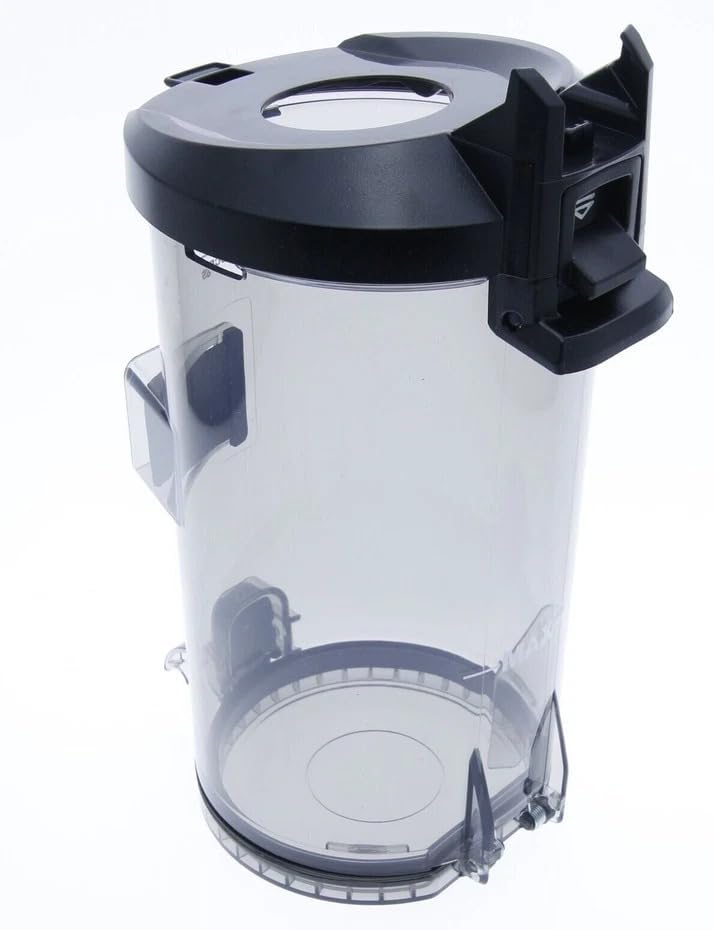
Image: Crypticorps 206324004 Replacement Dustbin Canister
Installation
- Ensure your Ryobi Cordless Pet Stick Vacuum (PBLBB717 or PBLSV717) is powered off and the battery is removed.
- Locate the dustbin release button on your vacuum. Press it to detach the old dustbin.
- Align the new Crypticorps 206324004 replacement canister with the vacuum's main body.
- Gently push the canister upwards until it clicks securely into place. Ensure it is firmly attached and does not wobble.
Video: Ryobi Stick Vacuum Dustbin and Battery Installation
This video demonstrates the installation of a replacement dustbin and battery for compatible Ryobi 18V ONE+ stick vacuums, including models PBLSV716, PBLSV717, and PCL720.
Operating Instructions
Once the replacement canister is securely installed and the battery is inserted, your vacuum is ready for operation. Refer to your original Ryobi vacuum manual for specific power and mode settings.
Maintenance
Emptying the Dustbin
- Power off the vacuum and remove the battery.
- Press the dustbin release button to detach the canister from the vacuum.
- Position the canister over a trash receptacle.
- Locate the bottom release latch on the dustbin and open it to empty the collected debris.
- Close the bottom latch securely before reattaching the dustbin to the vacuum.
Cleaning the Filter and Seal Ring
Regular cleaning of the filter and inspection of the seal ring are crucial for maintaining optimal suction and preventing dust leakage. The filter can be removed from the top of the dustbin for cleaning. The seal ring should be checked for cracks or damage.
Video: Ryobi Stick Vacuum Filter and Dustbin Assembly
This video demonstrates how to open, clean, and reassemble the dustbin and filter for compatible Ryobi stick vacuums, including models PCL720, PBLSV716, and PBLSV717.
Video: Dustbin Seal Ring Replacement
This video illustrates the process of replacing the seal ring on a vacuum dustbin lid, highlighting the importance of a good seal for effective vacuum performance.
Troubleshooting
- Reduced Suction: Check if the dustbin is full and needs emptying. Inspect the filter for clogs and clean it if necessary. Ensure the dustbin is properly seated and the seal ring is intact.
- Dust Leakage: Verify that the dustbin lid is closed securely and the seal ring is not damaged or improperly seated. Replace the seal ring if it shows signs of wear or cracking.
- Canister Not Attaching Securely: Ensure no debris is obstructing the connection points between the canister and the vacuum body. Realign and push firmly until a click is heard.
Specifications
| Feature | Description |
|---|---|
| Model Number | 206324004 |
| Brand | Crypticorps |
| Compatibility | Ryobi PBLBB717, PBLSV717 |
| Material | Durable Plastic |
| Color | Clear (Canister), Black (Lid/Handle) |
Warranty & Support
For warranty information or technical support regarding your Crypticorps 206324004 replacement part, please refer to the manufacturer's website or contact their customer service. Ensure you have your purchase details available.