
1. Introduction
This manual provides essential instructions for the proper installation, operation, and maintenance of the ZHRCLY EPC804-C accessory. This component is designed to function as an actuator or general accessory for various KOSO valve positioner models, including EPB-801, EPB814, EPB-811, EPC814-C, EPC804-L10, EPA801-L4, EPB801-L4, and EPB821-L4. Please read this manual thoroughly before attempting any procedures to ensure safe and efficient use.
2. Safety Information
WARNING: Failure to follow these safety instructions may result in serious injury, equipment damage, or property damage.
- Always disconnect power to the KOSO valve positioner and associated systems before installation, maintenance, or troubleshooting.
- Installation and service should only be performed by qualified and authorized personnel.
- Ensure all electrical connections comply with local and national electrical codes.
- Wear appropriate personal protective equipment (PPE) such as safety glasses and gloves.
- Do not operate the device if it appears damaged or if any components are missing.
- Keep the product away from moisture, extreme temperatures, and corrosive environments unless specifically rated for such conditions.
3. Product Overview
The ZHRCLY EPC804-C is an essential accessory designed to integrate seamlessly with compatible KOSO valve positioners. Its primary function is to enhance or enable specific operational capabilities of the main valve positioner system. This component is manufactured to precise standards to ensure reliability and compatibility.
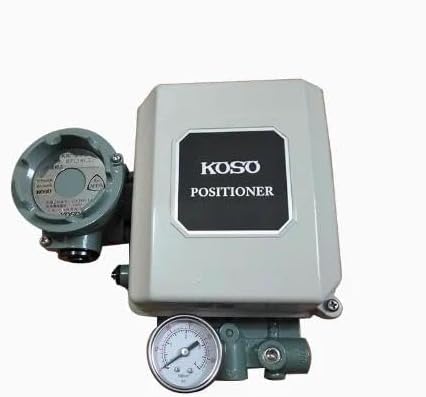
Figure 1: General representation of the ZHRCLY EPC804-C accessory. Actual appearance may vary slightly.
3.1. Components
The EPC804-C typically includes the main actuator body and necessary connection points for electrical and mechanical integration. Specific sub-components may vary based on the exact function it performs within the KOSO valve positioner system.
4. Setup and Installation
Proper installation is crucial for the correct functioning and longevity of the EPC804-C accessory. Refer to the specific KOSO valve positioner manual for detailed integration instructions.
4.1. Pre-Installation Checks
- Verify that the EPC804-C model is compatible with your specific KOSO valve positioner model (e.g., EPB-801, EPC814-C).
- Inspect the accessory for any visible damage from shipping. Do not install if damaged.
- Ensure all necessary tools and additional components (e.g., mounting hardware, wiring) are available.
4.2. Mounting
- Identify the designated mounting location on the KOSO valve positioner or associated equipment.
- Securely attach the EPC804-C using appropriate fasteners. Ensure a stable and vibration-free mount.
- Avoid over-tightening fasteners, which could damage the housing.
4.3. Electrical Connections
- Refer to the wiring diagram provided with your KOSO valve positioner and the EPC804-C (if applicable).
- Connect the power supply and signal wires to the designated terminals.
- Ensure all connections are tight and properly insulated to prevent short circuits or electrical hazards.
- Double-check all wiring before restoring power.
5. Operating Instructions
The ZHRCLY EPC804-C functions as an integrated part of the KOSO valve positioner system. Its operation is typically controlled and monitored through the main valve positioner unit.
5.1. Initial Power-Up
- After installation and verification of all connections, restore power to the KOSO valve positioner system.
- Observe the system for any unusual noises, smells, or error indicators.
- Allow the system to complete its self-test or initialization sequence, if applicable.
5.2. Functional Check
Perform a functional check according to the KOSO valve positioner's operating manual to confirm that the EPC804-C accessory is responding correctly and performing its intended function within the system. This may involve testing valve movement or signal responses.
6. Maintenance
Regular maintenance helps ensure the longevity and reliable performance of the EPC804-C accessory.
6.1. Routine Inspection
- Periodically inspect the accessory for any signs of wear, corrosion, or damage.
- Check all mounting hardware for tightness.
- Examine electrical connections for signs of degradation or loose wiring.
6.2. Cleaning
If necessary, gently clean the exterior of the EPC804-C with a soft, dry cloth. Avoid using harsh chemicals or abrasive materials that could damage the housing or seals. Ensure power is disconnected before cleaning.
7. Troubleshooting
If you encounter issues with the EPC804-C accessory, consider the following general troubleshooting steps:
- No Response: Check all electrical connections for proper seating and continuity. Verify that the KOSO valve positioner is receiving power and operating correctly.
- Incorrect Function: Ensure the EPC804-C is correctly installed and configured according to the KOSO valve positioner's manual. Check for any error codes on the main positioner.
- Physical Damage: If physical damage is observed, discontinue use and contact support for replacement or repair options.
For complex issues, consult the KOSO valve positioner's comprehensive troubleshooting guide or contact qualified technical support.
8. Specifications
| Feature | Detail |
|---|---|
| Model Number | EPC804-C |
| Brand | ZHRCLY |
| Manufacturer | Original factory |
| Item Weight | 5 pounds |
| Product Dimensions (L x W x H) | 1 x 1 x 1 inches |
| Compatibility | KOSO valve positioners (e.g., EPB-801, EPB814, EPB-811, EPC814-C, EPC804-L10, EPA801-L4, EPB801-L4, EPB821-L4) |
9. Warranty and Support
For warranty information, technical support, or service inquiries regarding your ZHRCLY EPC804-C accessory, please contact the original seller or manufacturer. Ensure you have your purchase details and model number (EPC804-C) available when contacting support.