
SKMEI SKMEI-2204-Black
SKMEI Digital Sports Watch User Manual
Model: SKMEI-2204-Black (SKMEI 1270)
Introduction
Thank you for choosing the SKMEI Digital Sports Watch. This manual provides detailed instructions on how to operate and maintain your watch. Please read it carefully to ensure proper use and to enjoy all the features of your new timepiece.
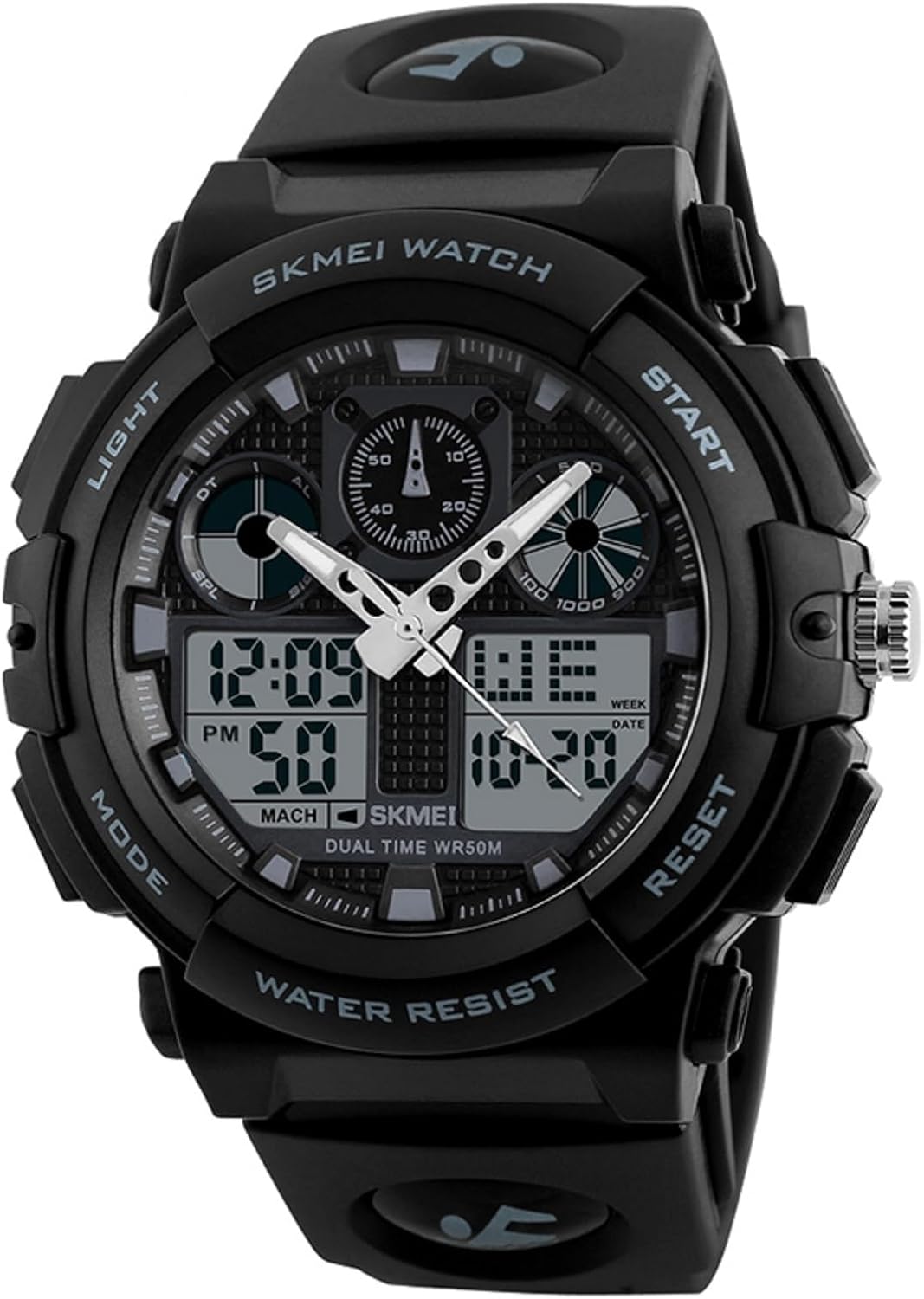
Image: Front view of the SKMEI Digital Sports Watch, highlighting its dual analog and digital display, along with the "LIGHT", "MODE", "START", and "RESET" buttons.
Product Features
- Dual Time Display: Combines analog and digital timekeeping for convenience.
- Chronograph: Stopwatch function for precise timing.
- Alarm: Set daily alarms.
- Date and Week Display: Shows current date and day of the week.
- EL Light: Electro-Luminescent backlight for visibility in low light conditions.
- 12/24-Hour Format: Option to display time in 12-hour or 24-hour format.
- 50M Water Resistance: Suitable for daily use, showering, and swimming in shallow water.

Image: The SKMEI watch with its EL backlight activated, illuminating the digital display for clear visibility in the dark.
Button Functions
The watch features four main buttons:
- LIGHT (Top Left): Activates the EL backlight.
- MODE (Bottom Left): Cycles through different modes (Time, Chronograph, Alarm, Dual Time).
- START (Top Right): Used to start/stop functions in Chronograph mode, adjust values in setting modes.
- RESET (Bottom Right): Used to reset functions in Chronograph mode, select items in setting modes.

Image: A detailed view of the watch face, clearly labeling the "LIGHT", "MODE", "START", and "RESET" buttons for user reference.
Setup and Time Setting
Setting Digital Time and Date:
- In normal time mode, press the MODE button three times to enter time setting mode. The seconds will flash.
- Press the RESET button to cycle through the setting items: Seconds → Hour → Minute → Month → Date → Day of Week.
- Use the START button to adjust the flashing value.
- Once all settings are complete, press the MODE button to exit setting mode.
- To switch between 12-hour and 24-hour format, press the START button while the hour is flashing in time setting mode.
Setting Analog Time:
The analog hands are set independently using the crown on the right side of the watch.
- Pull out the crown (small knob on the right side of the watch).
- Rotate the crown to adjust the analog hands to the desired time.
- Push the crown back in to start the analog movement.
Operating Instructions
Using the Chronograph (Stopwatch):
- From normal time mode, press the MODE button once to enter Chronograph mode. The display will show "00:00:00".
- Press the START button to begin timing.
- Press the START button again to pause timing.
- Press the RESET button to reset the chronograph to "00:00:00".
- To return to normal time mode, press the MODE button.
Setting and Using the Alarm:
- From normal time mode, press the MODE button twice to enter Alarm mode.
- Press the RESET button to select the hour or minute to set. The selected value will flash.
- Use the START button to adjust the flashing value.
- Press the MODE button to exit Alarm setting mode.
- To turn the alarm ON/OFF, press the START button while in Alarm mode (without entering setting mode). An alarm icon will appear/disappear.
- To turn the hourly chime ON/OFF, press the RESET button while in Alarm mode (without entering setting mode). A chime icon will appear/disappear.
Using Dual Time Zone:
- From normal time mode, press the MODE button four times to enter Dual Time mode.
- Press the RESET button to select the hour or minute to set. The selected value will flash.
- Use the START button to adjust the flashing value for the second time zone.
- Press the MODE button to exit Dual Time setting mode.
Using the EL Light:
Press the LIGHT button (top left) at any time to illuminate the digital display for a few seconds.
Maintenance and Care
Water Resistance (50M):
This watch is rated for 50 meters (5 ATM) water resistance. This means it is suitable for:
- Daily use and splashes.
- Showering (cold water only, avoid hot water and steam).
- Swimming in shallow water.
Important: Do not press any buttons while the watch is submerged in water. Avoid exposing the watch to hot water or steam, as this can compromise the water resistance seals.
General Care:
- Clean the watch regularly with a soft, dry cloth. For stubborn dirt, use a slightly damp cloth and then dry thoroughly.
- Avoid exposing the watch to extreme temperatures, strong magnetic fields, or harsh chemicals.
- If the watch is exposed to saltwater, rinse it with fresh water immediately and dry thoroughly.
- The battery life varies depending on usage. When the display becomes dim or functions become erratic, it may be time for a battery replacement by a qualified technician.

Image: The back casing of the SKMEI watch, displaying "WATER RESISTANT 5ATM" and the model number "1270", indicating its water resistance capabilities.
Troubleshooting
| Problem | Possible Cause | Solution |
|---|---|---|
| Digital display is dim or blank. | Low battery. | Replace the battery. Consult a professional watch repair service. |
| Analog hands are not moving. | Crown is pulled out; low battery for analog movement. | Push the crown back in. If still not moving, replace the battery. |
| Buttons are unresponsive. | Watch is wet; internal malfunction. | Ensure watch is dry. If issue persists, seek professional repair. |
| Water inside the watch. | Water resistance compromised (e.g., buttons pressed underwater, exposure to hot water). | Immediately take to a professional watch repair service to prevent further damage. |
Specifications
| Feature | Detail |
|---|---|
| Brand | SKMEI |
| Model | 1270 (SKMEI-2204-Black) |
| Movement | Digital |
| Crystal Material | Resin |
| Case Material | ABS |
| Band Material | PU (Polyurethane) |
| Buckle Material | Stainless Steel |
| Water Resistance | 50M (5 ATM) |
| Weight | 65g |
| Functions | Dual Time, Chronograph, Alarm, Date, Week, EL Light, 12/24-Hour Format |
| Dial Width | 50mm |
| Dial Thickness | 17mm |
| Band Width | 20mm |
| Watch Length | 255mm |

Image: A diagram illustrating the key dimensions of the SKMEI watch, including dial width (50mm), dial thickness (17mm), band width (20mm), and total watch length (255mm).
Warranty and Support
SKMEI products are manufactured with high standards of quality and durability. For specific warranty information, please refer to the warranty card included with your purchase or visit the official SKMEI website.
For technical support or service inquiries, please contact SKMEI customer service through their official channels. Keep your purchase receipt as proof of purchase.