
Lohhuby CAST-LB500B
Lohhuby Automatic Self-Cleaning Cat Litter Box User Manual
Model: CAST-LB500B
1. Product Overview
The Lohhuby Automatic Self-Cleaning Cat Litter Box is designed to provide a clean and hygienic environment for your feline companion. This open-design litter box features smart app control, health monitoring capabilities, and advanced safety mechanisms. It is suitable for medium cats and kittens.

Image: The Lohhuby Automatic Self-Cleaning Cat Litter Box, showcasing its design and key features alongside several cats.
Key Features:
- App Control: Manage and monitor the litter box remotely, including cleaning schedules and real-time updates.
- Open-Design: Provides ample space for cats, ensuring easy access and maintaining a fresh environment.
- Smart Health Monitor: Tracks cat weight, toilet time, toileting time, and daily usage count.
- Anti-Pinch Safety: Equipped with technology that halts operation if touched, ensuring pet safety.
- Quiet Operation: Operates at a low noise level (approximately 32dB), similar to a refrigerator.
- Easy Maintenance: Features a no-buckle design for simple drum removal and washing.
- Large Capacity Waste Drawer: 12-liter capacity, suitable for up to 12 days for a single cat.
2. Safety Information
Please read all safety instructions before operating the device to prevent injury or damage.
Important Safeguards:
- Anti-Pinch Design: The litter box is designed with anti-pinch technology to protect both cat paws and human fingers. The unit will stop immediately if it detects contact during operation.
- Real-Time Gravity Sensor: Integrated sensors detect when a cat enters or exits the litter box, pausing any cleaning cycles until the cat has safely left the unit.
- Ensure the unit is placed on a stable, level surface.
- Keep the power cord away from water and heat sources.
- Do not allow children to play with or operate the litter box without adult supervision.
- Use only clumping cat litter as recommended.

Image: Visual representation of the anti-pinch design and real-time gravity sensor for enhanced safety.
3. Setup Guide
The Lohhuby Automatic Self-Cleaning Cat Litter Box requires minimal assembly and is designed for easy setup.
Initial Assembly:
- Unpack all components from the packaging.
- Place the main unit on a flat, stable surface.
- Insert the waste drawer into the designated slot at the bottom of the unit.
- Add clumping cat litter to the inner drum, ensuring it does not exceed the maximum fill line.
- Connect the power adapter to the unit and plug it into a wall outlet.
App Connection:
- Download the official Lohhuby app from your smartphone's app store.
- Follow the in-app instructions to connect your litter box to your home Wi-Fi network.
- Note: The device supports 2.4G Wi-Fi networks only. Ensure your router is configured accordingly or select the 2.4G band during setup.
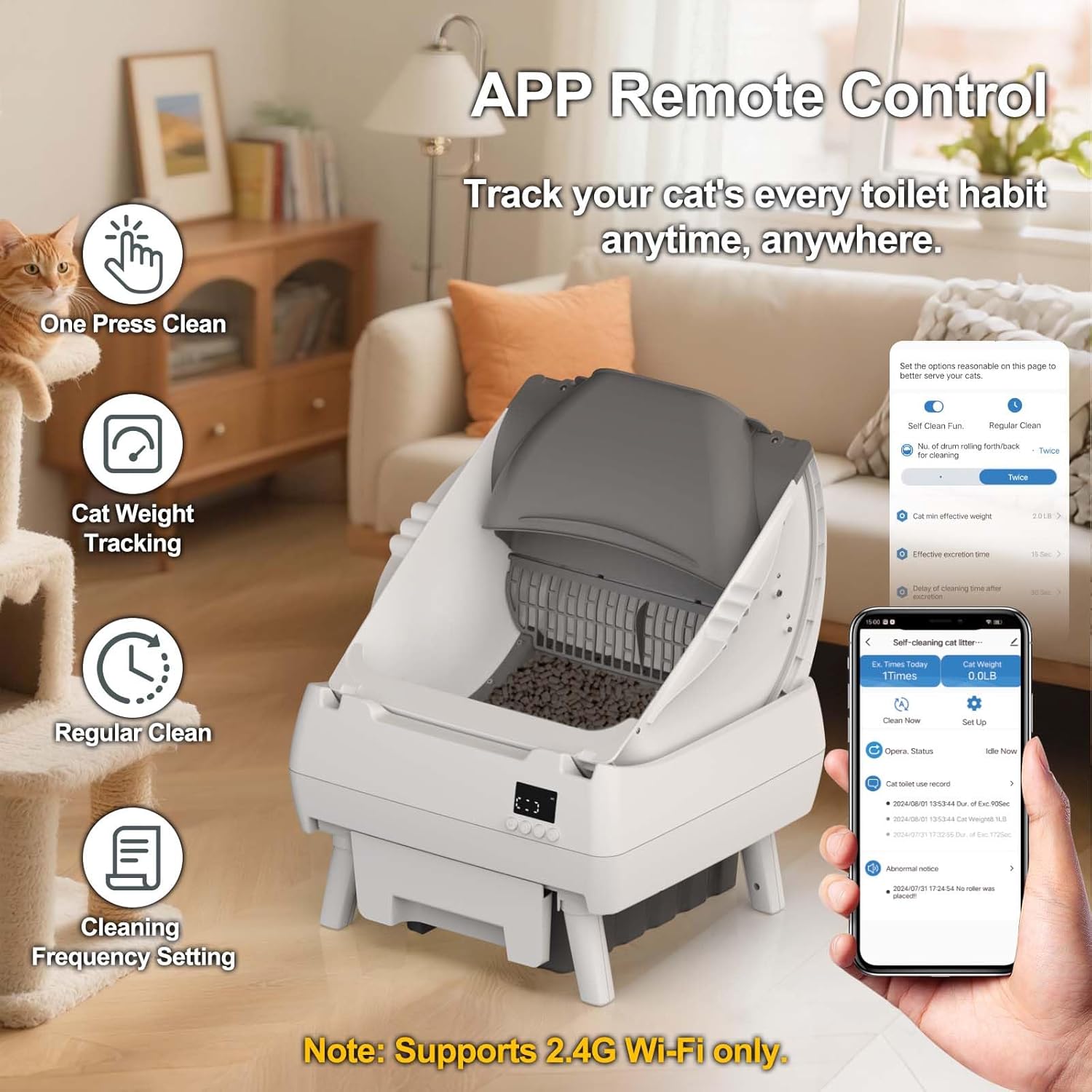
Image: The litter box demonstrating app remote control capabilities for tracking and cleaning.
4. Operating Instructions
The Lohhuby Automatic Self-Cleaning Cat Litter Box offers both automatic and manual cleaning options, controllable via the device or the dedicated app.
Automatic Operation:
- Once powered on and connected to the app, the litter box will automatically detect when your cat uses it.
- After a preset delay (configurable in the app), the cleaning cycle will initiate, sifting waste into the bottom drawer.
App Control Features:
- One-Press Clean: Manually initiate a cleaning cycle from your smartphone.
- Regular Clean: Set up recurring cleaning schedules based on your preference.
- Cleaning Frequency Setting: Customize how often the unit cleans after use.
- Cat Weight Tracking: Monitor your cat's weight trends, which can be an indicator of health.
- Health Monitoring: View detailed reports on toilet time, toileting duration, and daily usage count.
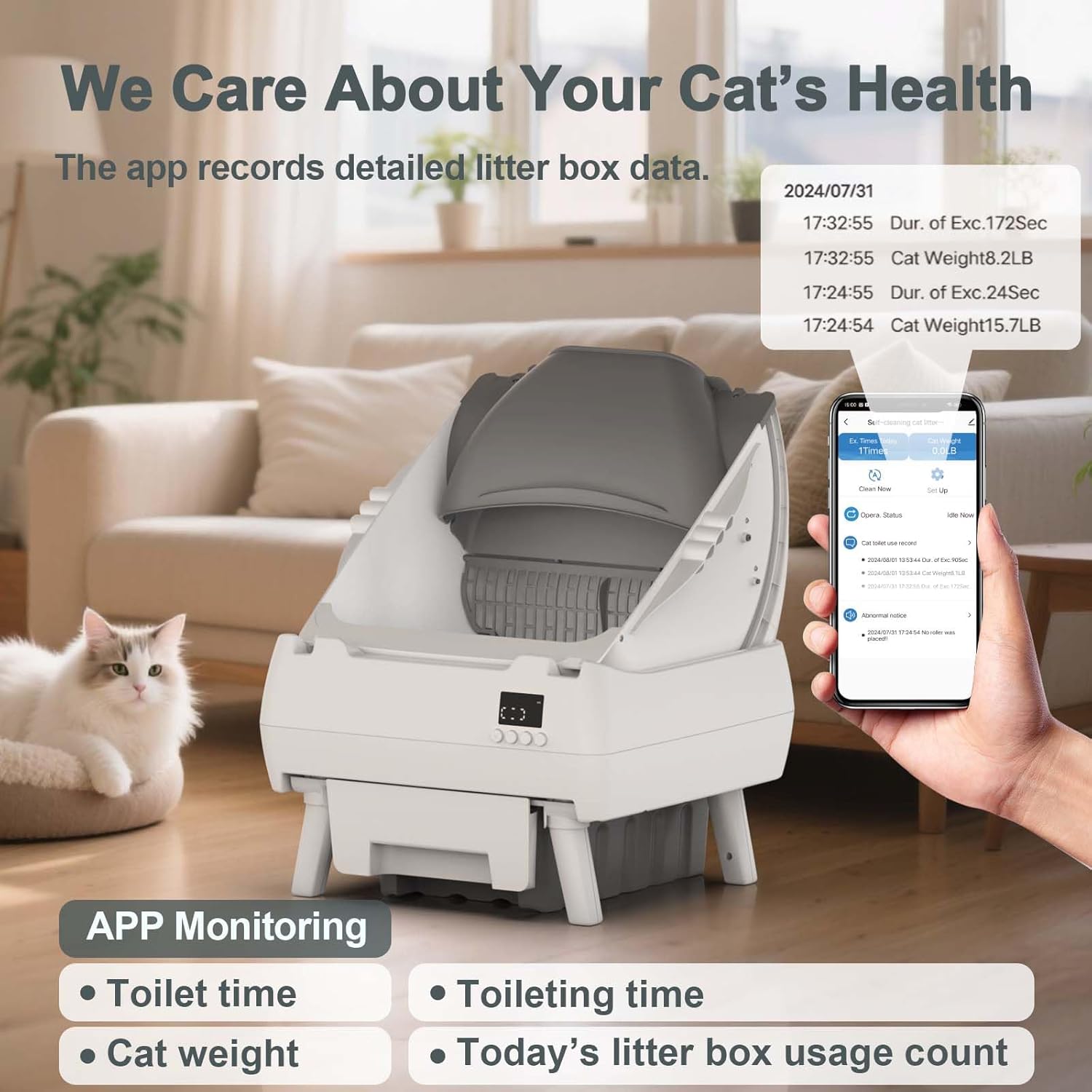
Image: The app interface displaying comprehensive cat health and usage data.
5. Maintenance and Cleaning
Regular cleaning ensures optimal performance and hygiene for your cat. The Lohhuby litter box is designed for easy maintenance.
Waste Drawer Emptying:
- The waste drawer has a 12-liter capacity and can hold waste for approximately 12 days for one cat.
- When the waste drawer is full, the app may provide a notification, or a 'Trash bin full' reminder may appear on the unit.
- Simply pull out the waste drawer, dispose of the contents, and replace the liner bag.
Inner Drum Cleaning:
- The inner drum features a no-buckle design, allowing for easy removal.
- Lift the inner drum from the base unit.
- All parts of the drum are washable. You can rinse it with water and mild soap.
- Ensure the drum is completely dry before placing it back onto the base unit.

Image: Illustration of how to easily remove and wash the inner drum.

Image: Visual guide for quick bag changes and washing the drum.
6. Troubleshooting
If you encounter any issues with your Lohhuby Automatic Self-Cleaning Cat Litter Box, please refer to the following common solutions.
Common Issues and Solutions:
- Unit Not Cleaning:
- Check if the waste drawer is full and needs emptying.
- Ensure the unit is properly powered and connected to Wi-Fi.
- Verify no obstructions are preventing the drum from rotating.
- Confirm the gravity sensor is not detecting a cat inside the unit.
- App Connectivity Issues:
- Ensure your Wi-Fi network is 2.4G.
- Restart your router and the litter box.
- Re-pair the device with the app following the setup instructions.
- Odor Issues:
- Empty the waste drawer more frequently.
- Clean the inner drum and base unit thoroughly.
- Ensure you are using high-quality clumping cat litter.
- Litter Sticking to Sides:
- This can sometimes occur with certain litter types or humidity levels. Regular cleaning of the drum will mitigate this.
If the problem persists, please contact customer support for further assistance.
7. Specifications
| Feature | Detail |
|---|---|
| Model Name | CAST-LB500B-White-001 |
| ASIN | B0F99576CF |
| Brand | Lohhuby |
| Dimensions (L x W x H) | 19.3" x 19.7" x 24.3" |
| Item Weight | 20 Pounds |
| Material | Plastic |
| Color | White |
| Litter Box Type | Automated Self-Cleaning Litter Box |
| Target Audience | House-cats (Medium cats and kittens) |
| Waste Drawer Capacity | 12 Liters |
| Noise Level | ≤32dB |
| Connectivity | 2.4G Wi-Fi only |
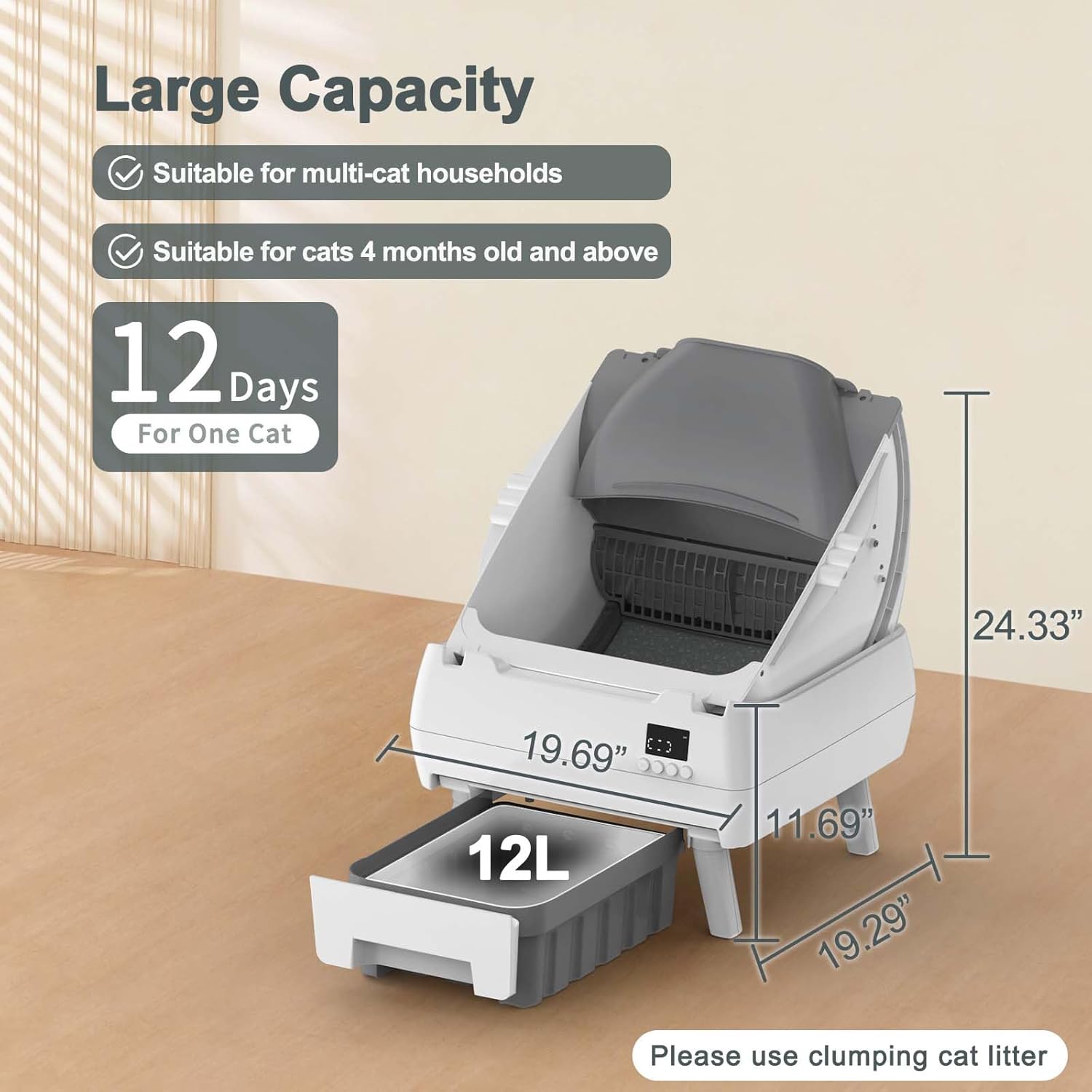
Image: Dimensions and capacity details of the Lohhuby Automatic Litter Box.
8. Warranty and Support
Lohhuby is committed to providing reliable products and excellent customer service.
Customer Support:
We offer 24/7 support to assist you with any questions or concerns regarding your Automatic Self-Cleaning Cat Litter Box. Please do not hesitate to reach out for prompt assistance.
For support, please refer to the contact information provided with your product packaging or visit the official Lohhuby website.
Warranty Information:
Specific warranty details are typically included with your product purchase. Please consult the warranty card or documentation provided in the box for information on coverage duration and terms.
Related Documents - CAST-LB500B
 |
Self-Cleaning Cat Litter Box User Manual | Cactus CAST-LB540 Comprehensive user manual for the Cactus CAST-LB540 Self-Cleaning Cat Litter Box. Learn about setup, operation, maintenance, app connectivity, and troubleshooting for your automatic pet care device. |
 |
Thomson Streaming Dongle 150/152/155 Cast User Manual and Setup Guide Comprehensive user manual and setup guide for the Thomson Streaming Dongle 150, 152, and 155 Cast, covering installation, features, troubleshooting, and specifications. |
 |
THOMSON Streaming Dongle 150, 152, 155 Cast User Manual Comprehensive user manual for the THOMSON Streaming Dongle 150, 152, and 155 Cast devices with Google TV. Covers safety information, installation, operation, features, troubleshooting, and technical specifications. |
 |
THOMSON STREAMING DONGLE 150, 152, 155 CAST User Manual Comprehensive user manual for the THOMSON STREAMING DONGLE 150, 152, and 155 CAST devices. This guide covers setup, remote control functions, initial configuration, home screen navigation, app management, Google account integration, search features, settings, Bluetooth connectivity, content casting, Google Assistant, display and audio configurations, troubleshooting, and detailed technical specifications. |
 |
Thomson Streaming Dongle 150, 152, 155 Cast User Manual Comprehensive user manual for the Thomson Streaming Dongle 150, 152, and 155 Cast. Learn about setup, installation, features like Google TV, voice control, content casting, Bluetooth connectivity, technical specifications, and troubleshooting. |
 |
THOMSON Streaming Dongle 150, 152, 155 Cast - Korisnički priručnik i vodič za postavljanje Sveobuhvatan korisnički priručnik za THOMSON Streaming Dongle 150, 152 i 155 Cast. Saznajte o postavljanju, instalaciji, funkcijama daljinskog upravljanja, značajkama Google TV-a, tehničkim specifikacijama i rješavanju problema. |
Ask a question about this manual
Ask about setup, troubleshooting, compatibility, parts, safety, or missing instructions. Manuals+ will review the question and use this page’s manual context to help answer it.