1. Introduction
Thank you for choosing the SHETAZ S20-Pro Automatic Self-Cleaning Litter Box. This manual provides essential information for the safe and efficient operation, setup, and maintenance of your new device. Please read this manual thoroughly before use and retain it for future reference.
2. Product Overview
The SHETAZ S20-Pro is designed to simplify cat care with its automatic cleaning features, smart app control, and enhanced safety mechanisms. It accommodates cats weighing between 2.5 lbs and 30 lbs.
Key Features:
- Automatic Self-Cleaning: Initiates cleaning cycles automatically after your cat exits.
- Smart App Remote Control: Monitor and control the litter box from your smartphone.
- Low Noise Operation: Operates at approximately 35dB, ensuring a quiet environment.
- Advanced Safety Sensors: Equipped with anti-pinch, infrared, weight, and Hall sensors for your cat's safety.
- Large Capacity: Features a 65L interior space and a 12L waste bin, suitable for multiple cats and extended periods.
- Versatile Litter Compatibility: Supports various types of cat litter including plant-based, bentonite, mixed, and mineral sands.
Product Dimensions:
19.56 x 25.98 x 21.1 inches (Length x Height x Width)
Weight: 30.45 Pounds
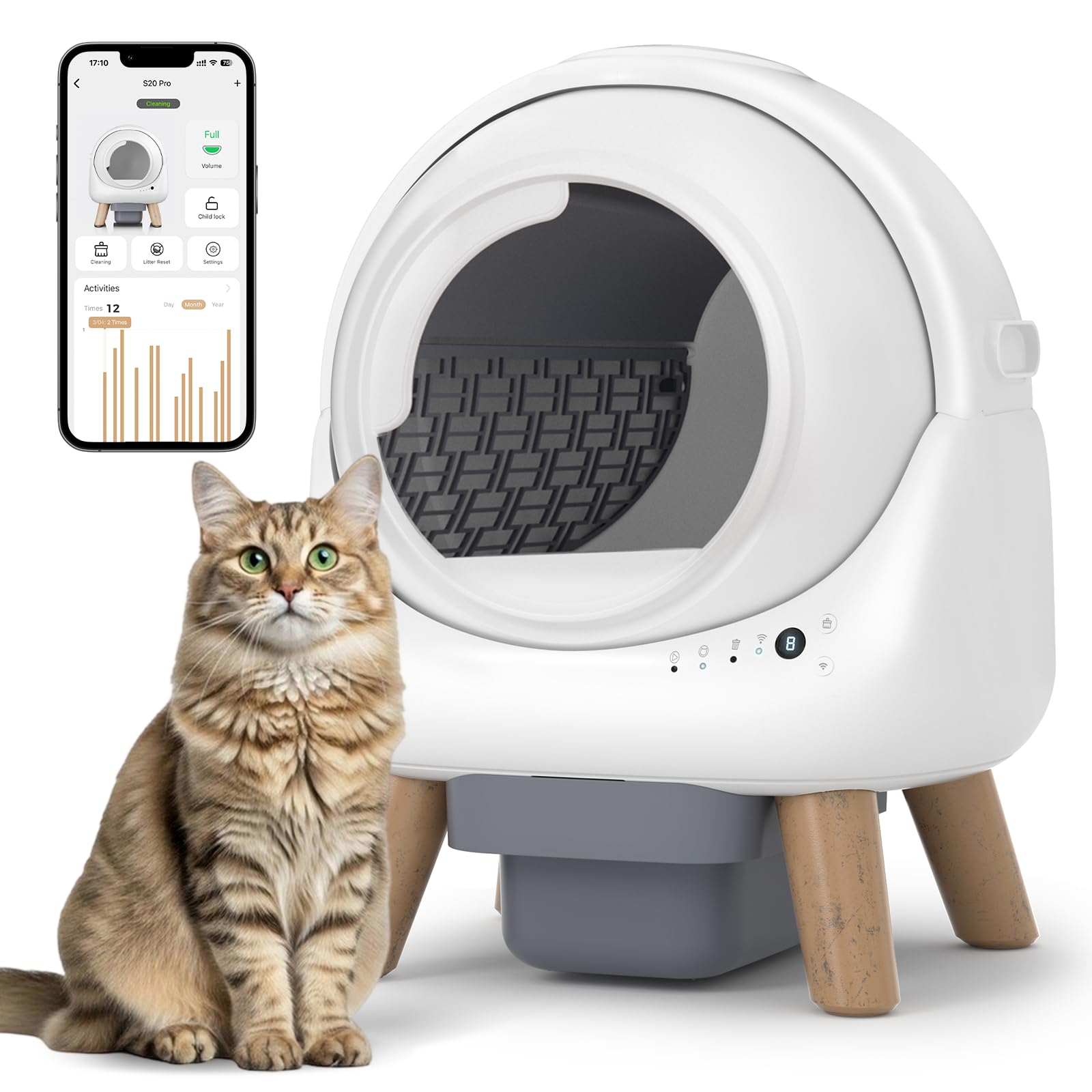
Figure 2.1: Product dimensions and large capacity for cats weighing 2.5-30 lbs.

Figure 2.2: Designed for cats of all sizes and breeds, highlighting key features.

Figure 2.3: Supports multiple cat litter materials for odor control.

Figure 2.4: Four sensing devices ensure cat safety during operation.
3. Setup
3.1 Package Contents
Before assembly, ensure all components are present:
- Cat litter box x1
- Kickstand x4
- Power adapter x1
- Garbage bag x1
- User Manual x1
- Quick installation card x1

Figure 3.1: Package contents of the SHETAZ S20-Pro.
3.2 Assembly Instructions
- Attach the four kickstands to the base of the litter box.
- Insert the litter baffle into the globe.
- Place a garbage bag into the waste bin and slide the bin into the base.
- Carefully place the globe onto the base, ensuring it is securely seated.
- Connect the power adapter to the unit and a power outlet.
3.3 Initial Litter Filling
Fill the globe with your preferred clumping cat litter, ensuring the level does not exceed the 'MAX' line indicated inside the globe. After filling, long-press the cleaning button for 3 seconds to calibrate the litter level.
4. Operating Instructions
4.1 Automatic Cleaning Cycle
The SHETAZ S20-Pro automatically detects when your cat has used the litter box and exited. After a preset delay (to allow clumping), the globe will rotate, sifting clean litter and depositing waste into the sealed waste bin below.
4.2 Manual Cleaning
To initiate a cleaning cycle manually, press the 'Cleaning' button on the control panel. The globe will perform a full cleaning rotation.
4.3 Indicator Lights
The control panel features several indicator lights:
- Standby/Operating Status: Indicates if the unit is in standby or actively cleaning.
- Cat Detection: Illuminates when a cat is detected inside the globe.
- Waste Bin Full: Illuminates when the waste bin requires emptying.
- Wi-Fi Status: Indicates Wi-Fi connection status.
4.4 Smart App Control
Download the SHETAZ app to your smartphone to access advanced features:
- Remote control of cleaning cycles.
- Real-time monitoring of cat activity and litter box status.
- Notifications for waste bin full and other alerts.

Figure 4.1: Smart App Remote Control interface.

Figure 4.2: Monitor your cat's activity and litter box status anywhere with the app.
5. Maintenance
5.1 Emptying the Waste Bin
When the 'Waste Bin Full' indicator illuminates, it's time to empty the waste bin. Simply pull out the drawer from the base, tie off the full garbage bag, and replace it with a new one. The 12L trash bin can hold waste for up to 15 days for a single cat.

Figure 5.1: Easy removal and replacement of the waste bin.

Figure 5.2: The 12L trash bin provides up to 15 days of scoopless convenience.
5.2 Cleaning the Unit
For thorough cleaning, the interior liner is removable. It features a double-sided waterproof coating with 300D high-density Oxford cloth for easy cleaning.
- Unplug the unit from the power source.
- Remove the clips securing the globe.
- Carefully lift and remove the globe from the base.
- Remove the interior liner for cleaning.
- Clean the globe and liner with mild soap and water. Ensure all parts are completely dry before reassembly.
- Important: The base unit should not be washed with water as it contains electronic components and poses a risk of damage.
- Reinstall the dry liner and globe onto the base, securing the clips.

Figure 5.3: Steps for disassembling and cleaning the globe. Do not wash the base.

Figure 5.4: Removable liner for easy cleaning.
6. Troubleshooting
If you encounter any issues with your SHETAZ S20-Pro, please refer to the following common problems and solutions:
- Unit not cleaning: Check power connection, ensure the waste bin is not full, and verify no obstructions are present.
- Indicator lights flashing unexpectedly: Refer to the 'Indicator Lights' section (4.3) for specific meanings.
- App connectivity issues: Ensure your device is within Wi-Fi range and connected to a 2.4GHz network. Restart the app and the litter box if necessary.
- Litter level inaccurate: After adding or changing litter, long-press the cleaning button for 3 seconds to recalibrate the litter level.
For persistent issues, please contact customer support.
7. Specifications
| Feature | Detail |
|---|---|
| Model Number | S20-Pro |
| Product Dimensions | 19.56 x 25.98 x 21.1 inches |
| Product Weight | 30.45 Pounds |
| Litter Box Type | Automated Self-Cleaning |
| Internal Capacity | 65 Liters |
| Waste Bin Capacity | 12 Liters |
| Recommended Cat Weight | 2.5 - 30 lbs |
| Noise Level | ≤ 35dB |
| Manufacturer | SHETAZ |
8. Warranty and Support
For warranty information, technical support, or any product-related inquiries, please contact SHETAZ customer service through the contact details provided on your purchase receipt or the official SHETAZ website. Please have your model number (S20-Pro) and purchase date ready when contacting support.