
1. Introduction
This manual provides essential instructions for the setup, operation, and maintenance of your ZLKJ SW8 Smartwatch. Please read this manual thoroughly before using your device to ensure proper function and longevity.
The ZLKJ SW8 is a versatile smartwatch featuring a 1.39-inch HD touchscreen, built-in GPS, Bluetooth calling, an AI voice assistant, and comprehensive fitness tracking with 107 sport modes. It is designed for durability with 3ATM waterproofing and is compatible with both Android and iOS devices.

Image: Front view of the ZLKJ SW8 Smartwatch, displaying a digital watch face with GPS and AI assistant indicators.
2. What's in the Box
Verify that all items are present in your product packaging:
- GPS Smartwatch (ZL-SW8)
- Magnetic Charging Cable
- User's Manual (this document)
3. Setup
3.1 Charging the Smartwatch
Before initial use, fully charge your smartwatch. Connect the magnetic charging cable to the charging contacts on the back of the watch and plug the USB end into a power adapter (not included) or a computer's USB port.
- Ensure the magnetic pins align correctly with the watch's charging points.
- A charging indicator will appear on the screen.
- Charging typically takes approximately 2 hours for a full charge.
3.2 App Installation and Pairing
To unlock the full functionality of your ZLKJ SW8 Smartwatch, download and install the Da Fit app on your smartphone.
- Scan the QR code in the manual or search for "Da Fit" in your phone's app store (Google Play Store for Android, Apple App Store for iOS).
- Install the app and create an account or log in.
- Enable Bluetooth on your smartphone.
- Open the Da Fit app, navigate to the 'Device' section, and tap 'Add Device'.
- Select 'ZL-SW8' from the list of available devices to pair.
- Confirm the pairing request on both your phone and the smartwatch.
Once paired, the watch will synchronize time and data with your phone.
3.3 Customizing Watch Faces
Personalize your smartwatch by changing the watch face:
- Through the Da Fit app: Browse a selection of over 100 watch faces or upload your own photo to create a custom design.
- On the smartwatch: Long-press the home screen to quickly cycle through pre-installed watch faces.

Image: The ZLKJ SW8 Smartwatch displaying its 1.39-inch HD screen and options for AI-generated and custom watch faces.
4. Operating Instructions
4.1 Basic Navigation
- Touchscreen: Swipe left/right, up/down to navigate menus and access different functions. Tap to select.
- Side Buttons: The watch features physical buttons for power, back, and quick access to certain features. Refer to the on-screen prompts for specific button functions.
- Raise-to-Wake: The screen will automatically turn on when you raise your wrist.
4.2 Bluetooth Calling
Once paired with your smartphone, you can make and receive calls directly from your smartwatch.

Image: The ZLKJ SW8 Smartwatch displaying an incoming call and message notifications, illustrating its Bluetooth calling and information notification features.
- Answering Calls: Tap the green phone icon on the watch screen when a call comes in.
- Rejecting Calls: Tap the red phone icon to decline a call.
- Making Calls: Access the dial pad or contact list through the watch's menu.
4.3 AI Voice Assistant
The integrated AI voice assistant allows for hands-free control.

Image: The ZLKJ SW8 Smartwatch demonstrating its AI Smart Assistant feature, showing a chat interface for quick answers.
- Activate the voice assistant through the watch menu or a designated button.
- Use voice commands to control music, check weather, set alarms, and more.
4.4 GPS Tracking
The built-in GPS allows for phone-free tracking of outdoor activities.

Image: The ZLKJ SW8 Smartwatch highlighting its tactical flashlight, precise GPS positioning with satellite tracking, and adventure-ready sensors like barometer and compass.
- Start a GPS-enabled sport mode (e.g., running, hiking) to record your route, distance, and pace.
- Review your activity data in the Da Fit app after synchronization.
4.5 Sport Modes and Health Tracking
The smartwatch supports 107 sport modes and monitors various health metrics.

Image: The ZLKJ SW8 Smartwatch showcasing its 100+ sports modes with various activity icons and images of people engaging in outdoor sports.
- Sport Modes: Select your desired activity from the watch's sport mode menu to track specific workout data.
- Step Tracking: The watch automatically counts your daily steps.
- Sleep Tracking: Wear the watch to bed to monitor your sleep patterns and quality.
- Other Metrics: The watch may also track heart rate, calories burned, and distance.
4.6 Notifications
Receive real-time notifications from your phone directly on your wrist.
- Enable desired app notifications within the Da Fit app settings.
- Raise your wrist to view incoming messages and alerts.
4.7 Tactical Flashlight
The smartwatch includes a tactical flashlight function for various lighting needs.
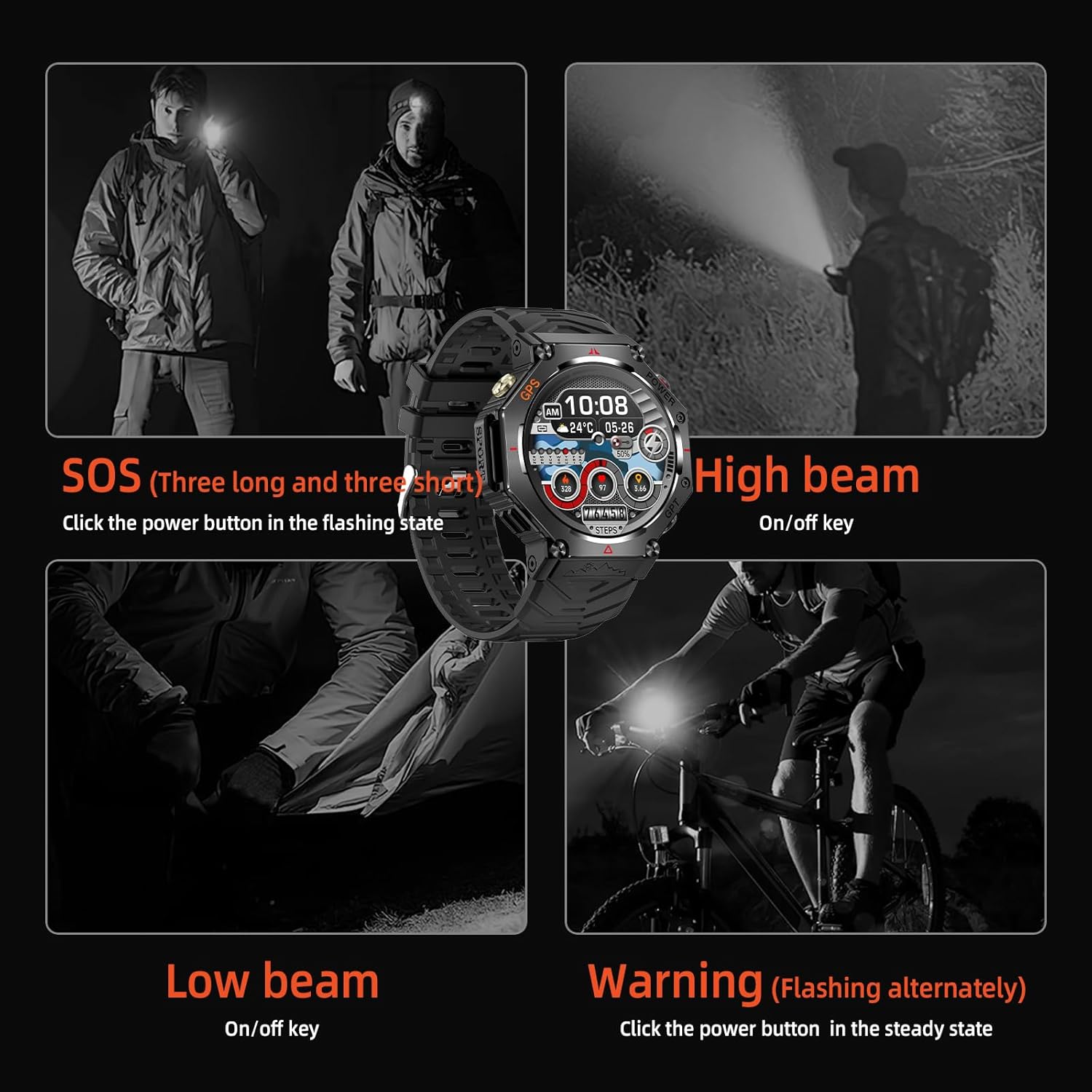
Image: The ZLKJ SW8 Smartwatch demonstrating its tactical flashlight with SOS, high beam, low beam, and warning (flashing) modes.
- Access the flashlight feature through the watch's menu.
- Different modes (e.g., high beam, low beam, SOS, warning) can be activated by pressing the power button in the flashing or steady state.
5. Maintenance
5.1 Waterproofing
The ZLKJ SW8 Smartwatch features 3ATM waterproof protection, making it suitable for daily use and various water activities.

Image: A person swimming while wearing the ZLKJ SW8 Smartwatch, illustrating its IP68 waterproof rating and suitability for water activities.
- It can withstand splashes, rain, and brief immersion in water up to 30 meters.
- Avoid hot water, steam, or prolonged exposure to high-pressure water jets.
- Do not operate buttons underwater.
5.2 Cleaning
- Wipe the watch and strap regularly with a soft, damp cloth.
- Ensure the charging contacts are clean and dry before charging.
- Avoid using harsh chemicals or abrasive materials.
5.3 Battery Care
- Charge the watch regularly, avoiding complete discharge for extended periods.
- Store the watch in a cool, dry place when not in use.
6. Troubleshooting
- Watch not turning on: Ensure the watch is fully charged. Connect it to the charger for at least 30 minutes.
- Cannot pair with phone: Make sure Bluetooth is enabled on your phone and the watch. Restart both devices and try pairing again. Ensure the Da Fit app has necessary permissions.
- Notifications not received: Check app notification settings in the Da Fit app and your phone's system settings. Ensure the watch is connected via Bluetooth.
- Inaccurate data: Ensure the watch is worn snugly on your wrist. For GPS, ensure you have a clear view of the sky.
- Screen unresponsive: Try restarting the watch by pressing and holding the power button.
For further assistance, refer to the Da Fit app's help section or contact customer support.
7. Specifications
| Feature | Detail |
|---|---|
| Model Number | ZL-SW8 |
| Screen Size | 1.39 Inches |
| Display Type | HD Touchscreen |
| Waterproof Rating | 3ATM |
| Connectivity | Bluetooth |
| GPS | Built-in GPS |
| Battery Capacity | 530 mAh Lithium Ion |
| Operating System | RTOS |
| Memory Storage Capacity | 128 MB |
| RAM Memory Installed Size | 578 KB |
| Compatibility | Android 4.4 and above, iOS 9 and above |
| Item Weight | 64 Grams (2.26 ounces) |
| Wrist Strap Size | 150-260mm |

Image: Detailed diagram showing the dimensions of the ZLKJ SW8 Smartwatch, including watch face diameter, thickness, and wrist strap length.
8. Warranty and Support
Your ZLKJ SW8 Smartwatch comes with a comprehensive post-sale support for one year from the date of purchase. This warranty covers manufacturing defects and ensures your peace of mind.
- Every watch undergoes rigorous quality checks.
- A dedicated customer service team is available 24/7 to assist with any issues.
For warranty claims or technical support, please contact ZLKJ customer service through the contact information provided with your purchase or via the Da Fit app.