
1. Introduction
Thank you for choosing the PUKAMI ML-KWFRC-202411 Gaming Chair. This ergonomic chair is designed to provide comfort and support for extended periods of gaming, office work, or study. It features a racing-style design with a footrest, adjustable headrest, and lumbar support. Please read this manual thoroughly before assembly and use to ensure proper function and longevity of your chair.

Image 1: PUKAMI ML-KWFRC-202411 Gaming Chair, showcasing its pink and black design with a footrest.
2. Safety Information
- Always assemble the chair on a flat, stable surface to prevent accidents.
- Be cautious when lifting and moving the chair due to its weight. Seek assistance if necessary.
- Do not stand on the chair or use it as a step stool.
- Ensure all screws and bolts are securely tightened before use and periodically check for looseness.
- Keep children and pets away from the assembly area.
- Do not expose the chair to direct sunlight or extreme temperatures, as this may damage the material.
- Adhere to the maximum weight recommendation of 400 pounds.
3. Package Contents
The package includes all necessary components and tools for assembly. Please refer to the separate assembly guide provided with your product for a detailed list of parts and step-by-step instructions.
4. Assembly Instructions
Detailed, picture-based assembly instructions are included in the box with your PUKAMI Gaming Chair. Please follow these instructions carefully to ensure correct and safe assembly. Typically, assembly can be completed within an hour.

Image 2: A diagram illustrating the various dimensions of the PUKAMI Gaming Chair, including height, width, and depth measurements.
5. Operating Instructions
5.1. Reclining Function
The chair's backrest can be adjusted from 90° to 155°. Locate the recline lever on the side of the chair (typically on the right). Pull the lever up to unlock the backrest, adjust to your desired angle, and then release the lever to lock it in place. This allows for various positions, from upright for work to a relaxed recline for rest.
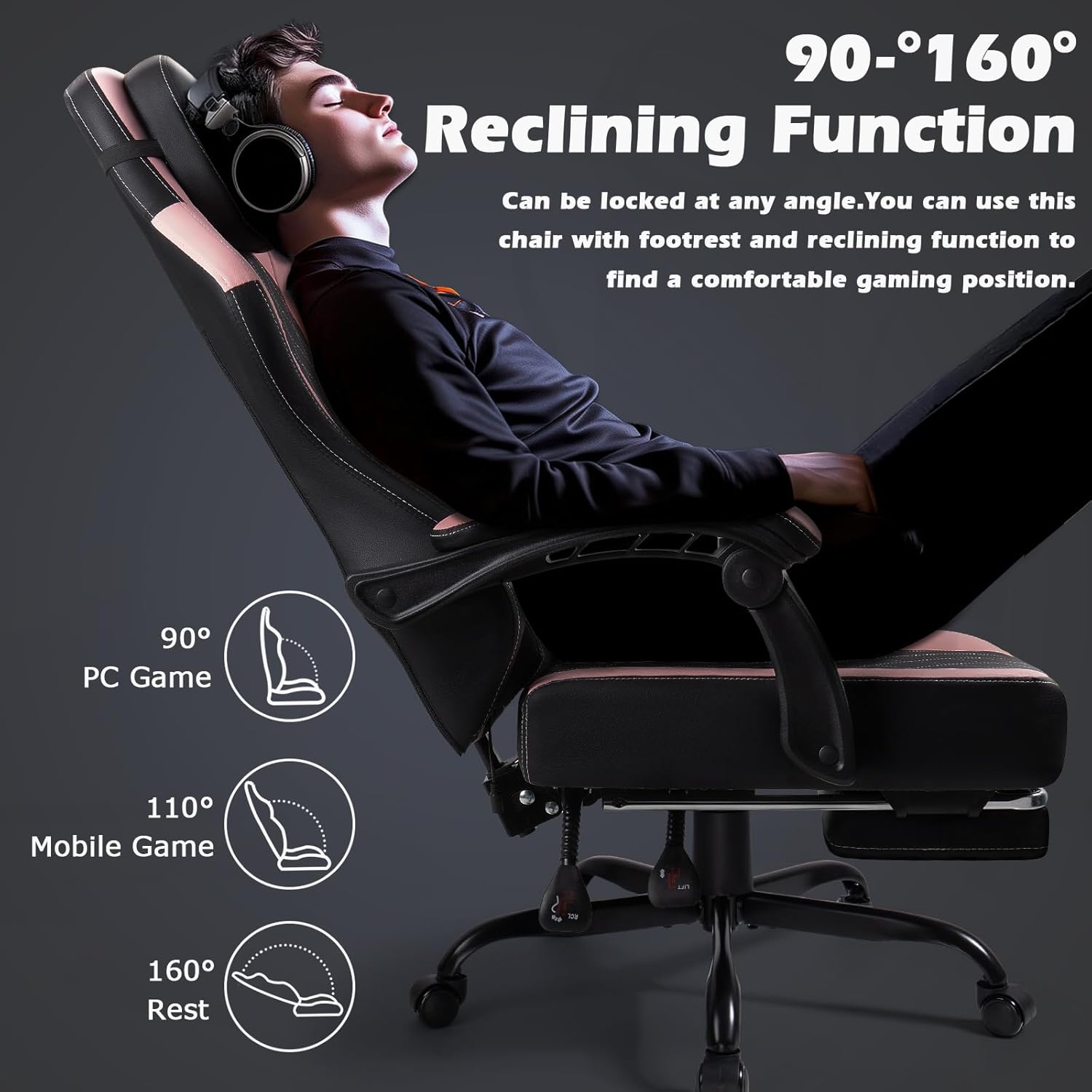
Image 3: Visual representation of the chair's reclining capabilities, showing angles for PC gaming (90°), mobile gaming (110°), and resting (160°).
5.2. Height Adjustment
To adjust the seat height, locate the lever under the seat (typically on the right side). To raise the seat, lift the lever while taking your weight off the chair. To lower the seat, lift the lever while remaining seated. The seat height can be adjusted from 13.8 to 17.7 inches.
5.3. Retractable Footrest
The chair features a retractable footrest for added comfort. To extend the footrest, pull it out from underneath the seat. To retract it, push it back in until it is fully stored. This feature is ideal for relaxing during breaks.

Image 4: A close-up view of the retractable footrest mechanism, demonstrating how it extends and retracts for user comfort.
5.4. Headrest and Lumbar Support
The headrest and lumbar support cushions are adjustable to suit your sitting position and provide optimal ergonomic support. Adjust their positions by sliding them up or down along the chair's backrest to align with your neck and lower back curves.

Image 5: An illustration highlighting the 6-point ergonomic support system of the chair, including head, neck, shoulder, back, massage lumbar, and leg support.
5.5. Armrests
The armrests feature a linkage design, meaning they move in conjunction with the backrest when reclined, providing continuous arm support. These armrests are fixed in height and position relative to the seat.

Image 6: A detailed image of the thickened linkage armrest, emphasizing its robust construction and how it supports the user's arms.
5.6. Wingless Comfort Seat Cushion
The chair is designed with a wingless seat cushion to maximize the actual seating area, allowing for more freedom of movement and accommodating various body shapes without feeling constricted.
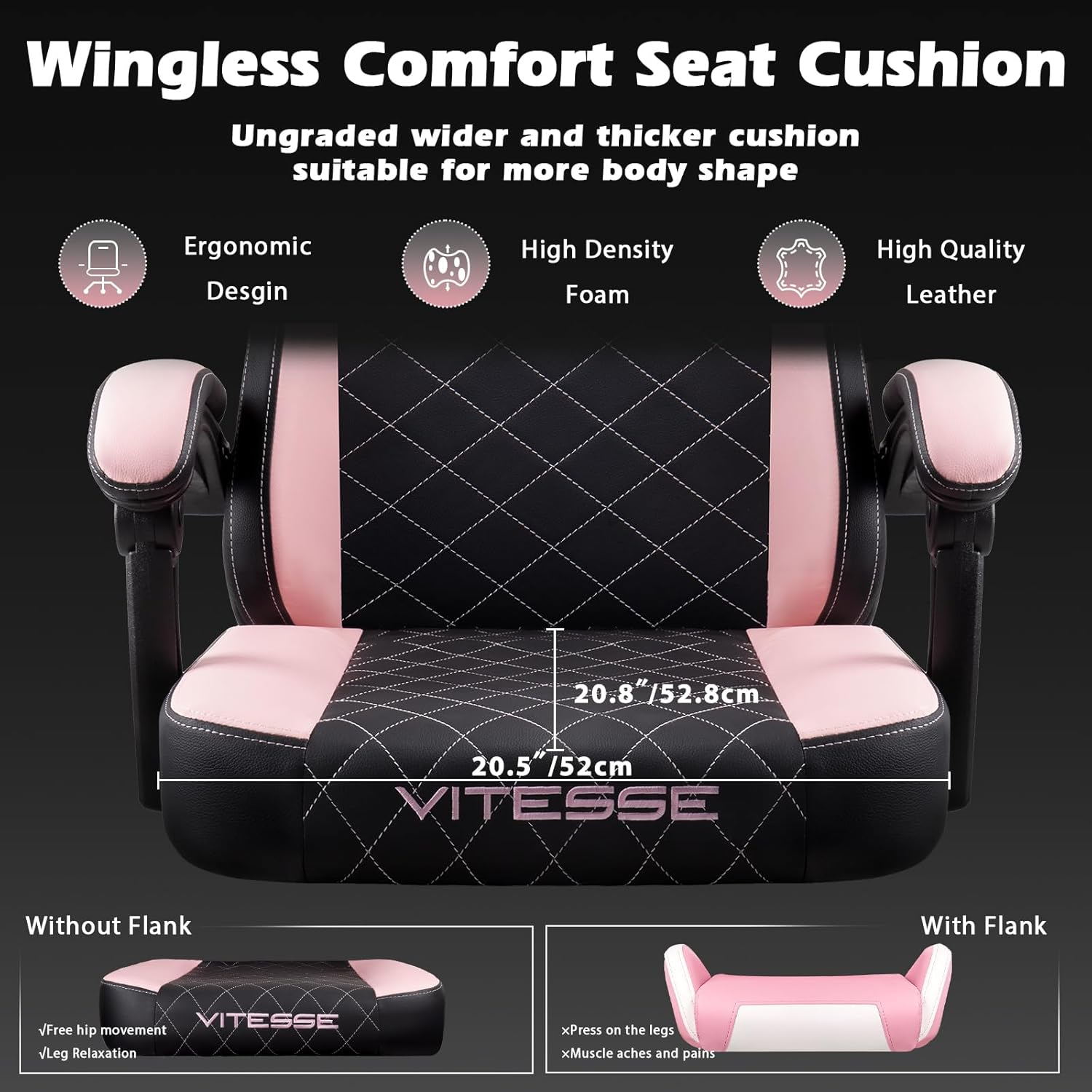
Image 7: A visual comparison demonstrating the benefits of the wingless comfort seat cushion, highlighting increased seating area and freedom of movement.
5.7. Swivel and Wheels
The chair features 360-degree swivel capability and mute rolling noiseless wheels, designed to protect wooden floors and allow for smooth movement across various surfaces.
6. Maintenance
- Cleaning: Wipe the PU leather surfaces with a soft, damp cloth. For stubborn stains, use a mild soap solution and dry immediately. Avoid harsh chemicals or abrasive cleaners.
- Hardware Check: Periodically check all bolts and screws to ensure they are tight. Re-tighten if necessary to maintain stability and safety.
- Wheel Care: Keep the wheels free of hair and debris to ensure smooth rolling.
- Avoid Overloading: Do not exceed the maximum weight capacity of 400 pounds.
7. Troubleshooting
- Chair Squeaks: Check and tighten all bolts and screws. A small amount of silicone lubricant can be applied to moving parts if the squeaking persists.
- Difficulty Adjusting Height: Ensure the gas lift lever is fully engaged. If the chair still doesn't adjust, the gas lift cylinder may need replacement.
- Chair Wobbles: Verify that all components are correctly assembled and all fasteners are securely tightened. Ensure the chair is on a flat, even surface.
- Wheels Not Rolling Smoothly: Clean any debris (hair, dust) from the wheel casters.
8. Specifications
| Feature | Detail |
|---|---|
| Brand | PUKAMI |
| Model Name | ML-KWFRC-202411 |
| Color | Pink |
| Product Dimensions | 22"D x 20.8"W x 47.24"H |
| Maximum Weight Recommendation | 400 Pounds |
| Material | Faux Leather, Sponge (Fill Material) |
| Back Style | Continuous Back |
| Reclining Position Count | 3 (90-155°) |
| Arm Style | Rounded (Linkage Design) |
| Leg Style | Wheels (Mute 360-degree rolling) |
| Included Components | Arm Pad, Caster, Cushion (Headrest, Lumbar Support) |
| Item Weight | 40.8 pounds |
9. Warranty and Support
For warranty information and customer support, please refer to your purchase documentation or contact PUKAMI customer service directly. Keep your proof of purchase for any warranty claims.