1. Product Overview
The AugustknowU SG-004A is a compact, multi-functional handheld signal generator and calibrator designed for engineers and technicians. It supports a wide range of signal types, including active and passive current, voltage, frequency, and thermocouple signals. This device is ideal for various applications such as PLC system debugging, DCS system debugging simulation, valve positioner adjustment, instrumentation calibration, and inverter detection.
Key Features:
- Multi-functional Signal Generation: Supports active and passive current, voltage, frequency, and thermocouple signals.
- Engineering Quantity Display Conversion: Converts signals to physical or engineering quantities with adjustable parameters.
- Programmed Output Modes: Offers monotonic rise, monotonic fall, and cycle modes for automated testing.
- Real-time Curve Display: Visualizes input and output signal trends with customizable sampling times.
- Historical Data Recording: Records and allows viewing of historical data.
- USB Firmware Upgrade: Supports USB simulation U disk for firmware updates.
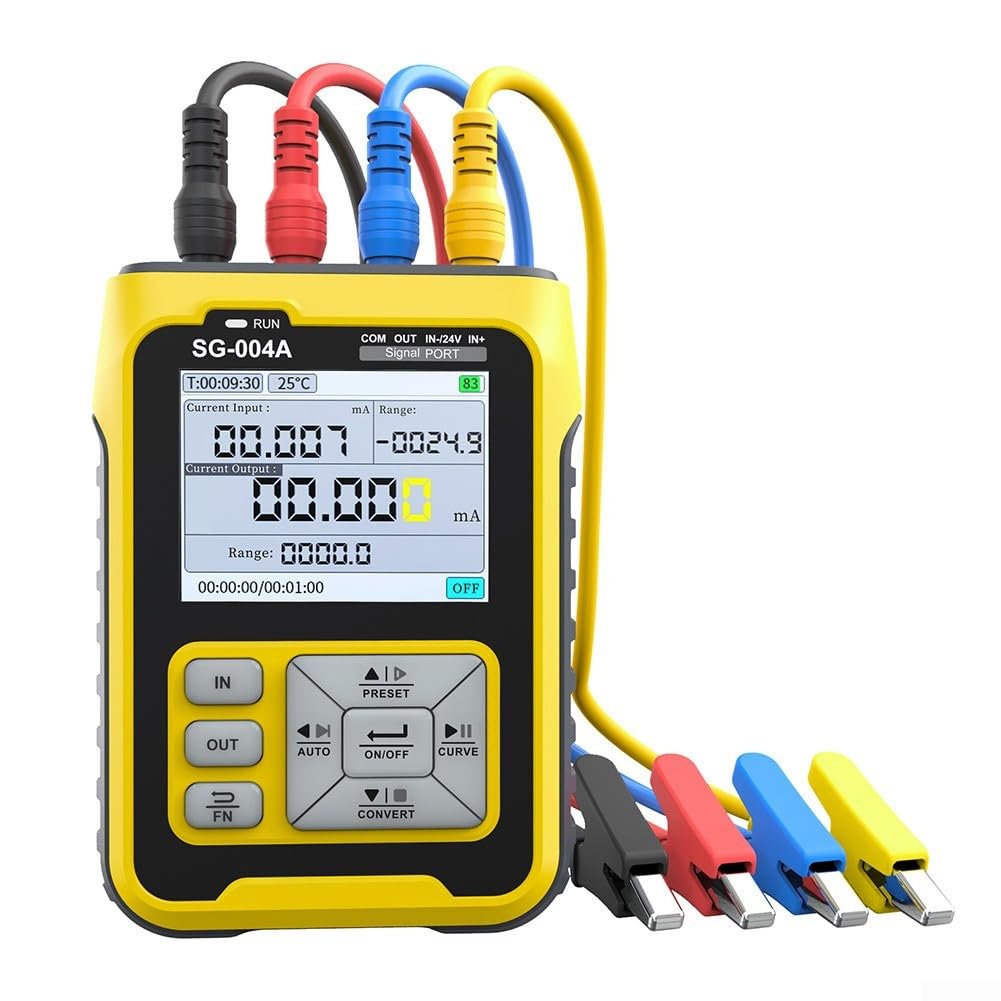
2. Product Features and Capabilities
Signal Types:

Output Signal Types:
- Active Current: 0~24mA
- Passive Current: 0~24mA
- Voltage: 0~24V
- Frequency/PWM: 0~9999Hz
- 24V Loop: 0~24mA
- Millivolt/Thermocouple: -10~110mV
- Resistance/Thermal Resistor: 0~3900Ω
Input Signal Types:
- Active Current: 0~24mA
- Voltage: 0~24V
- Frequency/PWM: 0~9999Hz
- Millivolt/Thermocouple: -10~110mV
- Resistance/Thermal Resistor: 0~400Ω
Extended Functions:
- Program Automatic Lift Output
- Preset Output
- Signal Linear Conversion Output
- Real-time Curve
- History Record
- Output Timing
- Modbus Slave
- USB Emulated U Disk Firmware Upgrade
Compact Design:
The SG-004A is designed for portability, featuring a mini size and lightweight construction, making it easy to carry for on-site work.

3. Technical Specifications
| Parameter | Value |
|---|---|
| Part Name | Signal Generator |
| Material | ABS |
| Dimensions (L*W*H) | 82mm * 28mm * 112mm (3.23 x 1.10 x 4.41 inches) |
| Color | Black + Yellow |
| Charging Port | Type-C |
| Power Input | 5V-12V/10W (Max) |
| Battery Capacity | 3000mAh |
| Standby Time | 24h |
| LCD Size | 2.4 inch TFT Full Color |
| Item Weight | 1.04 pounds (approx. 470g) |
Detailed Technical Parameters:

4. Applications
The SG-004A is a versatile tool suitable for a wide range of industrial and scientific applications, including:
- PLC System Debugging
- DCS System Debugging Simulation
- Valve Positioner Adjustment
- Instrumentation Calibration
- Inverter Detection

5. Device Layout and Controls
Familiarize yourself with the device's layout and controls for efficient operation.

Key Components:
- 2.4-inch TFT Full Color LCD Screen: Displays all operational data and settings.
- Indicator Light: Provides status feedback.
- Input/Output Ports: Dedicated ports for COM, OUT, IN-(24V), IN+(<30V).
- Control Buttons: Include IN, OUT, FN (Function), PRESET, AUTO, ON/OFF, CURVE, CONVERT, directional arrows (Up, Down, Left, Right), Escape/Return, and Enter for navigation and setting adjustments.
6. Power and Durability
The SG-004A is built with user convenience and longevity in mind.

- 24H Standby: Equipped with a built-in 3000mAh lithium battery for extended use.
- Power Display: The screen shows the remaining battery level.
- Type-C Charging: Supports Type-C interface for fast charging.
- Anti-Drop Design: Features an ABS hard shell and elastic silicone surround protection for durability.
- Detail Control: Integrated non-slip silicone stripes prevent slipping during use.
7. Setup and Connections
Proper connection is crucial for accurate measurements and signal generation. The device offers various connection options for different instruments.

Connection Guidelines:
- PLC/Process Instrument (Input/Output): All-round signal output/input for current, voltage, millivolt/frequency, resistance/thermal resistance, and various thermocouple signals. Switched by electronic switches.
- Pneumatic Valves (Valve Position Given): Connect the input (-) port to 24V as the negative pole of the input signal. Input and output are performed simultaneously.
- Pneumatic Valves (Valve Position Feedback): Connect the input (-) port to 24V as the power supply for valve feedback. Input and output are carried out at the same time.
Initial Setup and Unboxing:
Upon receiving your SG-004A, carefully unbox the device and its accessories. Ensure all components listed in the package contents are present. Power on the device using the Type-C port and observe the initial display.
Internal Structure Overview:
For advanced users or troubleshooting, understanding the internal components can be beneficial. The device features a main circuit board with various components, including the Geehy APM32 microcontroller and power management ICs.
8. Operating Instructions
The SG-004A offers intuitive controls for generating and measuring various signals. Use the directional buttons and 'Enter' to navigate menus and adjust values.
General Operation:
- Power On/Off: Press and hold the power button to turn the device on or off.
- Menu Navigation: Use the 'Up', 'Down', 'Left', 'Right' buttons to navigate through menu options. Press 'Enter' to select an option or confirm a setting.
- Input/Output Mode Selection: Use the 'IN' and 'OUT' buttons to switch between input measurement and output generation modes.
- Signal Type Selection: Within 'IN' or 'OUT' mode, navigate to select the desired signal type (mA, V, Hz, etc.).
- Value Adjustment: Use the directional buttons to increase or decrease signal values.
- Calibration: The device supports calibration for various measurements. Refer to the calibration menu to adjust values using a precise external meter.
Current and Voltage Output Testing:
The device can output precise current and voltage signals for testing and calibration purposes. Connect an external multimeter to the output ports to verify the generated signals.
Voltage and Current High-Precision Tests:
Perform high-precision tests for both voltage and current outputs to ensure accuracy. The device allows for fine adjustments to meet specific requirements.
Current Output Short Circuit Protection Test:
The SG-004A features current output short circuit protection. To test this, set a current output and then intentionally short the output terminals. The device should safely cut off the output.
9. Maintenance
- Cleaning: Use a soft, dry cloth to clean the device. Avoid using abrasive cleaners or solvents.
- Storage: Store the device in a cool, dry place away from direct sunlight and extreme temperatures.
- Battery Care: Charge the battery regularly, even if not in use, to maintain its lifespan. Avoid fully discharging the battery for extended periods.
- Firmware Updates: Periodically check for firmware updates on the manufacturer's website to ensure optimal performance and access to new features. Use the USB firmware upgrade function as described in the product features.
10. Troubleshooting
If you encounter issues with your SG-004A, refer to the following common troubleshooting steps:
- Device Not Powering On: Ensure the battery is charged. Connect the device to a power source using the Type-C cable and try again.
- Inaccurate Readings: Check all connections for proper contact. Ensure the device is correctly calibrated for the specific signal type. Refer to the calibration section in the operating instructions.
- No Signal Output: Verify that the output mode is selected and the output is enabled (ON/OFF button). Check the set value and range.
- Display Issues: If the screen is unresponsive or shows abnormal behavior, try restarting the device. If the issue persists, contact customer support.
11. Warranty and Support
For warranty information, technical support, or service inquiries, please refer to the contact details provided with your product packaging or visit the official AugustknowU website. Keep your purchase receipt as proof of purchase for warranty claims.