
Introduction
Thank you for choosing the EZVALO Under Cabinet Lighting system. This manual provides comprehensive instructions for the installation, operation, and maintenance of your new lights. Please read this manual thoroughly before use to ensure proper functionality and longevity of the product.

Image: Five EZVALO 10-inch under cabinet lights standing upright, with a remote control in the foreground. Above them are three smaller images showing the lights emitting warm white, natural white, and cool white light.
Product Contents
The EZVALO Under Cabinet Lighting package includes the following items:
- 5 x 10-inch Motion Sensor Lights
- 10 x Adhesive Iron Sheets
- 1 x Remote Control
- 1 x Instruction Manual (this document)
Specifications
| Brand | EZVALO |
| Model | 10inch 5Pack |
| Color | Warm White (3000K), Natural White (4500K), Cool White (6500K) |
| Material | Aluminum |
| Product Dimensions | 10"L x 1.7"W x 0.53"H |
| Item Weight | 1.74 pounds (total for 5-pack) |
| Power Source | Rechargeable Battery (2400mAh) |
| Brightness | 120 Lumen |
| Special Features | Dimmable, Adjustable Color Temperature, Magnetic, Motion Sensor, Remote Control, Timer |
| Control Method | Push Button, Remote Control |
| Motion Sensor Range | 120° wide sensing angle, 12FT detection range |
| Motion Sensor Auto-Off | Approximately 20 seconds after no motion detected |
Installation
The EZVALO lights offer two convenient, tool-free installation methods:
- Direct Magnetic Attachment: For metal surfaces (e.g., refrigerators, metal shelves), the lights have strong built-in magnets that allow them to snap directly onto the surface.
- Adhesive Metal Plates: For non-metal surfaces (e.g., wood cabinets, walls), use the included adhesive iron sheets.
- Clean the desired installation surface thoroughly to ensure it is dry and free of dust or grease.
- Peel off the protective film from one side of an adhesive iron sheet and firmly press it onto the cleaned surface.
- Allow the adhesive to set for a few minutes for optimal adhesion.
- Align the light with the installed metal plate and allow its built-in magnets to attach securely.
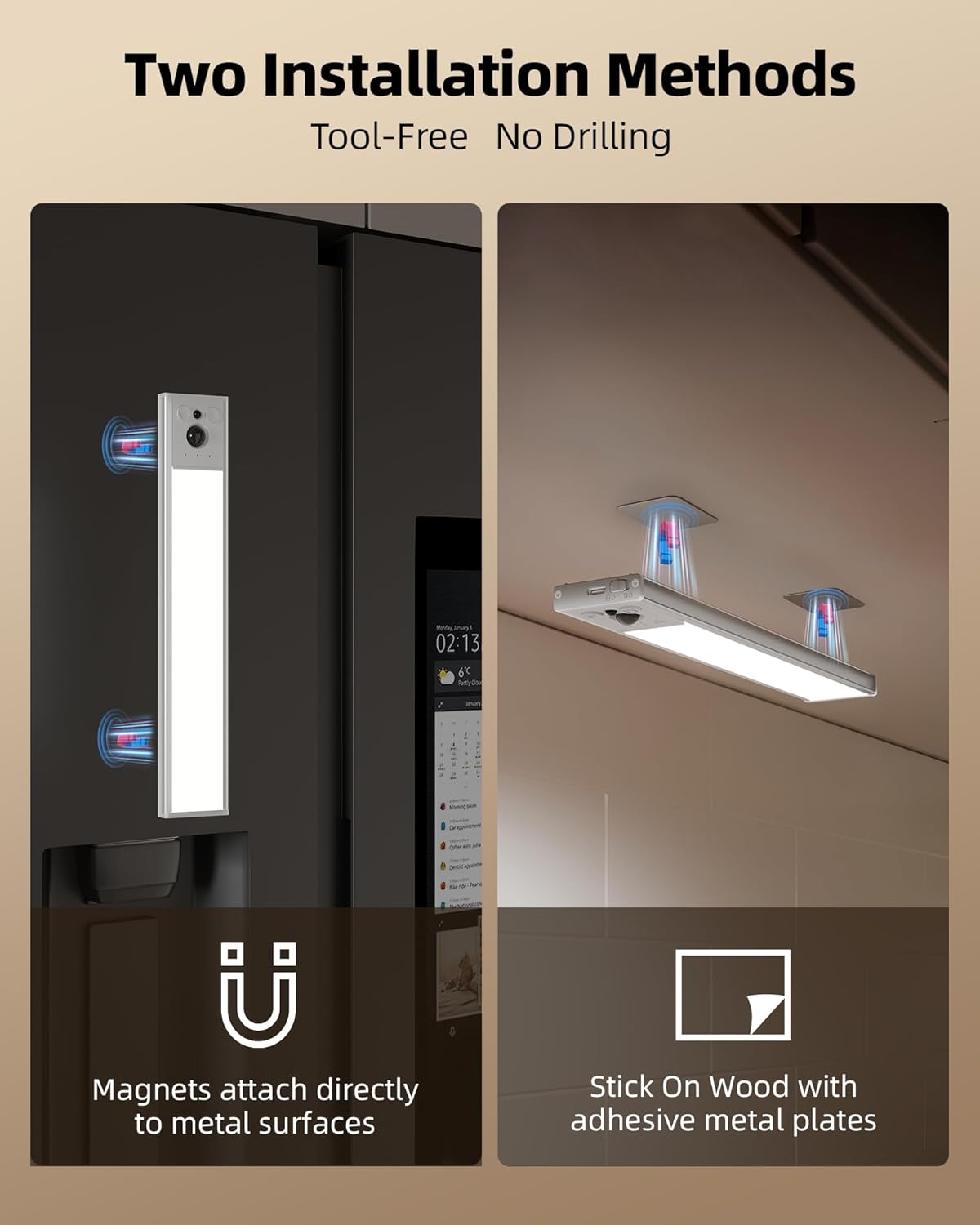
Image: Two images demonstrating installation methods: one showing the light magnetically attached to a metal surface (like a refrigerator), and another showing it attached to a wooden surface using adhesive metal plates.
These lights are versatile and can be installed in various indoor locations such as kitchens, cabinets, pantries, hallways, bedrooms, living rooms, bathrooms, and stairs to illuminate every corner.

Image: Three images showing the lights installed in various locations: kitchen, cabinet/pantry, and hallway, emphasizing their versatility.
Operating Instructions
Charging the Lights
Before first use, or when the light indicator shows low battery, charge the lights using the provided Type-C cable. A full charge takes approximately 3 hours.
- Connect the Type-C cable to the charging port on the light.
- Connect the other end of the cable to a USB power source (e.g., wall adapter, computer USB port).
- The indicator light will be red while charging and turn green when fully charged.
A fully charged light can last 15-45 days in Motion Sensor Mode (depending on usage frequency) or 12 hours in Always-On Mode at 100% brightness.
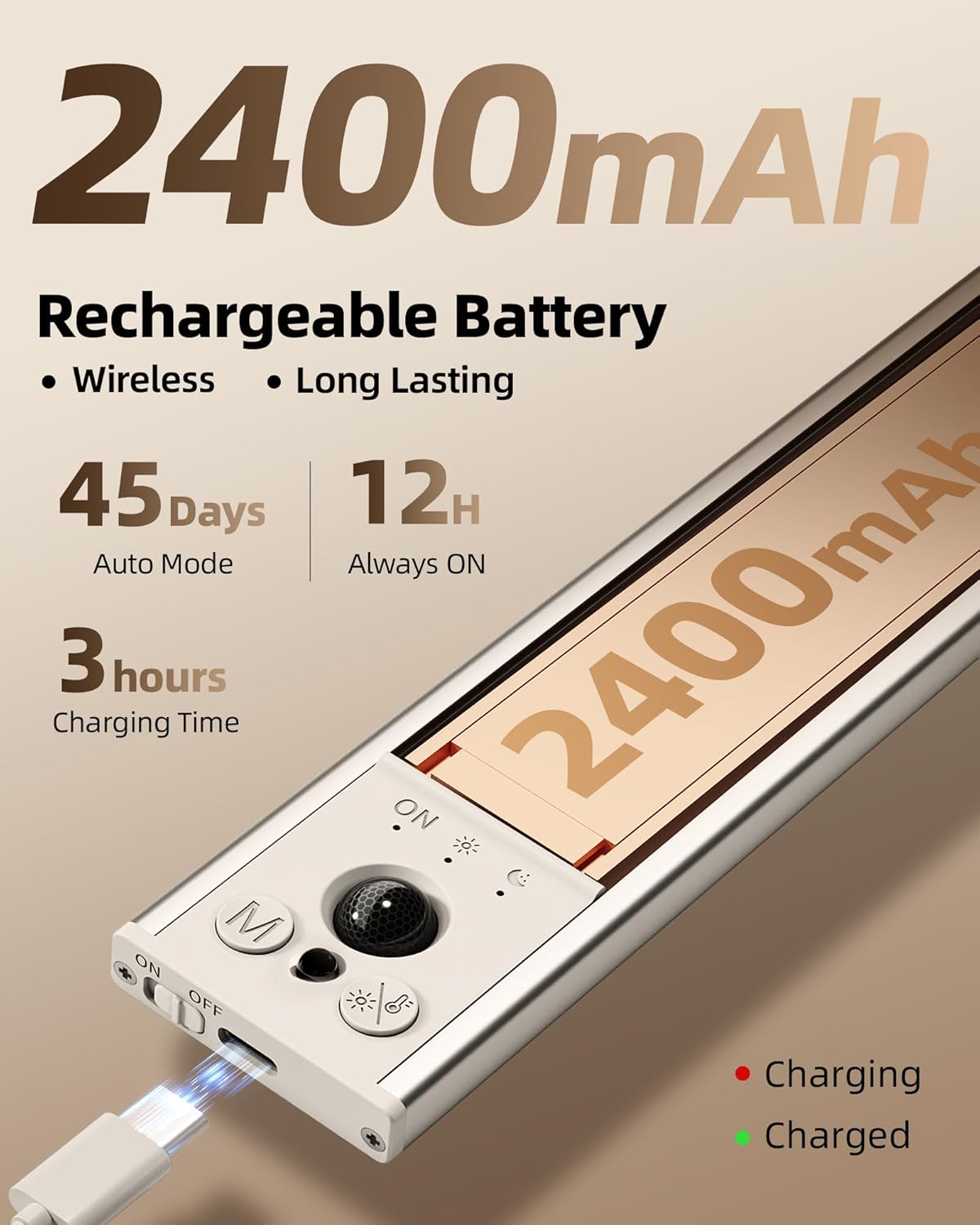
Image: Close-up image of an EZVALO light being charged via a Type-C cable, highlighting its 2400mAh rechargeable battery. Text indicates 45 days in auto mode, 12 hours always ON, and 3 hours charging time. Small indicators show red for charging and green for charged.
Understanding Work Modes
The lights feature four distinct work modes, selectable via the remote control or the light's integrated buttons:
- Always-On Mode: Provides continuous lighting. Ideal for tasks requiring constant illumination.
- Day Mode (Motion Sensor): Activates the light whenever motion is detected, regardless of ambient light conditions.
- Night Mode (Motion Sensor): Activates the light only when motion is detected in a dark environment. This mode conserves battery life by not activating during daylight.
- Off: Turns the light off completely.
In motion sensor modes, the light activates in approximately 0.1 seconds upon detecting motion and automatically turns off after about 20 seconds of no motion.

Image: Three images illustrating the different work modes: Always On Mode (kitchen scene with continuous light), Auto-Day Mode (closet scene with lights turning on with motion), and Auto-Night Mode (staircase scene with lights turning on only in dark environments).
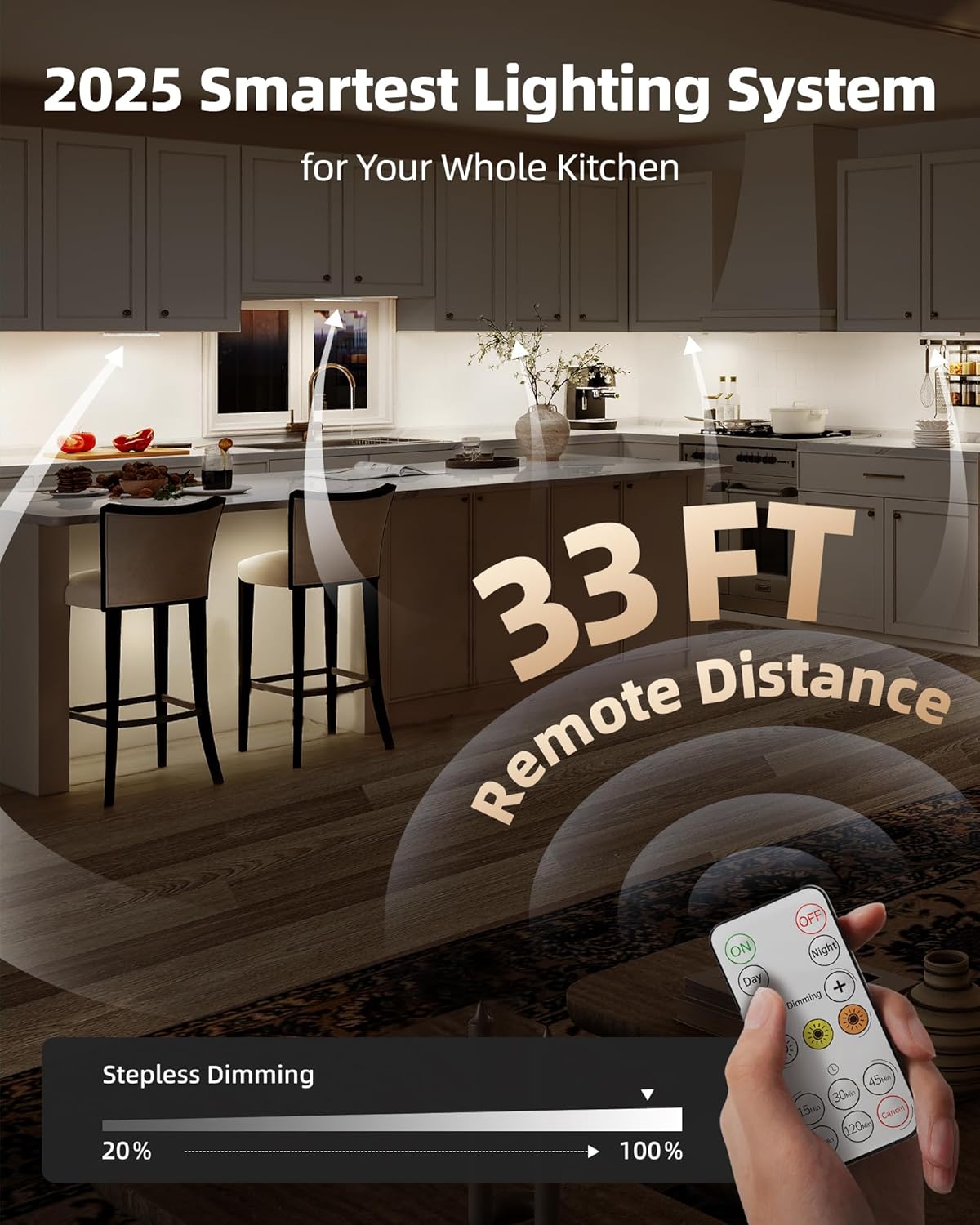
Image: Image showing a woman walking in a kitchen with EZVALO lights installed under cabinets, illustrating the 120-degree wide sensing angle and 12FT detection range of the motion sensor. Insets show a 3.0 upgrade motion sensor, 20s auto-off, 120-degree range, 12FT detection, and 0.1s motion response.
Adjusting Brightness and Color Temperature
The EZVALO lights offer adjustable brightness and three color temperature options to suit your preferences and environment:
- Brightness: Dimmable from 10% to 100%. Use the remote control's dimming buttons to adjust the light intensity.
- Color Temperatures:
- 3000K Warm White: Provides a cozy and inviting ambiance.
- 4500K Natural White: Offers a balanced and versatile illumination, suitable for most tasks.
- 6500K Cool White: Delivers bright and energizing light, ideal for task lighting.
These adjustments can be made using the included remote control, which has a remote distance of up to 33 feet.
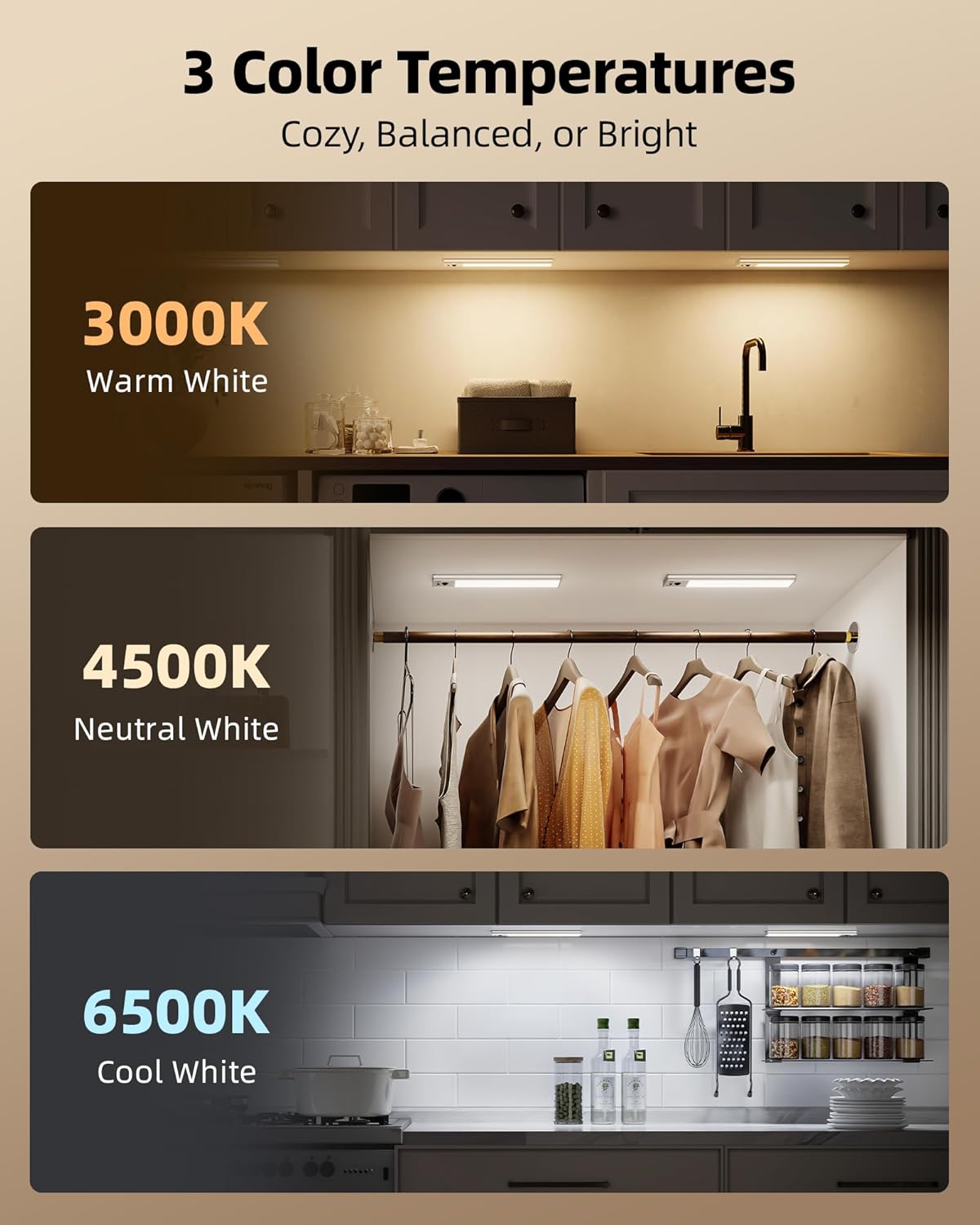
Image: Three images showing the lights in different settings with varying color temperatures: 3000K Warm White (kitchen), 4500K Natural White (closet), and 6500K Cool White (kitchen).

Image: Image of a kitchen with under cabinet lights illuminating the space, demonstrating a 33 FT remote distance. A hand holds the remote control, showing buttons for ON/OFF, Day/Night mode, color temperature adjustment, and dimming from 20% to 100%.
Care and Maintenance
To ensure the longevity and optimal performance of your EZVALO Under Cabinet Lights, follow these simple care and maintenance guidelines:
- Cleaning: Wipe the lights with a soft, dry, or slightly damp cloth. Avoid using abrasive cleaners, solvents, or harsh chemicals, as these can damage the finish or electronic components.
- Battery Care: Recharge the lights regularly, especially if they are not in frequent use, to maintain battery health. Avoid fully depleting the battery for extended periods.
- Storage: If storing the lights for an extended period, ensure they are fully charged and store them in a cool, dry place away from direct sunlight and extreme temperatures.
- Environment: These lights are designed for indoor use only. Avoid exposing them to water, high humidity, or extreme temperatures.
Troubleshooting
If you encounter any issues with your EZVALO Under Cabinet Lights, please refer to the following common troubleshooting steps:
- Light does not turn on:
- Ensure the light is charged. Connect it to a power source and check if the charging indicator lights up.
- Verify the light is not in "Off" mode. Cycle through the modes using the button on the light or the remote control.
- Motion sensor not working:
- Check if the light is in "Day Mode" or "Night Mode". If in "Night Mode", ensure the environment is dark enough for activation.
- Ensure there are no obstructions blocking the motion sensor.
- Confirm the light is charged. Low battery can affect sensor performance.
- Remote control not responding:
- Ensure there is a clear line of sight between the remote and the lights.
- Check the remote control's battery. Replace if necessary.
- Ensure the lights are within the 33-foot remote operating range.
- Light flickers or dims unexpectedly:
- This often indicates a low battery. Recharge the light fully.
If these steps do not resolve the issue, please contact customer support for further assistance.
Warranty and Support
EZVALO products are designed for quality and reliability. For information regarding warranty coverage, please refer to the warranty card included with your purchase or visit the official EZVALO website.
For technical support, troubleshooting assistance beyond this manual, or any other inquiries, please contact EZVALO customer service through the following channels:
- Online Support: Visit the EZVALO brand store on Amazon: EZVALO Store
- Refer to the contact information provided in the packaging or on the product's official listing page.
Please have your product model number (10inch 5Pack) and purchase date ready when contacting support.