
kdes4534
User Manual for Magnetic Case for iPhone 16 Pro Series
Model: kdes4534 | Brand: Generic
1. Introduction
This manual provides instructions for the Magnetic Case designed for iPhone 16 Pro Max, iPhone 16 Pro, iPhone 16 Plus, and iPhone 16 models. This case features a brushed metal bezel-less design, integrated lens protection, a clear bumper, and a versatile ring kickstand with magnetic capabilities.
The case is engineered for durability and convenience, offering protection against scratches, drops, and fingerprints while supporting wireless charging and magnetic car holders.
2. Features
- Compatibility: Specifically designed for iPhone 16 Pro Max, 16 Pro, 16 Plus, and 16.
- Material: Constructed with a durable metal edge and a clear, transparent PC back that resists yellowing.
- Magnetic Suction: Integrated magnets support wireless charging and compatibility with magnetic car holders.
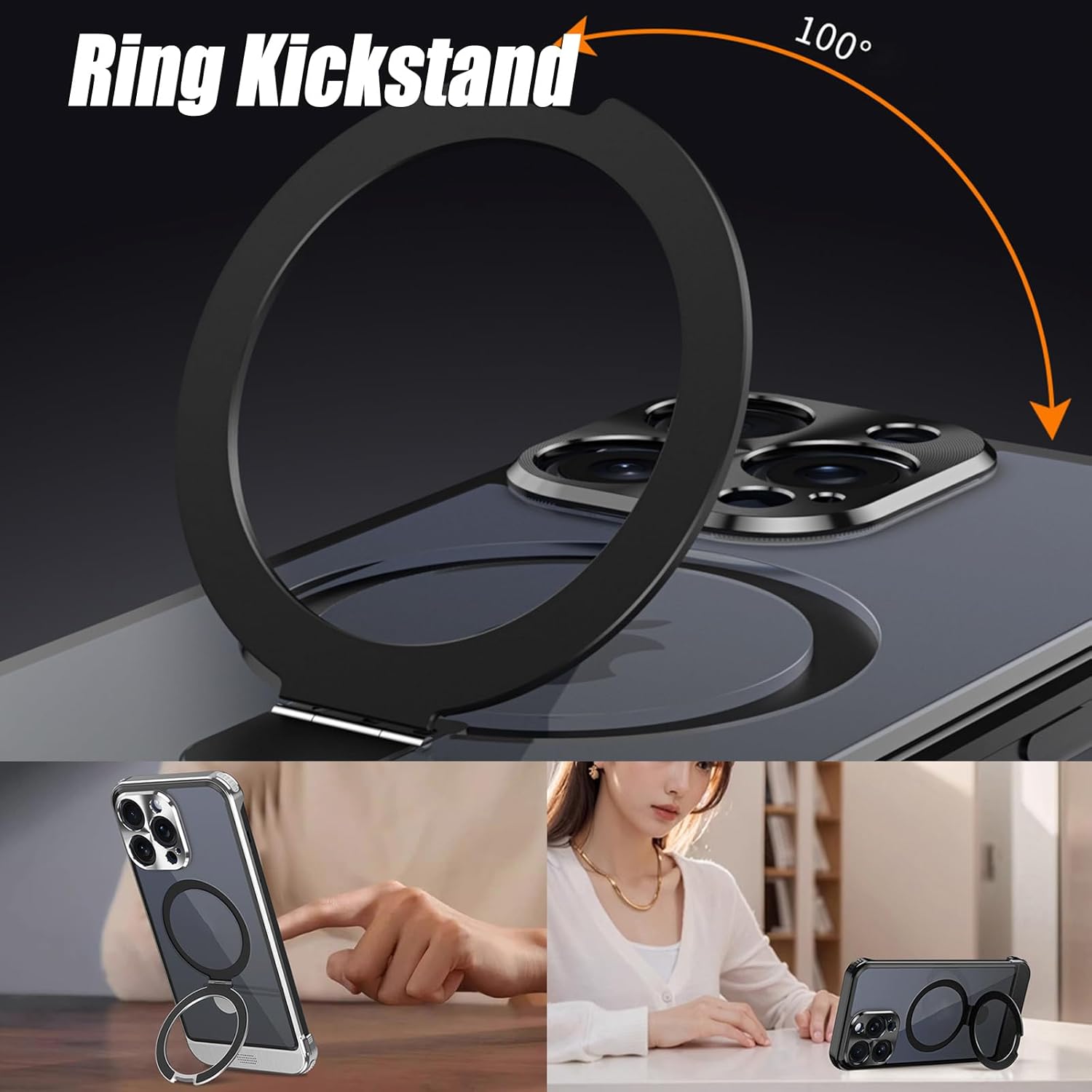
- Ring Kickstand: Features a metal ring stand on the back that is adjustable for various viewing angles and provides a secure grip.
- Lens Protection: The camera lens area is fully wrapped and protected against scratches and scuffs.
- Protection: Offers comprehensive protection against scratches, accidental drops, and fingerprints.
- Design: Slim, lightweight, anti-slip, and anti-fingerprint design for comfortable handling.
3. Package Contents
The package includes the following item:
- Magnetic Phone Case with Integrated Ring Kickstand (1 unit)
4. Setup and Installation
Installing the case is a straightforward process due to its innovative metal edge snap-on mounting design.
- Ensure your iPhone is clean and free of dust or debris.
- Align the top edge of your iPhone with the top section of the case.
- Gently press your iPhone into the case, ensuring all corners and edges snap securely into place. The metal edge design allows for easy and secure attachment.
- Verify that all buttons, ports, and the camera lens are properly aligned with the case's cutouts.


5. Operating Instructions
5.1 Using the Magnetic Charging Feature
The case is designed with integrated magnets to support efficient wireless charging and compatibility with magnetic car holders. To use this feature:
- Place your iPhone, with the case installed, onto a compatible magnetic wireless charger. The magnets in the case will align with the charger for optimal power transfer.
- For magnetic car holders, simply attach the back of the case to the magnetic mount. The strong magnetic connection will hold your phone securely in place.

5.2 Utilizing the Ring Kickstand
The integrated metal ring on the back of the case serves as both a secure grip and a versatile kickstand.
- For Grip: Slide your finger through the ring to hold your phone more securely, reducing the risk of accidental drops.
- For Kickstand: Pull out the ring until it clicks into an open position. You can rotate the ring up to 100 degrees to achieve various viewing angles for watching videos, making video calls, or browsing.
- When not in use, gently push the ring back into its recessed position to keep the case slim and pocket-friendly.

6. Maintenance
To ensure the longevity and appearance of your phone case, follow these simple maintenance guidelines:
- Cleaning: Wipe the case regularly with a soft, damp cloth to remove dust, dirt, and fingerprints. Avoid using harsh chemicals or abrasive cleaners, as these may damage the material or finish.
- Storage: When not in use, store the case in a clean, dry place away from direct sunlight and extreme temperatures.
- Avoid Impact: While the case offers heavy-duty protection, excessive force or sharp impacts can still cause damage.
7. Troubleshooting
If you encounter any issues with your phone case, consider the following common solutions:
- Case Not Fitting Properly: Ensure you have selected the correct model for your iPhone (16 Pro Max, 16 Pro, 16 Plus, or 16). Re-align the phone and case, ensuring all edges snap into place.
- Wireless Charging Issues: Verify that your wireless charger is compatible with magnetic charging. Ensure the phone is centered on the charging pad. Remove any foreign objects between the phone and the charger.
- Ring Kickstand Stiffness: The kickstand may be stiff initially. Gently work it back and forth a few times to loosen it. Ensure no debris is obstructing its movement.
- Scratches on Case: While the case is designed to be scratch-resistant, minor abrasions can occur from daily use. Regular cleaning can help maintain its appearance.

8. Specifications
| Attribute | Detail |
|---|---|
| Model Number | kdes4534 |
| Brand | Generic |
| Compatible Phone Models | iPhone 16 Pro Max, 16 Pro, 16 Plus, 16 |
| Material | Metal, PC (Polycarbonate) |
| Color | Blue (for this specific variant) |
| Item Weight | 7.7 ounces |
| Package Dimensions | 4.29 x 3.46 x 0.98 inches |
| Special Features | Heavy Duty Protection, Magnetic Suction, Integrated Ring Kickstand, Lens Protection, Anti-yellowing, Anti-fingerprint |
| Form Factor | Pouch (refers to the case type) |
9. Warranty and Support
For any questions, concerns, or support regarding your Magnetic Case, please contact the seller or manufacturer directly through the platform where the product was purchased. Please refer to your purchase receipt or order details for specific warranty information, if applicable.