
1. Introduction
This instruction manual provides essential information for the installation, operation, maintenance, and troubleshooting of the TDAOCTN SYNC4 APIM NAV Module. This module is designed as a replacement or upgrade component for specific Ford F-150 vehicles equipped with a 12-inch SYNC4 display. Please read this manual thoroughly before proceeding with installation or operation to ensure proper functionality and to avoid potential issues.
2. Product Overview
The TDAOCTN SYNC4 APIM NAV Module is an Automotive Personal Information Module (APIM) specifically engineered for Ford F-150 models from 2021 to 2023 that feature a 12-inch display. This module integrates navigation capabilities and is intended to address issues such as inoperable touchscreens, black screens, frequent Bluetooth disconnections, or input lag in existing SYNC4 systems. It is pre-programmed to match your vehicle's VIN for a plug-and-play installation.
Key Features:
- Designed for 12-inch display option SYNC4 systems in 2021-2023 Ford F-150.
- OEM equivalent part number: ML3T-14G670-BF (interchangeable with BFP, BFO, BFN, etc.).
- Plug and Play functionality after VIN programming.
- Equipped with original navigation software, including the latest NA223 map for USA and Canada.
- Eliminates the need for a dealer visit for programming when VIN is provided.

Image 2.1: Top view of the SYNC4 APIM NAV Module, highlighting its connectors and heat sink design.

Image 2.2: Angled view of the SYNC4 APIM NAV Module, displaying its robust construction and primary connection port.
3. Compatibility
This module is specifically compatible with:
- Vehicle Models: Ford F-150 (2021, 2022, 2023)
- Display Size: Vehicles equipped with a 12-inch SYNC4 screen display option.
- OEM Part Numbers: ML3T-14G670-BF (and its variants such as BFP, BFO, BFN, etc.). Please verify your existing module's engineering number matches one of these.
Important Note:
- This module is NOT compatible with 8-inch screen displays.
- It is NOT recommended for use with other vehicle years or models, or for newer firmware versions not explicitly supported.
4. Package Contents
Upon opening the package, please verify that all components are present and undamaged:
- 1x TDAOCTN SYNC4 APIM NAV Module
If any items are missing or damaged, please contact customer support immediately.
5. Setup and Installation
The TDAOCTN SYNC4 APIM NAV Module is designed for a plug-and-play experience, provided the necessary pre-programming is completed. Professional installation is recommended for individuals unfamiliar with automotive electronics.
5.1 Pre-Installation Steps:
- VIN Programming: It is crucial to provide your vehicle's VIN (Vehicle Identification Number) at the time of purchase. The module will be pre-programmed with data matching your car's VIN for free. Without VIN programming, the module may not function correctly.
- Vehicle Preparation: Ensure your vehicle's ignition is off and the battery is disconnected before beginning any installation work to prevent electrical damage or injury.
- Tools Required: Gather necessary automotive tools, which may include trim removal tools, screwdrivers, and socket wrenches, depending on your vehicle's specific dashboard disassembly requirements.
5.2 Installation Procedure:
- Access Existing APIM: Carefully remove the necessary dashboard trim and components to gain access to the existing SYNC4 APIM module. Refer to your vehicle's service manual or an online guide for specific instructions on accessing the APIM in your 2021-2023 Ford F-150.
- Disconnect Old Module: Disconnect all electrical connectors and antenna cables from the old APIM module.
- Remove Old Module: Unmount and remove the old APIM module from its housing.
- Install New Module: Carefully place the TDAOCTN SYNC4 APIM NAV Module into the housing.
- Connect New Module: Reconnect all electrical connectors and antenna cables to the new module. Ensure all connections are secure.
- Reassemble Dashboard: Carefully reassemble the dashboard components and trim.
- Reconnect Battery: Reconnect the vehicle's battery.
- Test Functionality: Turn on the vehicle and test the SYNC4 system, including the touchscreen, navigation, Bluetooth, and other integrated features.
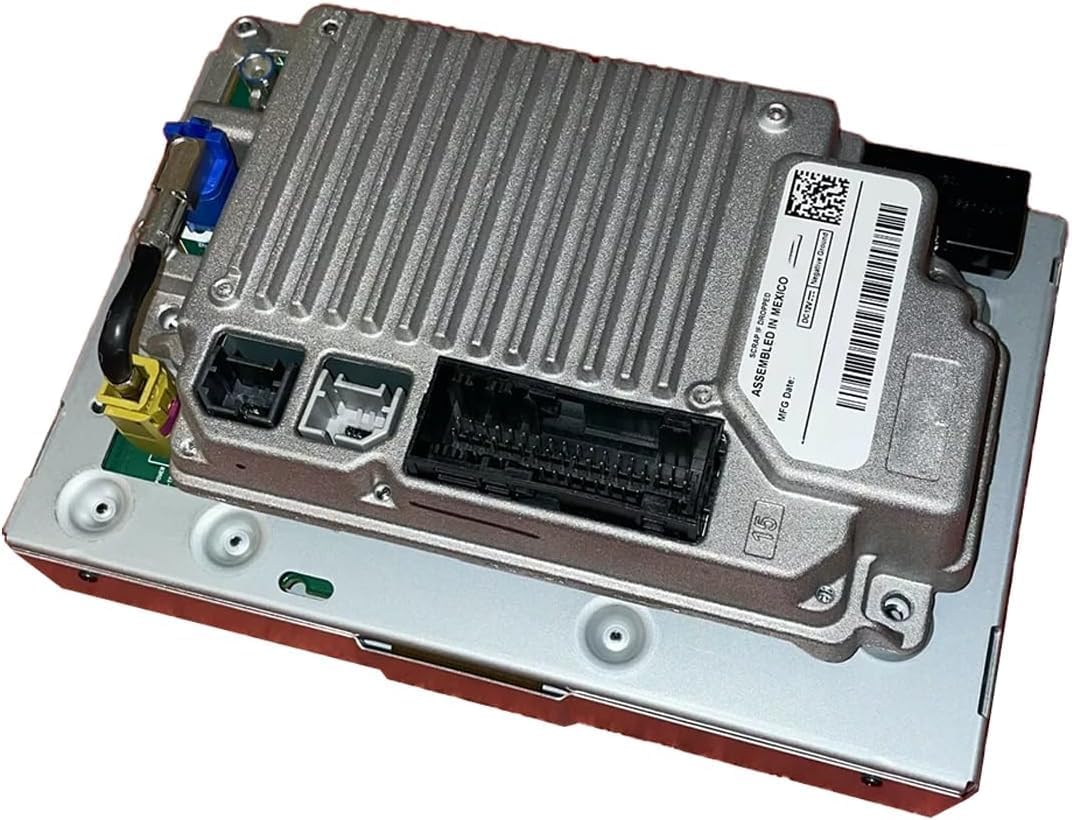
Image 5.1: Rear view of the SYNC4 APIM NAV Module, illustrating the primary electrical and antenna connections.

Image 5.2: Side view of the SYNC4 APIM NAV Module, showing the heat dissipation fins and identification label.
6. Operating Instructions
Once installed and powered on, the TDAOCTN SYNC4 APIM NAV Module operates as a standard Ford SYNC4 system. Familiarize yourself with the SYNC4 interface for optimal use.
- Navigation: Access the integrated navigation system to input destinations, view maps, and receive turn-by-turn directions. The module includes the latest NA223 map data for North America.
- Touchscreen Interface: Interact with the system via the 12-inch touchscreen display.
- Voice Commands: Utilize the vehicle's voice command features for hands-free control of navigation, audio, and communication.
- Connectivity: Connect your mobile devices via USB for media playback or smartphone integration.
- System Updates: Periodically check for official Ford SYNC4 software updates through your vehicle's settings or Ford's official channels to ensure the system remains current.
7. Maintenance
The TDAOCTN SYNC4 APIM NAV Module requires minimal maintenance. Adhering to these guidelines can help ensure its longevity:
- Keep Dry: Protect the module from moisture and extreme humidity.
- Clean Connections: Ensure all electrical connections remain clean and free of corrosion. If reinstalling, inspect connectors for any debris.
- Temperature Control: Avoid exposing the vehicle to extreme temperatures for prolonged periods, as this can affect electronic components.
- Software Integrity: Avoid unauthorized software modifications or
Ask a question about this manual
Ask about setup, troubleshooting, compatibility, parts, safety, or missing instructions. Manuals+ will review the question and use this page’s manual context to help answer it.