
1. Introduction
This manual provides detailed instructions for the installation, operation, and maintenance of your COSTWAY 30k Quad 4 Zone Mini Split Air Conditioner. Please read this manual thoroughly before using the appliance and retain it for future reference.
The COSTWAY 30k Quad 4 Zone Mini Split Air Conditioner is a high-efficiency system designed to provide multi-room climate control. It features a 30000 BTU outdoor unit connected to four independent 7000 BTU indoor units, allowing for individualized temperature settings in different zones. With a 23 SEER2 rating and 10 HSPF2 rating, it utilizes R32 refrigerant for reduced environmental impact and is WiFi-enabled for smart control.

Image 1.1: Overview of the COSTWAY 30k Quad 4 Zone Mini Split Air Conditioner system.
Video 1.1: An overview of the COSTWAY 30k Quad 4 Zone Mini Split Air Conditioner's features and design.
2. Safety Information
To ensure safe operation and prevent damage to the unit or injury to users, please observe the following safety precautions:
- Professional Installation Required: Installation of this mini split air conditioner must be performed by a qualified and certified HVAC professional. Incorrect installation can lead to refrigerant leakage, electric shock, fire, or water leakage.
- Electrical Safety: Ensure the power supply matches the unit's requirements (208-230V). Do not use extension cords. Always disconnect power before performing any maintenance or cleaning.
- Refrigerant: This unit uses R32 refrigerant. Handle with care and ensure proper ventilation during installation and servicing. R32 is a mildly flammable refrigerant.
- Clearance: Do not block the air inlets or outlets of either the indoor or outdoor units. Maintain adequate clearance for proper airflow.
- Children and Pets: Keep children and pets away from the unit, especially during operation and maintenance.
- Operating Conditions: The outdoor unit is designed to operate in a wide range of climate conditions, from -13°F to 125°F. However, extreme conditions may affect performance.
- Unit Integrity: Do not attempt to repair or modify the unit yourself. Contact qualified service personnel for any repairs.
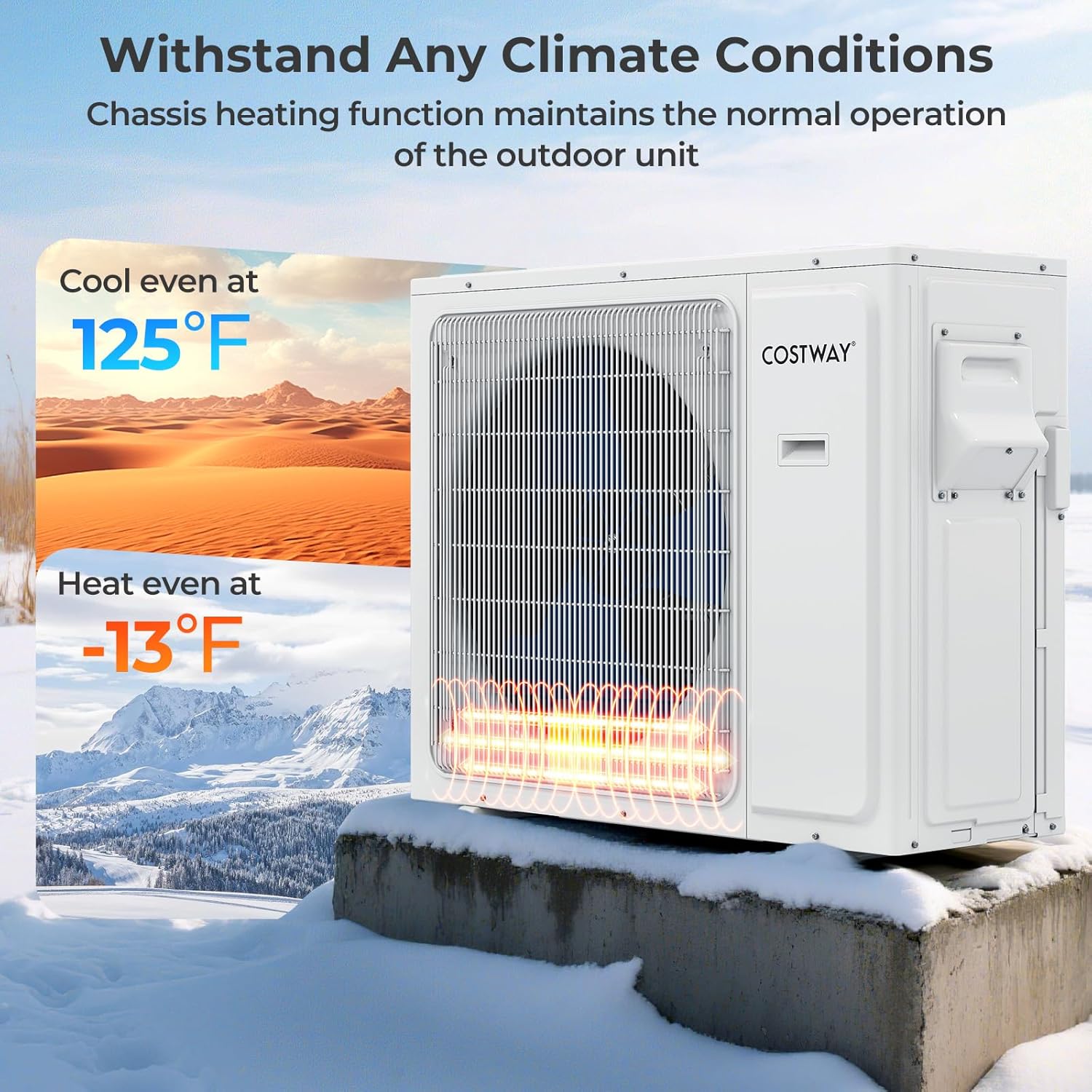
Image 2.1: The outdoor unit is designed to withstand temperatures from -13°F to 125°F.
3. Package Contents
Verify that all components are present and undamaged upon unpacking. If any items are missing or damaged, contact your retailer or COSTWAY customer support immediately.
- 1 x Outdoor Unit
- 4 x Indoor Units
- 4 x Communication Wires
- 4 x Copper Connection Pipes (Air + Liquid)
- 4 x Drain Hoses
- 4 x Remote Controls
- 4 x Mounting Plates
- 4 x Wall Sleeves
- 8 x Wall Caps
- 4 x Screw Kits
- 8 x Putty
- 8 x Tape
- 5 x User Guides

Image 3.1: All components included in the package.
4. Setup and Installation
As stated in the safety information, installation of this mini split air conditioner requires a professional HVAC installer to ensure proper function and safety. The following information provides general guidance.
4.1 Unit Placement
Each of the four indoor units can be placed in separate rooms, allowing for independent temperature control in up to four zones. Ensure adequate space for both indoor and outdoor units for optimal airflow and maintenance access.
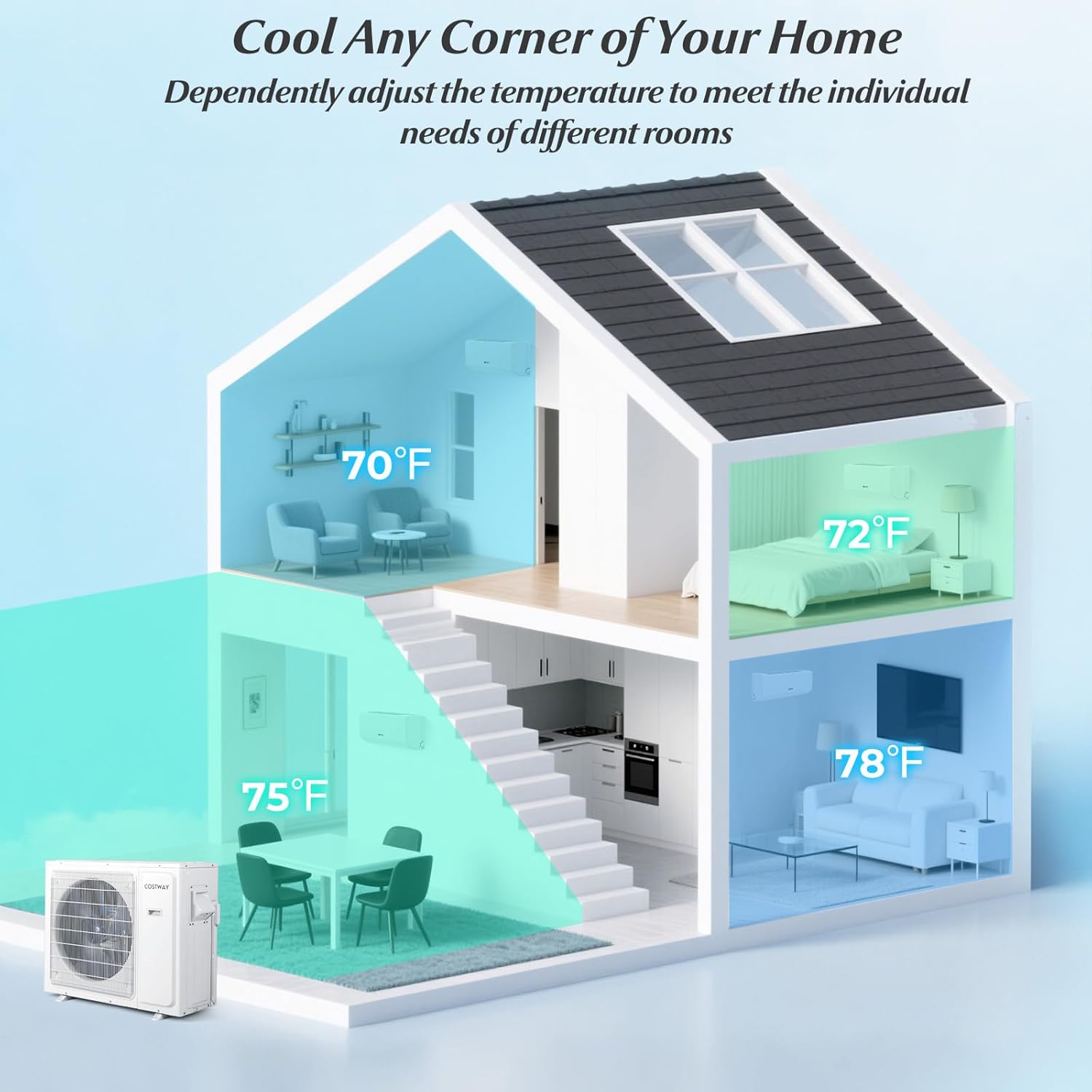
Image 4.1: Example of multi-zone cooling setup in a home.
4.2 Dimensions
Refer to the following table for the dimensions of the indoor and outdoor units to plan your installation space.

Image 4.2: Dimensions for indoor and outdoor units.
4.3 Electrical and Refrigerant Connections
All electrical wiring and refrigerant line connections must be performed by a licensed professional according to local codes and regulations. The system requires a 208-230V power supply.
5. Operating Instructions
Your COSTWAY mini split system offers various functions and modes for optimal comfort and energy efficiency.
5.1 Control Methods
The unit can be controlled using the included remote controls or via a smartphone app when connected to a 2.4GHz Wi-Fi network.

Image 5.1: Control your comfort from anywhere using the smartphone app.
5.2 Operating Modes
Select from the following modes using the remote control or app:
- Auto Mode: The unit automatically selects the operating mode (cooling or heating) based on the room temperature.
- Cool Mode: Provides cooling to lower the room temperature.
- Heat Mode: Provides heating to raise the room temperature.
- Dry Mode: Dehumidifies the room by removing excess moisture.
- Fan Mode: Circulates air without cooling or heating.
- Sleep Mode: Adjusts temperature and fan speed for quiet, comfortable sleep.
5.3 Fan Speeds
Choose from five fan speeds: Auto, Low, Mid, High, or Strong, to customize airflow.
5.4 Special Features
- Auto Swing: Automatically adjusts the louver direction for even air distribution.
- Feeling Function: The remote control has a built-in temperature sensor that allows the unit to adjust its operation based on the temperature around the remote, providing more precise comfort.
- 24-Hour Timer: Program the unit to turn on or off automatically within a 24-hour period.
- Sleep Mode & Screen Off: For a restful night, activate sleep mode which reduces noise and adjusts temperature. The screen off function turns off the display lights on the indoor unit.
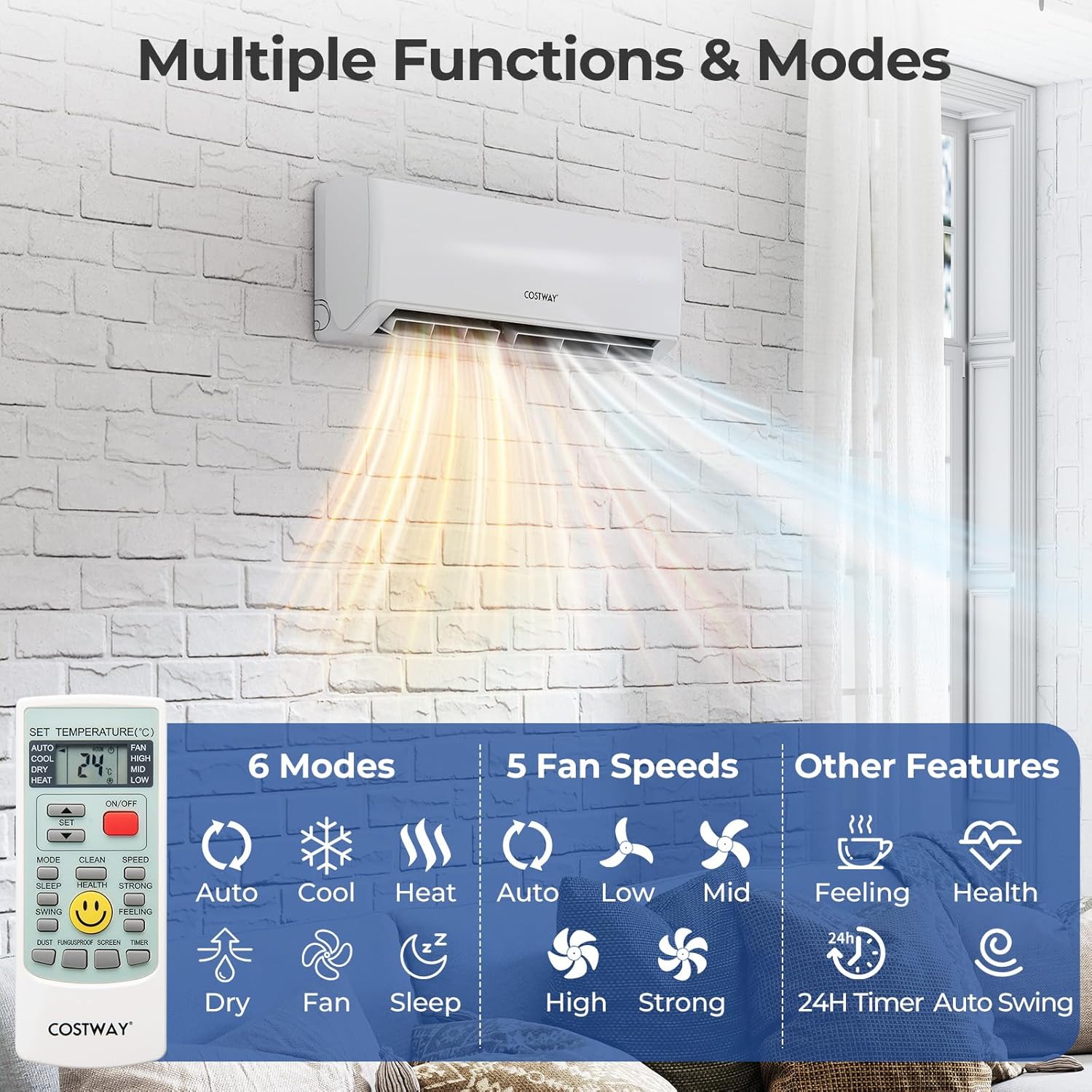
Image 5.2: Multiple functions and modes available for operation.
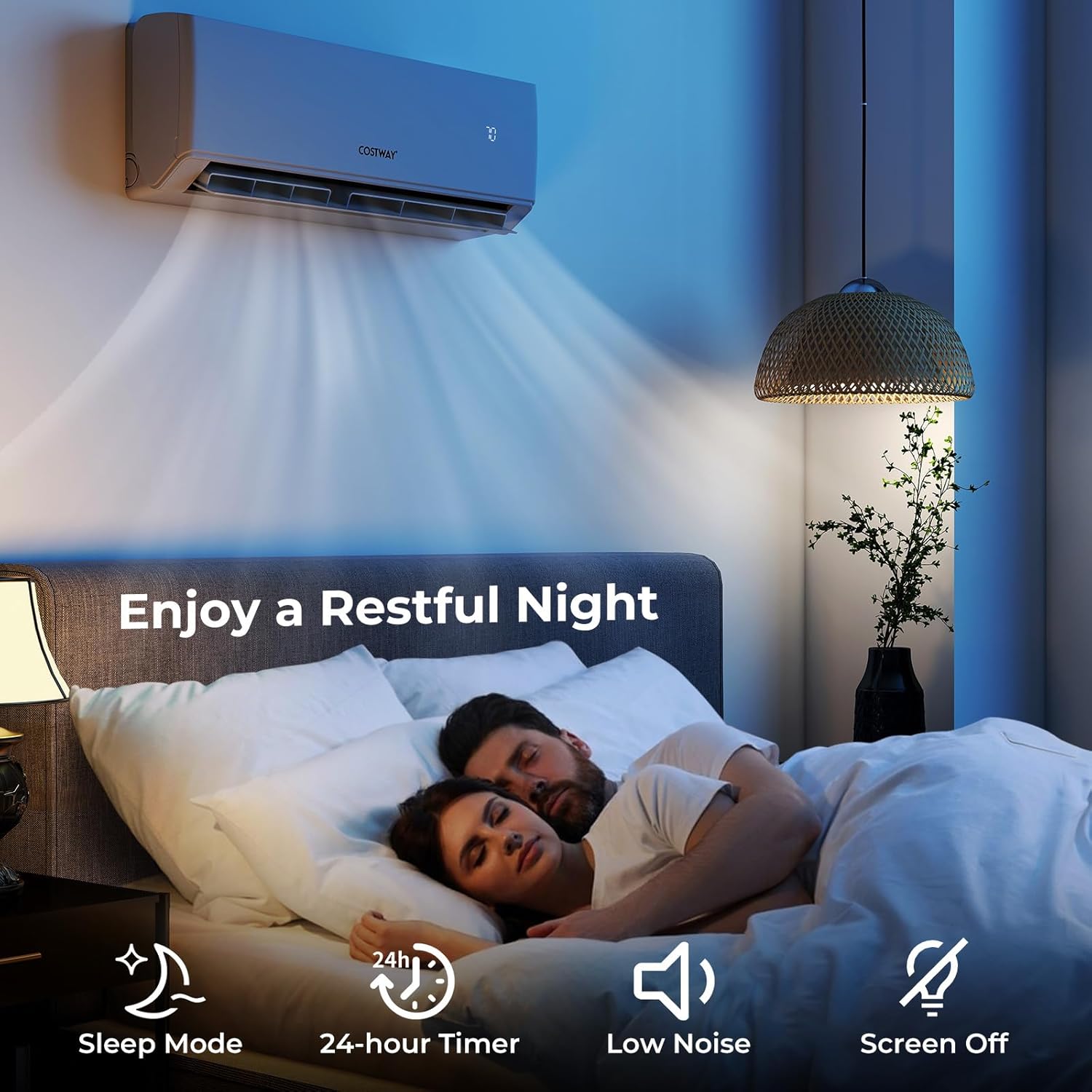
Image 5.3: Features for a restful night, including Sleep Mode and Screen Off.
6. Maintenance
Regular maintenance is crucial for ensuring the longevity, efficiency, and optimal performance of your COSTWAY mini split air conditioner.
6.1 Air Filter Cleaning
The air filters in the indoor units should be cleaned regularly (e.g., every two weeks or as needed, depending on usage and air quality). Dirty filters can reduce airflow, decrease efficiency, and impact air quality.
- Turn off the unit and disconnect power.
- Open the front panel of the indoor unit.
- Carefully remove the air filters.
- Clean the filters with a vacuum cleaner or wash them with lukewarm water and a mild detergent. Rinse thoroughly.
- Allow filters to dry completely before reinstalling.
- Close the front panel and restore power.

Image 6.1: Regular cleaning of air filters is essential for pure air and efficient operation.
6.2 Self-Clean Technology
The unit is equipped with a self-clean function that helps prevent dust and mold buildup on the indoor coil. This function heats the evaporator to remove accumulated residue, ensuring efficient operation and cleaner air. Consult the full user manual for instructions on how to activate this feature.
6.3 Professional Servicing
It is recommended to have the entire system inspected and serviced by a qualified HVAC technician annually to ensure all components are functioning correctly, refrigerant levels are optimal, and drainage systems are clear.
7. Troubleshooting
Before contacting customer support, please review the following common issues and potential solutions.
| Problem | Possible Cause | Solution |
|---|---|---|
| Unit does not turn on | No power supply; Circuit breaker tripped; Remote control batteries dead. | Check power connection; Reset circuit breaker; Replace remote control batteries. |
| No cooling/heating | Incorrect mode selected; Temperature setting too high/low; Dirty air filters; Doors/windows open. | Select appropriate mode (Cool/Heat); Adjust temperature setting; Clean air filters; Close all doors and windows. |
| Weak airflow | Dirty air filters; Obstruction at air inlet/outlet. | Clean air filters; Remove any obstructions. |
| Unusual noise | Loose parts; Unit not level; Foreign object inside. | Ensure unit is securely mounted and level. If noise persists, contact professional service. |
| WiFi connectivity issues | Incorrect network (5GHz instead of 2.4GHz); Router issues; App not configured correctly. | Ensure connection to a 2.4GHz Wi-Fi network; Restart router; Reconfigure app settings. |
| Error Code Displayed | System malfunction. | Note the error code and consult the comprehensive troubleshooting guide in the full user manual or contact professional service. |
If the problem persists after attempting these solutions, please contact COSTWAY customer support or a qualified HVAC technician.
8. Specifications
Key technical specifications for the COSTWAY 30k Quad 4 Zone Mini Split Air Conditioner.
| Feature | Specification |
|---|---|
| Brand | COSTWAY |
| Model Number | B0F92JDGGX |
| Cooling Capacity | 30000 BTU (Outdoor Unit) |
| Indoor Unit Capacity | 4 x 7000 BTU |
| SEER2 Rating | 23 |
| HSPF2 Rating | 10 |
| Refrigerant Type | R32 |
| Voltage | 208-230V |
| Noise Level (Indoor) | 40 Decibels (typical) |
| Outdoor Unit Dimensions (D x W x H) | 17.9" x 41.2" x 31.8" |
| Operating Temperature Range | -13°F to 125°F |
| Control Method | App, Remote Control |
| Certifications | Energy Star, ETL, AHRI |

Image 8.1: Energy efficiency ratings and certifications.

Image 8.2: BTU capacity recommendations for multi-room use.
9. Warranty and Support
COSTWAY is committed to providing reliable products and excellent customer service.
9.1 Product Warranty
Your COSTWAY mini split system comes with a 5-year warranty on the compressor and a 3-year warranty on parts. Please retain your proof of purchase for warranty claims.
9.2 Technical Support
COSTWAY offers lifetime technical support for this product. For assistance with installation, operation, or troubleshooting, please contact our support team.
9.3 Customer Service
Our customer service team is available 24/7 to assist you via phone, email, or live support. For more information and contact details, please visit the official COSTWAY store: