
1. Product Overview
The E-Shine Leisure Under Desk Elliptical Trainer B1 Pro is a compact and portable leg exerciser designed for use while seated. It offers both automatic and manual exercise modes, an LCD display for tracking workout metrics, and a convenient remote control. This device is suitable for individuals seeking to maintain activity, improve circulation, or assist with rehabilitation exercises from a seated position.

Figure 1: E-Shine Leisure Under Desk Elliptical Trainer B1 Pro.
2. Setup
2.1 Unpacking and Initial Inspection
Your E-Shine Leisure Under Desk Elliptical Trainer B1 Pro comes fully assembled, requiring no complex installation. Carefully remove the elliptical from its packaging. Inspect all components for any signs of damage during transit. The package should include:
- Elliptical Trainer Unit
- Instruction Manual (this document)
- Power Plugin
- Remote Control
2.2 Placement
Place the elliptical on a flat, stable surface under your desk, in front of a sofa, or at a dining table. Ensure there is enough space for comfortable leg movement without obstruction. The unit is designed for quiet operation, making it suitable for various environments.
2.3 Power Connection
Connect the provided power plugin to the elliptical unit and then to a standard electrical outlet. The device is ready for use once plugged in.

Figure 2: Power connection for automatic workout mode.
3. Operation
The elliptical trainer offers both automatic and manual modes, controlled via the integrated touchpad or the remote control. Always use the elliptical while seated.
3.1 Control Panel (Touchpad)
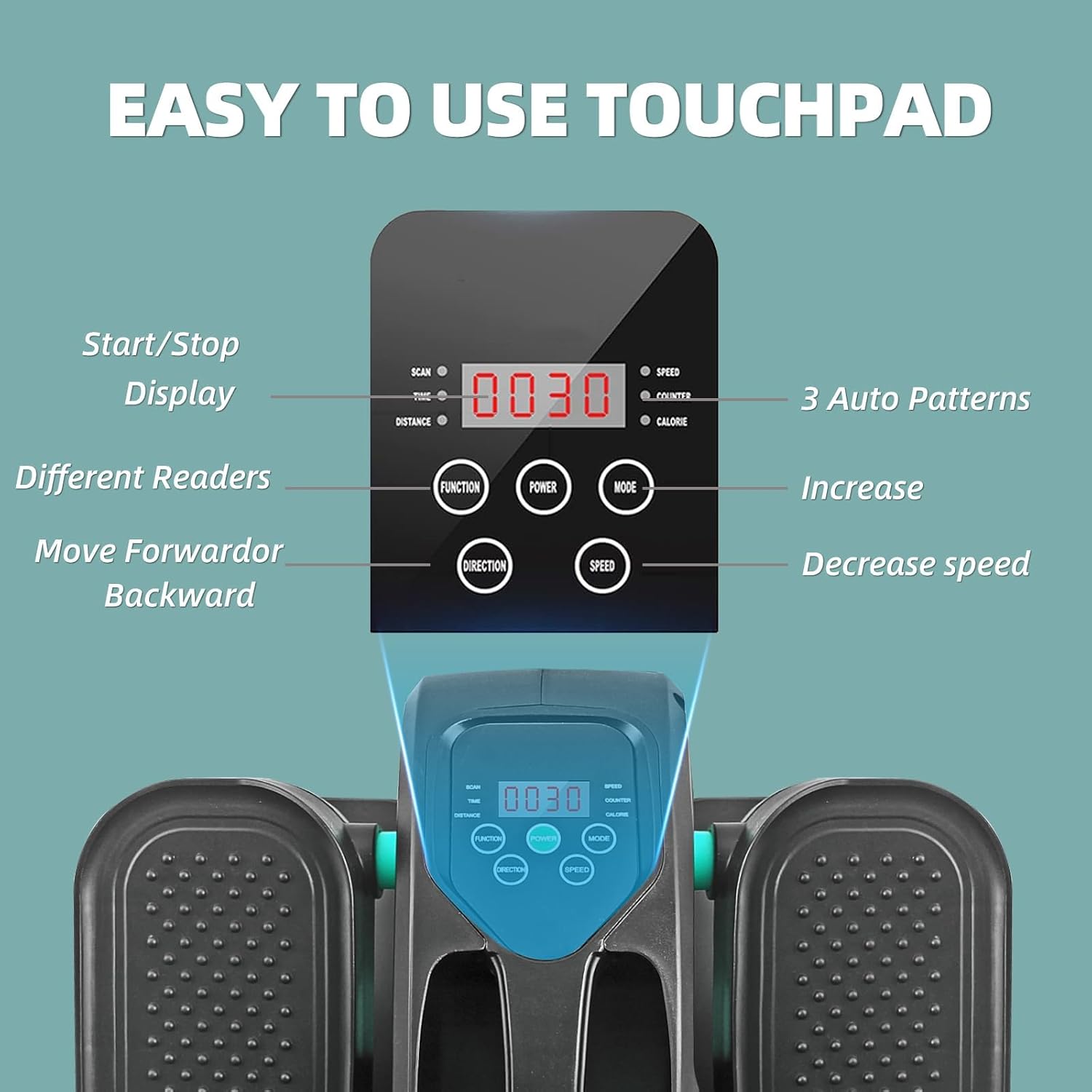
Figure 3: Easy-to-use touchpad and LCD display.
- Start/Stop: Initiates or pauses the exercise.
- Function: Cycles through display metrics (Time, Speed, Calories, Scan, Distance).
- Power: Turns the unit on or off.
- Mode: Switches between automatic (P1-P3) and manual (H1-H5) modes.
- Direction: Changes the pedal movement direction (clockwise or counter-clockwise).
- Speed: Adjusts the speed in manual mode (H1-H5) or selects auto pattern (P1-P3).
3.2 Remote Control
The included remote control provides convenient access to all functions, allowing you to adjust settings without bending down.

Figure 4: Remote control for convenient operation.
3.3 Exercise Modes
- Automatic Mode (P1-P3): The elliptical operates through pre-programmed patterns. Select P1, P2, or P3 using the Speed button on the touchpad or remote.
- Manual Mode (H1-H5): Allows you to manually control the speed. There are 5 speed levels (H1 being the slowest, H5 the fastest, ranging from 1.5-5.7 KM/h). Adjust speed using the Speed buttons.
The elliptical also supports both clockwise and counter-clockwise pedal movement, which can be selected using the Direction button.

Figure 5: Key operational features of the elliptical trainer.
3.4 LCD Display Metrics
The LCD display provides real-time feedback on your workout:
- Time: Duration of your exercise session.
- Speed: Current pedaling speed.
- Calories: Estimated calories burned.
- Distance: Estimated distance covered.
- Scan: Automatically cycles through all metrics.
Note: The unit is designed to stop automatically after 30 minutes of continuous use. To continue your workout, simply restart the machine.
4. Maintenance
Regular maintenance ensures the longevity and optimal performance of your elliptical trainer.
- Cleaning: Wipe down the unit with a soft, damp cloth after each use to remove dust and sweat. Avoid using abrasive cleaners or solvents.
- Storage: Store the elliptical in a cool, dry place away from direct sunlight and extreme temperatures.
- Inspection: Periodically check all moving parts and connections to ensure they are secure. If you notice any loose components, tighten them carefully.
- Noise: If the unit develops squeaking noises, ensure it is placed on a flat, stable surface. If the noise persists, contact customer support.
5. Troubleshooting
If you encounter any issues with your E-Shine Leisure Under Desk Elliptical Trainer B1 Pro, refer to the following common problems and solutions:
| Problem | Possible Cause | Solution |
|---|---|---|
| Unit does not power on. | Not properly plugged in; power outlet issue. | Ensure the power plugin is securely connected to both the elliptical and a working electrical outlet. Test the outlet with another device. |
| Machine makes unusual noises (e.g., squeaking). | Unstable surface; internal component friction. | Place the elliptical on a firm, level surface. If noise persists, contact customer support. |
| Remote control is unresponsive. | Dead batteries; obstruction. | Replace the remote control batteries. Ensure no objects are blocking the signal path to the elliptical's sensor. |
| Unit stops after 30 minutes. | Automatic safety/timer feature. | This is a normal operational feature. Simply restart the machine to continue your workout. |
6. Specifications
| Feature | Detail |
|---|---|
| Model Name | Elliptical Trainer Machine B1 Pro |
| Manufacturer Reference | ESHINELEISUREDEMBL1 |
| Brand | E-Shine Leisure |
| Product Dimensions | 43.18 x 35.56 x 20.32 cm (17 x 14 x 8 inches) |
| Item Weight | 7.39 kg (16.3 lbs) |
| Colour | Blue Style |
| Material | Aluminum |
| Display Type | LCD |
| Resistance Mechanism | Magnetic |
| Number of Resistance Levels | 3 (Automatic Patterns P1-P3); 5 (Manual Speeds H1-H5) |
| Maximum Weight Recommendation | 120 Kilograms |
| Maximum Stride Length | 17 Inches |
| Tracked Metrics | Time, Speed, Calories Burned, Distance, Steps per Minute |
| Included Components | Elliptical, Instruction Manual, Power Plugin, Remote Control |
7. Customer Support
For any product inquiries, technical assistance, or warranty claims, please contact our customer support team. We are committed to providing prompt assistance and aim to reply within 24 hours.
Contact information (e.g., email, phone number, website) would typically be provided here by the manufacturer.
While specific warranty details are not provided in this manual, please retain your proof of purchase for any potential warranty service.