
Introduction
Thank you for purchasing the SuperKois Double Bed Frame C14. This manual provides detailed instructions for assembly, operation, maintenance, and safety to ensure optimal use and longevity of your product. Please read this manual thoroughly before assembly and retain it for future reference.

Figure 1: SuperKois Double Bed Frame C14. This image displays the assembled bed frame in a bedroom, highlighting its design and integrated headboard shelf.
Safety Information
WARNING: Assembly is required for this product. Exercise caution during the assembly process.
- Ensure all parts are present and undamaged before beginning assembly.
- Assemble the bed frame on a soft, clean surface to prevent scratches.
- Do not overtighten screws during initial assembly; tighten fully only after all parts are loosely connected.
- Keep small parts away from children to prevent choking hazards.
- The maximum load capacity for this bed frame is approximately 300 kg. Do not exceed this weight limit.
- Regularly check all bolts and connections to ensure they remain tight and secure.
Package Contents
Before assembly, verify that all components are included in your package. All tools required for assembly are provided.
- Bed Frame Components (numbered for easy identification)
- Support Bars (16 high-density steel bars)
- Central Vertical Reinforcement Bar
- Legs (7-leg design for stability)
- Headboard with integrated shelf, 2 AC outlets, 1 USB port, and 1 Type-C port
- Quiet Caps for frame and support bar connections
- Anti-scratch caps for legs
- Assembly Tools (e.g., Allen wrench)
- Instruction Manual
Setup and Assembly Instructions
This bed frame is designed for simple assembly. Each part is numbered, and all necessary tools are included. For visual guidance, please refer to the included illustrated instructions.
- Unpack and Identify Parts: Carefully unpack all components and lay them out on a soft surface. Match each part to the corresponding number in the instruction diagram.
- Assemble the Main Frame: Connect the side rails to the headboard and footboard using the provided bolts. Ensure all connections are loose at this stage.
- Install Support Bars: Place the 16 high-density steel support bars across the frame. Ensure the quiet caps are properly fitted at the connection points to minimize noise.
- Attach Central Reinforcement and Legs: Secure the central vertical reinforcement bar and attach the 7 legs to the frame. Ensure the anti-scratch caps are on the bottom of each leg.
- Final Tightening: Once all components are in place and the frame is level, gradually tighten all bolts securely. Avoid over-tightening.
- Headboard Power Unit Installation: Ensure the power unit for the AC outlets, USB, and Type-C ports is securely fitted into the headboard. The design is dust-resistant for safety.

Figure 2: Bed Frame Dimensions and Structural Overview. This image illustrates the overall dimensions of the double bed frame, including its length, width, height, and the 31cm under-bed storage space. It also highlights the 300kg load capacity and the robust steel pipe construction.

Figure 3: Easy Assembly Process. This graphic illustrates the straightforward assembly process, highlighting numbered parts and the inclusion of all necessary tools.

Figure 4: Load Capacity and Stable Design. This image details the structural elements contributing to the bed frame's 300kg load capacity, including high-strength steel pipes, 16 support bars for even weight distribution, and a central reinforcement bar to prevent sagging.
Operating Instructions
Headboard Functionality
The integrated headboard features a 20cm wide shelf, providing convenient storage for personal items such as smartphones, tablets, glasses, alarm clocks, and small lamps. This helps keep your bedside area organized.
Multi-functional Power Outlets
The headboard is equipped with a multi-functional power unit:
- 2 AC Outlets: These outlets are designed with a dust-resistant cover for safety. Plug in your devices as needed.
- 1 USB Port: Use this port to charge your USB-compatible devices.
- 1 Type-C Port: Use this port to charge your Type-C compatible devices.
The power cord for the headboard unit is approximately 1.8 meters long.
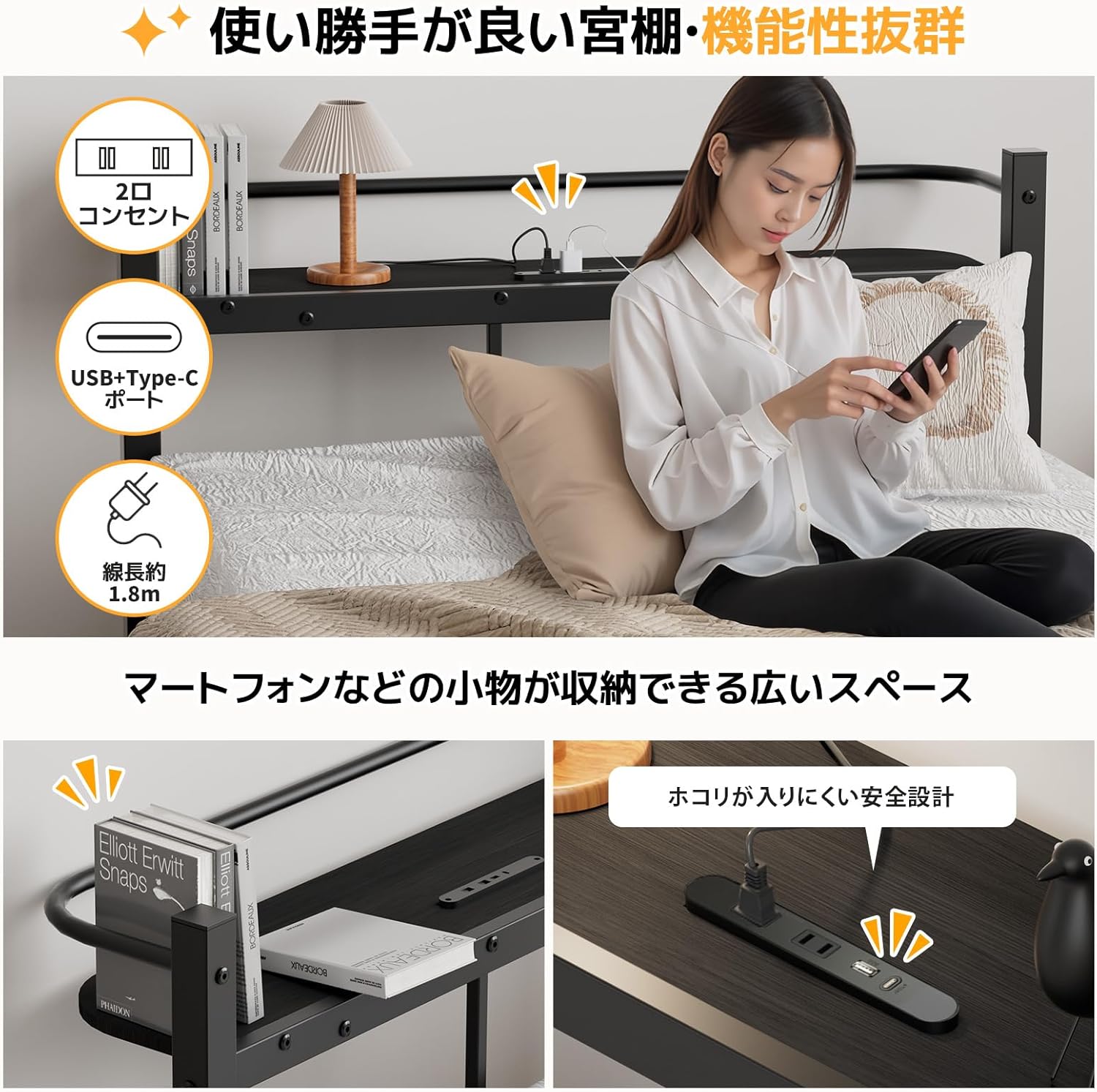
Figure 5: Headboard with Integrated Power and Storage. This image highlights the practical headboard design, featuring a wide shelf for storing personal items and integrated power outlets (2 AC, 1 USB, 1 Type-C) for convenient device charging.
Maintenance
To ensure the longevity and cleanliness of your SuperKois bed frame, follow these simple maintenance guidelines:
- Cleaning: Wipe the frame and headboard surfaces with a dry cloth. Avoid using abrasive cleaners or harsh chemicals that could damage the powder coating or MDF board.
- Regular Checks: Periodically inspect all bolts and connections to ensure they are tight. Retighten if necessary.
- Ventilation: The steel pipe support bars are designed for excellent ventilation. To maintain this, ensure adequate airflow around and under the mattress to prevent moisture buildup, mold, and dust mites.
- Powder Coating: The frame features a powder coating to prevent rust and reduce fading or paint peeling. Avoid scratching the surface to preserve this protective layer.

Figure 6: Key Design Features for Durability and Comfort. This image illustrates four important aspects of the bed frame's design: quiet caps to reduce noise, anti-scratch caps to protect floors, a high frame to prevent mattress slippage, and a rust-preventative powder coating.
Troubleshooting
If you encounter any issues with your SuperKois bed frame, please refer to the following common solutions:
- Squeaking Noises:
- Ensure all bolts are securely tightened. Loose connections are a common cause of squeaking.
- Verify that the quiet caps are correctly installed at all frame and support bar connection points.
- Instability/Wobbling:
- Check that all legs are firmly attached and making even contact with the floor.
- Confirm that the central vertical reinforcement bar is properly installed and secured.
- Ensure the bed frame is on a flat, level surface.
- Power Outlets/Ports Not Working:
- Verify that the bed frame's power cord is securely plugged into a functional wall outlet.
- Check if the power unit in the headboard is properly seated and connected.
- Ensure the dust-resistant covers on the AC outlets are fully open when in use.
If the issue persists after following these steps, please contact customer support.
Specifications
| Feature | Detail |
|---|---|
| Model Number | C14 |
| Dimensions (W x L x H) | 140 cm x 225 cm x 76 cm |
| Under-bed Clearance | 31 cm |
| Power Cord Length | 180 cm |
| Frame Material | Alloy Steel (Powder Coated), MDF Board |
| Load Capacity | Approx. 300 kg |
| Product Weight | Approx. 23.1 kg |
| Headboard Features | 20cm wide shelf, 2 AC outlets, 1 USB port, 1 Type-C port, Quiet Caps |
| Color | Black |
| Care Instructions | Dry wipe |
Warranty and Support
SuperKois offers a one-year warranty from the date of purchase for this bed frame. If any malfunction occurs under normal use during the warranty period, please contact us immediately for prompt assistance.
To contact support, please navigate to your order history and select "Contact Seller" for this product. Our specialized staff will respond to your inquiries.
Warranty Claim Process:
- Contact our store via email.
- We will confirm your customer information and the details of the defect.
- Arrangements will be made for replacement parts, product exchange, or refund.
- We will receive the replacement parts, product, or process the refund.
Our business hours are 10:00 - 19:00. Inquiries outside of business hours will be responded to on the next business day.
Figure 7: Warranty and Support Process. This image outlines the steps for contacting customer support and initiating a warranty claim, including contact methods and resolution options.