
TP6842
TP6842 7TOP 7" Wi-Fi Hands-Free VIP Door Entry Monitor
User Manual
1. Introduction
Thank you for choosing the TP6842 7TOP 7" Wi-Fi Hands-Free VIP Door Entry Monitor. This device is designed to provide seamless communication and enhanced security for your home or business. This manual provides essential information for the proper installation, operation, and maintenance of your new monitor. Please read this manual thoroughly before use and retain it for future reference.
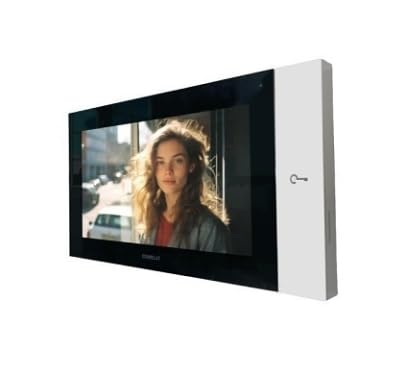
Image: The TP6842 7TOP monitor, featuring a sleek black display panel and a white side panel with a key icon, shown from a slight angle. The screen displays a live video feed of a person.
2. Safety Information
To ensure safe operation and prevent damage, please observe the following safety precautions:
- Do not expose the monitor to rain, moisture, or extreme temperatures.
- Ensure proper ventilation to prevent overheating.
- Only use the power adapter supplied with the device.
- Do not attempt to disassemble or repair the unit yourself. Refer all servicing to qualified personnel.
- Keep the monitor away from strong magnetic fields.
3. Package Contents
Please check the package contents upon opening. If any items are missing or damaged, contact your supplier immediately.
- TP6842 7TOP 7" Wi-Fi Hands-Free VIP Door Entry Monitor
- Mounting Bracket
- Power Adapter
- Mounting Screws and Wall Plugs
- User Manual (this document)
4. Setup
4.1 Installation Location
Choose a suitable indoor location for the monitor, away from direct sunlight, heat sources, and areas with high humidity. Ensure the location allows for easy access to a power outlet and has good Wi-Fi signal coverage.
4.2 Mounting the Monitor
- Secure the mounting bracket to the wall using the provided screws and wall plugs. Ensure it is level and firmly attached.
- Connect the necessary cables (power, network if wired option is used, though this model is primarily Wi-Fi) to the back of the monitor.
- Carefully align the monitor with the mounting bracket and slide it into place until it clicks securely.
4.3 Initial Power-On and Wi-Fi Setup
- Plug the power adapter into the monitor and then into a wall outlet. The monitor will power on automatically.
- Follow the on-screen prompts to select your language and connect to your Wi-Fi network. You will need your Wi-Fi network name (SSID) and password.
- Once connected, the monitor will attempt to link with your VIP door entry system. Follow the system-specific instructions for pairing.
5. Operating the Monitor
5.1 Touchscreen Navigation
The TP6842 7TOP features an intuitive touchscreen interface. Tap icons to select functions, swipe to navigate menus, and use pinch-to-zoom gestures where applicable.
5.2 Receiving a Call
When a visitor presses the call button on your VIP door entry unit, the monitor will ring and display the visitor's video feed. Tap the 'Answer' icon to establish two-way communication.
5.3 Two-Way Communication
The monitor supports hands-free two-way audio communication. Speak clearly towards the monitor. The integrated microphone and speaker will transmit your voice and play the visitor's voice.
5.4 Door Release Function
During a call, a 'Door Release' icon (often depicted as a key or open door) will appear on the screen. Tap this icon to remotely unlock the connected door or gate. Confirm the action when prompted.
5.5 Settings and Configuration
Access the 'Settings' menu from the main screen to adjust various parameters:
- Wi-Fi Settings: Change network, view connection status.
- Audio Settings: Adjust speaker volume, microphone sensitivity.
- Display Settings: Brightness, screen timeout.
- System Information: View firmware version, device ID.
6. Maintenance
6.1 Cleaning
To clean the monitor, gently wipe the screen and casing with a soft, dry, lint-free cloth. For stubborn marks, slightly dampen the cloth with water. Do not use abrasive cleaners, solvents, or aerosol sprays.
6.2 Software Updates
Periodically check for software updates in the 'Settings' menu. Updates can provide new features, performance improvements, and security enhancements. Ensure the monitor is connected to a stable power source and Wi-Fi network during updates.
7. Troubleshooting
| Problem | Possible Cause | Solution |
|---|---|---|
| Monitor does not power on. | No power, faulty adapter. | Check power connection. Ensure adapter is working. |
| No video from outdoor unit. | Connection issue with outdoor unit, system fault. | Verify VIP system connection. Consult VIP system manual. |
| No audio during call. | Volume too low, microphone muted, connection issue. | Adjust volume in settings. Check microphone settings. |
| Cannot connect to Wi-Fi. | Incorrect password, weak signal, router issue. | Re-enter password. Move closer to router. Restart router. |
8. Specifications
- Model: TP6842 7TOP
- Display: 7-Inch Touchscreen
- Connectivity: Wi-Fi (Wireless), VIP System Compatible
- Operation: Hands-Free
- Features: Two-way communication, Video verification, Door release function
- Design: Compact and Modern
- Manufacturer: COMELIT
- ASIN: B0F8XVDGCH
9. Warranty and Support
This product comes with a standard manufacturer's warranty. Please refer to the warranty card included in your package for specific terms and conditions. For technical support, troubleshooting assistance, or warranty claims, please contact your point of purchase or the manufacturer's customer service department.
Related Documents - TP6842
 |
Comelit 7TOP TP6842, TP6842B, TP6842BM Hands-Free Wi-Fi Door Entry Monitor User Manual Comprehensive user manual for the Comelit 7TOP hands-free Wi-Fi door entry monitor (models TP6842, TP6842B, TP6842BM). Learn about installation, configuration, user interface, features, and app integration. |
 |
Comelit 7TOP TP6842 Series Wi-Fi Door Entry Monitor Technical Manual Detailed technical manual for the Comelit 7TOP TP6842, TP6842B, and TP6842BM Wi-Fi door entry monitors. Covers features, specifications, installation, and system integration for ViP systems. |
 |
Comelit 7TOP TP6842 Wi-Fi Door Entry Monitor - Full Technical Manual Comprehensive technical manual for the Comelit 7TOP TP6842, TP6842B, and TP6842BM Wi-Fi door entry monitor. Covers installation, specifications, configuration, and wiring diagrams. |
 |
Podręcznik Techniczny Wideodomofonu Comelit 7TOP (TP6842, TP6842B, TP6842BM) Szczegółowy podręcznik techniczny dla wideodomofonu Comelit 7TOP (modele TP6842, TP6842B, TP6842BM). Opisuje instalację, konfigurację, funkcje i specyfikacje techniczne urządzenia, w tym łączność Wi-Fi i zdalny dostęp przez aplikację mobilną. |
 |
Comelit General Catalogue: Advanced Door Entry Systems and Access Control Solutions Explore the comprehensive Comelit General Catalogue for cutting-edge door entry systems, video intercoms, audio solutions, and access control technologies. Discover innovative products for residential and commercial applications. |
Ask a question about this manual
Ask about setup, troubleshooting, compatibility, parts, safety, or missing instructions. Manuals+ will review the question and use this page’s manual context to help answer it.