1. Product Overview
This document provides instructions for the installation, operation, and maintenance of the OEM Door Switch, part number WP3406107. This switch is designed as a replacement component for various Admiral dryer models, including AED4475TQ0, AED4475TQ1, AED4675YQ0, and AGD4475TQ1. The door switch is a critical safety and operational component that detects whether the dryer door is closed, allowing the appliance to start and operate safely.
2. Safety Information
WARNING: Before attempting any installation, repair, or maintenance on an appliance, always disconnect the appliance from its power source. Failure to do so can result in electric shock, serious injury, or death.
- Ensure the appliance is unplugged or the circuit breaker is turned off before beginning work.
- Wear appropriate personal protective equipment, such as gloves and safety glasses.
- If you are unsure about any step, consult a qualified technician.
- Keep children and pets away from the work area.
3. Package Contents
- 1 x OEM Door Switch (Part Number WP3406107)
4. Installation Instructions
This section provides general guidance for replacing a dryer door switch. Specific steps may vary slightly depending on your exact dryer model. Always refer to your appliance's service manual for detailed instructions.
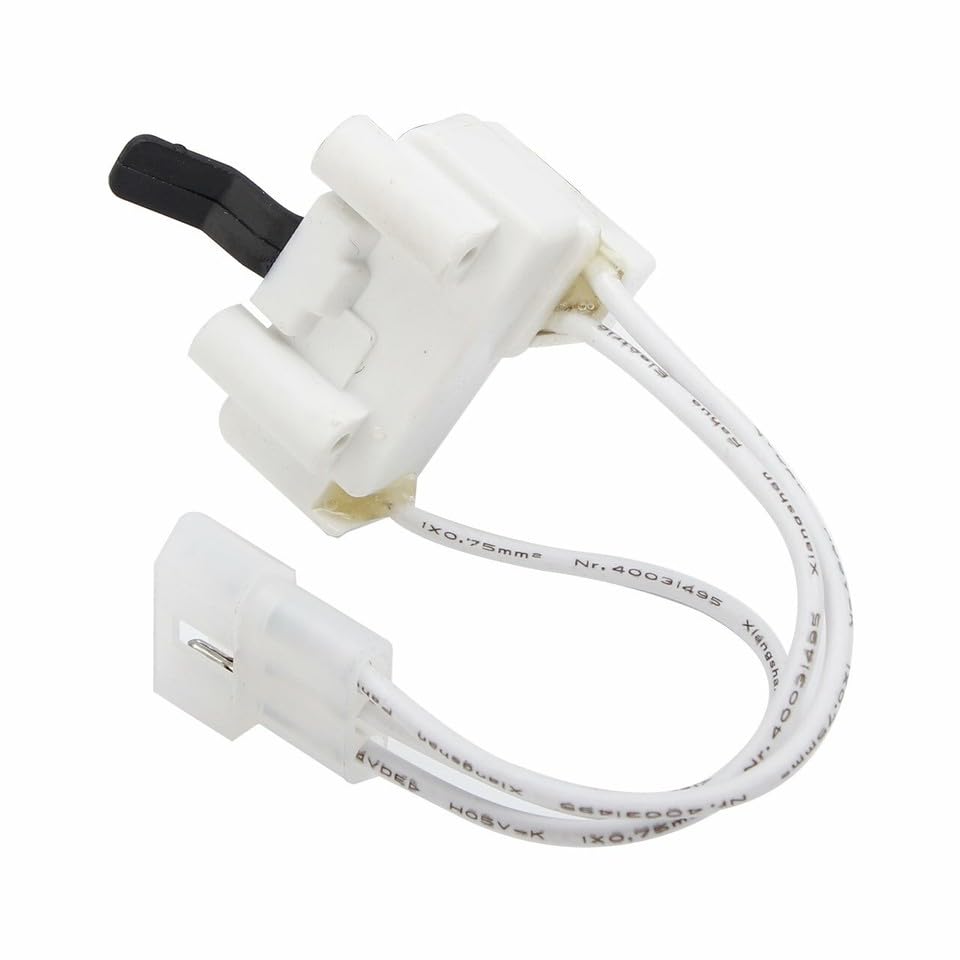
Image 1: The OEM Door Switch (WP3406107) with its white housing, black plunger, and attached wiring harness. This component is crucial for detecting the dryer door's position.
- Disconnect Power: Unplug the dryer from the electrical outlet or turn off the circuit breaker supplying power to the dryer.
- Access the Switch: Depending on your dryer model, you may need to remove the top panel, front panel, or control panel to access the door switch. This often involves removing screws located around the edges of the panels.
- Locate the Old Switch: The door switch is typically located near the door opening, often mounted to the dryer's front bulkhead or cabinet frame. It usually has wires connected to it.
- Disconnect Wires: Carefully disconnect the electrical wires from the old door switch. Note their positions or take a photo for reassembly.
- Remove Old Switch: Unmount the old door switch from its position. It may be held in place by screws, clips, or a friction fit.
- Install New Switch: Position the new WP3406107 door switch in the same location and secure it using the original fasteners or clips.
- Reconnect Wires: Reconnect the electrical wires to the new switch, ensuring they are securely attached to the correct terminals.
- Reassemble Dryer: Reattach any panels or components that were removed to access the switch. Ensure all screws are tightened.
- Restore Power: Plug the dryer back into the electrical outlet or turn on the circuit breaker.
- Test Operation: Close the dryer door and attempt to start a cycle. The dryer should now operate correctly. If it does not, refer to the Troubleshooting section.
5. Operation
The door switch is an essential safety and functional component of your dryer. When the dryer door is closed, the switch plunger is depressed, completing an electrical circuit that allows the dryer to start and operate. If the door is open, the plunger is released, breaking the circuit and preventing the dryer from running. This mechanism ensures that the dryer cannot operate with an open door, preventing potential hazards.
6. Maintenance
The door switch typically requires minimal maintenance. Periodically, you may:
- Inspect for Wear: During other dryer maintenance (e.g., cleaning the lint trap housing), visually inspect the door switch for any signs of physical damage, cracks, or excessive wear on the plunger.
- Keep Clean: Ensure the area around the door switch is free from lint buildup, which could potentially interfere with its operation.
If the switch shows signs of damage or intermittent operation, replacement is recommended.
7. Troubleshooting
If your dryer is experiencing issues related to the door switch, consider the following:
| Symptom | Possible Cause | Solution |
|---|---|---|
| Dryer does not start when door is closed. | Faulty door switch, loose wiring, door not fully closed. | Ensure door is securely latched. Inspect door switch for proper function (plunger movement). Check wiring connections. Replace door switch if faulty. |
| Dryer stops mid-cycle when door is closed. | Intermittent door switch failure, loose wiring. | Inspect door switch and wiring for intermittent contact. Replace door switch if necessary. |
| Dryer starts with door open (safety concern). | Stuck or shorted door switch, incorrect installation. | Immediately disconnect power. Inspect door switch for proper plunger return. Ensure correct wiring. Replace door switch if it fails to open the circuit when the door is open. |
If troubleshooting steps do not resolve the issue, it is recommended to contact a qualified appliance repair technician.
8. Specifications
- Part Number: WP3406107
- Compatible Appliance Brand: Admiral
- Compatible Models: AED4475TQ0, AED4475TQ1, AED4675YQ0, AGD4475TQ1
- Manufacturer: Digifang-Parts
- Color: Black/White (referring to switch components)
9. Warranty and Support
For information regarding warranty coverage or technical support for this replacement part, please contact the seller or manufacturer directly. Keep your purchase receipt as proof of purchase.
Seller: Digifang
For general inquiries or assistance, please refer to the contact information provided at the point of purchase.


