
Introduction
This manual provides essential instructions for the safe and efficient use of your Phoenix Home Oversized Power Recliner Chair. Please read this manual thoroughly before assembly and operation, and retain it for future reference.
The Phoenix Home Power Recliner Chair offers electric reclining, massage, and heating functions, along with convenient features like a USB charging port and storage pockets. It is designed for comfort and relaxation in various home and office settings.
Safety Information
WARNING:
- Always assemble the chair on a stable, flat surface.
- Be cautious when adjusting the reclining angle to avoid tipping.
- This chair is heavy (approximately 116 pounds) and should be placed on a sturdy, level floor to prevent instability.
- Do not leave children or pets unattended near the chair to prevent injury.
- Ensure all electrical connections are secure and undamaged. Discontinue use and contact support if any electrical component malfunctions or shows signs of overheating.
Setup and Assembly
Your Phoenix Home Power Recliner Chair is designed for straightforward assembly. Detailed, numbered assembly instructions are included in the product packaging. Assembly typically takes 5-10 minutes.
The chair is shipped in multiple boxes (typically 3 boxes). Ensure all components are present before beginning assembly.

Image: Product dimensions and packaging information. The chair measures approximately 37.8"D x 40.09"W x 41.3"H and is shipped in 3 boxes. Maximum load capacity is 350 lbs.
Pre-Assembly Checklist:
- Verify all parts are included as per the packing list.
- Ensure you have adequate space for assembly.
- Place all components on a soft, clean surface to prevent scratches.
Operating Instructions
Electric Reclining Function:
To recline the chair, locate the electric button on the side of the chair. Press and hold the button to smoothly adjust the reclining angle from 45° (upright) to 160° (fully reclined). Release the button at your desired position.
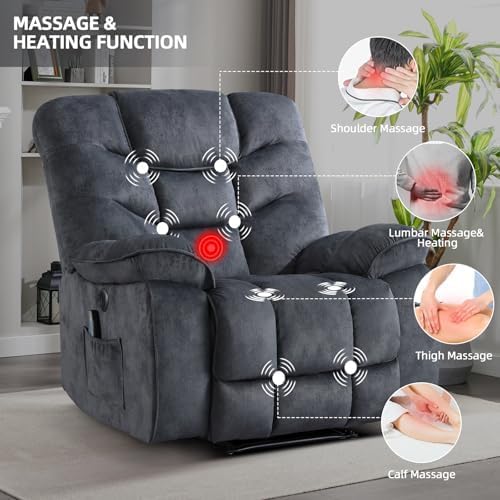
Image: Reclining positions. The chair can adjust from 90° for reading, 120° for watching TV, to 160° for napping, controlled by an electric button.
Massage and Heating Functions:
The chair features 8 vibration points and 1 waist heating point. These functions are controlled via the included remote control. Use the remote to select massage intensity, modes, and activate the lumbar heating feature.
- Vibration Points: Located around the waist, thighs, and legs.
- Waist Heating: Promotes blood circulation and enhances relaxation.
- Remote Control: Allows customization of intensity, 5 massage modes, and timing settings.

Image: Massage and heating features. The chair offers lumbar heating, 8-point massage, 5 massage modes, and timing functions, all managed via a remote control.

Image: Detailed massage and heating function. This diagram highlights the specific areas targeted by the massage: shoulder, lumbar, thigh, and calf.
USB Charging Port:
A USB charging port is integrated into the side of the chair for convenient charging of your electronic devices.
Storage Pockets:
The chair includes side pockets and an additional front pocket for storing items such as remote controls, magazines, or other personal belongings.

Image: Detailed features display. This image showcases key design elements such as ergonomic backrest for optimal seating support, soft high-quality foam cushions, the electric button for adjusting recline and footrest, and convenient side pockets for storage.
Maintenance
To ensure the longevity and appearance of your recliner chair, follow these maintenance guidelines:
- Cleaning: The chair's material is designed to be easy to clean. For general cleaning, wipe the surface with a soft, damp cloth. Avoid using harsh chemicals or abrasive cleaners, as these may damage the fabric.
- Spills: Blot spills immediately with a clean, dry cloth.
- Electrical Components: Keep electrical components dry and free from dust. Regularly check power cords for any signs of damage.
- Moving the Chair: When moving the chair, lift it rather than dragging it to prevent damage to the legs and floor.

Image: Material characteristics. The chair's fabric is breathable, soft to the skin, and easy to clean.
Troubleshooting
If you encounter any issues with your Phoenix Home Power Recliner Chair, please refer to the following common troubleshooting steps:
- Chair Not Reclining:
- Ensure the power cord is securely plugged into a functional electrical outlet.
- Check if the power adapter is properly connected to the chair.
- Verify that no obstructions are preventing the reclining mechanism from operating.
- Massage/Heat Not Working:
- Confirm the chair is powered on.
- Check the remote control batteries and ensure it is functioning correctly.
- Ensure all connections for the massage and heating elements are secure.
- Massage/Heat Element Not Turning Off:
- Immediately unplug the chair from the power outlet.
- Contact customer service for assistance. Do not attempt to repair electrical components yourself. This could indicate a safety hazard.
- Unusual Noises:
- Inspect the reclining mechanism for any loose parts or obstructions.
- If noises persist, discontinue use and contact customer support.
For issues not covered here, or if troubleshooting steps do not resolve the problem, please contact Phoenix Home customer service.
Specifications
| Attribute | Detail |
|---|---|
| Brand | Phoenix Home |
| Model Name | Oversized Power Recliner Chairs |
| Model Number | CNN0135 |
| Color | Dark Gray |
| Product Dimensions | 37.8"D x 40.09"W x 41.3"H |
| Item Weight | 116 pounds |
| Maximum Weight Recommendation | 350 Pounds |
| Fill Material | Foam |
| Special Features | Arm Rest, Back Support, Ergonomic, Electric Recline, Massage, Heat, USB Port, Side Pockets |
| Reclining Angle | 45° to 160° |
| Massage Points | 8 Vibration Points |
| Heating Points | 1 Waist Heating Point |
| Included Components | Integrated Footrest, Remote Control |
Warranty and Support
Phoenix Home is committed to providing quality products and excellent after-sales service. While specific warranty details are not provided in this manual, in the unlikely event of any transport-related damage or operational defects, please contact our customer service team immediately.
We are dedicated to resolving any issues you may encounter and ensuring your satisfaction with your Phoenix Home Power Recliner Chair.
Contact Support: For assistance, please refer to the contact information provided in your product packaging or visit the Phoenix Home official website.