
WILLQR 66437963-60V60AH
WILLQR Electric Bike Battery User Manual
Model: 66437963-60V60AH
Introduction
This manual provides essential information for the safe and efficient use of your WILLQR 60V Li-ion Electric Bike Battery. This battery is designed for electric bikes, mopeds, and tricycles, compatible with motors ranging from 100W to 5000W depending on the capacity variant.
Please read this manual thoroughly before installation and operation to ensure optimal performance and longevity of your battery.
Important Safety Information
- Do not disassemble, open, or shred the battery pack.
- Do not expose the battery to heat or flame. Avoid storage in direct sunlight.
- Do not short-circuit the battery.
- Do not expose the battery to mechanical shock.
- In case of a battery leak, do not allow the liquid to come into contact with skin or eyes. If contact has occurred, wash the affected area with copious amounts of water and seek medical advice.
- Keep the battery clean and dry.
- Use only the charger specifically provided for the equipment.
- Always charge the battery in a well-ventilated area.
- Keep out of reach of children.
Product Overview
The WILLQR Electric Bike Battery is a high-performance Li-ion battery designed for various electric vehicles. It features a robust design with integrated safety mechanisms.

Figure 1: WILLQR 60V Electric Bike Battery, showing the battery unit, charger, and examples of compatible vehicles like an electric scooter, moped, and go-kart.

Figure 2: Key features of the battery, highlighting the power display, voltage display, portable handle for easy carrying, and the universal 3-pin charge/discharge interface.
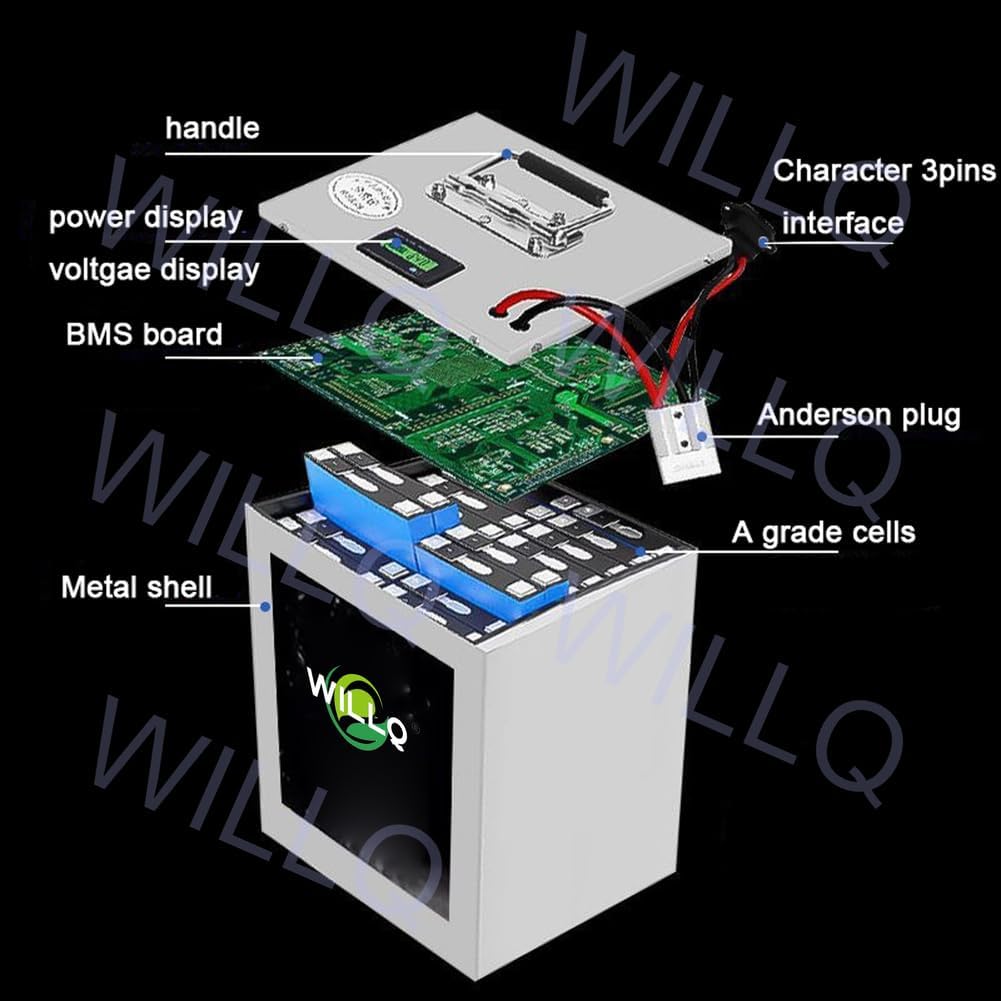
Figure 3: An exploded view of the battery, illustrating its internal components such as the handle, power and voltage display, BMS board, Anderson plug, A-grade cells, and the metal shell.
Key Features:
- Portable Design: Lightweight with a built-in handle for easy removal and transport.
- LED Power Indicator: Allows real-time monitoring of battery level and voltage.
- Universal Interface: Features a 3-pin interface for both charging and discharging.
- Advanced BMS Protection: Equipped with a 30A-100A Battery Management System to prevent over-charging, over-temperature, over-discharging, over-current, and short circuits, ensuring cell balance.
- Durable Construction: Housed in a stainless steel shell for enhanced protection.
Installation Guide
Follow these steps to properly install your WILLQR Electric Bike Battery:
- Locate Battery Compartment: Open the seat cushion or designated access panel on your electric vehicle to find the controller box/board.
- Connect Wires: Carefully connect the battery wires to your vehicle's electrical system. Ensure correct polarity: connect the black wire to black and the red wire to red.
- Plug in Battery: Insert the battery's 3-pin interface into the corresponding port on your vehicle. Ensure a secure connection.
- Secure Battery: Once connected, ensure the battery is securely placed within its compartment to prevent movement during operation.
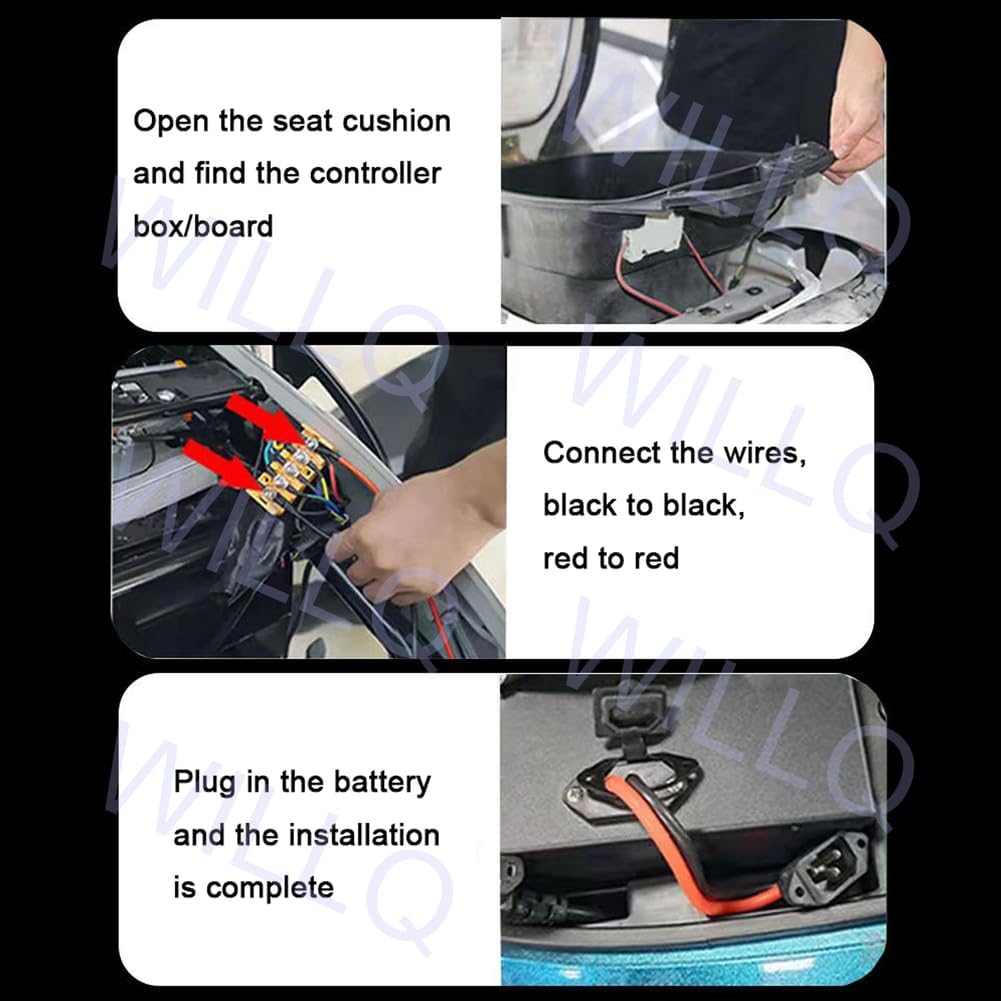
Figure 4: Visual guide for battery installation, showing opening the seat cushion, connecting wires (black to black, red to red), and plugging in the battery.
Important: Before first use, ensure the battery is fully charged. If the battery has been stored for a long time, it may require an initial charge.
Operation and Charging
Checking Battery Level:
The battery is equipped with an LED power indicator. Press the button on the battery to check the current power level and voltage. This helps you monitor the battery's status in real-time and estimate remaining mileage.
Charging the Battery:
Use only the provided 67.2V 5A-10A charger. The battery can be charged while installed on the vehicle or removed for convenient charging indoors.
- Connect the charger to the battery's 3-pin universal charging port.
- Plug the charger into a standard electrical outlet.
- The charging time typically ranges from 6 to 10 hours, depending on the battery capacity and its initial charge level.
- Ensure the charging area is well-ventilated.
Note: If the power is depleted during storage or transportation, charge the battery before its first use.
Maintenance and Storage
- Regular Charging: If storing the battery for a long period, charge it for 2 hours every month to maintain its health and prevent deep discharge.
- Storage Conditions: Keep the battery in a cool, dry place, away from direct sunlight, heat sources, and moisture.
- Cleaning: Use a dry, soft cloth to clean the battery. Do not use water or other liquids.
- Cycle Life: The battery is designed for over 3000 charge and discharge cycles, ensuring long-term reliability.

Figure 5: Illustration indicating the battery's impressive lifespan of over 3000 charge and discharge cycles.
Troubleshooting
| Problem | Possible Cause | Solution |
|---|---|---|
| Battery not charging | Charger not connected properly; Faulty charger; Battery deeply discharged. | Ensure secure connection. Try another outlet. If deeply discharged, leave connected for a few hours. Contact support if issue persists. |
| Battery not powering device | Battery not fully charged; Loose connection; BMS protection activated. | Charge battery fully. Check all connections. Disconnect and reconnect battery to reset BMS. |
| Reduced range/performance | Battery not fully charged; Aging battery; Extreme temperatures. | Ensure full charge. Battery performance naturally degrades over time. Operate within recommended temperature ranges. |
If you encounter issues not listed here or if the suggested solutions do not resolve the problem, please contact WILLQR customer support.
Technical Specifications
| Feature | Detail |
|---|---|
| Battery Type | Lithium-ion (Li-ion) |
| Standard Voltage | 60V |
| Available Capacities | 45Ah, 50Ah, 60Ah, 65Ah, 80Ah |
| Charger Output | 67.2V 5A-10A |
| Charging Time | 6-10 hours (approx.) |
| Discharge/Charge Port | Universal 3-pin interface |
| BMS Protection | 30A-100A (Over-charge, over-temp, over-discharge, over-current, short circuit) |
| Cycle Life | 3000+ cycles |
| Dimensions (60Ah model) | 250 x 185 x 145 mm (approx. 9.84 x 7.28 x 5.71 inches) |
| Weight (60Ah model) | Approx. 14 kg (30.8 lbs) |
| Compatible Motor Power | 100W - 5000W (depending on battery capacity) |
Note: Specific dimensions and weight vary by capacity. For the 60Ah model, dimensions are 250*185*145mm.

Figure 6: Diagram illustrating the approximate dimensions of the battery unit (e.g., 30cm height, 22cm width, 17cm depth for a specific variant).
Compatibility
This WILLQR 60V Li-ion battery is suitable for a wide range of electric vehicles, including but not limited to:
- Electric Bicycles
- Electric Mopeds
- Electric Tricycles
- Other electric vehicles requiring 60V power with compatible motor wattage.
Ensure your motor's power consumption falls within the battery's supported range:
- 45Ah for 0~2700W motors
- 50Ah for 0~3000W motors
- 60Ah for 0~3500W motors
- 65Ah for 0~4000W motors
- 80Ah for 0~5000W motors
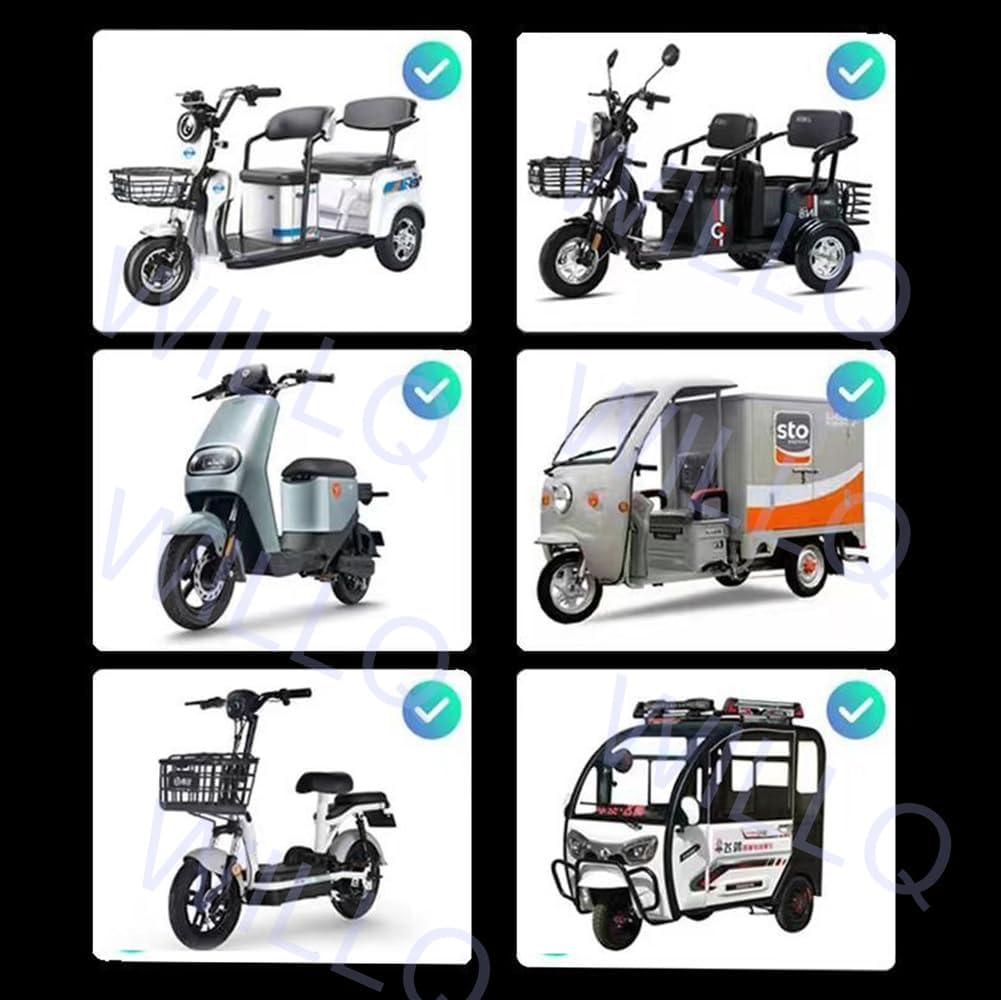
Figure 7: Examples of various electric vehicles, such as scooters and tricycles, that are compatible with the WILLQR 60V battery.
Warranty and Support
WILLQR products are manufactured to high-quality standards. For information regarding warranty coverage and terms, please refer to the product packaging or contact WILLQR customer service directly.
For technical assistance, troubleshooting, or any inquiries about your WILLQR Electric Bike Battery, please contact our support team through the retailer or manufacturer's official channels.
Online Support: Visit the official WILLQR website or the retailer's product page for FAQs and contact information.
Ask a question about this manual
Ask about setup, troubleshooting, compatibility, parts, safety, or missing instructions. Manuals+ will review the question and use this page’s manual context to help answer it.