
1. Introduction
This manual provides detailed instructions for the installation, operation, and maintenance of your NAVIVOX 8.8-inch Linux Screen. This device is designed to integrate Wireless CarPlay and Android Auto functionalities into compatible BMW vehicles, enhancing your driving experience while retaining original vehicle features.
This specific model (Bonroad-88 E60 CIC) is compatible with BMW 3 Series E90 E91 E92 E93 (2009-2012) and BMW 5 Series E60 E61 E63 E64 (2009-2010) equipped with the original CIC System.
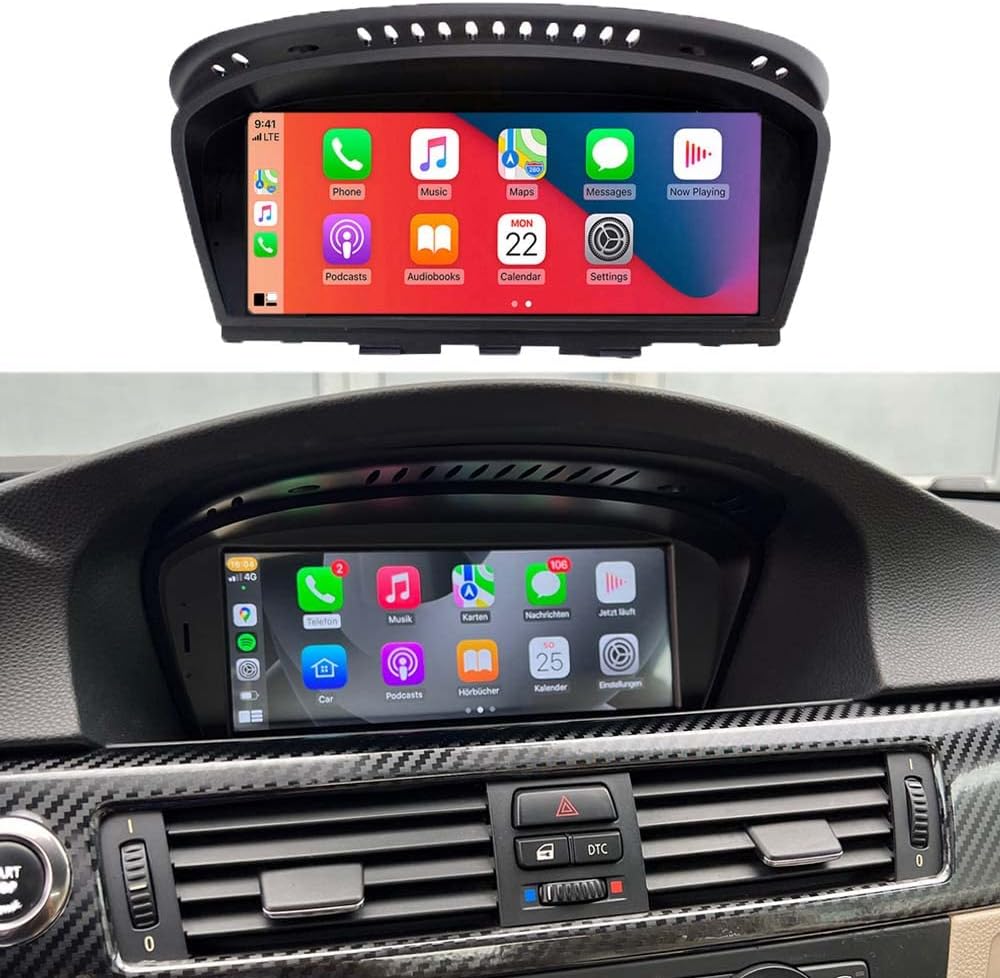
Image 1.1: The NAVIVOX 8.8-inch Linux Screen integrated into a BMW dashboard, showcasing the CarPlay interface.

Image 1.2: Visual comparison highlighting the added functionalities like CarPlay, Android Auto, Mirror Link, Video Play, and Online Map support provided by the NAVIVOX upgrade.
2. Setup and Installation Notes
Careful preparation is essential for a successful installation. Please follow these steps before and during the installation process.
2.1 Pre-Installation Checks
- Verify Car Model and Year: Ensure your BMW 3/5 Series model and year are compatible with the E60 CIC version of this screen. Refer to Image 2.1 for visual guidance on compatible models.
- Identify Original System: Confirm your vehicle has the original CIC System. This is crucial for proper functionality. Image 2.1 illustrates how to identify the CIC system's LVDS plug (4 pins) versus the CCC system's LVDS plug (10 pins).
- AUX Output Requirement: The device outputs sound through your car's original AUX output. If your vehicle does not have an active AUX input, it must be activated by a local car workshop. Alternatively, a Fiber Optic box can be purchased and connected.

Image 2.1: Step-by-step guide to verify car model compatibility (3-Series E90/E91/E92/E93 2008-2013, 5-Series E60/E61/E62/E63 2008-2012) and identify the correct CIC System LVDS plug (4 pins).
2.2 Initial Configuration
After physical installation, some initial software configurations are required.
- Factory Settings Access: The factory setting code for this Linux radio is 8866. To access: Go to Setting > System > Factory (8866) > Car Setup. Choose the correct version for your vehicle.
- Audio Output Setup: After entering the OEM system via the factory settings, ensure the sound output is set to AUX. This is critical for audio functionality.
- Camera Configuration: If your vehicle has a reverse camera, configure it in the settings. Go to Setting > Reverse. Select "Original" if your camera is factory-installed, or "CVBS-NTSC" if it is an aftermarket camera.
3. Operating Instructions
This section details how to use the various features of your NAVIVOX Linux Screen.
3.1 System Switching
The device allows seamless switching between the Android/Linux system and your original BMW OEM system. This ensures you can access all original vehicle functions when needed.
3.2 CarPlay and Android Auto
The screen supports both wired and wireless Apple CarPlay and Android Auto. These features allow you to integrate your smartphone for navigation, music, messaging, and more, directly on the car's display.
- Connection: Follow the on-screen prompts to connect your smartphone via Bluetooth for wireless connection, or a USB cable for wired connection.
- Features: Access phone calls, messages, GPS navigation (e.g., Apple Maps, Google Maps, Waze), music streaming (e.g., Spotify, Apple Music), and other compatible applications.

Image 3.1: Visual representation of Wireless CarPlay and Android Auto functionalities, demonstrating smartphone integration with the NAVIVOX screen.
3.3 Retained Original Functions
The NAVIVOX screen is designed to retain all original vehicle functionalities without requiring software modifications to the vehicle's control unit. This includes:
- iDrive Knob Control: Continue to use your original iDrive controller for navigation and selection within both the OEM and the new Linux system.
- Steering Wheel Controls: Manage audio, calls, and other functions directly from your steering wheel buttons.
- Original CD Player: The functionality of your vehicle's CD player is preserved.
- Original Radio: Access your vehicle's original radio tuner.
- Original Bluetooth: Your vehicle's native Bluetooth connectivity remains operational.
- Original Amplifier System: The existing amplifier system is fully supported.
- Original Car Information Display: Important vehicle information, such as oil, fuel, speed, and temperature, continues to be displayed.
- Original Backup Camera: If your vehicle has a factory-installed backup camera, it will integrate with the new screen (ensure proper configuration as per Section 2.2).

Image 3.2: Visual demonstration of how the NAVIVOX system supports and retains original BMW features including iDrive, amplifier, car information display, backup camera, steering wheel controls, CD player, radio, and Bluetooth.

Image 3.3: Detailed view of the continued functionality of original steering wheel buttons (e.g., volume, voice commands) and the iDrive knob for system navigation.
4. Maintenance
To ensure the longevity and optimal performance of your NAVIVOX Linux Screen, follow these general maintenance guidelines:
- Cleaning: Use a soft, lint-free cloth slightly dampened with water or a screen-safe cleaner to wipe the display. Avoid harsh chemicals or abrasive materials.
- Environmental Conditions: Avoid exposing the device to extreme temperatures, direct sunlight for prolonged periods, or excessive moisture.
- Software Updates: Periodically check for available software updates from the manufacturer to ensure optimal performance and access to new features.
5. Troubleshooting
This section addresses common issues you might encounter and provides solutions.
- No Sound Output:
- Ensure your car's original AUX input is activated. If not, it must be activated by a car workshop or a Fiber Optic box installed.
- Verify that the audio output in the device's settings (within the OEM system) is set to AUX.
- Reverse Camera Not Displaying:
- Check the camera settings under Setting > Reverse. Ensure the correct type is selected ("Original" for factory, "CVBS-NTSC" for aftermarket).
- Verify all camera connections are secure.
- CarPlay/Android Auto Not Connecting:
- Ensure Bluetooth is enabled on your phone and the device.
- For wired connection, try a different USB cable.
- Restart both your phone and the car's system.
- System Freezing or Unresponsive:
- Perform a soft reset by turning off the car's ignition and restarting after a few minutes.
- If the issue persists, contact customer support.
6. Specifications
| Feature | Specification |
|---|---|
| Brand | NAVIVOX |
| Model Number | Bonroad-88 |
| Item Weight | 3.25 pounds (1.47 kg) |
| Package Dimensions | 11.3 x 7.2 x 6.2 inches (28.7 x 18.3 x 15.7 cm) |
| Connectivity Technology | Auxiliary, Wi-Fi |
| Compatible Devices | Smartphone, Car |
| Connector Type | 3.5mm Jack |
| Audio Output Mode | Stereo |
| Video Encoding | H.264, H.265/HEVC |
| Number of Channels | 2 |
| Audio Output Type | RCA |
| Wireless Communication Technology | Wireless |
7. Warranty and Support
For warranty information, technical support, or any questions not covered in this manual, please contact NAVIVOX customer service through the retailer where the product was purchased. Please have your product model number (Bonroad-88 E60 CIC) and purchase details ready when contacting support.


