
Introduction
Thank you for purchasing the GoAssemb HG4-58 U.S. Willys RC Simulation Off-Road Car. This 1/14 scale 2.4G 4WD vehicle is designed for enthusiasts aged 16 and above, offering a realistic driving experience with dual-speed switching, integrated sound and lights, and charging protection. This manual provides essential information for the safe operation, setup, maintenance, and troubleshooting of your RC car.
What's in the Box
Carefully unpack all components and ensure all items are present before beginning setup.
- HG4-58 RC Simulation Car (Desert Yellow)
- 2.4G Remote Control
- 7.4V 600mAh Body Battery
- Charging Cable
- Instruction Manual
- Spare Tire
- Roof Replacement Part
- Alloy Machine Gun
- Shovel
- Axe
- Oil Barrel
- Sticker Sheet

Image: All components included in the HG4-58 package.
Safety Precautions
To ensure safe operation and prevent damage, please read and adhere to the following safety guidelines:
- This product is suitable for users aged 16 and above. Adult supervision is recommended for younger users.
- Keep hands, hair, and loose clothing away from moving parts of the vehicle.
- Do not operate the RC car near people, pets, or obstacles.
- Avoid operating in wet conditions or near water to prevent damage to electronic components.
- Always turn off the vehicle and remote control when not in use.
- Use only the provided charging cable and battery. Do not attempt to charge damaged or non-rechargeable batteries.
- Dispose of batteries responsibly according to local regulations.
- The vehicle includes overcharge protection, low-voltage cutoff, motor jam prevention, and heat dissipation for safe operation.
Setup
1. Charging the Vehicle Battery
- Connect the 7.4V 600mAh body battery to the charging cable.
- Plug the USB end of the charging cable into a suitable USB power adapter (not included).
- The charging indicator light will show the charging status. Charging typically takes approximately 120 minutes.
- Once fully charged, disconnect the battery from the charger.
2. Installing Batteries in the Remote Control
- Open the battery compartment on the back of the remote control.
- Insert four 'AA' batteries (not included) into the compartment, ensuring correct polarity.
- Close the battery compartment securely.
3. Installing the Vehicle Battery
- Locate the battery compartment on the RC car.
- Connect the fully charged 7.4V 600mAh battery to the car's power connector.
- Carefully place the battery inside the compartment and secure the cover.
4. Pairing the Remote Control and Vehicle
- Turn on the RC car using its power switch.
- Turn on the remote control.
- The remote control and vehicle should automatically pair. A successful connection is usually indicated by a solid light on the remote or vehicle.
Operating Instructions
The HG4-58 offers full proportional control for precise maneuvering.
Remote Control Functions:
- Throttle Trigger: Pull to move forward, push to move backward.
- Steering Wheel: Turn left or right to steer the vehicle.
- Dual-Speed Switch: Toggle between two speed modes:
- First Gear: Approximately 6.9 KM/H for faster movement.
- Second Gear: Approximately 2.3 KM/H for precise control and crawling.
- Lights and Sound: The vehicle features realistic LED headlights and engine sounds. These functions are typically activated upon powering on the vehicle or via dedicated buttons on the remote control (refer to remote diagram in the included manual for specific button functions).
- RC Winch: The integrated high-torque RC winch can be operated via the remote control. Refer to the remote control diagram for the specific button to activate and control the winch.

Image: Side profile of the HG4-58 RC car.

Image: The HG4-58 RC car navigating an outdoor environment.

Image: Detail of the LED retro headlights and engine compartment.

Image: High-simulation interior and high-grip soft tires.

Image: Car body features and the RC winch.
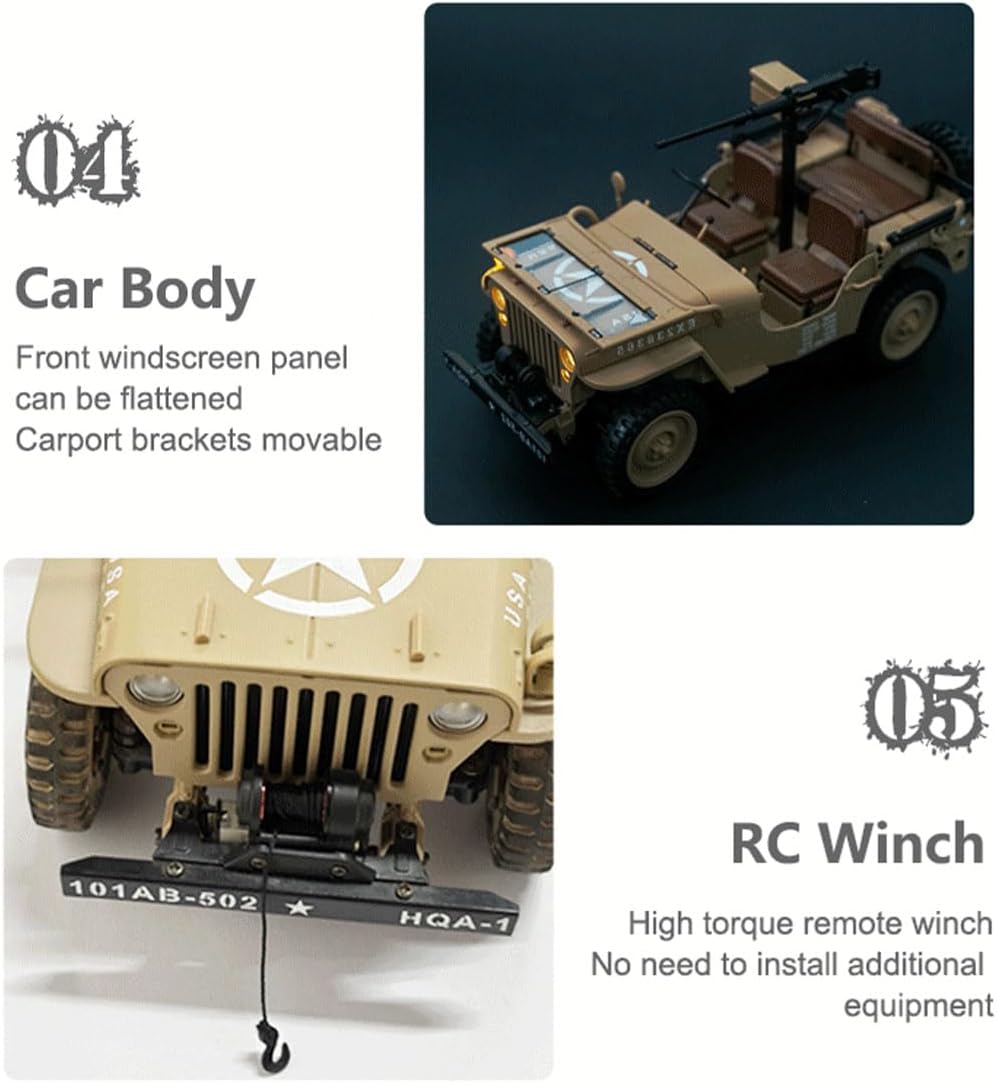
Image: Customizable configuration kits and sound & light effects.
Official Product Video: HG4-58 U.S. Willys RC Simulation Off-Road Car Display
Video: A dynamic display of the HG4-58 U.S. Willys RC Simulation Off-Road Car in action, showcasing its features and movement in various environments.
Maintenance
Proper maintenance will extend the life and performance of your RC car.
- Cleaning: After each use, especially in dusty or dirty conditions, gently clean the vehicle with a soft brush or cloth. Avoid using water or harsh chemicals directly on electronic components.
- Battery Care: Always disconnect the battery from the vehicle when not in use. Store batteries in a cool, dry place. Do not overcharge or completely discharge the battery.
- Storage: Store the RC car and remote control in a dry, cool place away from direct sunlight and extreme temperatures.
- Inspection: Regularly inspect the wheels, suspension, and other moving parts for any signs of wear or damage. Tighten any loose screws.
Troubleshooting
If you encounter issues with your HG4-58, refer to the following common problems and solutions:
| Problem | Possible Cause | Solution |
|---|---|---|
| Vehicle does not respond to remote. | Low battery in vehicle or remote; Not paired; Interference. | Charge vehicle battery; Replace remote batteries; Re-pair vehicle and remote; Move to an area with less interference. |
| Short control range. | Low battery in remote; Environmental interference. | Replace remote batteries; Avoid operating near large metal structures or other 2.4G devices. |
| Vehicle moves slowly or inconsistently. | Low vehicle battery; Obstruction in drivetrain. | Charge vehicle battery; Check wheels and gears for debris. |
| Lights or sound not working. | Feature not activated; Wiring issue. | Ensure vehicle is powered on and features are enabled via remote; Check for loose connections (if accessible). |
Specifications
- Model Number: HG4-58
- Scale: 1/14
- Material: Plastic + Alloy + Electronic Components
- Drive System: 4WD
- Control Frequency: 2.4Ghz
- Vehicle Battery: 7.4V 600mAh Li-ion
- Remote Control Battery: 4 x 'AA' batteries (not included)
- Speed (First Gear): Approx. 6.9 KM/H
- Speed (Second Gear): Approx. 2.3 KM/H
- Remote Control Time: Approx. 30 minutes
- Charging Time: Approx. 120 minutes
- Remote Control Distance: Over 30 meters
- Product Weight: 650g
- Product Dimensions: 24 x 11.3 x 12.3 cm (9.45 x 4.45 x 4.84 inches)
- Recommended Age: 16+
- Features: Dual-speed switching, sound and lights, charging protection, metal chassis, alloy transmission, RC winch.
Warranty and Support
GoAssemb products are manufactured to high-quality standards. For any questions, technical support, or warranty claims, please contact your retailer or the manufacturer directly. Please retain your proof of purchase for warranty purposes.
For further assistance, please visit the GoAssemb Store.