
1. Introduction
Thank you for choosing the FANPYY RLS1000 Thermal Printhead. This component is designed to provide high-precision printing performance for your Rongta RLS series thermal scales, ensuring clear and reliable output for receipts and labels. This manual provides essential information for the proper installation, operation, maintenance, and troubleshooting of your new printhead.
The RLS1000 Thermal Printhead is compatible with various Rongta scale models, including RLS1100, RLS1000A, RLS1100A, RLS1000C, RLS1100C, RLS1515, and RLS1530.

Figure 1: Angled view of the RLS1000 Thermal Printhead. This image displays the overall structure, including the circuit board and connectors.
2. Safety Information
Please read and understand the following safety precautions before handling or installing the printhead:
- Always disconnect the power from the thermal scale/printer before attempting any installation or maintenance.
- Avoid touching the thermal element directly, as static electricity or oils from your skin can damage it.
- Handle the printhead with care to prevent physical damage to the delicate components.
- Keep the printhead away from liquids and excessive dust.
3. Package Contents
Verify that your package contains the following item:
- 1 x FANPYY RLS1000 Thermal Printhead
4. Setup and Installation
The FANPYY RLS1000 Thermal Printhead is designed for plug-and-play installation. Follow these steps to replace your existing printhead:
- Power Off and Disconnect: Ensure your Rongta thermal scale/printer is completely powered off and unplugged from the electrical outlet.
- Open Printer Cover: Open the printer's top cover to access the printhead assembly. Refer to your specific Rongta scale's user manual for instructions on how to open it safely.
- Locate and Remove Old Printhead: Carefully locate the existing printhead. Disconnect any ribbon cables or connectors attached to it. Unlatch or unscrew the old printhead from its mounting bracket. Handle the old printhead with care, especially if it's hot from recent use.
- Install New Printhead: Gently place the new FANPYY RLS1000 Thermal Printhead into the designated slot. Ensure it is correctly aligned with the mounting points. Secure it using the original latches or screws.
- Connect Cables: Reconnect all ribbon cables and connectors to the new printhead. Ensure connections are firm and correctly oriented. The printhead features multiple connectors for secure integration.

Figure 2: Front view of the RLS1000 Thermal Printhead, showing the thermal element and connectors.
- Close Printer Cover: Close the printer's top cover securely.
- Power On and Test: Plug the printer back into the electrical outlet and power it on. Perform a test print to verify proper installation and print quality.
5. Operating Instructions
Once installed, the FANPYY RLS1000 Thermal Printhead operates as an integral part of your Rongta thermal scale/printer. Its high-quality thermal sensors ensure clear and precise printing for all your needs.
- General Operation: For detailed instructions on operating your thermal scale/printer, including loading paper and configuring settings, please refer to the original user manual provided with your Rongta device.
- Printing Performance: The printhead is designed for high precision, producing fine lines and clear text suitable for professional applications like receipts and labels.
- Energy Efficiency: Featuring a low-power design, the heating element responds quickly, contributing to efficient printing while minimizing energy consumption.
6. Maintenance
Proper maintenance extends the lifespan and ensures consistent performance of your thermal printhead. The RLS1000 is made from wear-resistant materials designed for a long lifespan, up to 50KM of printing length.
6.1. Cleaning the Printhead
Dust, paper debris, and adhesive residue can accumulate on the printhead, leading to poor print quality. Clean the printhead regularly, especially if you notice faded or incomplete prints.
- Power Off: Turn off and unplug the thermal scale/printer.
- Access Printhead: Open the printer cover to expose the printhead.
- Gentle Cleaning: Using a lint-free cloth or a cotton swab lightly dampened with isopropyl alcohol (99% pure), gently wipe the thermal element of the printhead. Wipe from one end to the other, avoiding scrubbing.
- Dry Thoroughly: Allow the printhead to air dry completely for a few minutes before closing the cover and powering on the printer.
6.2. General Care
- Use only high-quality thermal paper recommended for your printer model.
- Avoid exposing the printhead to extreme temperatures or direct sunlight.
- Do not use abrasive cleaners or sharp objects on the printhead.

Figure 3: Top view of the RLS1000 Thermal Printhead, illustrating the circuit board and thermal element.
7. Troubleshooting
If you encounter issues with your printhead, refer to the following common problems and solutions:
| Problem | Possible Cause | Solution |
|---|---|---|
| Faded or Incomplete Prints | Dirty printhead, worn-out printhead, low-quality thermal paper. | Clean the printhead (refer to Section 6.1). Ensure proper thermal paper is used. If cleaning does not resolve the issue, the printhead may need replacement due to wear. |
| No Print Output | Printhead not properly installed, loose cable connection, printer error. | Check printhead installation and cable connections (refer to Section 4). Consult your Rongta scale's manual for printer-specific error codes. |
| Vertical White Lines on Print | Damaged thermal element on the printhead. | This indicates a permanent damage to the printhead. The printhead will need to be replaced. |
8. Specifications
| Feature | Detail |
|---|---|
| Model | RLS1000 Thermal Printhead |
| Brand | FANPYY |
| Compatibility | Rongta RLS1100, RLS1000A, RLS1100A, RLS1000C, RLS1100C, RLS1515, RLS1530 Scales |
| Package Dimensions | 0.39 x 0.39 x 0.39 inches |
| Item Weight | 3.53 ounces |
| Number of Pieces | 1 |
| Voltage Compatibility | 110V, 220V |
| Estimated Lifespan | Up to 50KM printing length |
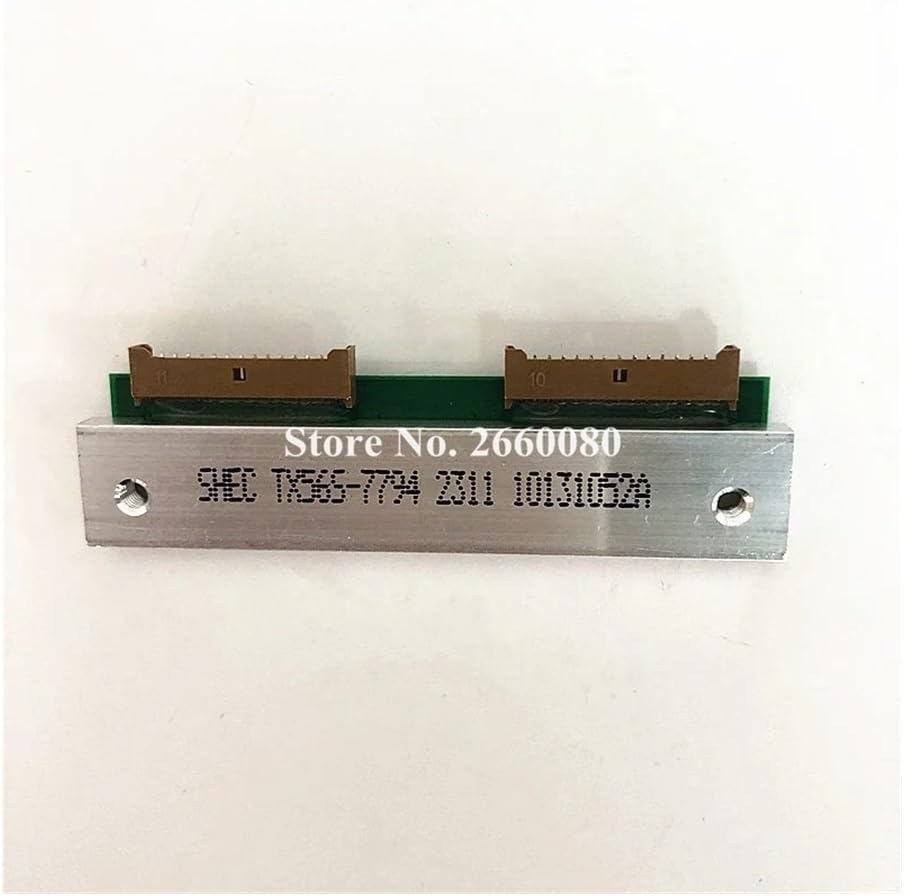
Figure 4: Bottom view of the RLS1000 Thermal Printhead, displaying identification markings.
9. Warranty Information
The FANPYY RLS1000 Thermal Printhead comes with a 12-month warranty service from the date of purchase. This warranty covers manufacturing defects and ensures reliable operation under normal use conditions. Please retain your proof of purchase for warranty claims.
10. Customer Support
Should you encounter any issues during installation, operation, or maintenance, or if you have any questions regarding your FANPYY RLS1000 Thermal Printhead, our professional technical support team is available to assist you.
For support, please contact your retailer or visit the official FANPYY website for contact information. When contacting support, please have your product model (RLS1000) and purchase details ready.