
1. Setup and Assembly
This section provides instructions for assembling your STRICH SDP-350S Digital Piano and identifying included components.
1.1 Included Items
Verify that all the following items are included in your package:
- STRICH SDP-350S Digital Piano Unit
- Headphones
- Key Stickers
- Triple Pedal Unit
- User Manual
- Power Adapter
- Piano Stand Legs and Hardware
1.2 Assembly Instructions
The main piano unit comes pre-assembled. The stand legs and triple pedal unit require attachment. Lay the piano unit upside down on a soft, flat surface to prevent scratches during leg attachment. Secure each leg to the designated points on the underside of the piano using the provided screws and screwdriver. Connect the triple pedal unit to the designated port on the back of the piano.
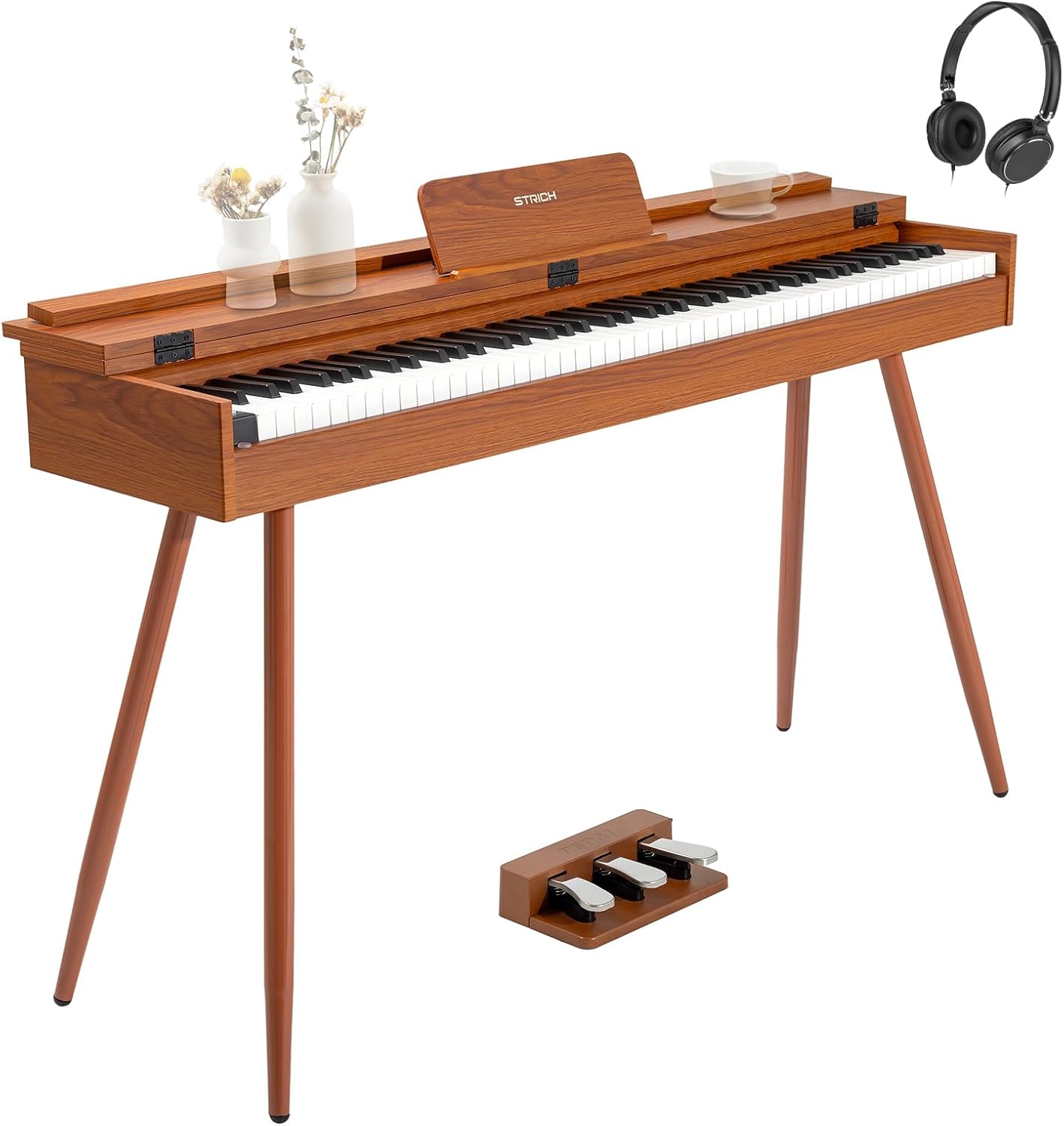
Figure 1: STRICH SDP-350S Digital Piano with included headphones and triple pedal.
Video 1: This video demonstrates the assembly process for the STRICH Digital Piano, including attaching the stand legs and connecting the pedal unit.
Video 2: This video provides an unboxing and initial setup overview of the STRICH Electric Piano, showing the components as they are removed from the packaging.
2. Operating Instructions
Familiarize yourself with the piano's controls and features for optimal use.
2.1 Basic Controls
The control panel is located on the left side of the keyboard. It includes buttons for volume, start/stop, tone, rhythm, transpose, tempo, chord, split, record, play, and demo functions. A digital display shows current settings.

Figure 2: Close-up view of the control panel and keyboard keys.
2.2 Key Features
- Hammer-Action Weighted Keys: The 88 full-size keys feature a responsive hammer-action mechanism with simulated ivory texture, designed to replicate the feel of an acoustic grand piano.
- Multi-timbres and Rhythms: Explore 900 preset timbres and 700 drum rhythms. The piano supports 128-note polyphony and includes an intelligent auto-chord function.
- Dual-Purpose Desktop Design: A protective sliding key cover keeps dust away. When closed, the cover transforms the piano into a flat tabletop surface.
- Headphone Connectivity: A 6.35mm headphone jack allows for silent practice.
- Built-in Speakers: The piano features two 25W speakers for stereo surround sound.

Figure 3: Visual representation of the piano's authentic sound capabilities, including 900 tones, 700 rhythms, 128 polyphony, and 110 demos.
Video 3: This video demonstrates how to set the tone and rhythm on the STRICH 88 key keyboard, showcasing various sound options.
2.3 Connectivity
The piano offers various connectivity options located on the rear panel:
- MIDI USB: Connect to a computer or other MIDI devices for advanced music production or learning.
- USB: For connecting USB drives to play MP3s.
- Audio-in: Allows external audio signals to be played through the piano's speakers.
- Headphone Output: For private practice.
- Sustain Pedal Input: For connecting the included triple pedal unit.
- Wireless Connectivity: Supports Bluetooth for connecting to mobile devices.

Figure 4: Detailed view of the rear connectivity panel, showing ports for power, MIDI, USB, headphones, audio input, and sustain pedal.
Video 4: This video highlights the differences between the SDP-350S and SEP-150S STRICH pianos, focusing on key features and functionalities.
3. Maintenance
To ensure the longevity and optimal performance of your digital piano, follow these maintenance guidelines:
- Dust Protection: Utilize the protective sliding key cover when the piano is not in use to prevent dust accumulation on the keys and internal components.
- Cleaning: Wipe the piano's surface with a soft, dry cloth. Avoid using abrasive cleaners or solvents that may damage the wood-textured finish.
- Environmental Conditions: Keep the piano away from direct sunlight, extreme temperatures, and high humidity to prevent warping or damage to electronic components.
4. Troubleshooting
If you encounter any issues with your STRICH SDP-350S Digital Piano, please refer to the following common troubleshooting steps:
- No Power: Ensure the power adapter is securely connected to both the piano and a working electrical outlet. Check the power switch on the rear panel.
- No Sound: Verify that the volume is turned up. If headphones are plugged in, unplug them to check speaker output. Ensure the correct tone is selected.
- Keys Not Responding: Check for any obstructions under the keys. If the issue persists, power cycle the piano.
- Pedal Malfunction: Ensure the triple pedal unit is securely connected to its input port on the rear panel.
For more detailed troubleshooting or issues not listed here, please consult the full user manual or contact customer support.
5. Specifications
| Feature | Specification |
|---|---|
| Model Name | SDP-350S |
| Brand | STRICH |
| Number of Keys | 88 |
| Key Type | Hammer Action, Weighted, Full-Size, Simulated Ivory Texture |
| Product Dimensions | 12.6"D x 51.6"W x 34.3"H |
| Item Weight | 58.3 pounds |
| Color | Mahogany |
| Material Type | Wood (outer casing), Plastic (keys) |
| Connectivity Technology | USB, Wireless (Bluetooth) |
| Connector Type | MIDI USB |
| Headphones Jack | 6.35mm Jack |
| Power Source | Corded Electric |
| Special Features | Built-In Speaker, Hammer Action, Headphone Jack, Wireless Connect, Sliding Key Cover |
6. Warranty and Support
For warranty information, technical support, or any inquiries regarding your STRICH SDP-350S Digital Piano, please refer to the contact details provided in your purchase documentation or on the official STRICH website. Please retain your proof of purchase for warranty claims.
This product is returnable until January 31, 2026, as per Amazon's return policy.

