
1. Product Overview
The Driauto 10.1-inch 8-Core Android Car Stereo is an advanced in-dash navigation and entertainment system designed for vehicles. It features a high-resolution IPS touchscreen, an 8-core processor, 6GB RAM, and 128GB internal storage, running on the Android 15 operating system. This unit supports wireless CarPlay, Android Auto, Mirror Link, GPS navigation, Bluetooth 5.0, DSP audio processing, FM/RDS radio, and includes a backup camera for enhanced driving safety.
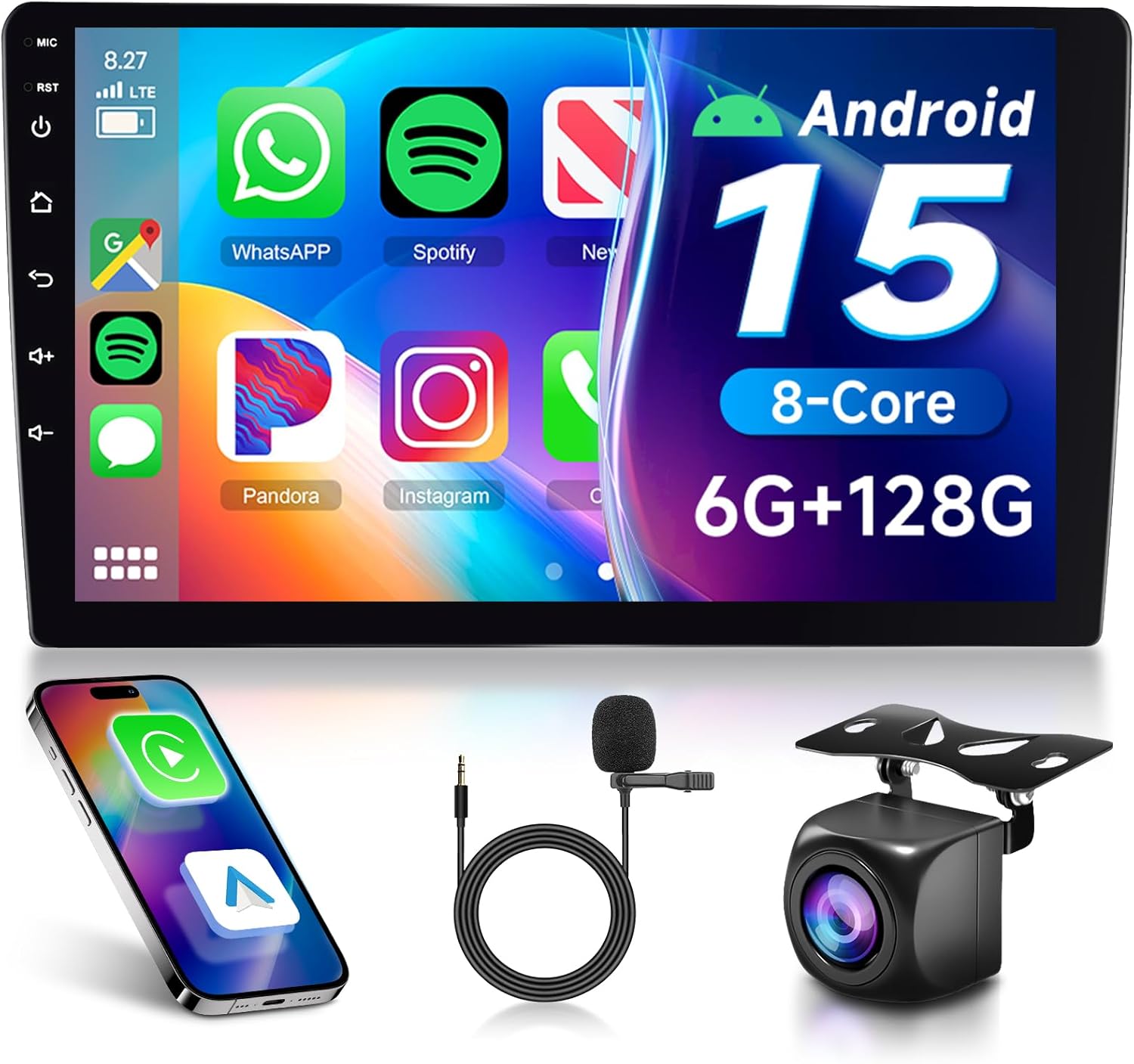
Image 1.1: The Driauto 10.1-inch Android Car Stereo unit, displaying its user interface with various applications. Also shown are a smartphone, an external microphone, and a backup camera, which are included accessories.
2. Setup and Installation
2.1 Unpacking and Component Check
Before installation, carefully unpack all components and verify against the packing list. Ensure all items are present and undamaged.

Image 2.1: Diagram illustrating the dimensions of the Driauto car stereo unit (242mm/9.5inch width, 147mm/5.7inch height, 71mm/2.8inch depth) and a visual packing list. The packing list includes the main unit, rear camera input cable, power cable, RCA cable, GPS antenna, USB cable, mounting bracket, user manual, microphone, and rear camera.
2.2 Wiring Connections
Refer to the wiring diagram provided in the included user manual for specific connections. Key connections include:
- Power Cable: Connect to vehicle's power supply (constant 12V, accessory 12V, and ground).
- RCA Cable: For audio/video input/output, including subwoofer and amplifier connections.
- GPS Antenna: Connect to the dedicated GPS port and mount in a location with clear sky view.
- USB Cable: For connecting USB devices or wired CarPlay/Android Auto.
- Rear Camera Input Cable: Connect the provided backup camera.
- Microphone: Connect the external microphone for hands-free calling and voice commands.
2.3 Backup Camera Installation
The included AHD wide-angle backup camera should be mounted at the rear of the vehicle. Connect the camera's video output to the 'Rear Camera Input' on the stereo unit. The camera's power cable typically connects to the vehicle's reverse light circuit, ensuring it activates automatically when reverse gear is engaged.

Image 2.2: This image displays the AHD backup camera functionality, showing a simulated rear view with parking guidelines on the stereo screen. It highlights features like AHD 720P resolution, night vision, wide angle, and waterproof design. Below, a diagram illustrates the wiring connection for the backup camera. The image also shows the interface for programming steering wheel controls, allowing users to map vehicle steering wheel buttons to stereo functions.
3. Operating Instructions
3.1 Power On/Off and Basic Navigation
Press the power button to turn the unit on or off. The 10.1-inch IPS touchscreen allows for intuitive navigation through the Android 15 interface. Swipe, tap, and pinch gestures are supported for interacting with applications and menus.

Image 3.1: This image highlights the 10-inch IPS screen, emphasizing its superior resolution (1280*720) compared to other screens. It also showcases the customizable user interface with 59 UI desktop themes and the 'Quad Screen' feature, allowing multiple applications to be displayed simultaneously for enhanced multitasking.
3.2 Wireless CarPlay and Android Auto
The unit supports both wireless CarPlay for iOS devices and wireless Android Auto for Android smartphones. To connect:
- Ensure Bluetooth and Wi-Fi are enabled on your smartphone.
- On the car stereo, navigate to the CarPlay or Android Auto application.
- Follow the on-screen prompts to pair your device.
- Once connected, your phone's compatible apps will appear on the stereo display.
3.3 Mirror Link Functionality
Mirror Link allows you to display your smartphone's screen directly onto the car stereo. This feature supports both wireless and wired connections. Consult your phone's manual for specific Mirror Link compatibility and setup procedures.

Image 3.2: This graphic illustrates the wireless and wired connectivity options for CarPlay, Android Auto, and Mirror Link. It shows how iOS devices connect via CarPlay, Android devices via Android Auto, and both types of phones can utilize Mirror Link to display their screens on the stereo.
3.4 GPS Navigation
The stereo includes a built-in GPS navigation system. Pre-installed maps or online navigation apps can be used. Ensure the GPS antenna is properly installed for optimal signal reception.
3.5 Bluetooth 5.0
Connect your smartphone via Bluetooth for hands-free calling and audio streaming. Access the Bluetooth menu on the stereo to pair devices, manage contacts, and control music playback.
3.6 FM/RDS Radio
Tune into FM radio stations. The RDS (Radio Data System) feature provides additional information such as station name and song title where available.
3.7 Digital Sound Processor (DSP)
The integrated 32 EQ DSP allows for precise audio customization. Adjust equalizer settings to tailor the sound output to your preferences and vehicle acoustics.

Image 3.3: This image details the Bluetooth 5.0, FM/RDS Radio, and DSP functionalities. It shows the FM radio interface with frequency tuning, the DSP interface with a 32-band equalizer for sound customization, and the Bluetooth interface for hands-free calling and music streaming.
3.8 Steering Wheel Control (SWC)
If your vehicle supports it, the stereo can be integrated with your existing steering wheel controls. Follow the instructions in the main user manual to program the buttons for functions like volume, track skip, and mode selection.
4. Maintenance
To ensure the longevity and optimal performance of your Driauto car stereo, follow these maintenance guidelines:
- Cleaning: Use a soft, dry cloth to clean the screen and unit. For stubborn smudges, a slightly damp cloth with a mild, non-abrasive cleaner can be used, but avoid spraying liquids directly onto the unit.
- Software Updates: Periodically check for software updates from the manufacturer to ensure the system runs efficiently and has the latest features and security patches.
- Environmental Conditions: Avoid exposing the unit to extreme temperatures, direct sunlight for prolonged periods, or excessive moisture.
5. Troubleshooting
This section addresses common issues you might encounter. For more detailed troubleshooting, refer to the full user manual or contact customer support.
| Problem | Possible Cause | Solution |
|---|---|---|
| Unit does not power on | Incorrect wiring, blown fuse, vehicle battery issue. | Check power connections, inspect vehicle fuses, verify battery voltage. |
| No sound output | Speaker wiring issues, volume too low, incorrect audio source. | Verify speaker connections, increase volume, select correct audio source. |
| GPS signal lost or inaccurate | GPS antenna improperly installed or obstructed. | Ensure GPS antenna has a clear view of the sky, check antenna connection. |
| CarPlay/Android Auto not connecting | Bluetooth/Wi-Fi off, phone compatibility, software glitch. | Ensure phone's Bluetooth/Wi-Fi is on, restart phone and stereo, check for software updates. |
| Touchscreen unresponsive | Temporary software issue, screen damage. | Restart the unit. If issue persists, contact support. |
6. Specifications
Detailed technical specifications for the Driauto 10.1-inch Android Car Stereo:
- Screen Size: 10.1 inches
- Screen Type: IPS Touch Screen
- Screen Resolution: 1280*720
- Operating System: Android 15
- Processor: 8-Core
- RAM: 6GB
- Internal Storage: 128GB
- Connectivity: Auxiliary, Bluetooth 5.0, HDMI, Wi-Fi
- Special Features: Built-In Bluetooth, DSP (32 EQ), GPS Navigation, Wireless Carplay, Wireless Android Auto, Mirror Link
- Compatible Devices: Smartphone
- Controller Type: Steering Wheel Control
- Connector Type: HDMI, RCA
- Audio Output Mode: Stereo, Surround
- Surround Sound Channel Configuration: 4.0
- Video Encoding Support: MKV, RMVB, AVI, MP4, MDV, etc.
- Output Power: 0.18 Kilowatts
- Item Weight: 2.97 pounds
- Package Dimensions: 12.44 x 10.08 x 3.23 inches

Image 6.1: This image highlights the core specifications of the stereo, including its 8-core processor, Android 15 operating system, 6GB RAM, and 128GB ROM. It also visually represents GPS navigation and Wi-Fi connectivity.
7. Warranty and Support
Driauto is committed to product quality and customer satisfaction. This product comes with the following support:
- Reply Time: Customer inquiries are typically responded to within 18 hours.
- Return Policy: 60-day return period.
- Replacement: 2-year replacement warranty.
- Support: Lifetime technical support.
For technical assistance, warranty claims, or any other inquiries, please refer to the contact information provided in your product packaging or visit the official Driauto website.


