1. Introduction
This manual provides comprehensive instructions for the RIMBILIE TP.HV510.PC822 TV Motherboard. It is designed to assist qualified technicians and experienced users in the proper installation, operation, maintenance, and troubleshooting of this television replacement component. Please read this manual thoroughly before attempting any installation or repair procedures.
2. Product Overview
The RIMBILIE TP.HV510.PC822 is a replacement TV motherboard designed to restore or improve the functionality of compatible television sets. This component integrates various essential functions, including video processing, audio signal handling, and power management, to ensure optimal TV performance.
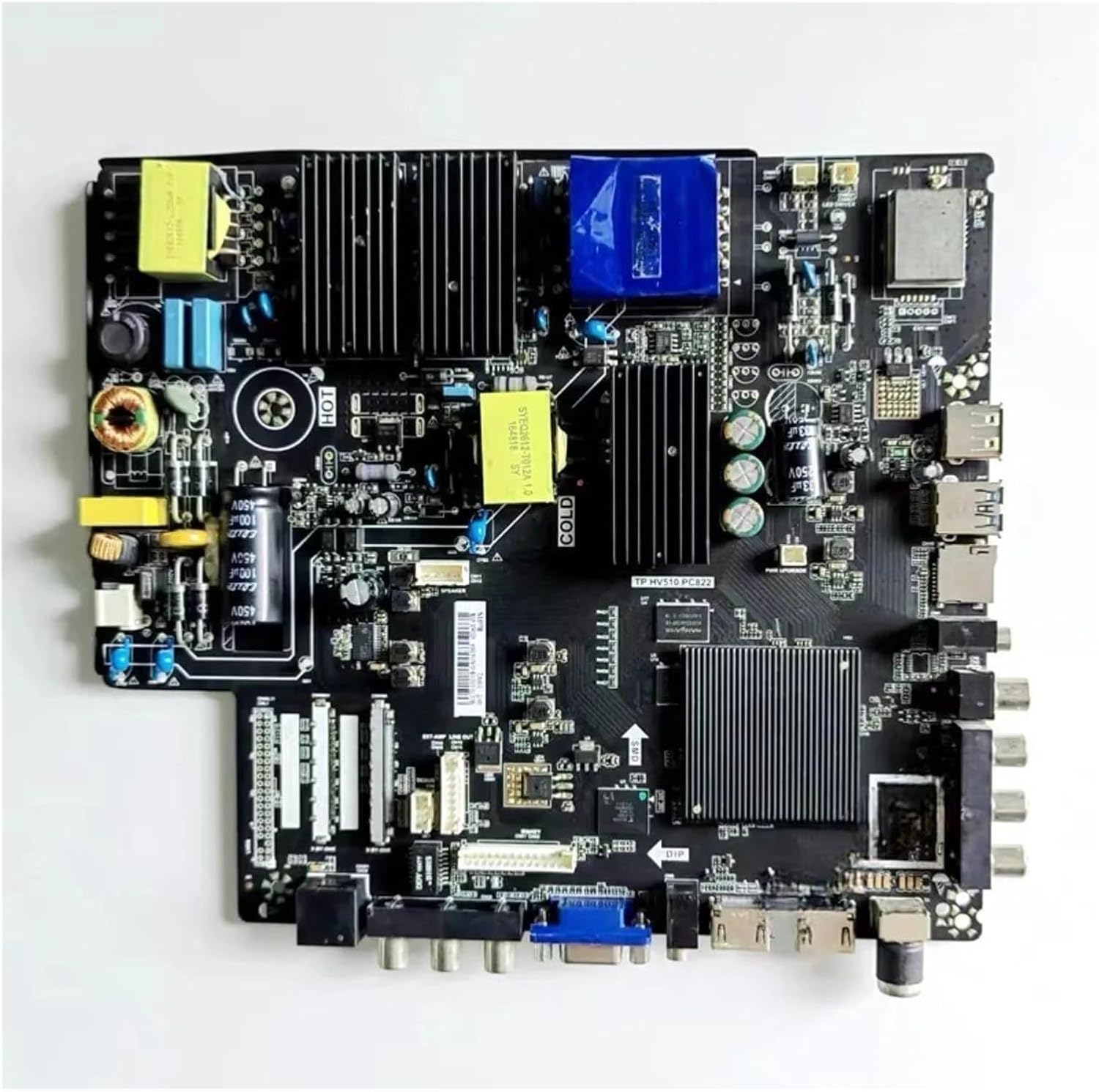
Figure 2.1: RIMBILIE TP.HV510.PC822 TV Motherboard
This image displays the RIMBILIE TP.HV510.PC822 TV Motherboard, a complex circuit board featuring various electronic components. Visible elements include heat sinks for thermal management, capacitors (e.g., 100µF 450V), inductors, integrated circuits, and multiple input/output ports such as HDMI, USB, and VGA. The board is labeled with "TP.HV510 PC822" indicating its model number, and also includes markings for "HOT" and "COLD" sections, likely related to power supply isolation. Connectors for internal components like display panels and speakers are also present.
3. Setup and Installation
Installation of a TV motherboard requires technical expertise and should only be performed by qualified personnel. Improper installation can lead to damage to the component, the television, or personal injury. Always ensure the television is disconnected from the power source before beginning any installation.
3.1 Safety Precautions
- Disconnect Power: Always unplug the TV from the main power outlet before opening the casing.
- Discharge Capacitors: Allow sufficient time for internal capacitors to discharge after disconnecting power, or safely discharge them using appropriate tools.
- Electrostatic Discharge (ESD) Protection: Use an anti-static wrist strap and work on an anti-static mat to prevent damage to sensitive electronic components.
- Proper Tools: Use insulated tools and ensure they are in good condition.
- Documentation: Take photos or make notes of cable connections before disconnecting them.
3.2 Installation Steps (General Guidelines)
- Access TV Interior: Carefully remove the back panel of the television to access the internal components.
- Locate Old Motherboard: Identify the existing motherboard and its connections.
- Disconnect Cables: Systematically disconnect all cables, ribbons, and connectors from the old motherboard.
- Remove Old Motherboard: Unscrew and carefully remove the old motherboard from the TV chassis.
- Install New Motherboard: Position the RIMBILIE TP.HV510.PC822 motherboard in the chassis, ensuring it aligns with mounting points. Secure it with screws.
- Reconnect Cables: Reconnect all cables, ribbons, and connectors to the new motherboard, ensuring correct orientation and secure connections. Refer to your TV's service manual or your prior documentation.
- Initial Power-Up: Before reassembling the TV, connect the power cord and perform a brief test to ensure basic functionality (e.g., power on, display backlight).
- Reassemble TV: If the initial test is successful, disconnect power, then carefully reassemble the TV's back panel.
4. Operating Instructions
The RIMBILIE TP.HV510.PC822 TV Motherboard functions as the central processing unit for your television. Once correctly installed, its operation is integrated with the TV's standard controls and remote. There are no specific operating instructions for the motherboard itself beyond ensuring proper installation.
Upon successful installation, the motherboard enables the following core TV functions:
- Power On/Off: Responds to power commands from the remote or TV buttons.
- Input Switching: Manages signal input from various sources (HDMI, USB, VGA, etc.).
- Picture Processing: Optimizes image quality, color, and clarity.
- Audio Processing: Handles audio signals for sound output.
- Menu Navigation: Supports the TV's on-screen display and settings adjustments.
Refer to your television's original user manual for specific instructions on operating your TV's features and settings.
5. Maintenance
The RIMBILIE TP.HV510.PC822 TV Motherboard is designed for long-term reliability and generally requires minimal maintenance. However, adhering to general electronic device care practices can extend its lifespan and ensure optimal performance.
- Keep Clean: Ensure the TV's ventilation openings are free from dust and debris to prevent overheating. Periodically clean the TV's exterior with a soft, dry cloth.
- Avoid Extreme Conditions: Do not expose the television to extreme temperatures, high humidity, or direct sunlight.
- Stable Power Supply: Use a surge protector to safeguard against power fluctuations that could damage internal components.
- Professional Servicing: If internal cleaning or inspection is required, it should be performed by a qualified technician. Do not attempt to open the TV casing unless you are trained to do so.
6. Troubleshooting
This section addresses common issues that a replacement motherboard like the TP.HV510.PC822 is designed to resolve. If you encounter problems after installation, review these points. For issues not listed, consult a professional technician.
6.1 Common Issues Addressed by Motherboard Replacement
- No Power / Black Screen: If the TV does not power on or displays a black screen despite receiving power, the motherboard may have been faulty. This replacement aims to restore power functionality.
- Blurred Screen / No Image: Issues with image processing, resulting in a blurred display or complete absence of a picture, can be resolved by a functional motherboard.
- No Sound: If the TV powers on and displays an image but produces no audio, the audio processing circuits on the motherboard might have failed. This replacement should restore sound output.
- Poor Picture Quality: Problems such as distorted colors, lines on the screen, or general degradation of image quality can often be attributed to a malfunctioning motherboard's video processing unit.
- System Instability: Frequent crashes, freezing, or unresponsiveness of the TV's operating system can indicate a motherboard issue. The replacement aims to improve system stability.
6.2 Post-Installation Checks
- Cable Connections: Double-check all internal cable connections to ensure they are securely seated and correctly oriented.
- Power Supply: Verify that the power supply unit is functioning correctly and providing stable voltage to the motherboard.
- External Devices: Test with different input sources (e.g., another HDMI device) to rule out issues with external equipment.
- Firmware: If applicable, ensure the TV's firmware is up-to-date after motherboard replacement, following the TV manufacturer's instructions.
7. Specifications
| Feature | Detail |
|---|---|
| Model Name | TP.HV510.PC822 (also compatible with TP.HV530.PC821, TP.MS638.PC822) |
| Brand | RIMBILIE |
| Manufacturer | hanyilan |
| Item Weight | 1.76 ounces |
| Package Dimensions | 0.39 x 0.39 x 0.39 inches |
| ASIN | B0F8R5TSQM |
| Date First Available | May 15, 2025 |
8. Warranty and Support
For warranty information, technical support, or inquiries regarding compatible models and accessories, please contact the manufacturer or your point of purchase. Ensure you have your product model number (TP.HV510.PC822) and purchase details available when seeking support.
For additional models or specific accessory needs, you may contact the seller directly for assistance.