
1. Introduction
This manual provides instructions for the Generic Replacement Remote Control designed for use with the Xpelair 6019008 XPSS XPA360CF 360 Degree Air Circulator Cooling Fan. Please read this manual carefully before using the remote control to ensure proper operation and to maximize its lifespan. This remote is an infrared (IR) replacement and is intended to replicate the functions of your original remote. Ensure your original remote matches the appearance of this replacement for full compatibility.
2. Product Overview
The replacement remote control features a compact design with clearly labeled buttons for easy operation of your compatible Xpelair air circulator fan. The remote is black in color.
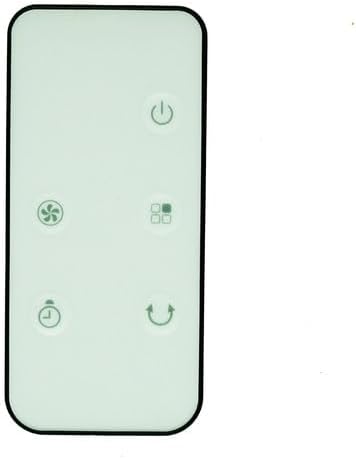
Image 2.1: Front view of the replacement remote control. This image displays the front face of the remote, showing the power button, a mode button (four squares icon), a fan speed button (fan icon), an oscillation button (loop arrow), and a timer button (clock icon).

Image 2.2: Back view of the replacement remote control. This image shows the rear of the remote, highlighting the battery compartment cover and instructions for opening it to insert or replace batteries.
3. Setup
3.1 Battery Installation
- Locate the battery compartment on the back of the remote control.
- Slide the battery compartment cover open in the direction indicated by the arrow (refer to Image 2.2).
- Insert two (2) AAA batteries, ensuring the positive (+) and negative (-) terminals align correctly with the markings inside the compartment. Note: Batteries are not included with the remote control.
- Slide the battery compartment cover back into place until it clicks securely.
3.2 Initial Use
This replacement remote control typically requires no setup or programming. Once batteries are correctly installed, it should be ready for immediate use with your compatible Xpelair 6019008 XPSS XPA360CF air circulator fan.
4. Operating Instructions
Point the remote control directly at the infrared receiver on your Xpelair air circulator fan. Ensure there are no obstructions between the remote and the fan.
- Power Button (⏻): Press to turn the fan ON or OFF.
- Mode Button (four squares icon): Press to cycle through different operating modes (e.g., Normal, Natural, Sleep, if supported by your fan model).
- Fan Speed Button (⚙): Press to adjust the fan speed (e.g., Low, Medium, High).
- Oscillation Button (↻): Press to activate or deactivate the oscillation function, allowing the fan to rotate and distribute air across a wider area.
- Timer Button (⏱): Press to set a timer for the fan to automatically turn off after a specified period (e.g., 1 hour, 2 hours, etc., depending on fan capabilities).
Note: The exact functions and number of settings for each button may vary slightly depending on the specific model of your Xpelair 6019008 XPSS XPA360CF fan. This remote is designed to replicate the functions of the original remote for the specified fan model.
5. Maintenance
5.1 Cleaning
To clean the remote control, gently wipe its surface with a soft, dry cloth. Do not use abrasive cleaners, solvents, or wet cloths, as these may damage the remote's finish or internal components.
5.2 Battery Replacement
Replace batteries when the remote's range decreases or it stops responding. Follow the battery installation steps in Section 3.1. Always replace both batteries at the same time with new AAA batteries. Do not mix old and new batteries or different types of batteries.
6. Troubleshooting
- Remote not responding:
- Ensure the remote is pointed directly at the fan's IR receiver.
- Check if there are any obstructions between the remote and the fan.
- Replace the batteries with fresh AAA batteries.
- Verify that the fan itself is powered on and functioning correctly.
- Some functions not working:
- This replacement remote is designed to be compatible with the Xpelair 6019008 XPSS XPA360CF. However, due to variations in fan models or original remote features, it cannot be guaranteed that all functions will be identical to your original remote.
- Ensure your fan model is precisely the one listed for compatibility.
7. Specifications
| Product Type | Replacement Infrared Remote Control |
| Compatibility | Xpelair 6019008 XPSS XPA360CF 360 Degree Air Circulator Cooling Fan |
| Power Source | 2 x AAA Batteries (not included) |
| Color | Black |
| Manufacturer | Easytry (Generic) |
8. Support and Warranty
For any questions, concerns, or issues regarding this replacement remote control, please contact the seller directly through the platform where it was purchased. As this is a generic replacement product, specific warranty details may vary. Please refer to the seller's return and support policies for further information.