
HUAHUU Vanity Desk 0125
HUAHUU Vanity Desk 0125 User Manual
White Makeup Vanity with Mirror, RGB Lights, and Power Outlets
Introduction
Thank you for choosing the HUAHUU Vanity Desk 0125. This manual provides essential information for the safe assembly, operation, and maintenance of your new vanity desk. Please read these instructions carefully before beginning assembly or use, and retain them for future reference.
Safety Information
- Always unplug the vanity from the power source before assembly, disassembly, or cleaning.
- Exercise caution around sharp edges and potential pinch points during assembly and regular use.
- Do not use the vanity if the power cord or any electrical components are damaged.
- Keep the vanity away from water and direct heat sources to prevent damage or electrical hazards.
- Avoid placing excessively heavy objects on the vanity, as this could compromise stability and cause tipping.
Package Contents
Before assembly, verify that all components listed below are present and undamaged. If any parts are missing or damaged, please contact customer support.

Figure 1: Exploded view of vanity desk components. This image illustrates all individual parts included in the package, such as the main desk panels, mirror frame, LED bulbs, drawer slides, stool parts, and various screws and connectors required for assembly.
Refer to the included assembly diagram for a detailed list of parts and hardware.
Setup and Assembly
Assembly is required for this product. It is recommended to have two people for certain steps. Ensure you have a clear, spacious area for assembly.
Tools Required:
- Phillips Head Screwdriver
- Hammer (optional, for dowels)
Assembly Steps:
- Unpack and Organize: Carefully remove all components from the packaging. Lay them out on a soft, clean surface to prevent scratches. Identify each part using the provided parts list.
- Assemble the Main Desk Frame: Follow the numerical sequence in the assembly diagram to connect the side panels, back panel, and bottom panel of the desk using the designated screws and dowels. Ensure all connections are secure.
- Install Drawer Slides: Attach the drawer slides to the inner sides of the desk frame and to the drawer boxes as indicated in the instructions. Pay close attention to the orientation (e.g., "DR with CR, DL with CL" as noted in customer feedback) to ensure smooth operation.
- Assemble Drawers: Construct the two large drawers and insert them into the installed slides. Test for smooth opening and closing.
- Attach Mirror Support and Shelves: Secure the mirror support structure and the open shelves to the top surface of the main desk.
- Mount the Mirror: Carefully attach the large lighted mirror to the mirror support. Ensure it is firmly secured.
- Install LED Lights:
- Mirror Lights: Screw the LED bulbs into the pre-drilled sockets around the mirror frame. Connect the wiring as per the diagram.
- RGB Strip Light: Adhere the RGB LED strip under the tabletop in the designated channel. Connect it to the control unit.
- Install Power Outlets: Secure the built-in power strip (2 AC, 2 USB, 1 Type-C) into the side panel of the desk. Connect its power cable.
- Assemble the Stool: Connect the stool panels and attach the cushion.
- Final Check: Verify all screws are tightened and the vanity is stable.

Figure 2: Fully assembled HUAHUU Vanity Desk 0125. This image displays the complete vanity desk setup, including the lighted mirror, two drawers, open shelves, and the accompanying stool, positioned in a room.
Operating Instructions
Mirror Lighting Control:
The vanity mirror features integrated LED lights with three color modes and adjustable brightness.
- Power On/Off: Locate the touch sensor on the mirror surface. Tap once to turn the lights on or off.
- Change Color Mode: With the lights on, tap the touch sensor repeatedly to cycle through the three color modes:
- Cold White
- Warm White
- Warm Yellow
- Adjust Brightness: With the lights on, press and hold the touch sensor to gradually increase or decrease the brightness. Release when the desired brightness level is reached.

Figure 3: Mirror lighting modes. This image demonstrates the three distinct color temperatures available for the mirror lights: Cold White, Warm White, and Warm Yellow, illustrating how they appear on the vanity.
RGB Strip Lighting Control:
The RGB LED strip under the tabletop offers extensive color options and dynamic modes, controllable via an app or a physical controller.
- App Control: Download the specified mobile application (refer to the QR code or app name provided in the packaging). Pair your device with the RGB lighting system via Bluetooth. The app allows access to 60,000+ colors, brightness adjustment, dynamic modes, music sync, and timing functions.
- Controller Control: Use the included physical controller to cycle through basic colors, adjust brightness, and select pre-set dynamic modes.

Figure 4: RGB lighting features. This image highlights the smart RGB lighting capabilities of the vanity desk, including app control, brightness adjustment, over 6,000 colors, dynamic modes, music mode, mic mode, and a timing function.
Using the Power Outlets:
The integrated power strip provides convenient access to power for various devices.
- AC Outlets: Plug in hair dryers, curling irons, or other AC-powered appliances into the two 125V/12A AC outlets.
- USB Ports: Connect mobile devices, smartwatches, or other USB-powered accessories to the two 5V/2A USB ports.
- Type-C Port: Utilize the Type-C port for compatible devices.
- Safety Note: Do not exceed the maximum power rating of the strip. Avoid using damaged cables or adapters.

Figure 5: Built-in charging station. This image provides a detailed view of the power strip integrated into the vanity desk, featuring two standard AC outlets, two USB ports, and one Type-C port for charging and powering various electronic devices.
Maintenance and Care
Proper care will extend the life and appearance of your vanity desk.
- Cleaning Surfaces: Wipe down all surfaces with a soft, damp cloth. Avoid abrasive cleaners or harsh chemicals that could damage the finish. For stubborn marks, a mild soap solution can be used, followed by drying with a clean cloth.
- Mirror Cleaning: Use a glass cleaner and a microfiber cloth for the mirror. Spray cleaner onto the cloth, not directly onto the mirror, to prevent liquid from seeping into the frame or electrical components.
- Drawer Maintenance: Periodically check drawer slides for smooth operation. If they become stiff, a small amount of silicone lubricant can be applied.
- Electrical Components: Ensure all electrical connections are dry and free from dust. Never attempt to clean electrical outlets or wiring with liquids while plugged in.
- Light Bulb Replacement: If a mirror LED bulb needs replacement, ensure the vanity is unplugged. Unscrew the old bulb and replace it with a compatible LED bulb of the same type and wattage.
Troubleshooting
This section addresses common issues you might encounter.
| Problem | Possible Cause | Solution |
|---|---|---|
| Mirror lights do not turn on. |
|
|
| RGB strip lights are not working or unresponsive. |
|
|
| Power outlets are not providing power. |
|
|
| Drawers are stiff or do not close properly. |
|
|
Specifications
| Feature | Detail |
|---|---|
| Model Number | Vanity Desk 0125 |
| Brand | HUAHUU |
| Product Dimensions (L x W x H) | 31.6" x 15.75" x 53.15" (80.26 cm x 40.0 cm x 134.98 cm) |
| Item Weight | 69.9 pounds (31.7 kg) |
| Material | Engineered Wood (MDF) |
| Mirror Lighting | LED bulbs, 3 Color Modes (Cold White, Warm White, Warm Yellow), Adjustable Brightness |
| RGB Strip Lighting | 60,000+ colors, App/Controller control, Dynamic modes, Music sync, Timing function |
| Power Outlets | 2 x AC (125V/12A), 2 x USB (5V/2A), 1 x Type-C |
| Storage | 2 Large Drawers, Open Shelves |
| Assembly Required | Yes |
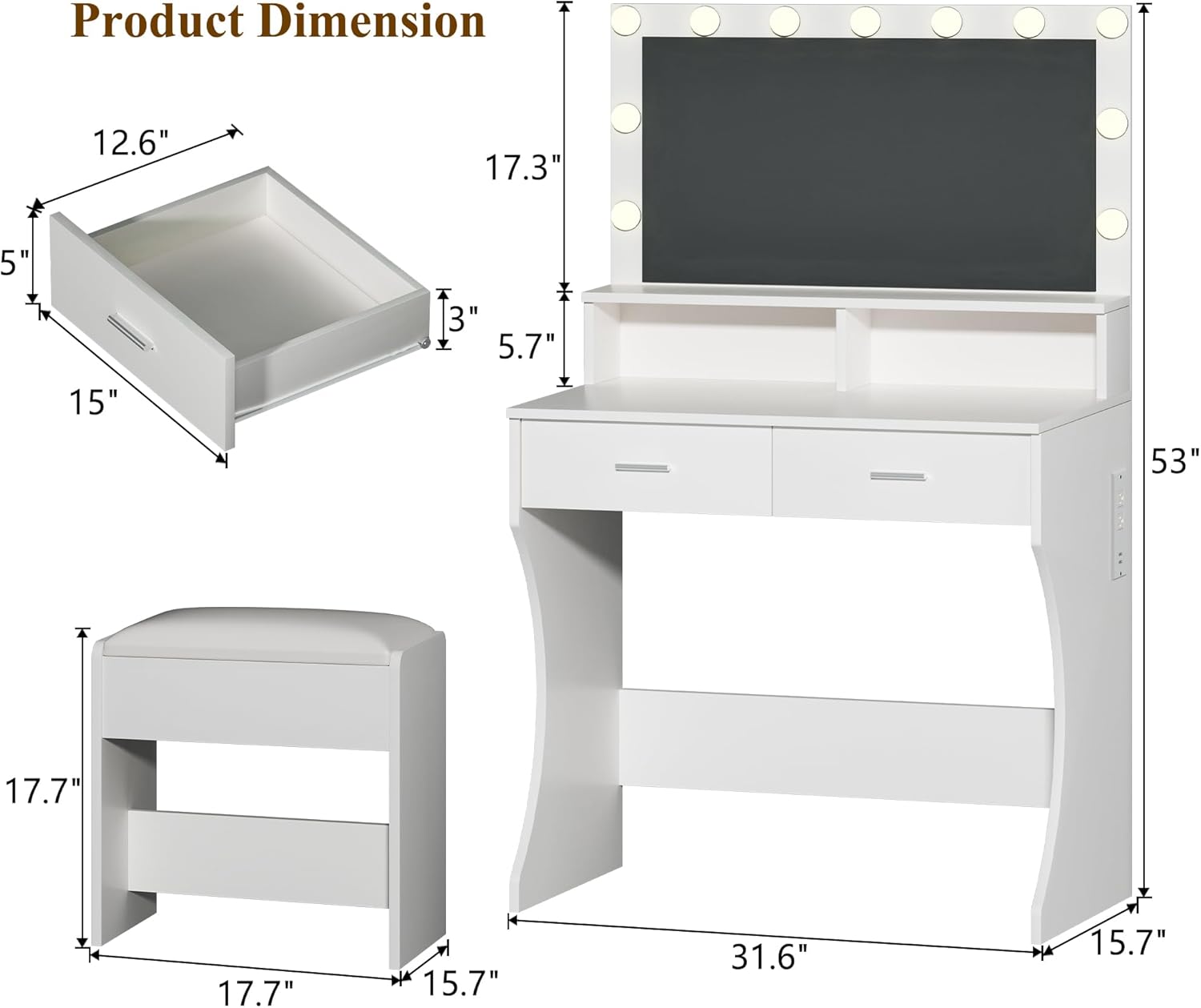
Figure 6: Product dimensions. This diagram provides precise measurements for the vanity desk and the stool, including height, width, and depth of various sections like drawers and the mirror.
Warranty Information
Specific warranty duration details are not provided in the product information. However, HUAHUU is committed to customer satisfaction.
For any issues related to manufacturing defects or product performance, please contact our customer support team. We will endeavor to resolve your concerns promptly.
Customer Support
If you have any questions, require assistance with assembly, or encounter any problems with your HUAHUU Vanity Desk 0125, please do not hesitate to contact us.
Our customer service team is dedicated to providing high-quality support and aims to respond to inquiries within 24 hours.
Contact Information: Refer to your purchase documentation or the HUAHUU brand store on Amazon for the most current contact methods.
You can visit the HUAHUU Store on Amazon for more information.
Ask a question about this manual
Ask about setup, troubleshooting, compatibility, parts, safety, or missing instructions. Manuals+ will review the question and use this page’s manual context to help answer it.