
BLATOMIC 700A
BLATOMIC LCD Control Wood Pellet Smoker Grill 700A User Manual
Model: 700A
Brand: BLATOMIC
1. Introduction
This manual provides essential information for the safe and efficient operation, maintenance, and troubleshooting of your BLATOMIC LCD Control Wood Pellet Smoker Grill, Model 700A. Please read all instructions carefully before assembly and use to ensure optimal performance and safety.
The BLATOMIC 700A is a versatile 8-in-1 outdoor cooking system designed for smoking, grilling, baking, roasting, searing, braising, and char-grilling. It features an LCD control panel for precise temperature management, a large cooking capacity, and enhanced portability.

Image 1: BLATOMIC LCD Control Wood Pellet Smoker Grill 700A, showcasing its overall design and features.
2. Important Safety Information
Always follow these safety guidelines to prevent injury or damage:
- Outdoor Use Only: This grill is designed for outdoor use in a well-ventilated area. Do not operate indoors or in enclosed spaces.
- Clearance: Maintain a minimum distance of 10 feet from combustible materials (e.g., houses, fences, trees).
- Stable Surface: Place the grill on a level, stable, non-combustible surface.
- Fuel Type: Use only food-grade wood pellets as fuel. Do not use charcoal, lighter fluid, or other accelerants.
- Hot Surfaces: The grill's exterior surfaces become extremely hot during operation. Use heat-resistant gloves and avoid direct contact.
- Children and Pets: Keep children and pets away from the grill at all times.
- Electrical Safety: Ensure the power cord is properly grounded and protected from heat and moisture. Do not operate with a damaged cord.
- Grease Fires: Regularly clean the grease management system to prevent grease fires. In case of a grease fire, turn off the grill and close the lid. Do not use water.
- Supervision: Never leave the grill unattended while in operation.
3. Product Overview and Components
Familiarize yourself with the key components of your BLATOMIC 700A grill:
- LCD Control Panel: Digital display and dial for precise temperature settings from 160°F to 500°F.
- Pellet Hopper: Stores wood pellets, feeding them automatically into the burn pot.
- Cooking Grates: Large 700 sq. in. cooking area, including a double-deck design for increased capacity.
- Grease Bucket: Collects drippings and excess grease for easy disposal.
- Side Table with Hooks: Provides convenient workspace and storage for grilling tools.
- Rugged Wheels: Enhances portability for easy maneuvering across various terrains.
- Meat Probe: Included for monitoring internal food temperature.
- Peripheral Device Handle: Allows for easy operation of the open flame slide without tools.
- Anti-Oil Strips: Located near the exhaust port and inside the grill cover to prevent oil leakage.

Image 2: Detailed diagram highlighting the main components of the BLATOMIC 700A grill.

Image 3: View of the grill's durable wheels and stable base.
4. Assembly
Your BLATOMIC 700A grill requires assembly. Please refer to the separate detailed assembly instructions included in your product packaging. Ensure all parts are present and follow the steps carefully. It is recommended to have two people for assembly.
5. Initial Setup and Seasoning
5.1 Pellet Loading
Open the lid of the pellet hopper and fill it with your desired flavor of food-grade wood pellets. Ensure the hopper is not overfilled.
5.2 Initial Burn-in (Seasoning)
Before cooking any food, perform an initial burn-in to remove any manufacturing oils and prepare the grill for use. This process typically involves running the grill at a high temperature for a period (e.g., 45 minutes at 350-400°F) with the lid closed. Refer to your detailed manual for specific burn-in instructions.
6. Operating Instructions
6.1 Power On/Off and Temperature Control
The LCD control panel allows for precise temperature management. To power on, ensure the grill is plugged in and turn the power switch to 'ON'. Use the dial to select your desired temperature between 160°F and 500°F. The digital display will show the current internal temperature.

Image 4: The LCD Control Panel for setting and monitoring grill temperature.
To power off, turn the dial to the 'Shut Down Cycle' setting. This initiates a cooling process that clears residual pellets and safely shuts down the grill. Do not simply unplug the unit or turn off the power switch directly from an active cooking cycle.
6.2 Smoking (Low & Slow)
For smoking, set the temperature to a lower range (e.g., 160°F - 225°F). The grill will automatically feed pellets to maintain the set temperature and produce consistent smoke for tender, flavorful results. The large 700 sq. in. cooking area can accommodate multiple items simultaneously, such as 7 chickens, 6 racks of ribs, or 40 burgers.

Image 5: Illustration of the large cooking capacity with various food items.
6.3 Grilling and Searing (Hot & Fast)
For grilling or searing, set the temperature to a higher range (e.g., 350°F - 500°F). Utilize the peripheral device handle to open the direct flame slide, allowing for direct heat exposure to achieve a crisp sear. Remember to close the slide for indirect cooking or smoking.

Image 6: Visual representation of the precise temperature control and faster pellet feeding system.
6.4 Using the Meat Probe
Insert the included meat probe into the thickest part of your food, avoiding bone. Plug the probe into the designated port on the control panel. The internal temperature of your food will be displayed, allowing you to cook to your desired doneness.
6.5 Pellet Management
The grill features an auto-feed system that delivers pellets as needed. Monitor the pellet level in the hopper and refill as necessary to ensure continuous operation. The hopper discharging device allows for easy removal of unused pellets.
Official Product Video: BLATOMIC Pellet Grill Operation
Video 1: This video demonstrates the general operation and features of a BLATOMIC wood pellet grill, including loading pellets and temperature control. While it references a 456 sq. in. model, the core functionalities are applicable to the 700A.
Seller Video: Z GRILLS Pellet Grill BBQ Smoker Overview
Video 2: This video from Z GRILLS Direct provides a general overview of a pellet grill's features, including the hopper, temperature settings, and cooking area. It offers insights into the user experience of similar pellet smokers.
Seller Video: Z GRILLS 450E Grilling and Smoking
Video 3: This video from Z GRILLS Direct demonstrates grilling and smoking ribs on a Z GRILLS 450E model. It illustrates the process of setting temperatures and placing food on the grates, providing practical examples for using a pellet grill.
7. Maintenance
7.1 Cleaning
- Grease Bucket: Regularly empty and clean the grease bucket to prevent overflow and potential fire hazards.
- Cooking Grates: Clean cooking grates after each use with a grill brush.
- Ash Cleanout: Periodically remove ash from the burn pot and grill interior. Ensure the grill is completely cool before cleaning.
- Anti-Oil Strips: Inspect and clean the anti-oil strips to maintain their effectiveness in preventing oil leakage.
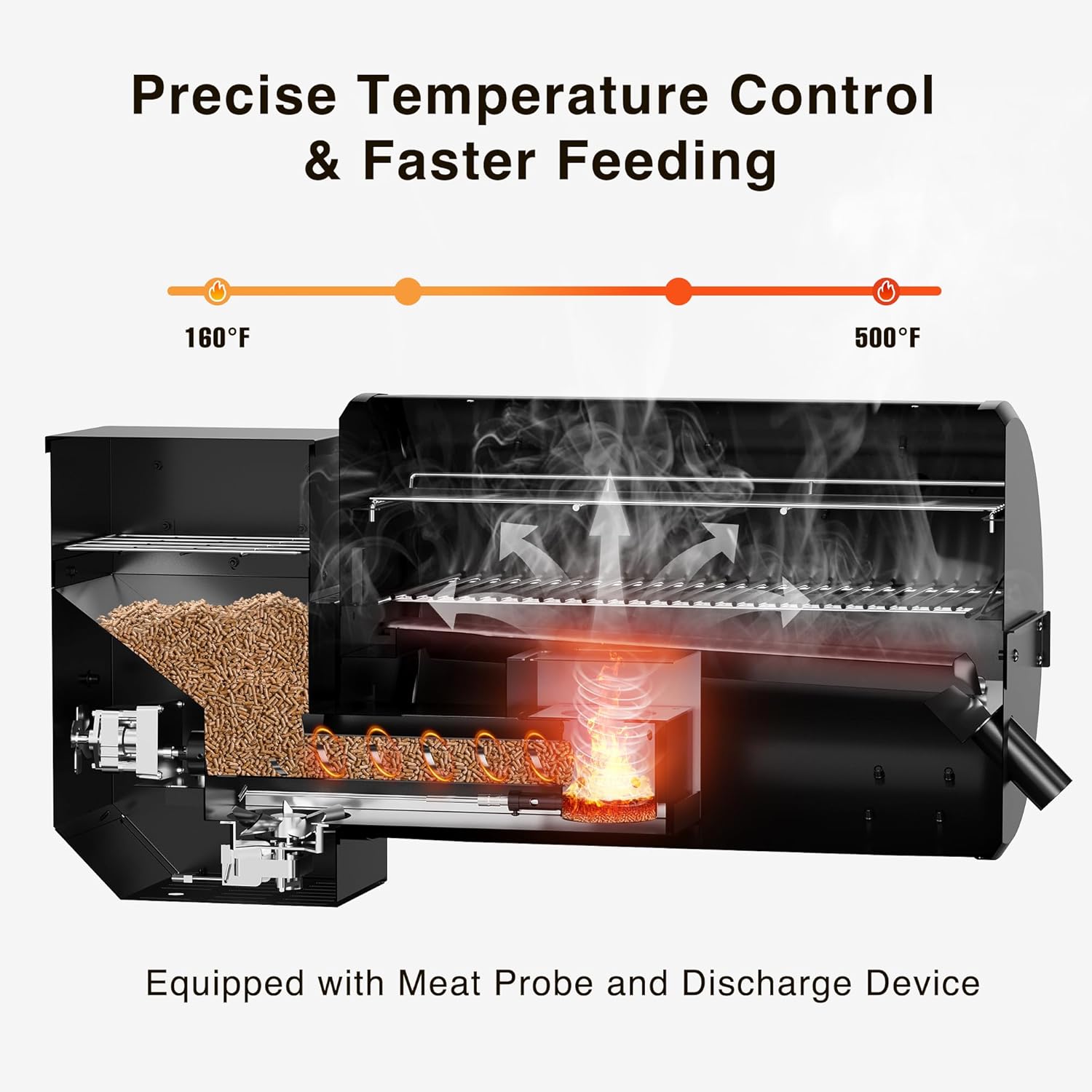
Image 7: The grease bucket and side table with hooks for convenient use and maintenance.
7.2 Pellet Storage
Store wood pellets in a dry, airtight container to prevent moisture absorption, which can affect performance.
8. Troubleshooting
If you encounter issues with your grill, consult the detailed troubleshooting section in your product manual. Common issues may include:
- Temperature Fluctuations: Check pellet levels, ensure the lid is sealed, and clean the burn pot.
- No Smoke Production: Verify pellets are feeding correctly and the igniter is functioning.
- Pellet Overfeed/Underfeed: Adjust the 'P' setting on the control panel if available, or consult the manual for calibration.
- Error Codes: Refer to your manual for explanations of specific error codes displayed on the LCD panel.
9. Specifications
| Feature | Detail |
|---|---|
| Brand | BLATOMIC |
| Model | 700A |
| Power Source | Wood Pellet |
| Color | Black |
| Outer Material | Stainless Steel |
| Item Weight | 150 Pounds |
| Product Dimensions | 52"D x 30"W x 44"H |
| Fuel Type | Wood Pellet |
| Cooking Capacity | 700 SQ IN. |
| Temperature Range | 160°F to 500°F (+/- 10 degrees) |
| UPC | 696168615257 |
10. Warranty and Support
For warranty information, please refer to the documentation included with your purchase or contact BLATOMIC customer support. The manufacturer, BLATOMIC, provides customer support for this product. Please retain your proof of purchase for any warranty claims.
Ask a question about this manual
Ask about setup, troubleshooting, compatibility, parts, safety, or missing instructions. Manuals+ will review the question and use this page’s manual context to help answer it.