
1. Introduction
Thank you for choosing the DurayLoly 55-inch Gaming Desk. This manual provides essential information for the safe assembly, operation, and maintenance of your new desk. Please read it thoroughly before beginning assembly and keep it for future reference.
This versatile desk is designed to enhance your gaming or work setup with features such as a spacious desktop, integrated LED lighting, a power and charging station, and flexible storage solutions.
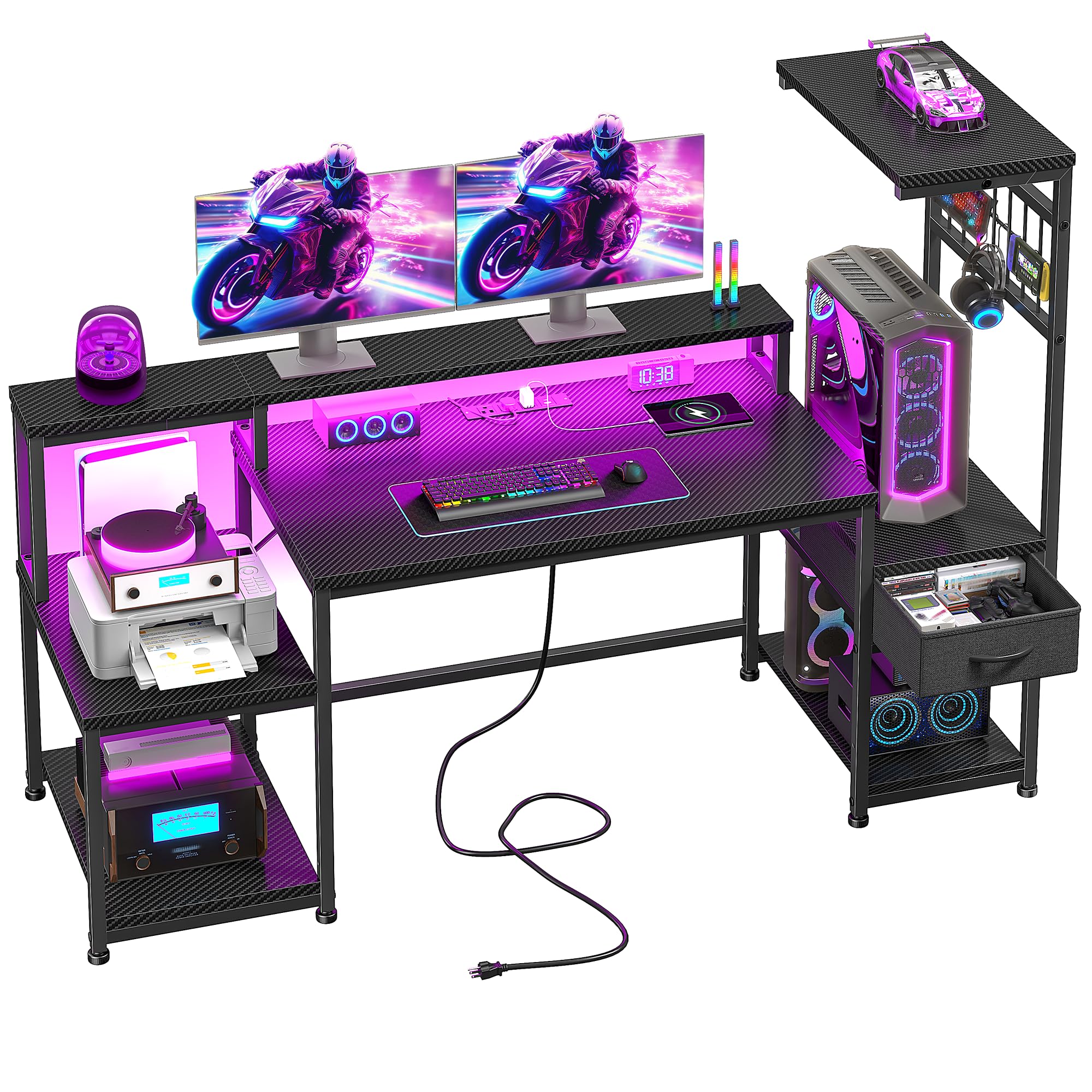
Image: The DurayLoly 55-inch Gaming Desk, showcasing its spacious design, LED lighting, and integrated features.
2. Important Safety Information
Please read and understand all safety warnings before assembly and use.
- Always assemble the desk on a stable, level surface.
- Ensure the desk is properly anchored to the wall or floor to prevent tipping, especially if heavy items are placed on upper shelves.
- Do not overload the desk, particularly the monitor stand and shelves. Refer to the weight limits in the specifications section.
- Always follow the manufacturer's instructions for proper use and maintenance of the integrated power and charging stations.
- Keep the desk and power stations away from water and other liquids to prevent electrical hazards.
- Keep small parts and packaging materials away from children and pets during assembly.
3. Package Contents
Before beginning assembly, verify that all parts listed below are present and undamaged. If any parts are missing or damaged, please contact customer support.

Image: All desk components, including wooden panels, metal frames, and hardware, laid out for inspection.
Components List:
- Desktop Panels (Main, Monitor Stand, Side Shelves)
- Metal Frame Components (Legs, Support Bars)
- Fabric Drawer(s)
- Integrated Power Strip (AC outlets, USB, Type-C)
- LED Light Strip with Remote Control
- Adjustable Non-Slip Feet
- Assembly Hardware (Screws, Allen Wrench)
- 2 Built-in Hooks
4. Setup and Assembly
Follow these steps carefully to assemble your DurayLoly Gaming Desk. It is recommended to have two people for assembly.
Step-by-Step Assembly:
- Unpack and Identify Parts: Lay out all components on a clean, soft surface to prevent scratches. Refer to the parts list to ensure everything is present.
- Assemble the Main Frame: Attach the metal legs to the main desktop panel using the provided screws. Ensure all connections are secure but do not overtighten initially.
- Install Side Shelves and Drawer Unit: Attach the side shelf frames to the main desk frame. The shelving unit is reversible and can be installed on either the left or right side according to your preference. Insert the fabric drawer into its designated slot.
- Attach Monitor Stand: Secure the monitor stand to the main desktop. This elevates your monitor for an ergonomic viewing angle.
- Install Integrated Power Station: Carefully place the power strip into the pre-drilled cutout on the desktop and secure it with the provided screws. Connect the power cable.
- Apply LED Lighting: Adhere the LED light strip to the underside of the monitor stand or desired area. Connect it to the power source.
- Attach Hooks: Install the two built-in hooks on the side frame for hanging headphones or other accessories.
- Final Tightening: Once all components are in place, carefully tighten all screws to ensure stability.
- Adjust Leveling Feet: Adjust the non-slip feet at the bottom of the desk legs to ensure the desk is stable and level on uneven floors.

Image: Diagram showing the dimensions of the desk and its various sections.
Assembly Video Guide:
Video: A short product introduction video by DurayLoly, demonstrating the desk's features and providing a visual overview of the assembly process.
5. Operating Instructions
5.1 Dynamic LED Lighting
The gaming desk features an LED strip with customizable lighting options to enhance your environment. Use the provided remote control to manage the lights.
- Colors: Choose from 20 static colors to match your mood or setup.
- Modes: Select from 20 dynamic modes for various lighting effects.
- Brightness: Adjust the brightness levels to reduce eye strain and optimize focus.
- Memory Function: The system remembers your last settings for quick ambiance shifts.

Image: The desk illuminated by its dynamic LED lighting, showcasing different color options.
5.2 Integrated Power & Charging Station
The desk includes a built-in power station for convenient access to power and charging.
- AC Outlets: 3 standard AC outlets (125V/12A) for powering monitors, computers, and other devices.
- USB Port: 1 USB-A port (5V/2A) for charging smartphones and other USB-powered devices.
- Type-C Port: 1 Type-C port (5V/2A) for charging compatible devices.
- Supports up to 5 devices simultaneously.

Image: A close-up view of the desk's integrated power strip, showing AC outlets, USB, and Type-C ports in use.
5.3 Ergonomic Monitor Stand
The elevated monitor stand promotes proper posture and reduces neck and spine strain during extended use. It also frees up valuable desktop space.

Image: An illustration demonstrating how the ergonomic monitor stand helps maintain correct posture.
5.4 Flexible Storage Solutions
The desk offers various storage options to keep your workspace organized.
- Reversible Shelving: The side shelves can be installed on either the left or right to suit your room layout.
- Fabric Drawer: Provides enclosed storage for smaller items.
- Built-in Hooks: Two hooks are available for hanging headphones, cables, or other accessories.

Image: Visual representation of the desk's storage capabilities, including the fabric drawer, shelves, and side hooks.
6. Maintenance
Regular maintenance will help prolong the life and appearance of your desk.
- Cleaning: Wipe surfaces with a soft, damp cloth. Avoid harsh chemicals or abrasive cleaners that may damage the finish.
- Dusting: Regularly dust all surfaces, including the LED strip and power outlets, to prevent buildup.
- Hardware Check: Periodically check and tighten all screws and fasteners to ensure the desk remains stable.
- Cable Management: Keep cables organized to prevent tangles and potential damage.
7. Troubleshooting
If you encounter any issues with your DurayLoly Gaming Desk, refer to the following common problems and solutions:
- Desk Wobbles:
Solution: Ensure all screws are fully tightened. Check that the adjustable non-slip feet are properly leveled on your floor. - LED Lights Not Working:
Solution: Verify that the LED strip is correctly connected to the power source. Check the remote control battery. Ensure the power outlet is functioning. - Power Outlets Not Providing Power:
Solution: Confirm the desk's main power cable is securely plugged into a working wall outlet. Check if the power strip has an on/off switch or circuit breaker that needs to be reset. - Missing or Damaged Parts:
Solution: If you discover any missing or damaged parts during assembly, do not proceed. Contact DurayLoly customer support immediately for assistance.
8. Specifications
| Feature | Detail |
|---|---|
| Brand | DurayLoly |
| Model Number | B0F8Q3RVTC |
| Product Dimensions | 19.6"D x 55"W x 51"H |
| Color | Black |
| Material | Wood (Top Material Type), Metal (Base Type) |
| Desk Design | Computer Desk |
| Special Features | LED Lights, Integrated Power Outlets (3 AC, 1 USB, 1 Type-C), Monitor Stand, 1 Drawer, 2 Reversible Shelves, 2 Hooks |
| Number of Drawers | 1 |
| Number of Shelves | 2 |
| Assembly Required | Yes |
9. Warranty and Support
Warranty Information:
DurayLoly products are manufactured to high-quality standards. This product comes with a limited warranty against defects in materials and workmanship. Please refer to the warranty card included in your package for specific terms, conditions, and duration. Keep your proof of purchase for warranty claims.
Customer Support:
For any questions, assistance with assembly, missing parts, or warranty claims, please contact DurayLoly customer support through the retailer where you purchased the product or visit the official DurayLoly brand store online.
Online Brand Store: DurayLoly Store