
Introduction
This manual provides detailed instructions for the setup, operation, and maintenance of your Edifier S300 Hi-Fi Tabletop Speaker. Please read this manual thoroughly before using the product to ensure proper functionality and to maximize your listening experience. Keep this manual for future reference.

The Edifier S300 Hi-Fi Tabletop Speaker, showcasing its elegant black walnut finish and front grille.
Important Safety Instructions
- Read these instructions carefully.
- Keep these instructions for future reference.
- Heed all warnings.
- Follow all instructions.
- Do not use this apparatus near water.
- Clean only with a dry cloth.
- Do not block any ventilation openings. Install in accordance with the manufacturer's instructions.
- Do not install near any heat sources such as radiators, heat registers, stoves, or other apparatus (including amplifiers) that produce heat.
- Protect the power cord from being walked on or pinched, particularly at plugs, convenience receptacles, and the point where they exit from the apparatus.
- Only use attachments/accessories specified by the manufacturer.
- Unplug this apparatus during lightning storms or when unused for long periods of time.
- Refer all servicing to qualified service personnel. Servicing is required when the apparatus has been damaged in any way, such as power-supply cord or plug is damaged, liquid has been spilled or objects have fallen into the apparatus, the apparatus has been exposed to rain or moisture, does not operate normally, or has been dropped.
What's in the Box
Upon unpacking, please verify that all items listed below are present and in good condition:
- S300 Speaker × 1
- Power Cable × 1
- USB Cable × 1
- 3.5mm-to-3.5mm Audio Cable × 1
- Remote Control × 1
- AAA Battery × 2
- Quick Start Guide × 1
- Important Safety Instructions × 1
An overview of all items included in the Edifier S300 package.
Product Overview
Front Panel Controls and Indicators
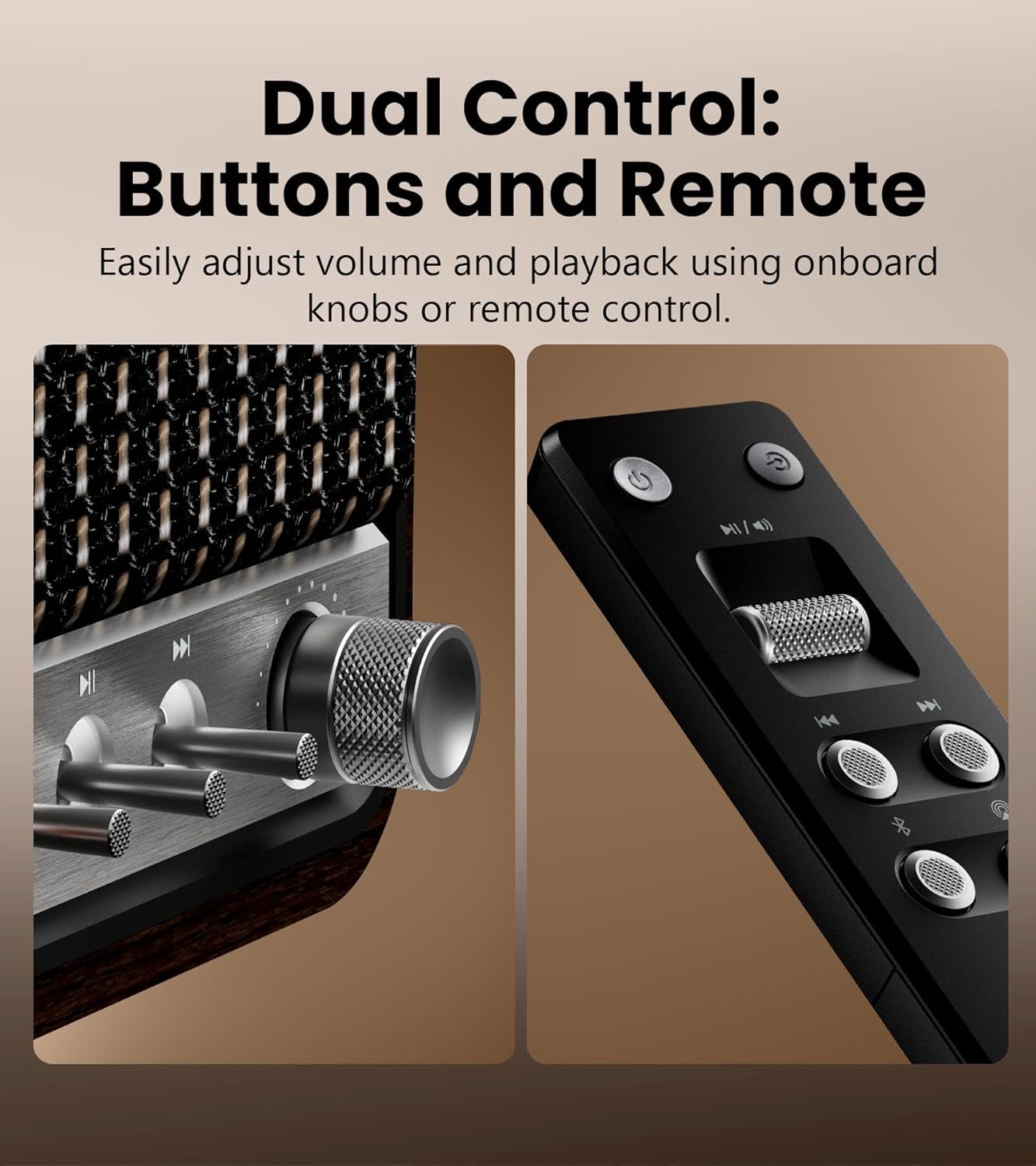
Detailed view of the speaker's control knobs and the included remote control.
- Volume/Input Selector Knob: Rotate to adjust volume. Press to cycle through input sources (Bluetooth, AirPlay, USB-C, AUX).
- Playback Controls: Buttons for Play/Pause, Previous Track, Next Track (functionality varies by input source).
- Status Indicator Light: Displays current input mode and connection status.
Rear Panel Connections

The rear panel of the Edifier S300, highlighting its various connectivity options.
- USB-C Input: For connecting to computers or other USB-C audio sources.
- AUX Input: Standard 3.5mm audio jack for connecting to analog audio devices.
- Power Input: Connect the provided power cable here.
Setup
Speaker Placement
For optimal sound performance, place the Edifier S300 on a stable, flat surface. Ensure there is adequate space around the speaker for proper ventilation. Placing the speaker near a wall can enhance bass response, but avoid placing it directly in a corner, which might lead to boomy or unclear bass.

The dimensions of the Edifier S300 speaker, useful for placement planning.
Power Connection
- Connect the power cable to the power input port on the rear of the speaker.
- Plug the other end of the power cable into a wall outlet.
- The speaker will power on automatically or can be turned on using the power button on the remote control.
Operating Instructions
Input Source Selection
The S300 supports multiple audio input sources. You can switch between them using the volume/input selector knob on the front panel or the dedicated input buttons on the remote control.
- Bluetooth: For wireless audio streaming from compatible devices.
- AirPlay 2: For seamless multi-room audio and lossless streaming from Apple devices.
- USB-C: For direct digital audio connection to computers or other USB-C sources.
- AUX: For connecting traditional analog audio devices using a 3.5mm cable.
Bluetooth Pairing

The Edifier S300 supports dual Bluetooth device pairing for convenient switching.
- Select Bluetooth input on the speaker. The status indicator will flash, indicating pairing mode.
- On your device (smartphone, tablet, computer), enable Bluetooth and search for "EDIFIER S300".
- Select "EDIFIER S300" to pair. Once connected, the indicator light will become solid.
- The S300 supports LDAC for high-resolution wireless audio on compatible Android 8.0+ devices.
- It also supports multi-device pairing, allowing two devices to be connected simultaneously.
AirPlay 2 Setup (for Apple Devices)

AirPlay 2 enables seamless multi-room audio and lossless streaming across your home.
- Ensure your S300 speaker is connected to the same Wi-Fi network as your Apple device.
- On your iOS device, open Control Center, tap the AirPlay icon, and select "EDIFIER S300".
- For multi-room audio, select multiple AirPlay 2 compatible speakers from the AirPlay menu.
- For stereo pairing, use the EDIFIER Home App to configure two S300 speakers as left and right channels.
Using the EDIFIER Home App
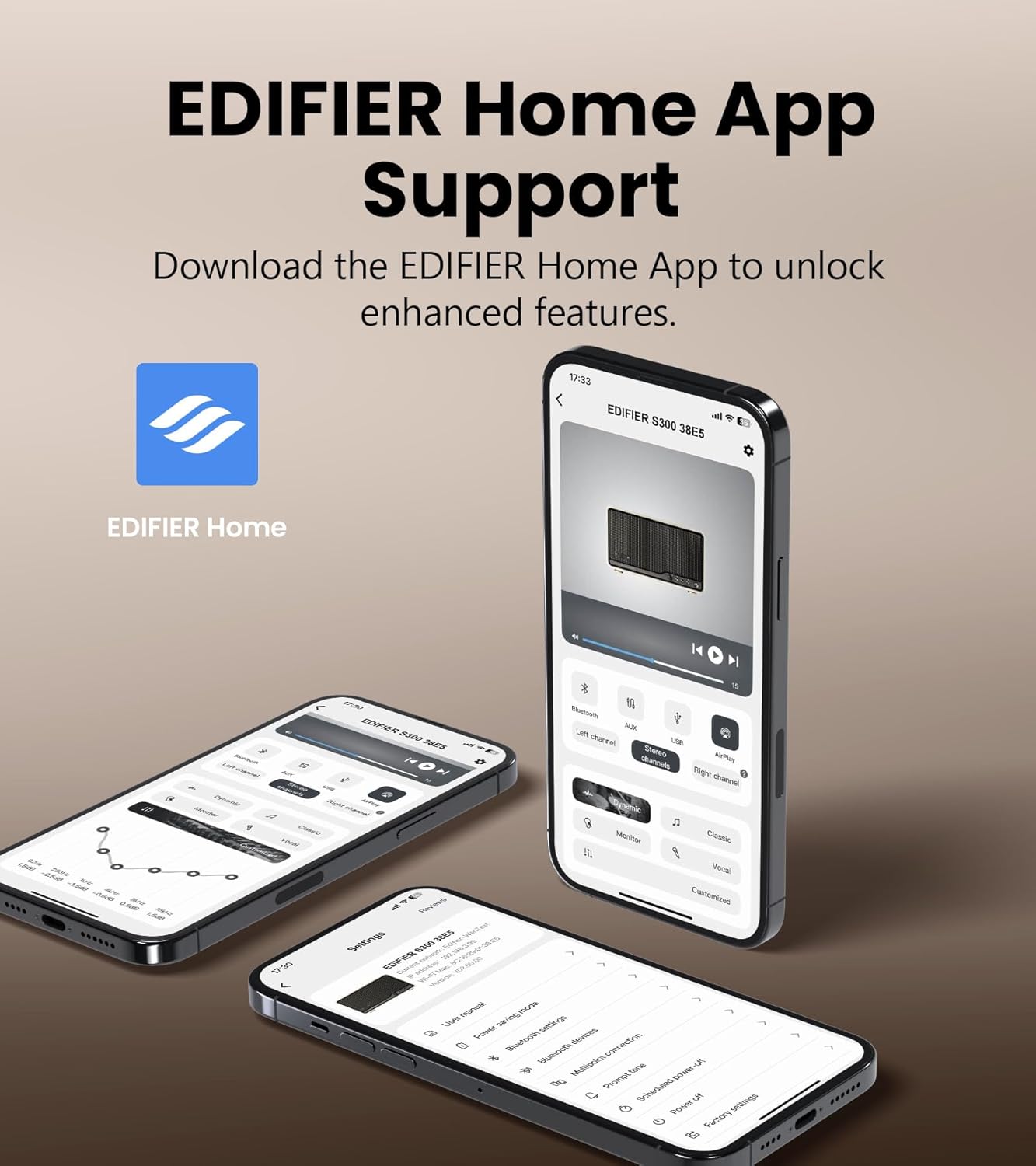
The EDIFIER Home App provides enhanced control and features for your S300 speaker.
Download the EDIFIER Home App from your device's app store to unlock enhanced features and control options for your S300 speaker. The app allows you to:
- Connect your speaker to a Wi-Fi network.
- Switch between input sources effortlessly.
- Control playback with ease.
- Customize sound effects to suit your preferences.
- Access the digital user manual anytime.
Maintenance
- Cleaning: Use a soft, dry cloth to clean the speaker's surface. Do not use liquid cleaners or aerosol sprays.
- Ventilation: Ensure the ventilation openings are not blocked to prevent overheating.
- Storage: If storing the speaker for an extended period, unplug it from the power outlet and store it in a cool, dry place.
Troubleshooting
| Problem | Possible Cause | Solution |
|---|---|---|
| No sound | Power not connected; incorrect input source selected; volume too low. | Ensure power cable is securely plugged in. Select the correct input source. Increase volume. |
| Bluetooth connection fails | Speaker not in pairing mode; device too far; interference. | Ensure speaker is in Bluetooth pairing mode. Move device closer to speaker. Avoid obstacles. Try re-pairing. |
| AirPlay 2 connection issues | Speaker and device on different Wi-Fi networks; network instability. | Verify both speaker and Apple device are on the same Wi-Fi network. Restart router and speaker. |
| Distorted sound | Volume too high; audio source quality is poor. | Reduce volume. Check audio source quality. |
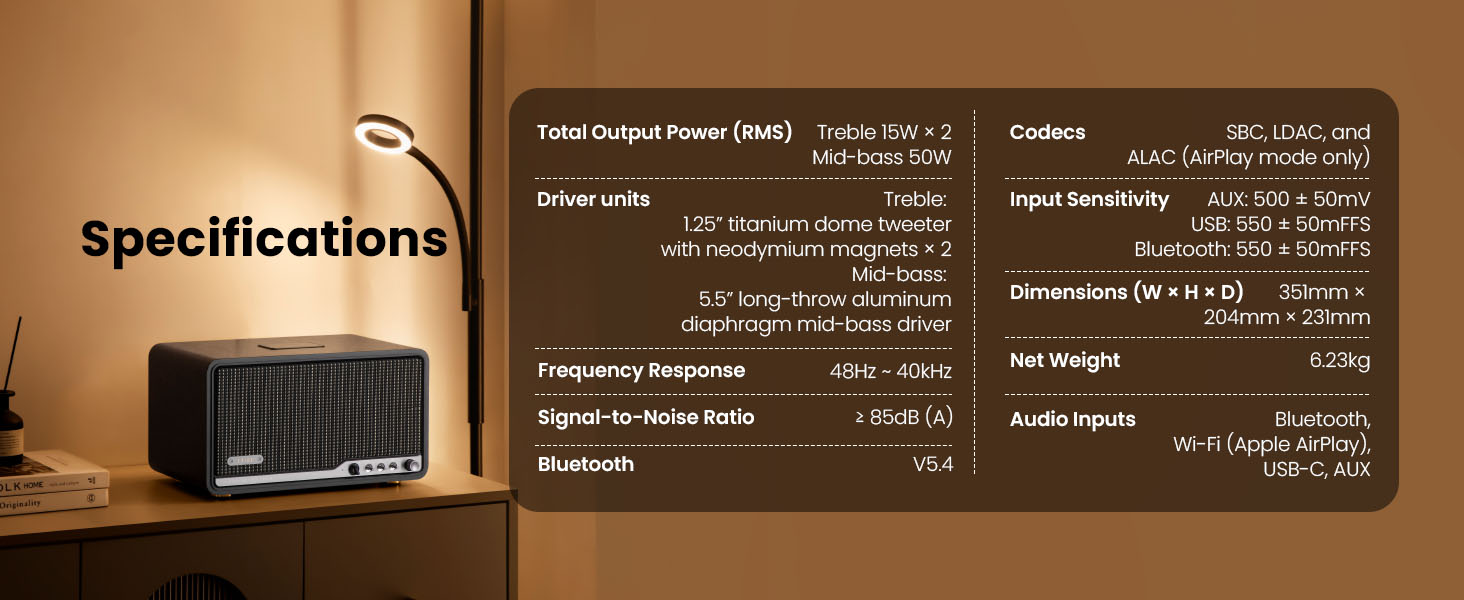
Specifications

Detailed technical specifications of the Edifier S300 speaker.
| Feature | Detail |
|---|---|
| Total Output Power (RMS) | Treble 15W × 2, Mid-bass 50W |
| Driver Units | 1.25" titanium dome tweeter with neodymium magnets × 2, 5.5" long-throw aluminum diaphragm mid-bass driver |
| Frequency Response | 48Hz ~ 40kHz |
| Signal-to-Noise Ratio | ≥ 85dB (A) |
| Bluetooth Version | V5.4 |
| Codecs | SBC, LDAC, and ALAC (AirPlay mode only) |
| Input Sensitivity | AUX: 500 ± 50mV, USB: 550 ± 50mFFS, Bluetooth: 550 ± 50mFFS |
| Dimensions (W × H × D) | 351mm × 204mm × 231mm (13.82" × 8.03" × 9.09") |
| Net Weight | 6.23kg (13.73 lbs) |
| Audio Inputs | Bluetooth, Wi-Fi (Apple AirPlay), USB-C, AUX |
Warranty and Support
Edifier products are designed and manufactured to the highest quality standards. For information regarding warranty coverage, please refer to the warranty card included in your product packaging or visit the official Edifier website.
For technical support, troubleshooting assistance, or service inquiries, please contact Edifier customer support through their official website or the contact information provided in your product documentation.
Official Edifier Website: www.edifier.com


