
1. Product Overview
This manual provides instructions for the podofo Android 13 Car Stereo, designed for specific Mercedes Benz models including W906 Sprinter, W169, W245, W639 Vito, and Viano. This unit features a 9-inch HD touchscreen, Android 13 operating system, Octa-core CPU, 2GB RAM, and 64GB ROM, ensuring smooth operation and quick response times. It supports various connectivity options and smart features to enhance your driving experience.

Image: Overview of the podofo Android 13 Car Stereo installed in a Mercedes Benz dashboard.
2. Setup and Installation
2.1 Compatibility
This car stereo head unit is compatible with Mercedes Benz W906 Sprinter, W169, W245, W639 Vito, and Viano models. It includes a Plug and Play wiring harness and is designed to retain the original factory frame.
2.2 Package Contents
Verify that all components are present in the package:
- Android Car Stereo
- GPS Antenna
- External Microphone
- HD Backup Camera
- Power Cable
- Installation Tool
- Rear Camera Input Cable
- RCA Cable
- USB Cable
- User Manual
- Radio Antenna
- Antenna Adapter
- Canbus (if applicable for your vehicle model)

Image: Diagram showing the dimensions of the car stereo and a list of included accessories.
2.3 Wiring Instructions
Refer to the wiring diagram provided with your unit and the image below for proper connection. Ensure all cables are securely connected before powering on the device.

Image: Detailed wiring diagram for the car stereo, showing connections for power, RCA, USB, rear camera, and GPS antenna.
2.4 Important Note for Optical Fiber Box
Before purchasing or installing, please check your radio line interface. If your vehicle's radio line interface is the same as the one shown in the diagram below, you will need to purchase a separate car optical fiber box. Contact customer service for guidance if you are unsure.

Image: Illustration highlighting the car optical fiber box and specific wiring interfaces that require it.
3. Operating Instructions
3.1 Initial Power On and System Overview
Upon first power-on, the system will boot to the Android 13 interface. The 9-inch HD touchscreen allows for intuitive navigation. The Octa-core CPU, 2GB RAM, and 64GB ROM ensure a responsive user experience.
3.2 Wireless CarPlay / Android Auto
The car stereo supports both wired and wireless CarPlay and Android Auto. This feature allows seamless integration with your smartphone, providing access to navigation, music, calls, and voice control directly from the car stereo display. This enhances driving safety and comfort.

Image: Display showing the Wireless CarPlay and Android Auto interface with voice command examples.
3.3 GPS Navigation and WiFi Connectivity
The unit includes a built-in GPS module, enabling both offline and online navigation. Connect to WiFi via a hotspot or local network to access online maps, stream videos, download apps from the Play Store, and utilize other internet-dependent features.

Image: Screenshots demonstrating WiFi connectivity for online content and GPS navigation with map display.
3.4 Bluetooth Hands-Free Calling and Music
Pair your smartphone via Bluetooth for hands-free calling and audio streaming. The system supports contact synchronization and displays call history, allowing you to manage communications safely while driving.

Image: User interface for Bluetooth hands-free calling and music playback.
3.5 FM RDS Radio and EQ Settings
Tune into your favorite FM radio stations with RDS support for station information. Customize your audio experience using the built-in EQ settings, which offer various presets (e.g., Pop, Rock, Jazz) and manual adjustments for sound optimization.

Image: Display showing FM radio tuning and the graphical equalizer settings.
3.6 Steering Wheel Control (SWC)
The unit supports steering wheel controls, allowing you to manage audio playback, answer calls, and navigate menus without taking your hands off the wheel. Configuration may be required in the system settings.
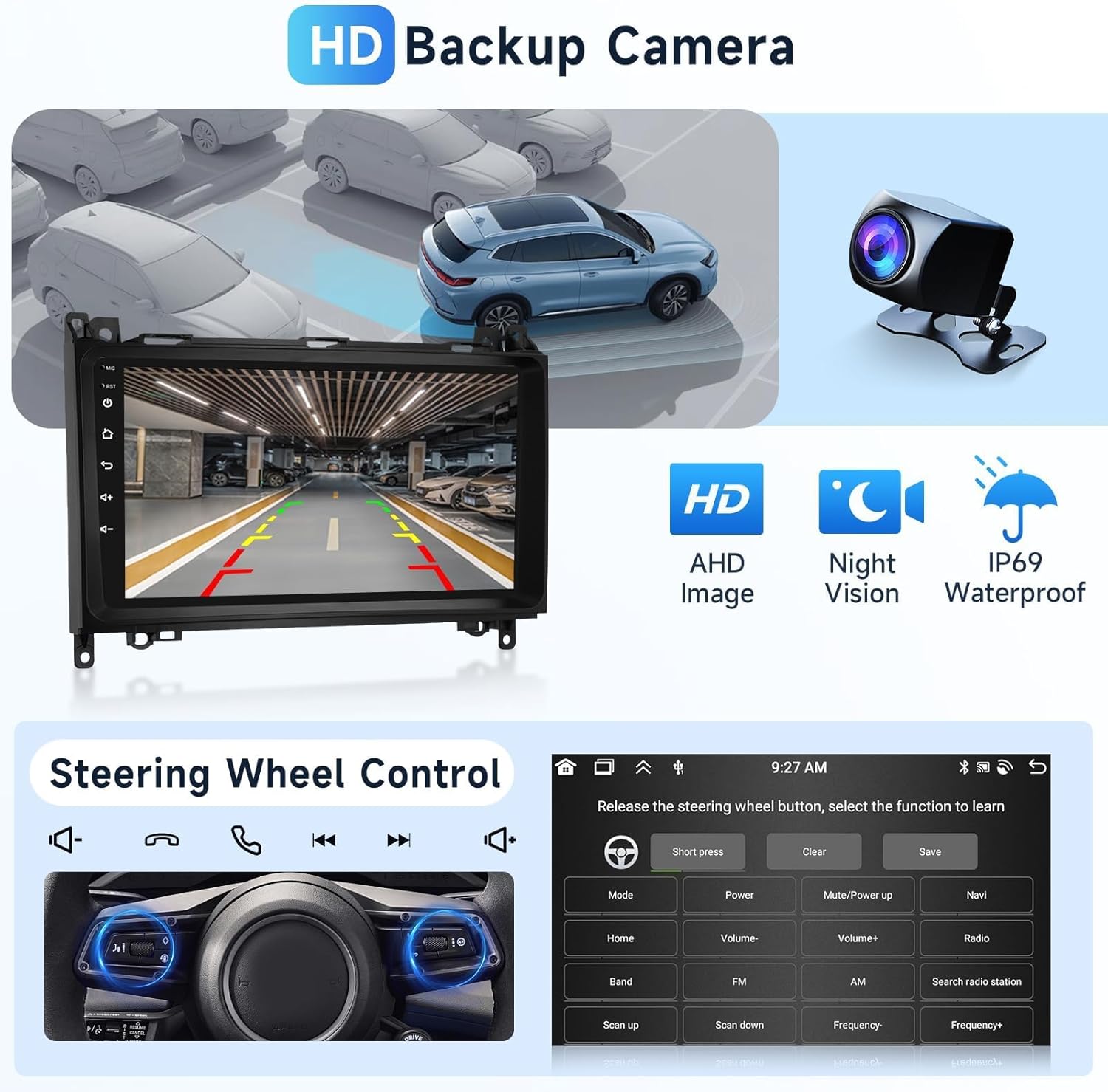
Image: Interface for programming steering wheel controls, showing options to assign functions to buttons.
3.7 HD Rear View Camera
Connect the included HD rear view camera for enhanced safety during parking and reversing. The display automatically switches to the camera feed when the vehicle is in reverse gear. The camera features AHD image quality, night vision, and IP69 waterproof rating.

Image: Screen displaying the rear view camera feed with parking guidelines, highlighting camera features like HD, night vision, and IP69 waterproof.
3.8 Mirror Link
Utilize the Mirror Link function to display your smartphone's screen directly on the car stereo. This allows you to view apps, videos, and other content from your iOS or Android device on the larger 9-inch display.

Image: Illustration of the Mirror Link feature, showing a smartphone screen mirrored onto the car stereo display.
3.9 Other Features
- Multiple UI Themes: Customize the user interface with various themes to match your preference.
- 1080p 2.5D Glass Touchscreen: Enjoy a clear and responsive display.
- Split Screen: Run two applications simultaneously on the screen for multitasking.
- Subwoofer Output: Connect an external subwoofer for enhanced bass.
- Dual USB Ports: For media playback, charging, or connecting other USB devices.

Image: Examples of different user interface themes available on the car stereo.

Image: Visuals highlighting the 1080p Full HD touchscreen, 2.5D glass, and split-screen functionality.
4. Maintenance
To ensure the longevity and optimal performance of your podofo car stereo, follow these maintenance guidelines:
- Screen Cleaning: Use a soft, lint-free cloth to gently wipe the touchscreen. Avoid abrasive cleaners or harsh chemicals that could damage the display.
- Software Updates: Periodically check for system software updates to ensure you have the latest features and bug fixes. Updates can typically be found in the system settings menu or on the manufacturer's website.
- Environmental Conditions: Avoid exposing the unit to extreme temperatures, direct sunlight for prolonged periods, or excessive moisture.
- Cable Connections: Ensure all cables remain securely connected. Loose connections can lead to intermittent functionality.
5. Troubleshooting
If you encounter issues with your car stereo, refer to the following common troubleshooting steps:
- No Power: Check all power connections. Ensure the vehicle's ignition is on. Verify the fuse in the vehicle's fuse box and the stereo's wiring harness.
- No Sound: Check speaker connections. Ensure the volume is not muted or set too low. Verify audio output settings in the system menu.
- Touchscreen Unresponsive: Try restarting the unit. If the issue persists, perform a factory reset (note: this will erase all user data).
- GPS Not Working: Ensure the GPS antenna is properly installed and has a clear view of the sky. Check GPS settings in the system menu.
- Bluetooth Connectivity Issues: Ensure Bluetooth is enabled on both the stereo and your phone. Delete previous pairings and try reconnecting.
- CarPlay/Android Auto Not Connecting: Ensure your phone is compatible and the connection method (wired/wireless) is correctly selected. Check USB cable integrity for wired connections.
If these steps do not resolve the issue, please contact podofo technical support for further assistance.
6. Specifications
| Feature | Specification |
|---|---|
| Brand | podofo |
| Model Name | podofo |
| Operating System | Android 13 |
| CPU | Octa 4 Core |
| RAM | 2GB |
| Memory Storage Capacity | 64 GB |
| Screen Size | 9 Inches |
| Display Type | LCD, Capacitive Touchscreen |
| Connectivity Technology | Bluetooth, USB, Wi-Fi |
| Special Features | Navigation, Wired/Wireless CarPlay/Android Auto, Mirror Link, Steering Wheel Control, HD Rear Camera, FM RDS Radio, EQ Settings, Subwoofer Output, Dual USB Ports, Split Screen |
| Supported Satellite Navigation System | GPS |
| Audio Output Mode | Stereo |
| Mounting Type | Dashboard Mount |
| Compatible Devices | Smartphone |
7. Warranty and Support
7.1 Warranty Information
This product comes with a 2-year warranty from the date of purchase. Please retain your proof of purchase for warranty claims.
7.2 Technical Support
Podofo offers professional technical support for any concerns regarding installation or use. If you have questions or require assistance, please reach out to us directly via Amazon. To help us assist you efficiently, please provide your car's model, year, and a photo of the center console if you have compatibility questions.

Image: Instructions on how to contact podofo technical support via Amazon.


