
1. Introduction
This manual provides essential information for the safe and effective use of the ATUUKOPC RU4S-D24 14-pin relay. It covers product overview, installation, operation, maintenance, and troubleshooting. Please read this manual thoroughly before using the product and retain it for future reference.
2. Safety Information
Observe the following safety precautions to prevent injury or damage to the product and connected equipment:
- Ensure all power is disconnected before installing, wiring, or performing maintenance on the relay.
- Only qualified personnel should perform electrical installations and wiring.
- Verify that the voltage and current ratings of the relay match the application requirements.
- Avoid exposing the relay to excessive moisture, dust, or extreme temperatures.
- Do not attempt to disassemble or modify the relay.
3. Product Overview
The ATUUKOPC RU4S-D24 is a general-purpose 14-pin relay designed for various switching applications. It operates on a 24V DC coil voltage and features multiple contact configurations, making it suitable for control circuits in automotive, industrial, and home automation systems. The 14-pin configuration allows for versatile wiring and control options.
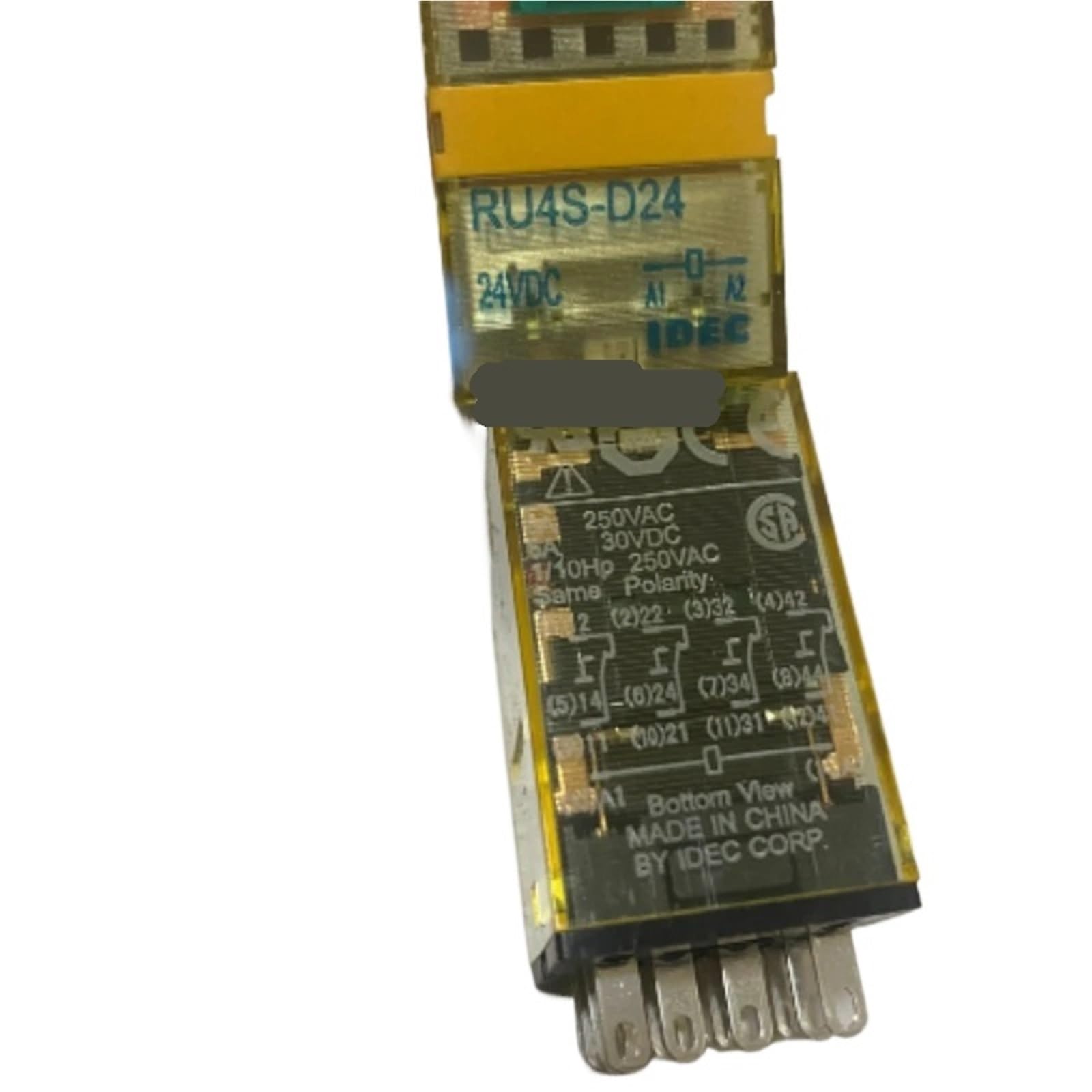
This image displays the ATUUKOPC RU4S-D24 14-pin relay, showing its compact form factor and pin configuration. The relay typically features a clear or opaque housing, allowing visibility of internal components, and clearly marked pins for electrical connections.
4. Setup and Installation
Follow these steps for proper installation of the RU4S-D24 relay:
- Power Disconnection: Ensure all power to the circuit is completely disconnected before beginning installation.
- Identify Pins: Refer to the relay's datasheet or markings to identify the coil terminals (typically A1, A2 or similar) and the contact terminals (normally open, normally closed, and common).
- Mounting: If using a compatible socket, insert the relay firmly into the socket. Ensure all pins align correctly. If direct wiring, use appropriate connectors.
- Wiring: Connect the coil terminals to the 24V DC control voltage source. Connect the load circuit to the appropriate contact terminals based on your application's requirements (e.g., common to power source, normally open to load).
- Verify Connections: Double-check all wiring for correctness and secure connections to prevent shorts or loose contacts.
- Power On: Once all connections are verified, restore power to the circuit.
5. Operating Instructions
The RU4S-D24 relay operates by energizing its coil. When the specified 24V DC voltage is applied to the coil terminals, an electromagnetic field is generated, which pulls the armature, causing the contacts to switch their state. When the coil is de-energized, the contacts return to their original state.
- Energizing the Coil: Apply 24V DC to the coil terminals. The relay will audibly click, and the contacts will switch.
- De-energizing the Coil: Remove the 24V DC from the coil terminals. The relay will click again, and the contacts will return to their resting state.
- Contact Function:
- Normally Open (NO): Contacts are open when the coil is de-energized and close when the coil is energized.
- Normally Closed (NC): Contacts are closed when the coil is de-energized and open when the coil is energized.
6. Maintenance
The ATUUKOPC RU4S-D24 relay is designed for reliable operation with minimal maintenance. However, periodic checks can help ensure longevity and performance:
- Visual Inspection: Periodically inspect the relay for any signs of physical damage, discoloration, or loose connections.
- Cleanliness: Keep the relay and its surroundings free from dust, dirt, and moisture. Use a soft, dry cloth for cleaning.
- Connection Integrity: Ensure all electrical connections remain tight and secure.
- Environmental Conditions: Confirm that the operating environment remains within the specified temperature and humidity ranges.
7. Troubleshooting
If the relay is not functioning as expected, consider the following common issues and solutions:
| Problem | Possible Cause | Solution |
|---|---|---|
| Relay does not switch (no click) | No power to coil, incorrect coil voltage, faulty coil, loose connections. | Check 24V DC supply to coil. Verify coil voltage. Inspect wiring. Replace relay if coil is faulty. |
| Load does not activate/deactivate | Incorrect contact wiring, faulty contacts, load issue. | Verify load circuit wiring. Test continuity of contacts. Check the load device independently. |
| Relay buzzes or hums | Incorrect voltage (AC instead of DC), loose armature, foreign object. | Ensure 24V DC is supplied. Inspect for physical obstructions. Replace relay if internal issue. |
| Overheating | Overcurrent through contacts, incorrect coil voltage, poor ventilation. | Ensure load current is within contact ratings. Verify coil voltage. Improve ventilation around relay. |
8. Specifications
Key specifications for the ATUUKOPC RU4S-D24 14-pin relay:
| Specification | Value |
|---|---|
| Model Number | RU4S-D24 |
| Coil Voltage | 24V DC (D24) |
| Number of Pins | 14 pins |
| Item Weight | 1.76 ounces |
| Package Dimensions | 0.39 x 0.39 x 0.39 inches |
| Manufacturer | ATUUKOPC |
9. Warranty and Support
For warranty information and technical support regarding the ATUUKOPC RU4S-D24 relay, please contact your point of purchase or the manufacturer directly. Specific warranty terms and conditions may vary based on region and retailer.