
1. Introduction
This manual provides detailed instructions for the safe and effective operation, setup, maintenance, and troubleshooting of the Generic Hermetic Compressor Analyzer, Model ZX9UEI087. This instrument is designed for testing hermetic compressors, offering capabilities for continuity and ground fault detection, locked rotor freeing, and electrical measurements.
2. Safety Information
WARNING: Always read and understand all safety instructions before operating this device. Failure to follow these instructions may result in electric shock, fire, or serious injury.
- Ensure the analyzer is connected to a properly grounded electrical outlet.
- Do not operate the device in wet conditions or with wet hands.
- Verify the correct voltage setting (120V or 240V AC) before connecting to a power source. Incorrect voltage can damage the unit and connected equipment.
- Always disconnect power to the compressor before making or breaking connections.
- Wear appropriate personal protective equipment (PPE), including safety glasses and insulated gloves, when working with electrical systems.
- Do not attempt to service the analyzer yourself. Refer all servicing to qualified personnel.
3. Product Overview and Features
The Generic Hermetic Compressor Analyzer is a versatile tool designed for diagnosing and maintaining hermetic compressors. Its key features include:
- Dual Voltage Operation: Compatible with both 120V and 240V AC power supplies.
- Continuity and Ground Fault Indication: Utilizes LED lights to clearly indicate continuity and ground faults in motor windings.
- Locked Rotor Freeing: Capable of freeing locked rotors by reversing motor action.
- Measurement Breakout Jacks: Provides convenient jacks for measuring voltage and resistance with external meters.
- Capacitor Testing: Features 3 ranges for testing AC starting capacitors up to 88301 MFD at 250V.
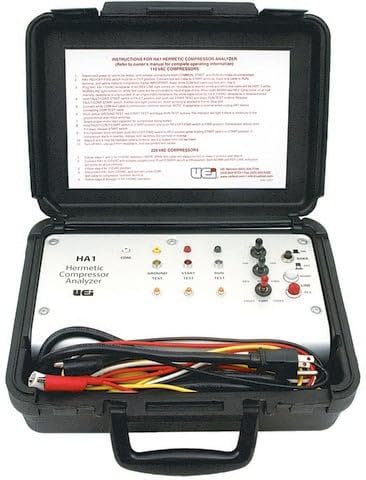
Figure 1: Front view of the Generic Hermetic Compressor Analyzer. This image displays the device's control panel, input/output terminals, and LED indicators for various diagnostic functions.
4. Setup
- Unpacking: Carefully remove the Hermetic Compressor Analyzer from its packaging. Verify all components, including the Adapter Cord ACF1, are present and undamaged.
- Power Connection:
- Identify the voltage selector switch (if present) and ensure it is set to the correct voltage (120V or 240V AC) matching your power supply.
- Connect the provided Adapter Cord ACF1 to the analyzer's power input.
- Plug the Adapter Cord ACF1 into a grounded electrical outlet.
- Initial Inspection: Before connecting to a compressor, perform a visual inspection of the analyzer and its cables for any signs of damage.
5. Operating Instructions
5.1. Continuity and Ground Fault Testing
- Ensure the compressor is disconnected from all power sources.
- Connect the analyzer's test leads to the compressor motor windings as per the diagram (refer to product-specific diagrams if available).
- Power on the analyzer.
- Observe the LED indicators:
- A lit "Continuity" LED indicates a complete circuit in the winding.
- A lit "Ground Fault" LED indicates a short circuit between the winding and the compressor casing.
- Interpret the results to diagnose winding integrity.
5.2. Freeing Locked Rotors
- Ensure the compressor is safely isolated and secured.
- Connect the analyzer to the compressor terminals according to the manufacturer's instructions for reversing motor action.
- Activate the "Locked Rotor Freeing" function on the analyzer. This typically involves a momentary application of reversed current.
- Monitor the compressor for signs of the rotor freeing. Repeat if necessary, following safety guidelines and allowing for cool-down periods.
5.3. Voltage and Resistance Measurement
- Connect an external multimeter or voltmeter to the breakout jacks on the analyzer.
- Select the appropriate measurement function (voltage or resistance) on your external meter.
- Connect the analyzer's test leads to the circuit or component you wish to measure.
- Read the values displayed on your external meter.
5.4. AC Starting Capacitor Testing
- Ensure the capacitor is fully discharged before handling.
- Connect the capacitor to the designated capacitor test terminals on the analyzer.
- Select the appropriate test range (e.g., for capacitors up to 88301 MFD at 250V).
- Initiate the test and observe the analyzer's display or indicators for the capacitor's condition.
6. Maintenance
- Cleaning: Disconnect the analyzer from power before cleaning. Use a soft, dry cloth to wipe the exterior. Do not use abrasive cleaners or solvents.
- Storage: Store the analyzer in a cool, dry place, away from direct sunlight and extreme temperatures. Keep it in its original packaging or a protective case when not in use.
- Cable Inspection: Regularly inspect all cables and connectors for wear, cuts, or damage. Replace damaged components immediately.
- Calibration: For optimal accuracy, periodic calibration by a qualified service center is recommended. Refer to the manufacturer for calibration schedules.
7. Troubleshooting
| Problem | Possible Cause | Solution |
|---|---|---|
| Device does not power on. | No power supply; incorrect voltage setting; damaged power cord. | Check power outlet; verify voltage selector switch; inspect and replace power cord if damaged. |
| LEDs for continuity/ground fault do not illuminate. | Improper connection to compressor; faulty test leads; internal fault. | Ensure secure connections; test leads for continuity; contact support if issue persists. |
| Locked rotor freeing function is ineffective. | Severe mechanical lock; incorrect connection; insufficient power. | Verify connections; ensure adequate power supply; consult a professional for severe mechanical issues. |
| Inaccurate voltage/resistance readings via breakout jacks. | Faulty external meter; poor connection to breakout jacks; analyzer malfunction. | Test external meter with known source; ensure secure connections; contact support. |
If troubleshooting steps do not resolve the issue, please contact customer support for further assistance.
8. Specifications
| Brand | Generic |
| Model Number | ZX9UEI087 |
| Manufacturer | 212 Main |
| ASIN | B0F8PK14BY |
| Voltage Operation | 120V and 240V AC |
| Capacitor Test Ranges | 3 ranges for AC starting capacitors up to 88301 MFD at 250V |
9. Warranty and Support
For warranty information, technical support, or service inquiries regarding your Generic Hermetic Compressor Analyzer, Model ZX9UEI087, please contact the manufacturer, 212 Main, or your authorized dealer. Please have your model number (ZX9UEI087) and ASIN (B0F8PK14BY) available when contacting support.
Contact information can typically be found on the product packaging or the manufacturer's official website.