
PC20
Ava Weigh PC20 Digital Portion Control Scale User Manual
Model: PC20
Product Overview
The Ava Weigh PC20 Digital Portion Control Scale is designed for precise and consistent weighing in various environments, from commercial kitchens to home use. It features a durable stainless steel platform and a clear LCD display for easy reading of measurements. This scale is ideal for portioning ingredients, monitoring food costs, and ensuring accurate serving sizes.
Key features include:
- Multiple Capacity Options: Available in 2 lb, 10 lb, and 20 lb versions to suit diverse weighing requirements.
- Clear LCD Display: Provides precise measurements with an easy-to-read digital readout.
- Compact and Durable Design: Space-saving footprint with a robust stainless steel platform.
- User-Friendly Control Panel: Dedicated Unit and Tare buttons for quick adjustments and conversions.
- Professional Quality: Engineered for consistent, accurate weighing in demanding settings.
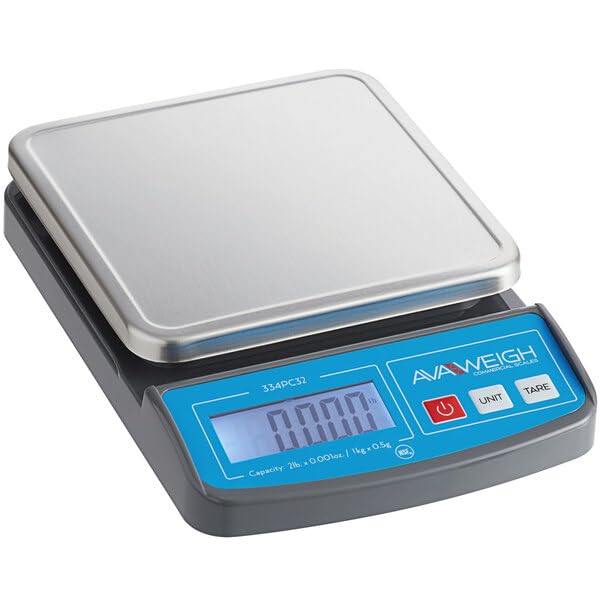
Image: The Ava Weigh PC20 Digital Portion Control Scale, featuring a rectangular stainless steel weighing platform and a blue control panel with an LCD display and three buttons: Power, Unit, and Tare. The model number "334PC32" is visible on the display panel.
Setup
- Unpacking: Carefully remove the scale and all components from the packaging. Retain packaging for future storage or transport.
- Placement: Place the scale on a flat, stable, and level surface. Avoid placing it near sources of vibration, extreme temperature changes, or direct sunlight, which can affect accuracy.
- Powering On:
- If your model uses batteries (not included), open the battery compartment on the underside of the scale and insert the required batteries, observing polarity.
- If your model uses an AC adapter (not included), plug the adapter into the scale's power input and then into a suitable electrical outlet.
- Initial Calibration Check: After powering on, the display should show "0.000". If not, press the Power button to turn it off and then on again.
Operating Instructions
Power On/Off
- To turn the scale ON, press the Power button. The display will show "0.000" when ready.
- To turn the scale OFF, press and hold the Power button for a few seconds until the display turns off.
Unit Conversion
- To change the weighing unit (e.g., lb, oz, kg, g), press the UNIT button.
- Each press will cycle through the available units. Select the desired unit before weighing.
Tare Function
The Tare function allows you to subtract the weight of a container or previous ingredients, so you only measure the net weight of the new item.
- Place an empty container on the weighing platform. The display will show its weight.
- Press the TARE button. The display will reset to "0.000".
- Add the item you wish to weigh into the container. The display will now show only the weight of the added item.
- To clear the Tare function, remove all items from the platform. The display will show a negative value equal to the tared weight. Press the TARE button again to return to "0.000".
Weighing Procedure
- Ensure the scale is on a stable surface and displaying "0.000".
- If using a container, perform the Tare function as described above.
- Gently place the item(s) to be weighed onto the center of the stainless steel platform.
- Read the stable weight displayed on the LCD.
- Remove the item(s) from the platform.
Maintenance
- Cleaning: Wipe the scale's stainless steel platform and body with a soft, damp cloth. For stubborn stains, a mild detergent can be used. Do not use abrasive cleaners, solvents, or immerse the scale in water. Ensure the scale is dry before storage or next use.
- Storage: Store the scale in a clean, dry place away from extreme temperatures and humidity. If storing for an extended period, remove batteries to prevent leakage.
- Handling: Handle the scale with care. Avoid dropping it or subjecting it to sudden impacts, as this can damage the internal sensors.
Troubleshooting
| Problem | Possible Cause | Solution |
|---|---|---|
| Scale does not turn on. | No power; batteries dead or incorrectly installed; AC adapter not connected. | Check battery installation/replace batteries. Ensure AC adapter is securely plugged in (if applicable). |
| Inaccurate readings. | Scale not on a level surface; excessive vibration; overloaded; damaged sensor. | Place scale on a firm, level surface. Avoid vibrations. Do not exceed maximum capacity. If problem persists, contact support. |
| Display shows "Err" or "O-Ld". | Scale is overloaded. | Remove excess weight immediately. Ensure weight is within the scale's capacity. |
| Display shows "Lo". | Low battery power. | Replace batteries. |
Specifications
| Feature | Detail |
|---|---|
| Model | PC20 |
| Brand | Generic (Avaweigh) |
| Capacity Options | 2 lb, 10 lb, 20 lb (depending on variant) |
| Display Type | LCD |
| Platform Material | Stainless Steel |
| Special Features | Unit Conversion, Tare Function |
| Recommended Uses | Restaurant, Food Service, Portion Control, Bakery, Commercial Kitchen |
| Package Dimensions | 12 x 10 x 3.5 inches |
| Package Weight | 2.5 Pounds |
Warranty and Support
For information regarding warranty coverage, please refer to the documentation included with your purchase or contact the manufacturer directly. As this product is listed under the "Generic" brand, specific warranty details may vary.
If you encounter any issues not covered in the troubleshooting section or require further assistance, please contact the seller or the manufacturer, Avaweigh, for support. Provide your model number (PC20) and a detailed description of the issue when seeking assistance.
Related Documents - PC20
 |
Epson TM-P20 User's Manual: Setup, Operation, and Safety A comprehensive user's manual for the Epson TM-P20 mobile printer, detailing setup procedures, basic operation, safety precautions, troubleshooting steps, product specifications, and available consumables. |
 |
OSG HY-PRO® Shrink Fit System: Carbide Extensions Catalog Explore the HY-PRO® Shrink Fit System by OSG, featuring high-precision carbide extensions designed for increased rigidity and reach. This catalog details various models, specifications, tool insertion/removal, features, and care instructions for optimal performance in machining applications. |
 |
Panasonic and Technics Product Model Catalog A comprehensive catalog of Panasonic and Technics product model numbers, covering a wide range of audio and video electronics manufactured by the company. |
 |
AvaTek PC20 20 lb. Compact Digital Portion Control Scale | NSF Listed Discover the AvaTek PC20, a 20 lb. capacity compact digital portion control scale. Features durable ABS, easy-clean stainless steel platform, LCD display, and NSF certification. Ideal for food service. |
 |
Groov-e Product Collection 2025: Stylish Tech for Everyday Life Explore the latest Groov-e Product Collection 2025, featuring a wide range of stylish and reliable consumer electronics including soundbars, headphones, speakers, chargers, accessories, and more. Discover high-quality tech for modern lifestyles. |
 |
EC Certificate for Kaz Europe Sàrl - Vital Parameter Monitoring Medical Devices Official EC Certificate confirming that Kaz Europe Sàrl's quality assurance system meets the requirements of Council Directive 93/42/EEC for vital parameter monitoring medical devices, including products from Braun and Vicks. |