
1. Introduction
Thank you for purchasing the CollaredEagle Pink 43-inch Vanity Desk. This manual provides essential information for the safe assembly, operation, and maintenance of your new vanity desk. Please read these instructions carefully before beginning assembly and retain them for future reference.
This vanity desk features a large mirror with adjustable lighting, multiple storage drawers including two with RGB lighting, a built-in power outlet, and a comfortable cushioned stool, designed to enhance your daily routine.

Image 1.1: The CollaredEagle Pink 43-inch Vanity Desk, showcasing its mirror, drawers, and included stool.
2. Safety Information
Please read and understand all safety warnings before assembly and use.
- Always unplug the vanity before assembly or disassembly.
- Be cautious of sharp edges and pinch points during assembly.
- Do not exceed the weight limit of the vanity top.
- Keep electrical components away from water.
- Always supervise children around the vanity.
- Ensure all connections are secure before use.
- Do not place hot items directly on the surface without protection.
3. Setup and Assembly
The CollaredEagle Vanity Desk is designed for straightforward assembly. Detailed instructions and all necessary tools are included in the package. Please follow these guidelines for a smooth setup process:
- Unpack and Organize: Carefully unpack all components. It is recommended to separate and group similar parts (e.g., screws, panels) to make them easier to find during assembly.
- Review Instructions: Before starting, thoroughly read the provided assembly instructions step-by-step. Familiarize yourself with the diagrams and part labels.
- Follow Numbered Steps: Assemble the vanity by following the numbered steps in the instruction manual precisely. Do not skip steps or attempt to force parts together.
- Secure Connections: Ensure all screws, bolts, and dowel pins are securely fastened. Avoid over-tightening to prevent damage to the engineered wood.
- Electrical Connections: Once the main structure is assembled, connect the mirror lights and the power outlet unit according to the instructions. Ensure the vanity is unplugged during this step.

Image 3.1: An overview of the vanity desk's components, including drawers, tempered glass top, LED light mirror, and soft stool.

Image 3.2: Detailed dimensions of the vanity desk, mirror, and stool for placement planning.
4. Operating Instructions
4.1. Mirror Lighting
The vanity mirror is equipped with 11 LED light bulbs offering three color modes and adjustable brightness.
- Power On/Off: Touch the designated switch on the mirror frame to turn the lights on or off.
- Change Color Mode: Briefly touch the switch to cycle through the three lighting modes: Cold White, Warm White, and Warm Yellow.
- Adjust Brightness: Press and hold the switch to adjust the brightness level. Release when the desired brightness is achieved.

Image 4.1: Illustration of the three adjustable color lighting modes for the mirror.
4.2. RGB Drawers
The two RGB drawers feature adjustable light strips with over 60,000 colors, dynamic modes, music sync, and mic mode, controllable via an app or remote.
- Power On/Off: Use the provided remote control or the dedicated mobile application to turn the RGB lights on or off.
- Color Selection: Select from over 60,000 colors using the app or remote.
- Mode Selection: Choose between dynamic modes, music synchronization, or mic mode for interactive lighting effects.
- Brightness Adjustment: Adjust the brightness of the RGB lights via the app or remote control.
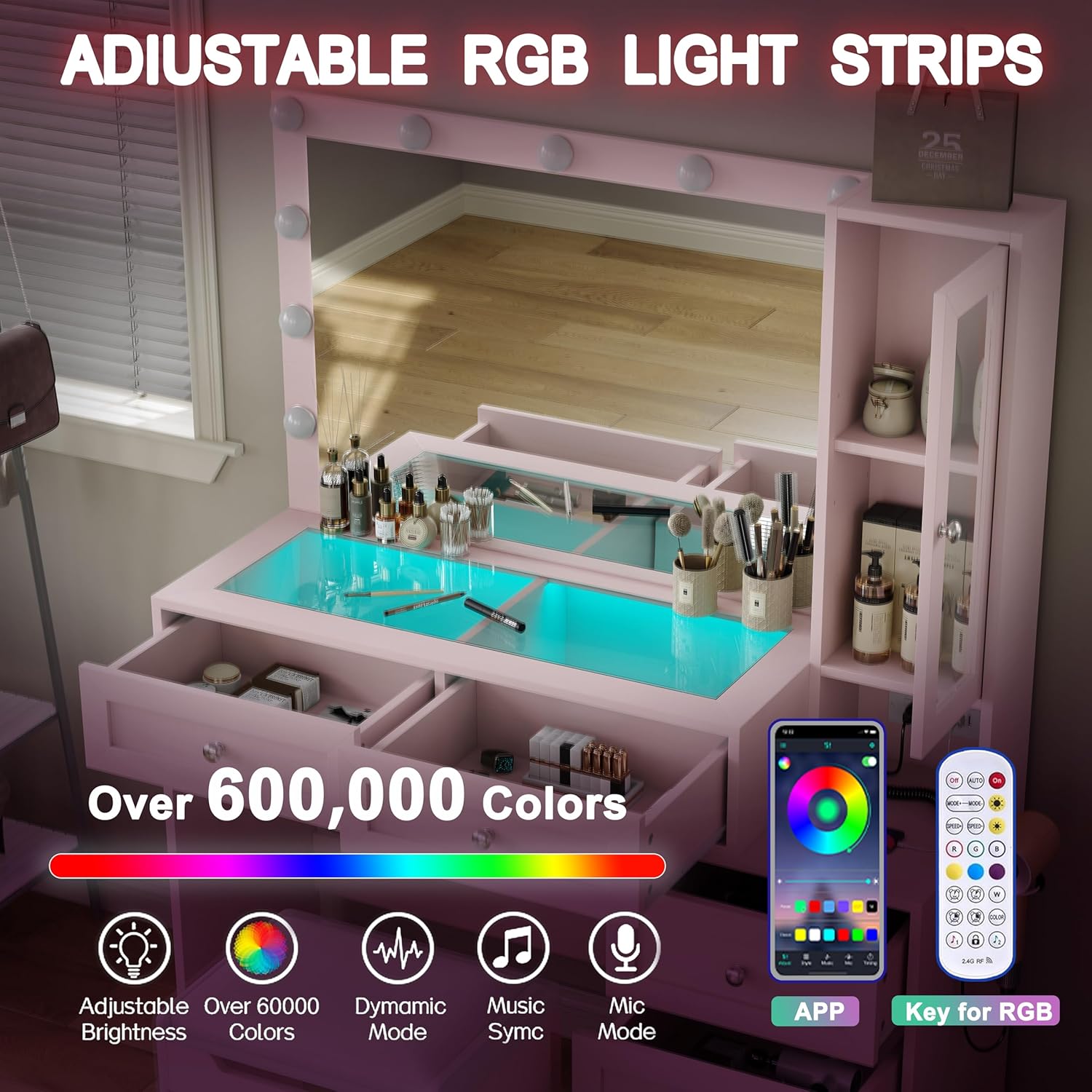
Image 4.2: The RGB light strips within the drawers, demonstrating control options via app and remote.
4.3. Built-in Charging Station
The vanity desk includes a built-in charging station for convenience.
- AC Outlets: Two standard 125V/25A AC outlets are available for powering devices like hair dryers or curling irons.
- USB Ports: One 5V/2A USB-A port and one 5V/2A Type-C port are provided for charging mobile phones, tablets, and other electronic devices.
- Usage: Simply plug your devices into the appropriate ports. Ensure the vanity is connected to a power source.
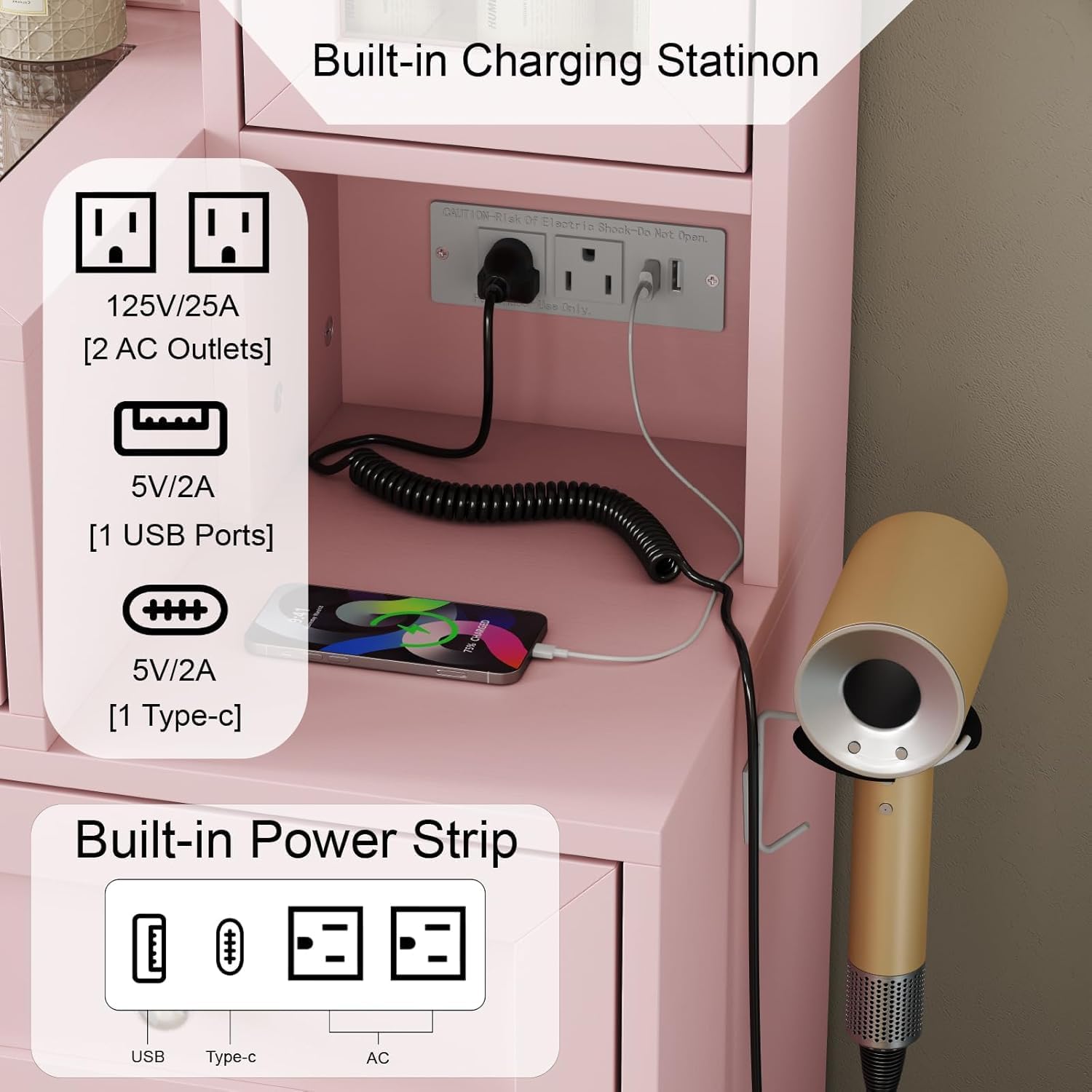
Image 4.3: A detailed view of the integrated power strip, featuring AC, USB, and Type-C charging options.
5. Maintenance
Proper care and maintenance will ensure the longevity and appearance of your vanity desk.
- Cleaning Surfaces: Wipe all surfaces with a soft, damp cloth. Avoid abrasive cleaners or harsh chemicals that may damage the finish.
- Mirror Cleaning: Use a glass cleaner specifically designed for mirrors and a lint-free cloth to prevent streaks.
- Dusting: Regularly dust the vanity with a dry, soft cloth to prevent buildup.
- Spills: Clean up spills immediately to prevent staining or damage to the wood.
- Electrical Components: Ensure all electrical connections are dry and free from dust. Do not spray liquids directly onto the power outlet or light fixtures.
- Tighten Fasteners: Periodically check and tighten any loose screws or fasteners to maintain stability.
6. Troubleshooting
If you encounter any issues with your vanity desk, refer to the following common problems and solutions:
| Problem | Possible Cause | Solution |
|---|---|---|
| Mirror lights not turning on | Power cord unplugged; faulty bulb; loose connection; power outage. | Ensure power cord is securely plugged in. Check if the outlet has power. Verify all light bulb connections. Replace faulty bulbs if necessary. |
| RGB drawer lights not working | RGB strip unplugged; remote battery dead; app connection issue. | Check the power connection for the RGB strips. Replace remote batteries. Re-pair the app with the RGB controller. |
| Charging station not providing power | Vanity unplugged; circuit breaker tripped; device cable faulty. | Ensure the vanity is plugged into a live outlet. Check your home's circuit breaker. Try a different charging cable or device. |
| Drawers are stiff or difficult to open/close | Misaligned drawer slides; debris in slides; over-tightened screws. | Check drawer slide alignment and clear any obstructions. Loosen screws slightly if they are too tight. |
| Vanity feels wobbly | Loose fasteners; uneven floor. | Tighten all assembly fasteners. Use furniture pads or shims under legs to level the vanity on uneven surfaces. |
7. Specifications
| Feature | Detail |
|---|---|
| Model Number | VD001-PK-GLS |
| Brand | CollaredEagle |
| Color | Pink |
| Material | Engineered Wood |
| Product Dimensions (D x W x H) | 31.49" x 31.49" x 53.1" |
| Item Weight | 88 pounds |
| Assembly Required | Yes |
| Mirror Lights | 11 LED bulbs, 3 color modes, brightness adjustable |
| RGB Drawers | 2 drawers with adjustable RGB light strips (60,000+ colors, dynamic modes, music sync, mic mode) |
| Charging Station | 2 AC outlets (125V/25A), 1 USB-A port (5V/2A), 1 Type-C port (5V/2A) |
| Stool Dimensions | 18.1" x 11.8" x 15.7" (L x W x H) |
8. Warranty and Support
8.1. Warranty Information
CollaredEagle products are manufactured to high-quality standards. For specific warranty details regarding your vanity desk, please refer to the warranty card included in your product packaging or contact CollaredEagle customer support directly. Keep your purchase receipt as proof of purchase for any warranty claims.
8.2. Customer Support
If you have any questions, require assistance with assembly, or encounter any issues not covered in this manual, please contact CollaredEagle customer support. Our team is available to provide guidance and resolve any concerns you may have.
- Manufacturer: CollaredEagle
- Contact Information: Please refer to the contact details provided in your product packaging or visit the official CollaredEagle website for support options.


