
Introduction
Thank you for choosing the Generic Power Recliner RH329. This manual provides essential information for the safe assembly, operation, maintenance, and troubleshooting of your new power recliner. Please read this manual thoroughly before use and retain it for future reference.

Front view of the Generic Power Recliner RH329, showcasing its design and upholstery.
Safety Instructions
- Ensure all components are securely assembled before use.
- Keep children and pets away from the recliner's moving parts during operation.
- Do not place hands or feet near the reclining mechanism to prevent injury.
- Avoid spilling liquids on the control panel or electrical components.
- Unplug the recliner from the power outlet before cleaning or maintenance.
- Do not attempt to repair the electrical components yourself. Contact qualified service personnel.
- Ensure the power cord is not pinched or damaged.
Package Contents
Please check that all the following components are included in your package:
- Recliner Base
- Backrest
- Power Adapter and Cord
- Remote Control
- Phone Holder Arm
- User Manual (this document)
Setup and Assembly
Follow these steps to assemble your power recliner:
- Unpack Components: Carefully remove all parts from the packaging. Place them on a soft, clean surface to prevent scratches.
- Attach Backrest: Align the metal brackets on the backrest with the corresponding slots on the recliner base. Slide the backrest down firmly until it clicks into place. Ensure it is securely locked.
- Connect Power: Locate the power cord from the recliner base and connect it to the power adapter. Plug the adapter into a standard wall outlet.
- Attach Phone Holder: Insert the flexible arm of the phone holder into the designated port on the side of the recliner. Adjust its position as desired.

Angled view of the recliner, highlighting the side pocket and the attachment point for the phone holder.
Operating Instructions
Power Reclining Function
The recliner features an electric motor for smooth and quiet reclining. Use the buttons located on the side panel or the remote control to adjust the position.
- Press the recline button (often an arrow pointing backward or a chair icon) to recline the chair.
- Press the upright button (often an arrow pointing forward or a chair icon) to return the chair to its upright position.
- You can stop the recliner at any desired angle up to 139 degrees by releasing the button.
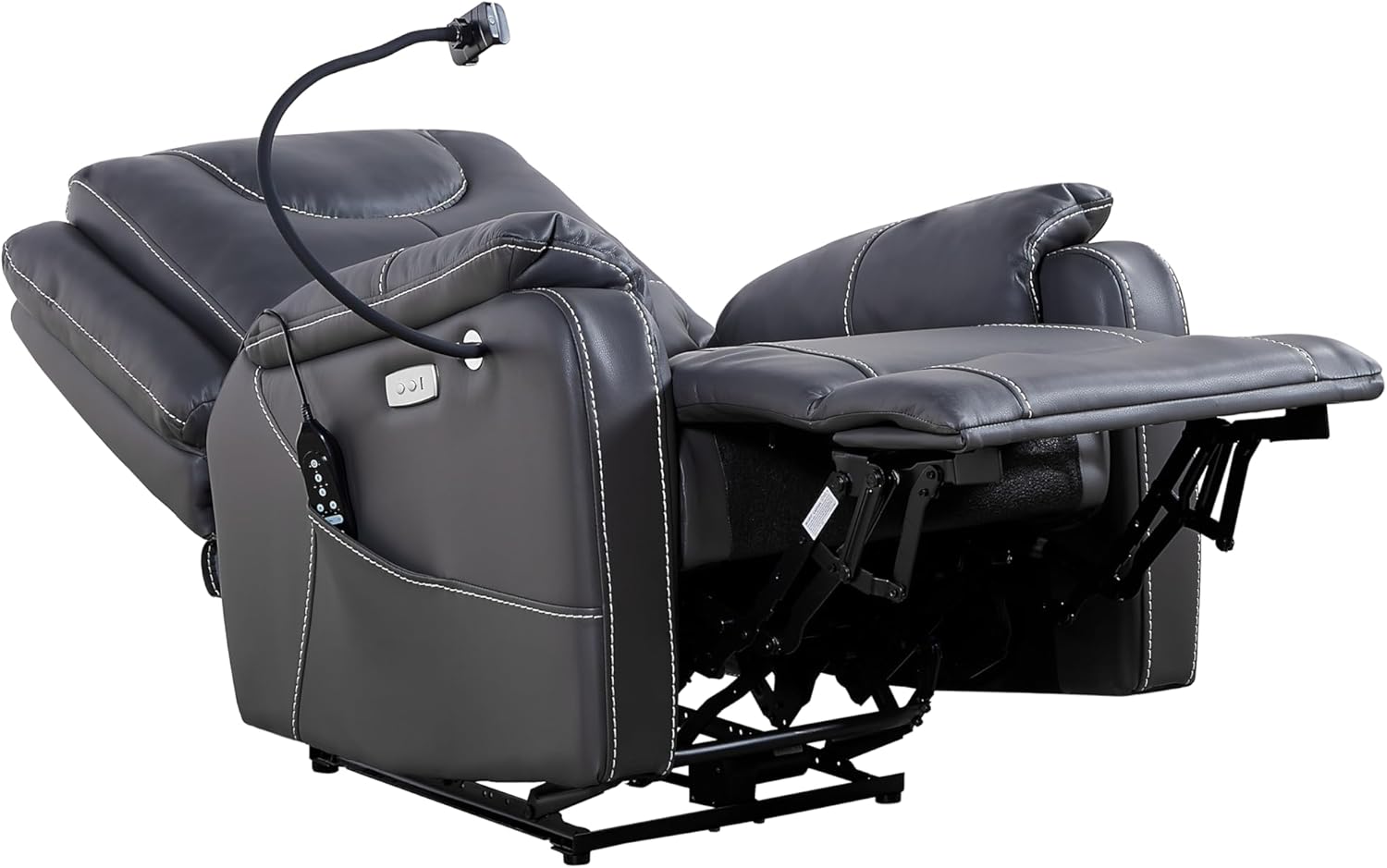
The recliner in its fully reclined position, demonstrating the extended footrest.
Massage and Heating Functions
The recliner is equipped with 8 vibrating massage points and 1 lumbar heating point, controlled via the remote.

Detailed view of the remote control, illustrating the various buttons for massage, heat, and timer functions.
- Power On/Off: Press the Power button (⑁) on the remote to activate or deactivate the massage and heating functions.
- Massage Zones: Use the BACK, LEG, THIGH, and LUMBAR buttons to select specific massage areas.
- Massage Modes: The M1, M2, M3 buttons typically cycle through different massage modes (e.g., pulse, wave, normal).
- Massage Intensity: The H (High), M (Medium), L (Low) buttons adjust the intensity of the vibration massage.
- Heating Function: Press the Heat button (☼) to turn on the lumbar heating. Press again to turn off.
- Timer: Use the 15, 30, 60 minute buttons to set an automatic shut-off timer for the massage and heating functions.
USB Charging Ports
The recliner includes USB charging ports for convenience.
- Locate the USB ports on the side control panel of the recliner.
- Plug your USB charging cable into the port to charge compatible devices such as smartphones or tablets.

Close-up of the integrated USB charging ports and reclining control buttons on the side panel.
Phone Holder
The flexible phone holder can be adjusted to your preferred viewing angle.
- Gently bend the flexible arm to position your phone for optimal viewing.
- Ensure your device is securely held in the clamp before releasing.
Maintenance
- Cleaning: Wipe the leather upholstery with a soft, damp cloth. For stubborn stains, use a mild leather cleaner. Avoid harsh chemicals or abrasive cleaners.
- Mechanism: Periodically check all bolts and screws to ensure they are tight. Do not lubricate the reclining mechanism unless specifically instructed by the manufacturer.
- Power Cord: Inspect the power cord regularly for any signs of damage. If damaged, discontinue use and contact customer support.
Troubleshooting
| Problem | Possible Cause | Solution |
|---|---|---|
| Recliner does not operate. | No power supply; loose connection. | Ensure the power cord is securely plugged into the wall outlet and the recliner. Check the wall outlet with another device. |
| Massage/Heating not working. | Remote control not powered on; loose connection. | Press the power button on the remote. Ensure the recliner is powered on. |
| Unusual noise during reclining. | Loose hardware; obstruction in mechanism. | Check for any obstructions under or around the recliner. Ensure all assembly bolts are tight. |
| USB ports not charging. | Recliner not powered; faulty cable/device. | Ensure the recliner is plugged in and powered on. Try a different USB cable or device to rule out issues with your accessories. |
Specifications
| Feature | Detail |
|---|---|
| Brand | Generic |
| Model | RH329 |
| Color | Black |
| Material | Leather |
| Product Dimensions (D x W x H) | 34.25" x 30.31" x 41.34" |
| Recline Angle | Up to 139 degrees |
| Massage Points | 8 vibrating points |
| Heating Points | 1 lumbar heating point |
| Motor Type | Okin motor |
| Additional Features | USB Charge Ports, Side Pockets, Phone Holder |
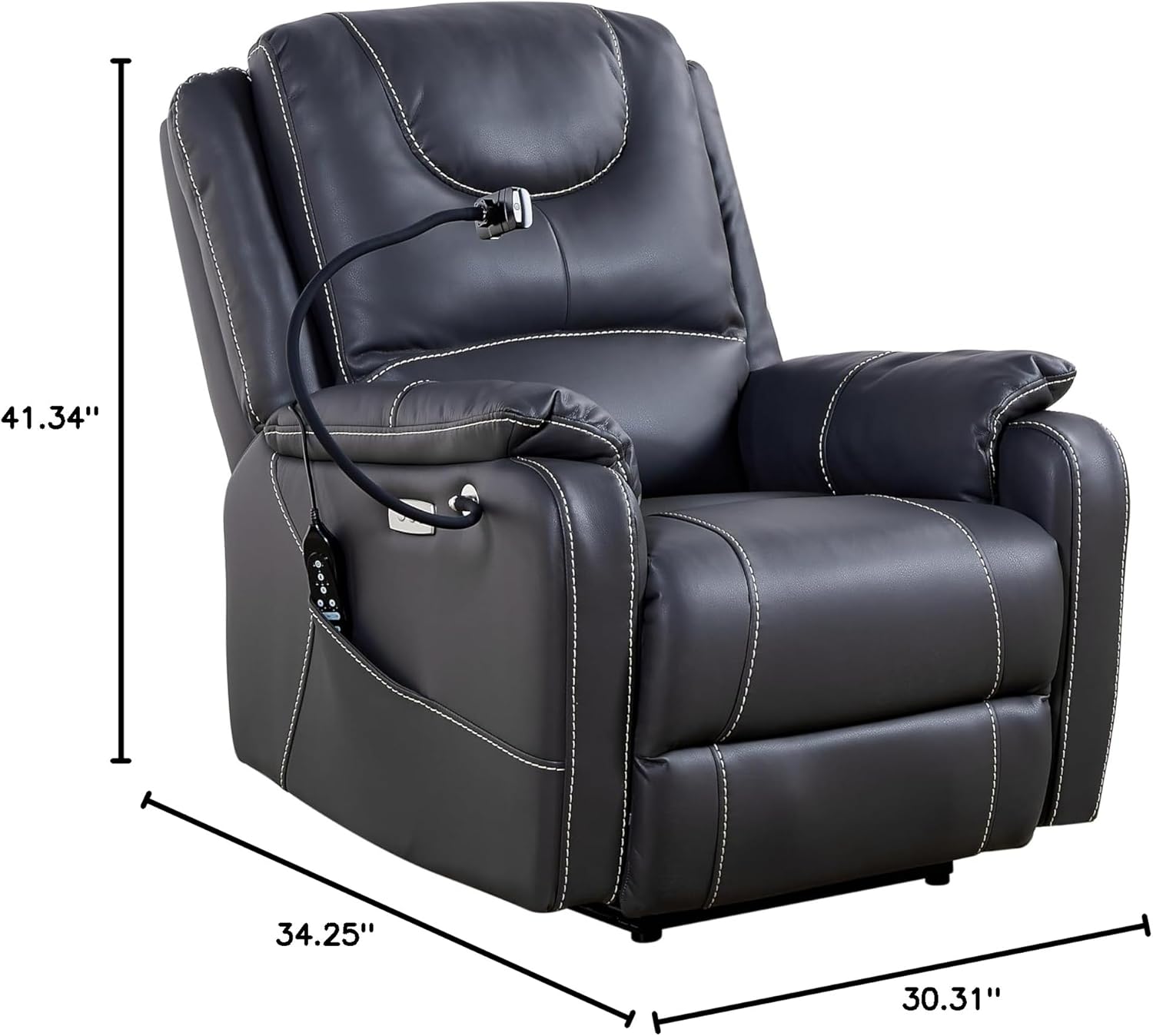
Dimensional overview of the recliner, indicating its height, depth, and width.
Warranty and Support
This product comes with a standard manufacturer's warranty. Please refer to the warranty card included in your package for specific terms and conditions. For technical support, replacement parts, or warranty claims, please contact the retailer or manufacturer directly.
For further assistance, please visit the product page or contact customer service.