
1. Introduction
This manual provides essential instructions for the setup, operation, and maintenance of your LG S45TR Soundbar System. Please read this manual thoroughly before using the product to ensure proper usage and to maximize your audio experience. Keep this manual for future reference.
2. Safety Information
Always follow basic safety precautions when using this product to reduce the risk of fire, electric shock, and injury. Do not expose the unit to rain or moisture. Do not open the casing; refer all servicing to qualified personnel. Ensure proper ventilation and avoid blocking any ventilation openings. Use only attachments/accessories specified by the manufacturer.
3. Package Contents
Verify that all components are present in the package:
- LG S45TR Soundbar Unit
- Wireless Subwoofer
- Two Wireless Rear Speakers
- Remote Control (with batteries)
- Power Cords
- HDMI Cable
- Wall Mount Bracket (optional, check package)
- User Manual (this document)

Image 3.1: Overview of the LG S45TR Soundbar system, showing the main soundbar unit, the wireless subwoofer, and the two wireless rear speakers.
4. Setup
4.1 Physical Connections
Connect the soundbar to your television using the appropriate cables. For optimal audio quality and control, HDMI ARC is recommended.
- HDMI (ARC) Connection: Connect one end of the HDMI cable to the HDMI (ARC) port on the soundbar and the other end to the HDMI (ARC) port on your TV. This allows audio to be sent from the TV to the soundbar and enables control of the soundbar using your TV remote.
- Optical Connection: If your TV does not have an HDMI (ARC) port, use an optical cable to connect the OPTICAL IN port on the soundbar to the optical digital output on your TV.
- USB Connection: For playing audio files from a USB storage device, insert the USB device into the USB port on the soundbar.
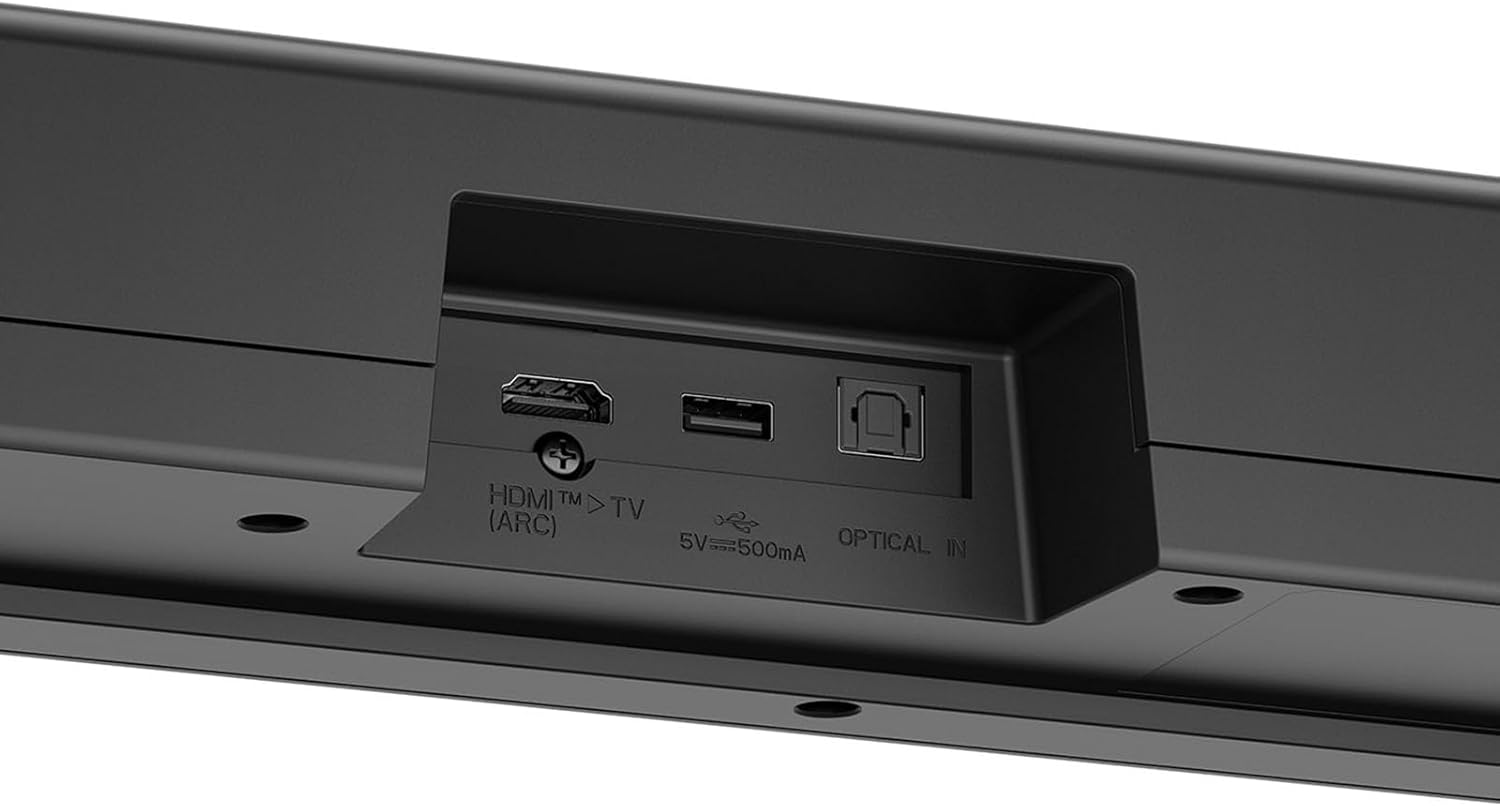
Image 4.1: Rear panel of the LG S45TR Soundbar, highlighting the HDMI (ARC), USB (5V=500mA), and Optical In ports for various connectivity options.
4.2 Wireless Rear Speaker Setup
The LG S45TR system includes two wireless rear speakers that connect automatically to the soundbar. Ensure the rear speakers are placed within range of the soundbar and connected to power.
- Place the rear speakers in your desired location, typically behind or to the sides of your listening position.
- Connect each rear speaker to a power outlet using its respective power cord.
- Power on the soundbar. The rear speakers will automatically attempt to pair with the soundbar. A solid green LED on the rear speakers indicates a successful connection.
- If pairing fails, refer to the troubleshooting section or manually initiate pairing as per the soundbar's display instructions.

Image 4.2: Illustration of the wireless rear speakers, demonstrating their ability to connect wirelessly to the soundbar system for flexible placement.
4.3 Initial Power On
After all connections are made, plug the soundbar and subwoofer into power outlets. Press the power button on the soundbar or the remote control to turn on the system. The soundbar display will show the current input mode.
5. Operating Instructions
5.1 WOW Interface
The WOW Interface provides integrated control of your LG S45TR Soundbar directly through your compatible LG TV. This feature allows for seamless adjustment of sound modes, profiles, and other settings.
- Ensure your LG TV is compatible with the WOW Interface feature.
- Access the WOW Interface through your LG TV's settings or a dedicated soundbar control menu.
- Use your LG TV remote to navigate and adjust soundbar settings, such as volume, input source, and sound effects.

Image 5.1: A compatible LG TV displaying the WOW Interface, which allows for direct control of the soundbar's settings, including sound modes and output options, using the TV remote.
5.2 AI Sound Pro
AI Sound Pro automatically analyzes the audio content and optimizes sound settings for the best listening experience. It categorizes different sounds into effects, music, and voices, then applies ideal settings.
- Activate AI Sound Pro through the soundbar's remote control or the WOW Interface on your LG TV.
- The soundbar will intelligently adjust equalization and sound effects based on the content being played (e.g., dialogue for news, dynamic range for music, immersive effects for movies).

Image 5.2: Visual representation of AI Sound Pro, illustrating how it adapts audio settings for different content types such as concerts, news broadcasts, and movies to deliver an optimized sound experience.
5.3 4.1 Channel Surround Sound
The LG S45TR delivers a 4.1 channel surround sound experience with its soundbar, subwoofer, and two rear speakers, creating an immersive audio environment.
- Ensure all speakers (soundbar, subwoofer, rear speakers) are properly connected and powered on.
- Position the rear speakers to create a balanced surround field in your listening area.
- Adjust the individual speaker levels if necessary through the soundbar settings to fine-tune the surround effect.

Image 5.3: A simulated living room environment showcasing the LG S45TR Soundbar system, including the soundbar, subwoofer, and rear speakers, creating a 4.1 channel surround sound experience.
5.4 Bluetooth Connectivity
Connect your mobile devices wirelessly to the soundbar via Bluetooth to stream audio.
- Press the Bluetooth button on the soundbar remote or the soundbar unit to switch to Bluetooth input mode. The display will show "BT PAIRING".
- On your mobile device, enable Bluetooth and search for available devices.
- Select "LG S45TR" from the list of devices to pair. Once connected, the display will show "BT READY".
6. Maintenance
To ensure the longevity and optimal performance of your LG S45TR Soundbar System, follow these maintenance guidelines:
- Cleaning: Use a soft, dry cloth to clean the surfaces of the soundbar, subwoofer, and rear speakers. Do not use liquid cleaners or abrasive materials, as they may damage the finish.
- Ventilation: Ensure that the ventilation openings on all units are not blocked. Proper airflow prevents overheating.
- Placement: Avoid placing the units in direct sunlight, near heat sources, or in areas with high humidity or dust.
- Power: Disconnect the power cords from the wall outlet if the system will not be used for an extended period.
7. Troubleshooting
If you encounter issues with your LG S45TR Soundbar System, refer to the following common problems and solutions:
- No Power: Check if all power cords are securely plugged into the wall outlets and the units. Ensure the power outlet is functional.
- No Sound:
- Verify the correct input source is selected on the soundbar.
- Check the volume level on both the soundbar and your TV.
- Ensure audio cables (HDMI ARC, Optical) are securely connected.
- If using Bluetooth, ensure the device is paired and playing audio.
- Rear Speakers Not Connecting:
- Ensure the rear speakers are powered on and within range of the soundbar.
- Refer to the soundbar's display or manual for specific instructions on manually pairing wireless speakers if automatic pairing fails.
- Remote Control Not Working: Replace the batteries. Ensure there are no obstructions between the remote and the soundbar.
- Distorted Sound: Reduce the volume. Check for any interference from other electronic devices. Ensure cables are not damaged.
For persistent issues, contact LG customer support.
8. Specifications
| Feature | Specification |
|---|---|
| Brand | LG |
| Model Name | S45T.DSAUELK |
| Product Dimensions | 6.3 x 72 x 8.7 cm |
| Item Weight | 10.28 kg |
| Speaker Maximum Output Power | 400 Watts |
| Connectivity Technology | Bluetooth, HDMI, Optical, USB |
| Audio Output Mode | Surround |
| Mounting Type | Shelf Mount |
| Speaker Type | Soundbar |
| Special Features | Bass Boost, Stereo Pairing |
| Recommended Uses | For Televisions |
| Compatible Devices | Laptop, Projector, Smartphone, Television |
9. Warranty and Support
Your LG S45TR Soundbar System is covered by a limited warranty. Please refer to the warranty card included in your package for detailed terms and conditions. For technical support, service, or further inquiries, please visit the official LG website or contact LG customer service in your region.
Online Support: www.lg.com/support