
Introduction
The DATAFY FYQ-K1-Ring Remote Control Page Turner is designed to enhance your reading experience by providing hands-free page navigation for compatible e-readers, tablets, and smartphones. It also functions as a remote control for your device's camera. This manual provides essential information for setup, operation, and maintenance.
Safety Information
- Keep the device away from water and moisture.
- Avoid exposing the device to extreme temperatures.
- Do not attempt to disassemble or repair the device yourself. Contact customer support if needed.
- Keep out of reach of children.
Package Contents
Verify that all items are present in your package:
- Ring Remote Control x 1
- Screen Sensor Clip x 1
- Type-C Charging Cable x 1
- Storage Bag x 1
- User Manual x 1

Image: All components included in the DATAFY FYQ-K1-Ring package.
Product Overview
The DATAFY FYQ-K1-Ring consists of two main parts: the ring remote control and the screen sensor clip. The ring remote is worn on your finger, allowing for easy page turning with a simple press. The screen sensor clip attaches to your device's screen to simulate a touch input.

Image: The ring remote control and the screen sensor clip.
Setup
- Charge the Devices: Ensure both the ring remote and the screen sensor clip are fully charged using the provided Type-C cable. The screen sensor clip has a blue light indicator that will be steady on when fully charged.
- Pairing:
- Single-click the button on the screen sensor clip. The blue light on the clip will turn steady on.
- Press any button on the ring remote control. The blue light on the screen sensor clip will flash three times, indicating a successful connection.

Image: Visual guide for turning on the clip switch and connecting the remote control.
- Attaching the Screen Sensor Clip:
- Clip the screen sensor onto the correct position of your e-reader, tablet, or smartphone. The smaller side of the sensor clip should be placed on the device's screen.
- For Kindle and most e-readers, clip the sensor on the right side of the screen to turn to the next page. To turn to the previous page, you may need to reposition the clip to the left side.
- The clip is designed to be case-friendly and fits devices up to 18.5mm (0.73 inches) thick.

Image: The screen sensor clip's maximum thickness for case compatibility.
Video: Demonstration of the upgraded page turner in use, highlighting hands-free operation.
Operating Instructions
For E-readers and Tablets (Page Turning)
- Once the screen sensor clip is correctly placed and paired, simply press the button on the ring remote control to turn the page forward.
- The device primarily supports page forward functionality. For previous pages, repositioning the clip may be necessary.
- If your reading application has a continuous scrolling mode, please disable it for optimal page turner performance.

Image: A user enjoying hands-free reading with the page turner, promoting comfort.
Video: Demonstration of the Remote Control Page Turner Ring for Kindle.
Video: Instructions on how to use the page turner with an iPad, including how to disable continuous scrolling.
For Smartphones (Camera Remote)
- To use the device as a camera remote, open your smartphone's default camera app.
- Clip the screen sensor onto the camera's shutter or video recording button on your screen.
- Press the button on the ring remote control to take photos or start/stop video recording.

Image: Demonstration of using the page turner as a remote for taking photos and videos with a smartphone.
Compatibility
The DATAFY FYQ-K1-Ring is compatible with a wide range of devices that feature capacitive touch screens.
- Compatible Devices: Kindle, Kindle Paperwhite, Kindle Oasis, Kindle Kids Edition, Kindle Voyage, Android Tablets, Surface, Kobo eReaders, iPhone, iPad, and other smartphones with capacitive screens.
- Incompatible Devices: Kindle 7th/8th Generation, Amazon Fire HD 10 (10th/11th generation).
- Case-Friendly Design: The receiver clip accommodates devices up to 18.5mm (0.73 inches) thick, ensuring compatibility with most device cases.

Image: Overview of compatible devices including iPads, Kindles, and Android/iPhone devices.
Charging and Battery Life
- Charging: Use the included Type-C USB cable to charge both the ring remote and the screen sensor clip.
- Quick Charge Time: Approximately 1.5 hours for a full charge.
- Single Use Time: Up to 25 hours of continuous use.
- Standby Time: Up to one week on a single charge.
- Automatic Shut-down: The device will automatically power off after 30 minutes of inactivity to conserve battery. Manual shut-down is not required.
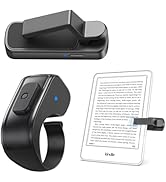
Image: Charging indicators and battery life details for the page turner.
Maintenance
- Keep the device clean by wiping it with a soft, dry cloth.
- Store the page turner in the provided storage bag when not in use to protect it from dust and scratches.
- Avoid dropping the device or subjecting it to strong impacts.
Troubleshooting
- Problem: The page turner is not responding.
Solution: Ensure both the screen sensor clip and the ring remote are charged. Re-pair the devices by single-clicking the clip button (blue light steady on) then pressing the ring remote button (blue light flashes three times). - Problem: The screen sensor clip blocks text on my e-reader.
Solution: Adjust the margins within your e-reader's settings to prevent the clip from covering content. Refer to your device's user manual for margin adjustment instructions. - Problem: The page turner does not turn pages on my iPad/tablet.
Solution: Check your reading application settings. Ensure that 'Continuous Scrolling' or similar features are disabled. The page turner is designed for page-by-page navigation. - Problem: The device only turns pages forward.
Solution: This model is designed to primarily support page forward functionality. To navigate backward, you may need to manually interact with your device's screen or reposition the sensor clip to the left side of the screen if your device supports left-side page turning.
Specifications
| Product Dimensions | 1.3 x 0.98 x 0.59 inches |
| Item Weight | 2.08 ounces |
| Item Model Number | K1PRO |
| Batteries | 1 C battery required (included) |
| Manufacturer | DATAFY |
| Max Supported Devices | 1 |
| Special Features | Ergonomic, Lightweight, Page Turner Clip Upgrade, Remote Control Video Shooting, Remote control camera to take pictures, Case-Friendly Page Turner |
Warranty and Support
The DATAFY FYQ-K1-Ring Remote Control Page Turner is backed by a thirty-six month Term of Service. For any inquiries or assistance, please contact DATAFY customer support. 24/7 customer service support is available to address your needs.

