
Introduction
This document provides instructions for the Generic replacement infrared (IR) remote control, designed for use with specific portable air conditioner models, including Goodhome Malay fdp26-3032zpr5, Euker 12000BTU-EK-1, and Euker 8000BTU-EK-2. This remote is intended as a direct replacement for your original remote control. Please ensure your current remote matches the appearance of the remote shown in this manual for compatibility.
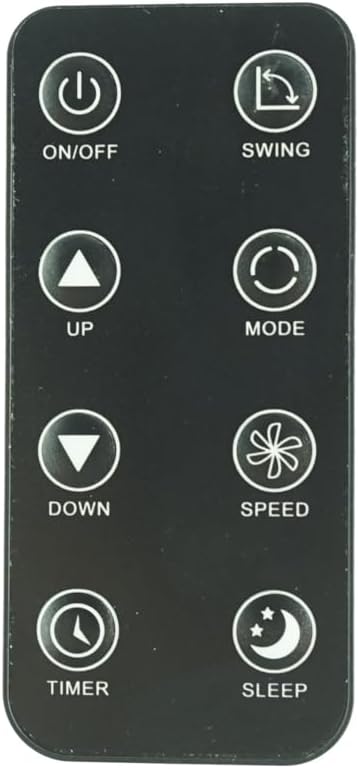
Figure 1: Front view of the Replacement Remote Control. This image displays the remote's layout, including buttons for ON/OFF, SWING, UP, DOWN, MODE, SPEED, TIMER, and SLEEP.
Setup
Battery Installation
The remote control requires two nonstandard batteries (CR2025 type, typically). Follow these steps to install or replace the batteries:
- Locate the battery compartment on the back of the remote control.
- Gently push the release tab or slide the battery cover open as indicated on the remote. Refer to Figure 2 for guidance.
- Insert two CR2025 batteries, ensuring the positive (+) side of the battery faces upwards, as marked inside the compartment.
- Close the battery cover securely until it clicks into place.

Figure 2: Back view of the remote control, illustrating the battery compartment and instructions for inserting the CR2025 battery. The image shows the "OPEN" and "PUSH" indicators for battery removal/insertion.
Compatibility Check
This remote is an infrared replacement. It does not require pairing. For proper functionality, it is crucial that your original remote control is identical in appearance to this replacement. If your air conditioner model is not explicitly listed in the product title, or if your original remote differs, this replacement may not be fully compatible or may not offer all original functions.
Operating Instructions
Point the remote control directly at the infrared receiver on your portable air conditioner. Ensure there are no obstructions between the remote and the air conditioner.
- ON/OFF Button: Press to turn the air conditioner on or off.
- SWING Button: Activates or deactivates the automatic swing function of the air conditioner's louvers.
- UP (▲) Button: Increases the temperature setting or adjusts other parameters upwards.
- DOWN (▼) Button: Decreases the temperature setting or adjusts other parameters downwards.
- MODE Button: Cycles through available operating modes (e.g., Cool, Fan, Dry, Heat - depending on AC model).
- SPEED Button: Adjusts the fan speed (e.g., Low, Medium, High, Auto).
- TIMER Button: Sets the timer for automatic on/off operations. Refer to your air conditioner's manual for specific timer programming.
- SLEEP Button: Activates the sleep mode, which typically adjusts temperature and fan speed for comfortable sleep.
Maintenance
Cleaning the Remote
To clean the remote control, wipe it gently with a soft, dry cloth. Do not use liquid cleaners, sprays, or abrasive materials, as these can damage the remote's surface or internal components.
Battery Care and Replacement
- Replace batteries when the remote's range decreases or buttons become unresponsive.
- Always replace both batteries at the same time with new ones of the correct type (CR2025).
- Do not mix old and new batteries, or different types of batteries.
- If the remote will not be used for an extended period, remove the batteries to prevent leakage and potential damage.
- Dispose of used batteries according to local regulations.
Storage
Store the remote control in a cool, dry place, away from direct sunlight, high temperatures, and excessive humidity. Avoid dropping the remote or exposing it to strong impacts.
Troubleshooting
- Remote not responding:
- Ensure the remote is pointed directly at the air conditioner's receiver.
- Check if there are any obstructions between the remote and the air conditioner.
- Replace the batteries with new ones, ensuring correct polarity.
- Verify that the air conditioner is powered on and plugged in.
- Some functions not working:
- This replacement remote may not support all functions of your original air conditioner remote, especially if your original remote had advanced features not present on this replacement.
- Confirm that your air conditioner model is listed as compatible.
- Remote range is poor:
- Replace the batteries.
- Ensure the remote's infrared emitter (at the top) is clean and unobstructed.
Specifications
| Feature | Detail |
|---|---|
| Product Type | Replacement Infrared (IR) Remote Control |
| Brand | Generic |
| Compatible Devices | Portable Air Conditioners (Goodhome Malay fdp26-3032zpr5, Euker 12000BTU-EK-1, Euker 8000BTU-EK-2) |
| Power Source | 2 x CR2025 Nonstandard Batteries (required) |
| Color | White (buttons) / Black (body) |
| Special Feature | Ergonomic design, direct replacement |
| Manufacturer | SZHKHXD |
| Country of Origin | China |
| ASIN | B0F8N5978L |
Support
For any questions, concerns, or issues regarding this replacement remote control, please contact the seller directly through the platform where you purchased the product. It is recommended to provide your order details and a clear description of the issue for prompt assistance.
Note: This product is a replacement remote and may not come with a separate manufacturer's warranty. Please refer to the seller's return policy for details on returns or exchanges.