
Introduction
This manual provides detailed instructions for the assembly, operation, and maintenance of your EMIAH Ergonomic Office Chair, Model YMX-GT100-Y-SE-1. Please read this manual thoroughly before assembly and use to ensure proper function and safety.
Safety Instructions
- Refer to these instructions for proper assembly, usage, and weight capacity.
- Keep the chair away from heat sources and sharp objects to prevent damage.
- Do not use the chair if any part is damaged or missing.
- Ensure all screws are tightened securely before use.
Package Contents
Verify that all components are present before beginning assembly:
- Wheels: 5 units
- Five-star plastic base: 1 unit
- Legs: 5 units
- Gas lift: 1 unit
- Control mechanism: 1 unit
- Armrests: 2 units
- Backrest: 1 unit
- Seat cushion: 1 unit
- Side panel: 2 units
- Side panel support: 2 units
- Footrest cushion: 1 unit
- Wrench: 1 unit
- Screw pack: 1 unit
- Assembly manual: 1 unit
Assembly Instructions
For a visual guide, please refer to the assembly video below.
Video: EMIAH Ergonomic Office Chair Assembly Guide. This video demonstrates the step-by-step process of assembling the chair, including attaching the base, gas lift, control mechanism, armrests, footrest, and backrest.
- Step 1: Assemble the Base. Fix the legs to the five-star plastic base using the provided screws (A). Ensure all legs are securely attached.
- Step 2: Insert the Gas Lift. Insert the gas lift into the central hole of the assembled base.
- Step 3: Attach Control Mechanism and Armrests to Seat Cushion. Utilize 4 screws (B) to fix the control mechanism to the underside of the seat cushion, ensuring the arrow points in the correct direction. Use 2 screws (C) to fix the control button to the side of the seat cushion, ensuring it is installed in the correct orientation. Secure the connection cable in the buckle. Use 6 screws (B) to fix the left and right armrests to both sides of the seat cushion. Before tightening, adjust the armrests to ensure a distance of 1.18 inches between them.
- Step 4: Attach Side Panel and Side Panel Support. Use 4 screws (E) to fix the side panel support to the underside of the seat cushion, ensuring it is oriented correctly. Use 4 screws (F) to fix the side panel to the support and the underside of the seat cushion, ensuring it is oriented correctly.
- Step 5: Insert the Footrest. Insert the footrest into the side panel support. Then, fix the two rubber rings (G) onto the metal rods of the footrest.
- Step 6: Attach Backrest to Seat Cushion. Use 3 screws (D) to fix the metal plate of the backrest to the seat cushion.
- Step 7: Complete Installation. Insert the gas lift into the base to complete the installation.
Operating Instructions
Your EMIAH Ergonomic Office Chair offers several adjustable features for personalized comfort:
Video: EMIAH Ergonomic Office Chair Product Features. This video demonstrates the various adjustable features of the chair, including recline, height, armrests, and footrest.
- Reclining Function: The chair features a manually adjustable reclining backrest, allowing you to recline up to 145 degrees. Use the side trigger control located on the right side of the seat to adjust and lock the recline angle.
- Height Adjustment: Adjust the chair's height effortlessly using the side trigger control on the right side of the seat.
- 4D Adjustable Headrest: The headrest can be adjusted in height and angle to provide optimal neck and head support.
- 3D Adjustable Armrests: The armrests can be manually adjusted in height, angle, and forward/backward position to suit your preference and alleviate shoulder and neck pressure.
- Retractable Footrest: Extend the footrest for additional leg support and relaxation.
- 360° Swivel: The chair offers full 360-degree rotation for ease of movement.

Image: Reclining function with footrest extended.
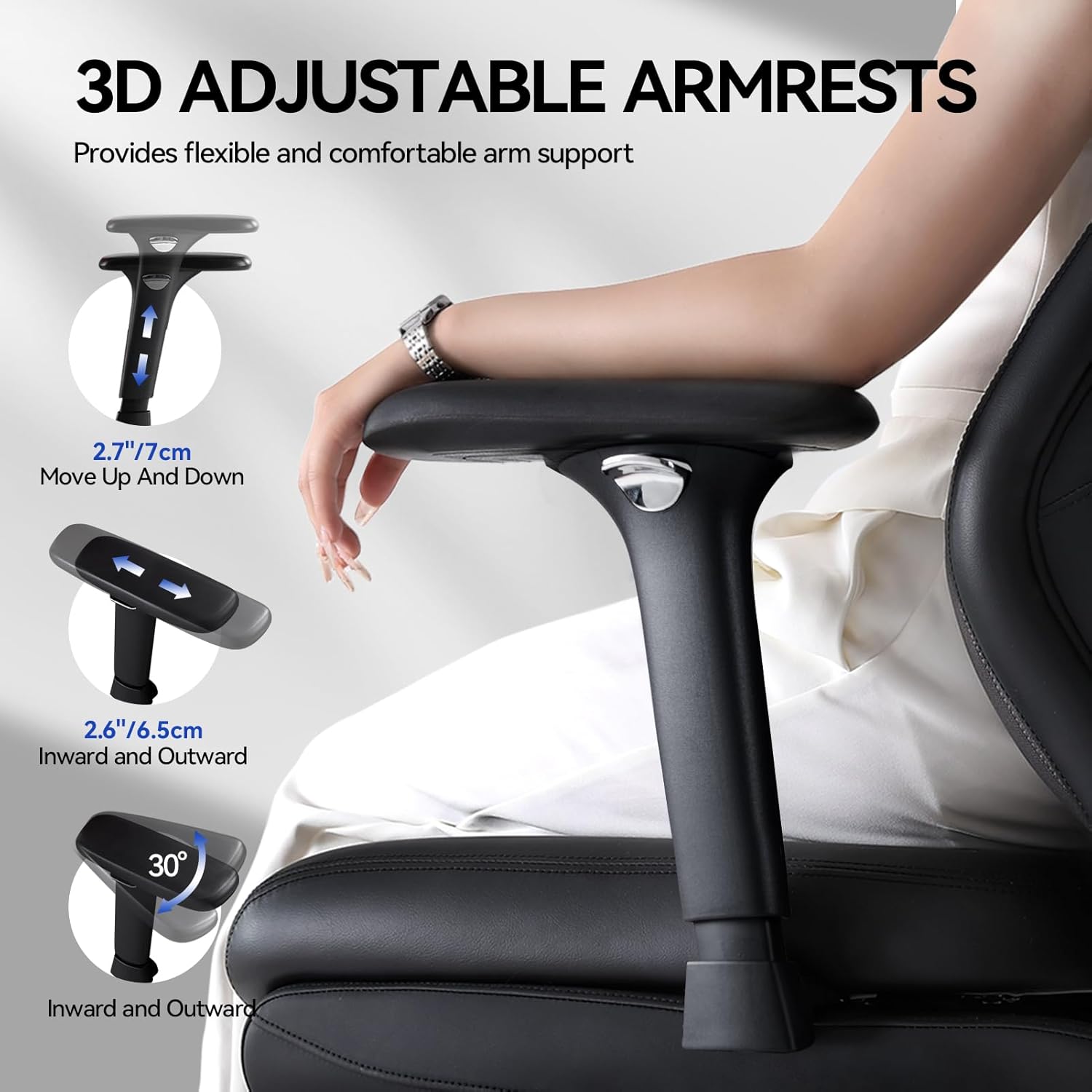
Image: 3D Adjustable Armrests.
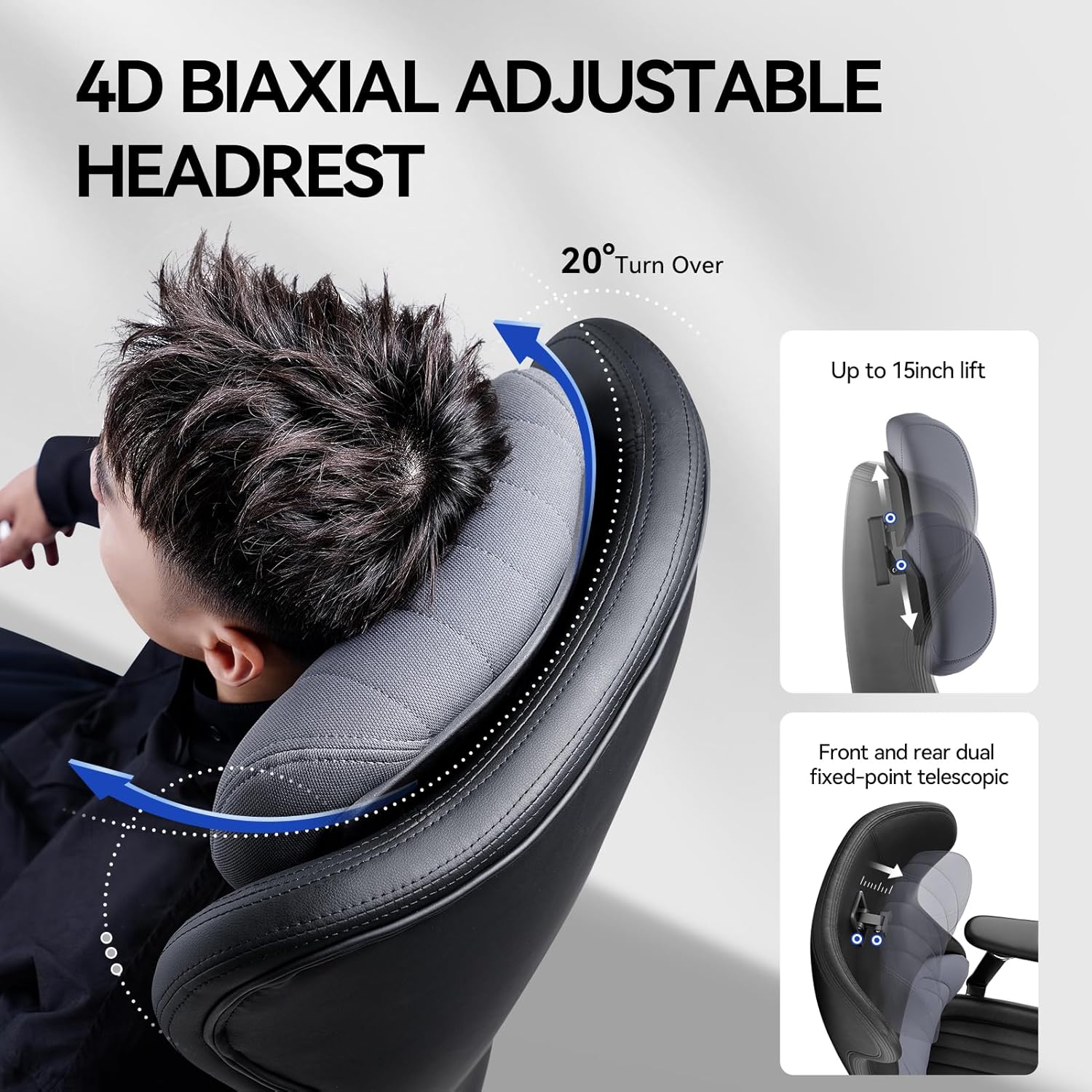
Image: 4D Biaxial Adjustable Headrest.
Maintenance
To maintain the appearance and longevity of your EMIAH Ergonomic Office Chair:
- Wipe clean with a damp cloth.
- Avoid using harsh chemicals or abrasive cleaners.
- Regularly check and tighten all screws to ensure stability.
Troubleshooting
- Chair Creaking: If the chair produces creaking noises, ensure all assembly screws are securely tightened. Loose connections in the base or armrests can cause noise.
- Difficulty Adjusting Height/Recline: Check the side trigger controls for any obstructions or if they are properly engaged. Ensure the gas lift is correctly seated in the base.
Specifications
| Brand | EMIAH |
| Model Number | YMX-GT100-Y-SE-1 |
| Color | Black |
| Product Dimensions | 80 x 69 x 121 cm (31.5 x 27.2 x 47.6 inches) |
| Product Weight | 28 kg (61.7 lbs) |
| Material | Synthetic Leather, Wood, Metal, Nylon, Plastic |
| Size | Large |
| Backrest Style | High Back |
| Frame Material | Metal |
| Seat Material Type | Synthetic Leather |

Image: Product Dimensions and Weight Capacity.
Warranty and Support
EMIAH offers a 30-day after-sales service policy and a one-year after-sales service for this office chair. Our dedicated customer service team is available to assist with any pre-sale or post-sale inquiries. Please feel free to contact us for support.