
1. Introduction
Thank you for choosing the Jacoosa TG38 Smart Watch. This device is designed to enhance your daily life with its advanced features, including a 1.83-inch HD touchscreen, Bluetooth calling, 5 ATM water resistance, and comprehensive health and fitness tracking. This manual provides detailed instructions to help you set up, operate, and maintain your smart watch for optimal performance.

Figure 1: Jacoosa TG38 Smart Watch (Pink)
2. What's in the Box
Please check the contents of your package. If any items are missing or damaged, please contact customer support.
- Jacoosa TG38 Smart Watch
- Watch Magnetic Charger
- User Manual
3. Product Overview
The Jacoosa TG38 Smart Watch features a sleek design and robust functionality. Key components include:
- Display: 1.83-inch HD square screen with 240×284 resolution and IPS full-viewing angle technology.
- Watch Faces: Over 100 customizable watch faces available through the companion app.
- Materials: Durable zinc alloy frame and a comfortable, skin-friendly silicone strap.

Figure 2: High-Definition Display and Customizable Watch Faces

Figure 3: TG38 Smart Watch Dimensions
4. Setup Guide
4.1 App Download and Installation
The Jacoosa TG38 Smart Watch requires the 'Da Fit' companion app for full functionality. The app is compatible with Android 5.0+ and iOS 9.0+ devices.
- Scan the QR code provided in the watch's packaging or on the watch screen, or search for 'Da Fit' in your device's app store (Google Play Store for Android, Apple App Store for iOS).
- Download and install the 'Da Fit' app.
- Open the app and follow the on-screen instructions to create an account or log in.
Download the Da Fit app here: http://plus.crrepa.com/app-download/dafit
4.2 Device Pairing
Ensure Bluetooth is enabled on your smartphone before proceeding.
- Open the 'Da Fit' app on your smartphone.
- Navigate to the 'Add Device' section within the app.
- The app will search for nearby devices. Select 'TG38' from the list of available devices.
- Confirm the pairing request on both your smartphone and the smart watch.
- Allow necessary permissions for notifications, contacts, and call history when prompted by the app or your phone's operating system.
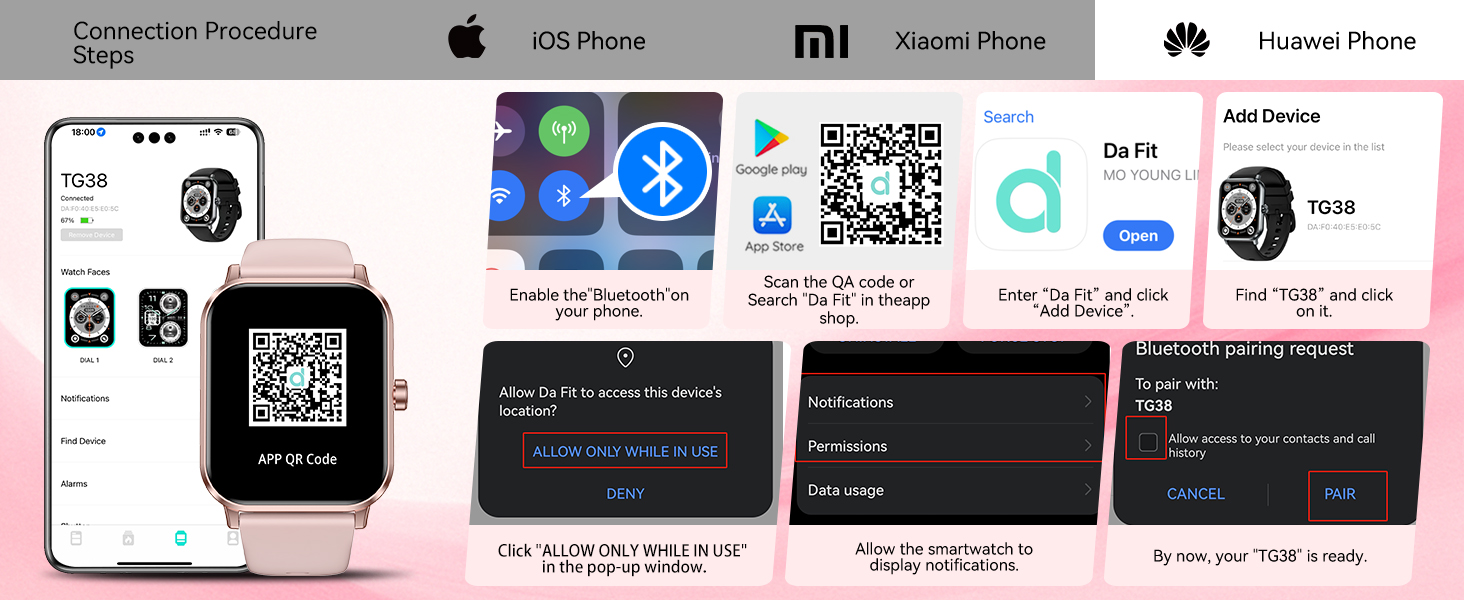
Figure 4: iOS Connection Procedure Steps

Figure 5: Xiaomi Phone Connection Procedure Steps

Figure 6: Huawei Phone Connection Procedure Steps
5. Operating Instructions
5.1 Bluetooth Calling and Notifications
Once paired, the smart watch allows you to manage calls and view notifications directly from your wrist.
- Make/Answer Calls: Use the watch's interface to dial numbers, access contacts, view call lists, and answer incoming calls. The watch phone function needs to be turned on in the app to be used.
- Notifications: Receive alerts for messages from major social apps (e.g., Facebook, Instagram) and other phone notifications. Note: The watch cannot reply to messages.

Figure 7: Bluetooth Calling and Voice Assistant

Figure 8: Smart Notifications

Figure 9: Make/Answer Calls Feature
5.2 Sports Modes
The watch supports over 130 sports modes, tracking data to help you adjust exercise intensity and monitor progress.
- Access sports modes through the watch menu.
- Select your desired activity (e.g., running, cycling, swimming).
- The watch will track relevant metrics such as steps, calories, heart rate, and distance. Note: Step recording starts after exceeding 20 steps.

Figure 10: 120+ Sports Modes Tracking

Figure 11: Extensive Sports Mode Selection
5.3 Health Monitoring
The smart watch provides continuous health monitoring features.
- Heart Rate Monitoring: 24-hour continuous heart rate monitoring. View data reports in the app.
- Sleep Analysis: Scientific sleep analysis provides data on deep sleep, light sleep, REM, and awake times.
- Blood Oxygen Monitor: Monitors blood oxygen levels to help track changes in your body.
- Menstrual Cycle Management: Special features for tracking and managing menstrual cycles.

Figure 12: Health and Fitness Tracking Features

Figure 13: 24/7 Heart Rate Monitoring

Figure 14: Blood Oxygen Monitor

Figure 15: Sleep Quality Monitoring

Figure 16: Women's Menstrual Cycle Tracking
5.4 Other Functions
The TG38 Smart Watch includes several additional useful features:
- Voice Assistant: Built-in voice assistant for everyday tasks (e.g., making calls, playing music, checking weather).
- Remote Camera Control: Control your smartphone camera remotely to take photos.
- Music Control: Play, pause, skip tracks on your smartphone.
- Timer & Stopwatch: Integrated timing functions.
- Alarm Clock: Set alarms directly from your watch.
- Find Your Phone: Locate your paired smartphone.
- Sedentary Reminder: Reminds you to move after periods of inactivity.
- Weather Forecast: Get real-time weather updates.
- Calculator: Basic calculator function.
- Brightness Adjustment: Adjust screen brightness for optimal viewing.
- Do Not Disturb Mode: Silence notifications during specific times.

Figure 17: Multifunctional Smart Watch Features

Figure 18: Multi-Function Exploration
6. Charging and Battery Life
The Jacoosa TG38 Smart Watch is equipped with an optimized power management system.
- Charging Time: Approximately 2.5 hours for a full charge.
- Normal Usage: Up to 7 days of battery life.
- Power Saving Mode: Up to 30 days of continuous operation.
To charge your watch, connect the magnetic charger to the charging points on the back of the watch and plug the USB end into a power source.

Figure 19: Charging and Battery Life Overview
7. Water Resistance
The Jacoosa TG38 Smart Watch has a 5 ATM water-resistance certification.
- It is suitable for handwashing, raining, and cold showers.
- It is not suitable for saunas or diving.
Avoid exposing the watch to hot water or steam, as this can compromise its water resistance.

Figure 20: 5 ATM Water Resistance Guidelines
8. Maintenance
To ensure the longevity and optimal performance of your smart watch, follow these maintenance guidelines:
- Cleaning: Regularly wipe the watch screen and strap with a soft, dry cloth. For stubborn dirt, use a slightly damp cloth and then dry thoroughly.
- Avoid Chemicals: Do not use harsh chemicals, cleaning solvents, or strong detergents, as these can damage the watch's finish and seals.
- Storage: Store the watch in a cool, dry place when not in use. Avoid extreme temperatures.
- Charging: Use only the provided magnetic charger. Ensure the charging contacts are clean and dry before charging.
- Strap Care: If the silicone strap becomes dirty, clean it with mild soap and water, then rinse and dry completely.
9. Troubleshooting
If you encounter issues with your Jacoosa TG38 Smart Watch, please refer to the following common solutions:
| Issue | Possible Solution |
|---|---|
| Failure to Connect to App | Ensure Bluetooth is enabled on your phone. Restart both your phone and the watch. Make sure the 'Da Fit' app has necessary permissions. Try unpairing and re-pairing the device. |
| Black Screen / Watch Unresponsive | Charge the watch for at least 30 minutes. If it remains unresponsive, try a soft reset (refer to the app for specific instructions or contact support). |
| No Message Notifications | Check app permissions for notifications on your phone. Ensure notifications are enabled within the 'Da Fit' app settings. Verify that your phone's Bluetooth is connected. |
| Media Sound from Watch | This typically means the watch is acting as a Bluetooth speaker. Go to your phone's Bluetooth settings, find the watch, and disable the 'Media audio' option. |
| Inaccurate Health Data | Ensure the watch is worn snugly on your wrist, about one finger's width from your wrist bone. Keep the sensor clean. Avoid excessive movement during measurements. |
If these solutions do not resolve your issue, please contact Jacoosa customer support for further assistance.
10. Specifications
| Feature | Detail |
|---|---|
| Model Number | TG38 |
| Screen Size | 1.83 Inches |
| Resolution | 240x284 HD |
| Connectivity | Bluetooth 5.3 |
| Water Resistance | 5 ATM |
| Battery Capacity | 350 mAh (Lithium Polymer) |
| Typical Use Battery Life | Up to 7 days |
| Standby Battery Life | Up to 30 days |
| Charging Time | Approx. 2.5 hours |
| Operating System Compatibility | Android 5.0+, iOS 9.0+ |
| Item Weight | 2.89 ounces |
| Special Features | Bluetooth Call, Message Reminder, Health Monitoring (Heart Rate, Sleep, Blood Oxygen, Female Cycle), Fitness Tracker (130+ Sports Modes), Stopwatch, Alarm Clock, Find Your Phone, Sedentary Reminder, Music Control, Weather Forecast, Do Not Disturb Mode, Brightness Adjustment, Camera Control, Voice Call, Voice Assistant. |
11. Warranty and Support
Jacoosa is committed to providing excellent customer service and product support.
- Product Exchange Support: 365 days from the date of purchase.
- Technical Support: Lifetime technical support is provided.
- Customer Service: 24-hour customer support response.
For any inquiries or assistance, please contact Jacoosa customer support through the contact information provided with your purchase or on the official Jacoosa website.