
1. Introduction
This manual provides detailed instructions for the installation, operation, and maintenance of your Conpert G6 AHD-CVBS Reversing Camera. This camera is designed to enhance vehicle safety by providing a clear rear view, assisting with parking and maneuvering. It features a robust, waterproof design and excellent night vision capabilities.
Compatibility: This camera is compatible with various VW models, including:
- VW Golf 5/GTI/R
- VW Golf 6/GEI/R/R-line (2008-2012)
- VW B6 Magotan (2007-2011)
- VW B7L Magotan (2011-2016)
- VW Old CC (2008-2018)
- VW B6/B7 Passat
- VW Beetle (2013-2018)
- VW Lamando (2014-2018)
- VW EOS
- VW Polo C/R/GTI (2011-2018)

Image: Front view of the Conpert G6 AHD-CVBS Reversing Camera, showing the lens and housing.
2. Package Contents
Please verify that all components listed below are included in your package:
- Badge Flip Camera x1
- Power Cable x1
- Video Cable x1
- Drain Pipe x1

Image: A visual representation of the Conpert G6 AHD-CVBS Reversing Camera package contents, including the camera unit, power cable, video cable, and drain pipe.
3. Setup and Installation
Careful installation is crucial for optimal performance. It is recommended to have this product installed by a qualified professional if you are unfamiliar with car electrical systems.
Installation Steps:
- Mount the Camera: Replace the existing badge or designated area with the new badge flip camera unit. Ensure it is securely fastened.
- Route Cables: Carefully route the power cable and video cable from the camera to the front of the vehicle, typically along the vehicle's existing wiring harnesses. Use the provided drain pipe if necessary for proper water drainage.
- Connect to Monitor: Connect the video cable to your car's monitor (not included).
- Connect Power: Connect the camera's power source to the vehicle's reverse lights. This ensures the camera activates automatically when the vehicle is put into reverse.
Wiring Diagram:
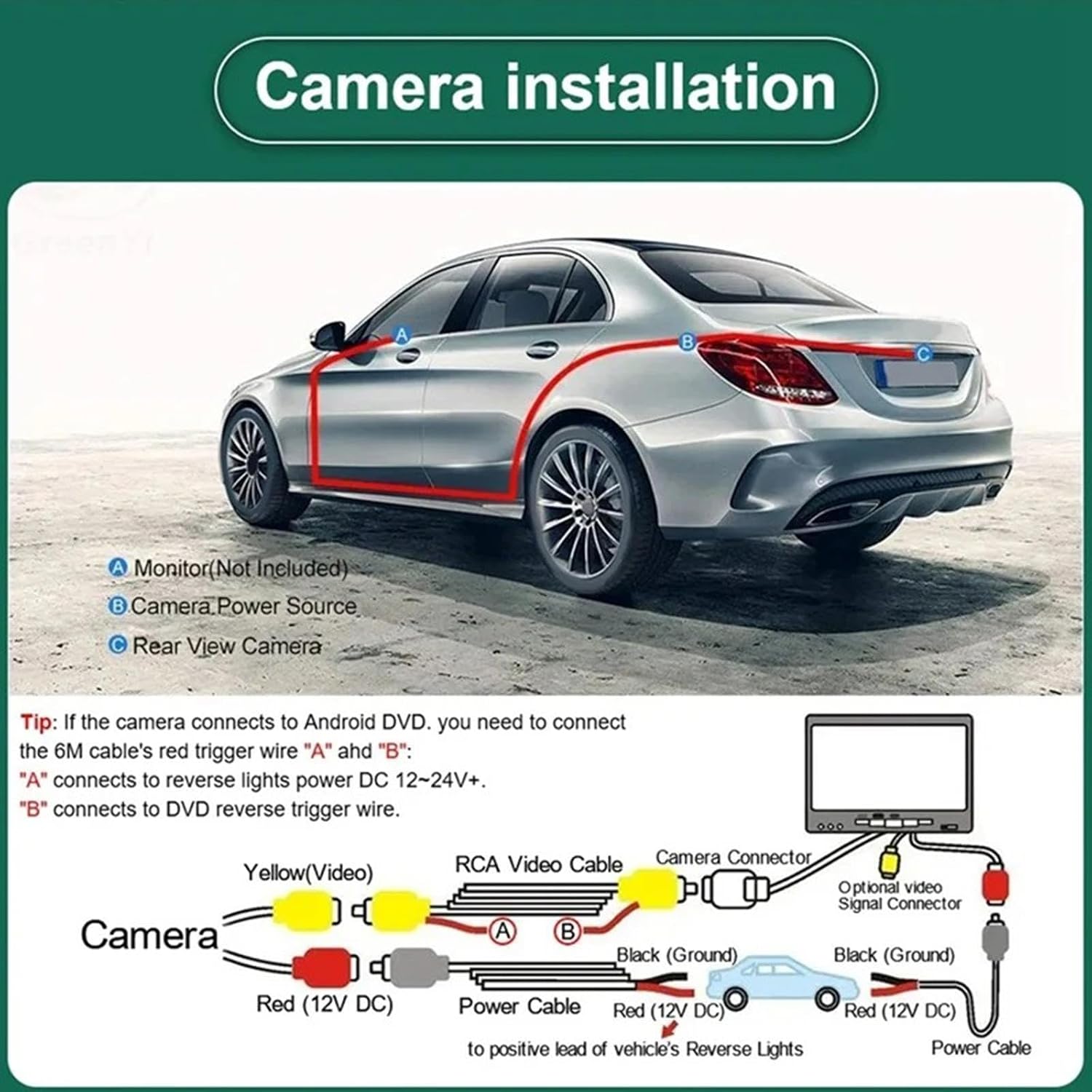
Image: A detailed wiring diagram illustrating how to connect the reversing camera to the monitor and vehicle's power source, specifically the reverse lights.
Important Note: If the camera connects to an Android DVD system, you may need to connect the 6-meter cable's red trigger wire "A" and "B". "A" connects to reverse lights power DC 12-24V+. "B" connects to the DVD reverse trigger wire.
Power Requirements:
- Use voltage: DC 12V
- Current: >= 80mA
- Do not support 24V trucks.
- Do not support the use of high-power transformers.
4. Operating Instructions
The camera automatically activates when the vehicle is shifted into reverse gear, displaying the rear view on your connected monitor.
AHD/CVBS Signal Switching:
Your camera supports both AHD and CVBS video signals. To switch between these signals, locate the green control line. Cutting this line will change the signal type. Ensure your monitor is compatible with the selected signal type.

Image: An illustration demonstrating how to switch between AHD and CVBS video signals by cutting a specific wire, and a screenshot of a camera settings menu showing AHD resolution options.
Note: If your monitor requires a CVBS signal, please cut the white wire to change the signal from AHD to CVBS (Option GAF, GAHD).
5. Maintenance
The Conpert G6 AHD-CVBS Reversing Camera is designed for durability and minimal maintenance.
- Waterproof Design: The camera features an IP68 waterproof rating, utilizing industrial-grade waterproof rubber and glue filling technology. This protects it from water, dust, and fog, ensuring reliable operation in various weather conditions.
- Temperature Resistance: The camera is built to operate effectively in extreme temperatures ranging from -22°F to 176°F (-30°C to 80°C).
- Cleaning: Periodically clean the camera lens with a soft, damp cloth to ensure a clear view. Avoid abrasive cleaners or materials that could scratch the lens.

Image: The Conpert G6 AHD-CVBS Reversing Camera shown with water effects, highlighting its IP68 waterproof and no-fog capabilities.
6. Troubleshooting
If you encounter issues with your reversing camera, please refer to the following common troubleshooting steps:
- No Image/Black Screen:
- Check all cable connections (power, video) to ensure they are secure.
- Verify that the camera is receiving 12V power when the vehicle is in reverse.
- Ensure your monitor is set to the correct input source.
- Confirm the video signal type (AHD/CVBS) matches your monitor's compatibility. Adjust by cutting the green or white wire as described in Section 4.
- Poor Image Quality:
- Clean the camera lens to remove any dirt or debris.
- Check for any obstructions blocking the camera's view.
- Ensure the video cable is not damaged or kinked.
- If using AHD, ensure your monitor supports AHD resolution for optimal clarity.
- Camera Not Activating:
- Confirm the power cable is correctly connected to the vehicle's reverse light circuit.
- Test the reverse lights to ensure they are functioning correctly.
7. Specifications
| Brand | Conpert |
| Model | G6 AHD-CVBS |
| Material | Plastic and Metal |
| Waterproof Grade | IP68 waterproof / 6.8 shockproof |
| Operating Voltage | DC 12V (Do not support 24V trucks) |
| Current | >= 80mA |
| Operating Temperature | -22°F to 176°F (-30°C to 80°C) |
| Color Brightness | Automatic and Positive |
8. Warranty and Support
Conpert is committed to providing high-quality products. If you have any questions, concerns, or require assistance with your G6 AHD-CVBS Reversing Camera, please do not hesitate to contact us through the Amazon platform. Our customer service team is available to help you with any product-related inquiries.