
Introduction
This manual provides detailed instructions for the installation, setup, operation, and maintenance of your Richelock IU53 Double-Sided Fingerprint & Keypad Door Lock. Please read this manual thoroughly before installation and use to ensure proper function and security.

Image: The Richelock IU53 Double-Sided Fingerprint and Keypad Door Lock, featuring both the exterior and interior units in matte black finish.
Product Features
- Dual-Sided Access: Independent control from both sides with dual keypads, fingerprint scanners, and mechanical key access.
- Biometric Security: High-resolution fingerprint sensors store up to 100 fingerprints per side, with self-learning AI for improved accuracy.
- Keypad Entry: Supports 1-15 digit unique codes, with up to 50 codes available per side. Backlit keypads include privacy shields.
- All-Weather Durability: Constructed from heavy-duty zinc alloy with an IP65 waterproof rating, designed to withstand temperatures from -22°F to 176°F.
- Flexible Locking Modes: Features auto-lock (programmable from 2 seconds to 12 hours) and manual lock modes.
- Emergency Power: USB-C ports under each knob provide instant power if batteries deplete.
- Voice-Guided Setup: Simplifies initial configuration with voice prompts.
- Long Battery Life: Operates on 2 AA batteries (not included) with a 2+ year battery life and low-power alerts.

Image: The Richelock IU53 lock installed on a gate, highlighting its dual-sided smart access capabilities via fingerprint, passcode, and mechanical key, suitable for various weather conditions.
Package Contents
Verify that all components are present before beginning installation:
- Exterior Lock Unit (with keypad and fingerprint scanner)
- Interior Lock Unit (with keypad and fingerprint scanner)
- Mortise Latch
- Strike Plate
- Mounting Hardware (screws, spindle)
- Mechanical Keys (4 included)
- Installation and User Guide
Note: 2 AA batteries are required and not included in the package.
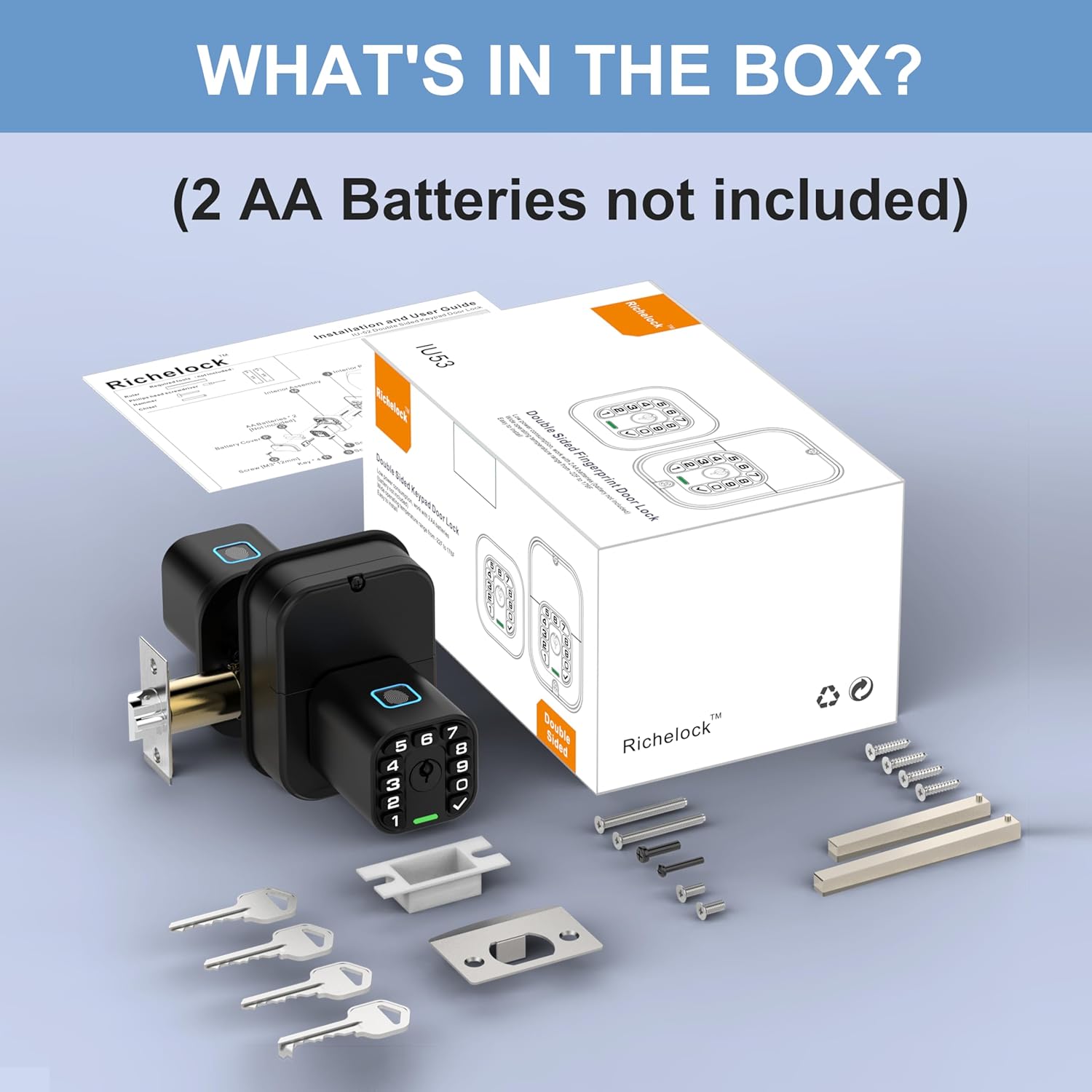
Image: A visual representation of all items included in the Richelock IU53 product package, such as the lock units, keys, and installation hardware.
Installation
The Richelock IU53 is designed for standard US doors with 2-3/4" or 2-3/8" backsets. Follow the detailed steps in the included Installation and User Guide for proper mounting.
- Prepare the Door: Ensure your door is properly prepped for a standard deadbolt installation.
- Install the Mortise Latch: Insert the latch into the door edge and secure it with screws.
- Install Exterior Unit: Route the cable through the door and align the exterior unit.
- Install Interior Unit: Connect the cable and secure the interior unit to the exterior unit using the provided screws.
- Insert Batteries: Open the battery cover on the interior unit and insert 2 AA batteries (ensure correct polarity).
- Test Operation: After installation, test the mechanical key and ensure the latch operates smoothly.

Image: A person using a screwdriver to install the Richelock IU53 door lock, illustrating the ease of the installation process.
Setup and Programming
The lock features voice-guided setup. To activate, hold the '√' button for 4 seconds.
- Master Code Setup: Follow voice prompts to set your initial master code. This code is essential for programming other settings.
- Fingerprint Registration:
- Access the fingerprint registration menu via the master code.
- Place your finger on the scanner multiple times as instructed until registration is complete.
- Repeat for up to 100 fingerprints per side.
- User Code Programming:
- Enter the programming mode using the master code.
- Select the option to add a user code.
- Enter a 1-15 digit code and confirm. Up to 50 codes can be stored per side.
- Auto-Lock Settings:
- The default auto-lock time is 5 seconds.
- Adjust the auto-lock delay from 2 seconds to 12 hours through the programming menu.
- Silent Mode: Activate or deactivate silent mode through the programming menu to mute keypad sounds.

Image: A finger pressing the checkmark button on the Richelock IU53 lock, indicating the activation of voice prompts for simplified setup and programming.
Operating Instructions
- Unlocking with Fingerprint: Place a registered finger on the fingerprint scanner. The lock will unlock after successful verification.
- Unlocking with Code: Enter your programmed user code on the keypad, then press the '√' button.
- Unlocking with Mechanical Key: Insert the mechanical key into the keyhole and turn to unlock.
- Manual Locking: To instantly lock the door, press the '√' button four times.
- Privacy Shield: The backlit keypad includes a privacy shield feature to prevent unauthorized viewing of codes.

Image: A hand operating the fingerprint scanner on the Richelock IU53 lock, demonstrating its advanced security features.
Maintenance
- Battery Replacement: When low-power alerts are indicated, replace the 2 AA batteries in the interior unit. Ensure correct polarity.
- Emergency Power: If batteries completely deplete, connect a USB-C power bank to the emergency USB-C port located under each knob to temporarily power the lock and gain access.
- Cleaning: Wipe the lock's exterior with a soft, damp cloth. Avoid abrasive cleaners or solvents that could damage the finish or electronic components.

Image: A detailed view of the Richelock IU53 lock's internal components, showing the battery compartment for 2 AA batteries and the USB-C port for emergency power, alongside mechanical keys.
Troubleshooting
- Lock Not Responding: Check battery levels. If batteries are low or dead, replace them or use the emergency USB-C power port.
- Fingerprint Not Recognized: Ensure your finger is clean and dry. Try repositioning your finger on the scanner. Re-register the fingerprint if issues persist.
- Keypad Not Working: Verify that the lock has power. If the keypad is unresponsive, try replacing the batteries.
- Lock Does Not Fit Door: Confirm your door's backset (distance from door edge to center of bore hole) is 2-3/4" or 2-3/8".
- Auto-Lock Malfunction: Check the auto-lock settings in the programming menu to ensure the desired delay is set.
Specifications
| Feature | Detail |
|---|---|
| Brand | Richelock |
| Model Name | IU53 |
| Lock Type | Biometric |
| Material | Zinc Alloy |
| Color | Matte Black |
| Special Feature | Waterproof |
| Item Weight | 3.06 pounds (1.39 Kilograms) |
| Package Dimensions | 8.94 x 5.59 x 4.53 inches |
| Backset Compatibility | 2-3/4" or 2-3/8" |
| Operating Temperature | -22°F to 176°F |
| Power Source | 2 AA Batteries (not included) |
| Emergency Power | USB-C |
Warranty and Support
The Richelock IU53 Double-Sided Fingerprint & Keypad Door Lock is backed by a 1-year warranty.
For technical assistance, troubleshooting, or warranty claims, please contact Richelock customer support. 24/7 support is available to assist you.
You can find more information and contact details on the official Richelock store: Richelock Store