1. Introduction
Thank you for choosing the GPUTEK BL02 Portable Electric Bicycle Pump. This compact and efficient pump is designed to provide quick and accurate inflation for various bicycle tires and sports balls. Please read this manual thoroughly before use to ensure proper operation and to maximize the lifespan of your device.
2. Safety Information
- This device is intended for inflating bicycle tires and sports balls only. Do not use it for car or motorcycle tires.
- Keep out of reach of children.
- Do not expose the pump to extreme temperatures, direct sunlight, or moisture.
- Avoid disassembling or modifying the pump, as this may void the warranty and pose safety risks.
- Ensure the correct pressure setting for your item to prevent over-inflation, which can cause damage or injury.
- Do not operate the pump continuously for extended periods without allowing it to cool down.
3. Package Contents
Verify that all items are present in your package:
- GPUTEK BL02 Bicycle Pump
- Hose-ready Schrader Adapter
- Hose-fit Presta Adapter
- Direct-fit Schrader Adapter
- Ball Needle Adapter
- USB Charging Cable
- User Manual
4. Product Overview
The GPUTEK BL02 pump is designed for portability and ease of use, featuring a clear digital display and intuitive controls.
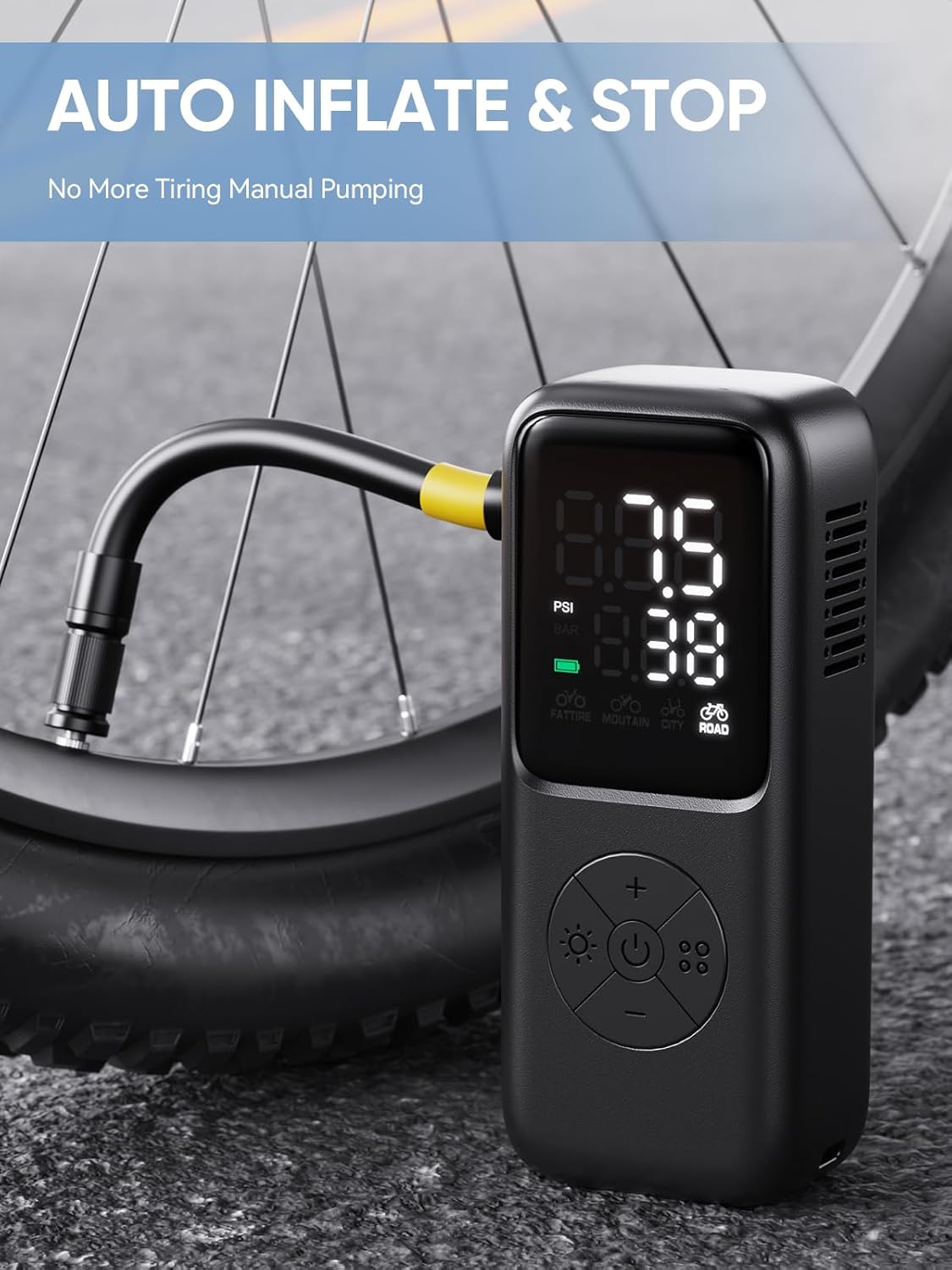
Image: The GPUTEK BL02 pump is compact and lightweight, measuring approximately 13 x 5.3 x 3.5 cm and weighing 230g, making it easy to carry in a pocket or bike bag.
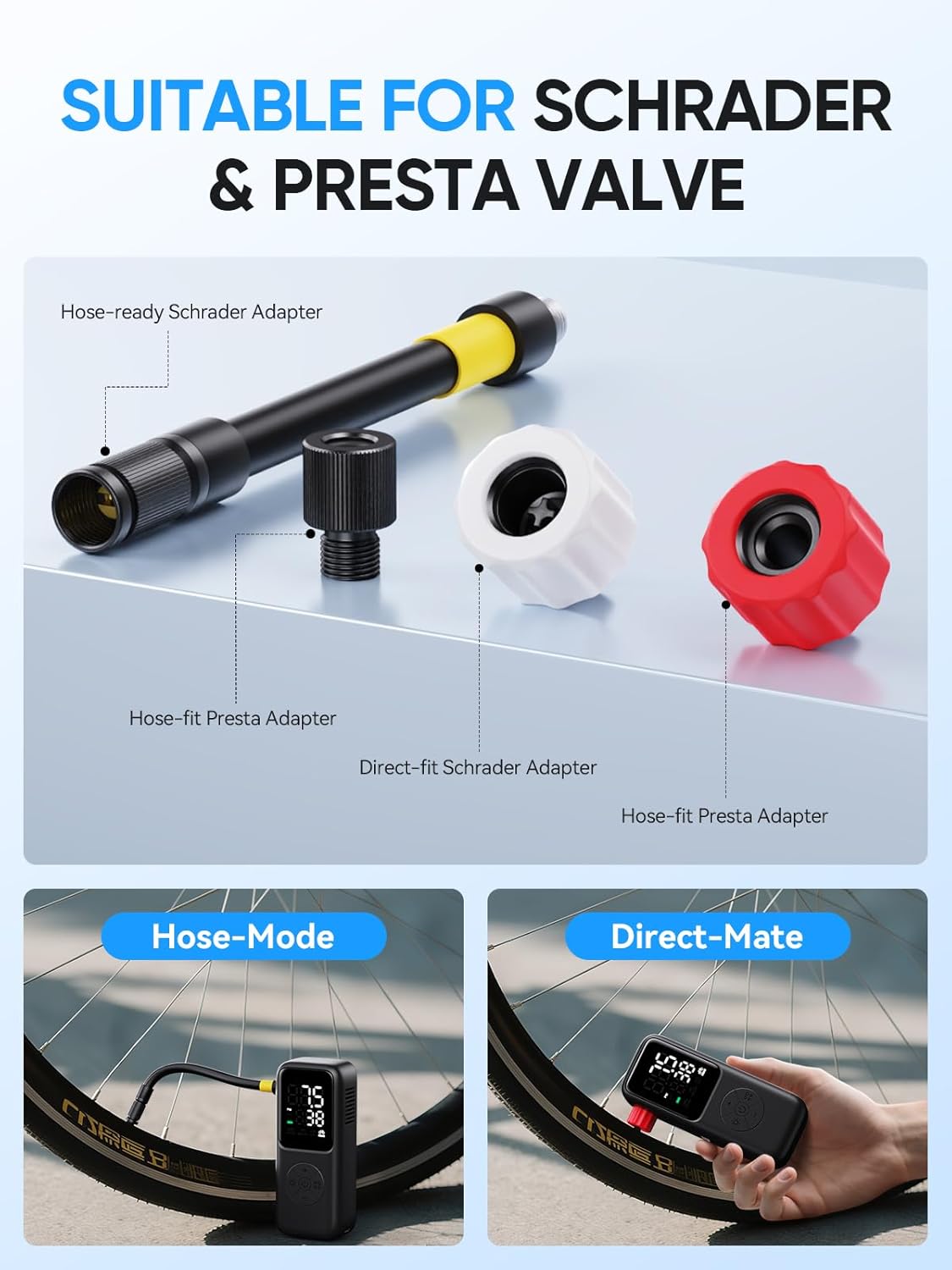
Image: The pump features a digital display for real-time pressure monitoring, battery level, and selection of preset inflation modes. It offers a maximum inflation of 120 PSI with an accuracy of ±0.1 PSI/0.1 BAR.
Controls and Display:
- Digital Display: Shows real-time pressure, target pressure, battery level, and selected mode.
- Power Button: Turns the pump on/off.
- Unit Button: Switches between PSI and BAR pressure units.
- Mode Selection Button: Cycles through preset inflation modes.
- +/- Buttons: Adjusts the target pressure.
5. Setup
5.1 Charging the Pump
Before first use, fully charge the GPUTEK BL02 pump. Connect the provided USB charging cable to the pump's charging port and to a suitable USB power adapter (not included). The battery indicator on the display will show charging status. A full charge typically takes a few hours.
The pump is equipped with a 2400 mAh battery, supporting multiple inflation cycles on a single charge.
5.2 Attaching Valve Adapters
The pump supports both Schrader and Presta valves. Choose the appropriate adapter based on your tire valve type.

Image: The pump comes with adapters for both Schrader and Presta valves, allowing for hose-mode or direct-fit connections.
- For Schrader Valves: You can use the direct-fit Schrader adapter by screwing it directly onto the pump's output, or use the hose with the hose-ready Schrader adapter.
- For Presta Valves: Use the hose-fit Presta adapter. Screw the Presta adapter onto the hose, then attach the hose to the pump.
- For Sports Balls: Attach the ball needle adapter to the hose.
6. Operating Instructions
6.1 Powering On/Off
- To Power On: Press and hold the Power button for a few seconds until the display illuminates.
- To Power Off: Press and hold the Power button again. The pump will also automatically shut off after a period of inactivity.
6.2 Understanding the Display
The digital display shows:
- Real-time Pressure: The current pressure of the connected item.
- Target Pressure: The desired pressure you set.
- Pressure Unit: PSI or BAR.
- Battery Level: Indicates remaining battery charge.
- Preset Modes: Icons representing the selected inflation mode.
6.3 Selecting Inflation Modes
The GPUTEK BL02 offers 5 preset modes and a custom mode:

Image: The pump features 5 preset inflation modes for different bicycle types and a custom mode, adjustable from 2 to 120 PSI.
- Press the Mode Selection button to cycle through: Fat Tire, Mountain Bike, City Bike, Road Bike, and Custom Mode.
- Each preset mode has a recommended pressure range.
- The Custom Mode allows you to set any pressure between 2 and 120 PSI.
6.4 Setting Target Pressure
- After selecting a mode, use the +/- buttons to adjust the target pressure to your desired PSI or BAR.
- Refer to your tire's sidewall for recommended pressure ranges.
6.5 Connecting to Tire Valve
- Ensure the appropriate adapter is securely attached to the pump or hose.
- Firmly connect the adapter to the tire valve. The display will show the current tire pressure.
6.6 Starting and Stopping Inflation

Image: The GPUTEK BL02 pump automatically inflates and stops once the preset target pressure is reached, eliminating manual effort.
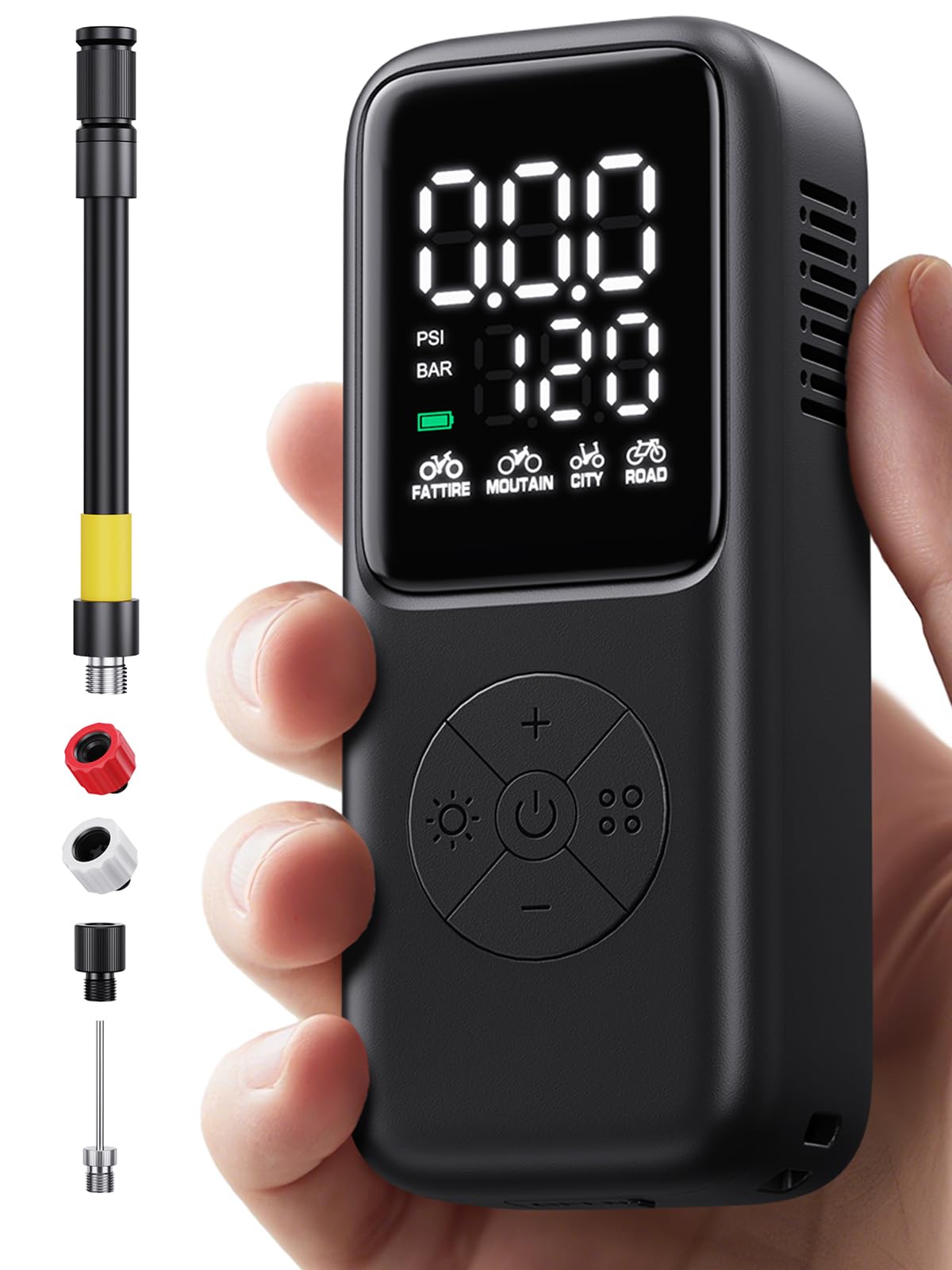
Image: The pump provides powerful and fast inflation, capable of topping off a tire (80 to 100 PSI) in 20 seconds and fully inflating a flat tire (0 to 100 PSI) in 80 seconds (based on 700*25C tires).
- Once the target pressure is set and the pump is connected, press the Power button to start inflation.
- The pump will automatically stop once the target pressure is reached.
- To manually stop inflation at any time, press the Power button again.
6.7 Inflating Sports Balls
Attach the ball needle adapter to the hose, then connect it to the sports ball. Select the Custom Mode and set the appropriate pressure for your ball (e.g., football, basketball, rugby, volleyball). Start inflation as described above.
7. Maintenance
7.1 Cleaning
Wipe the pump with a soft, dry cloth. Do not use harsh chemicals or abrasive cleaners. Ensure no water enters the charging port or air vents.
7.2 Storage
Store the pump in a cool, dry place away from direct sunlight and extreme temperatures. Keep all adapters and accessories together to prevent loss.
7.3 Battery Care
To prolong battery life, charge the pump regularly, even if not in frequent use. Avoid fully discharging the battery for extended periods.
8. Troubleshooting
| Problem | Possible Cause | Solution |
|---|---|---|
| Pump does not turn on | Low battery; Power button not pressed long enough | Charge the pump; Press and hold the Power button for 3 seconds |
| Pump inflates slowly or not at all | Incorrect adapter; Loose connection; Hose kinked; Low battery | Ensure correct adapter and secure connection; Check hose for kinks; Charge the pump |
| Pump stops before reaching target pressure | Low battery; Internal overheating protection | Charge the pump; Allow pump to cool down before resuming operation |
| Inaccurate pressure reading | Loose connection to valve | Ensure the adapter is tightly secured to the tire valve |
9. Specifications
| Feature | Detail |
|---|---|
| Model Number | BG-BL02 |
| Brand | GPUTEK |
| Dimensions | 5.4 x 3.5 x 13 cm |
| Weight | 230 g |
| Material | Acrylonitrile Butadiene Styrene (ABS) |
| Power Source | Rechargeable Battery (2400 mAh) |
| Max Pressure | 120 PSI |
| Pressure Accuracy | ±0.1 PSI / 0.1 BAR |
| Pressure Units | PSI, BAR |
| Valve Compatibility | Schrader, Presta |
| Color | Gray |
10. Warranty and Support
For warranty information or technical support, please refer to the documentation provided with your purchase or contact GPUTEK customer service through their official website or your retailer. Keep your proof of purchase for warranty claims.


