
1. Product Overview
The UTi260T is a powerful, portable, pocket-type infrared thermal imager designed for a wide range of applications including pipeline inspection, industrial manufacturing, refrigeration, construction, equipment maintenance, and automotive repair. It features a 3.5-inch IPS capacitive touch screen and offers a high resolution of 256 x 192 pixels for detailed thermal imaging.
Key capabilities include high and low temperature tracking, NFC quick connection to hotspots, and compatibility with Smart meters via Bluetooth. This device is a cost-effective solution for professional thermal imaging needs.

Figure 1.1: Front view of the UTi260T displaying a thermal image with temperature readings.
2. Key Features
- High Resolution Infrared Sensor: Equipped with a 256x192 resolution sensor for precise thermal inspections.
- Display: 3.5-inch IPS capacitive touch screen with 640x480 display resolution.
- Frame Rate: 25Hz for smooth thermal imaging.
- Visible Light Camera: Integrated 2 million pixel visible light camera.
- Temperature Measurement Range: Wide range from -20°C to 550°C.
- Versatile Imaging Modes: 7 adjustable color palettes (Red hot, high contrast rainbow, rainbow, lava, iron red, black hot, white hot) and 4 image modes (Thermal imaging, visible light, T-Mix/dual light, picture in picture).
- Advanced Connectivity: Bluetooth and NFC for quick connection to hotspots and Smart meters, enabling seamless data transfer.
- Temperature Tracking & Alarm: Full-screen automatic tracking of maximum/minimum temperature, with customizable high and low temperature limit alarms and LED flashing prompts.
- Digital Zoom: 1-8x continuous digital amplification.
- Data Analysis: Mobile APP and PC analysis software available for exporting reports.
- Additional Features: Customizable emissivity, reflection temperature, distance settings, and equipped with LED lighting function.

Figure 2.1: Overview of the UTi260T's core features and capabilities.
3. Setup
3.1 Charging the Device
Before first use, ensure the UTi260T is fully charged. Connect the provided Type-C USB cable to the device's charging port and plug the other end into a compatible USB power adapter (not included) or a computer USB port. The charging indicator will show the charging status.
3.2 Powering On/Off
- Power On: Press and hold the power button located on the side of the device until the screen illuminates.
- Power Off: Press and hold the power button until a power-off prompt appears on the screen, then confirm to shut down.
3.3 Initial Connectivity (NFC & Bluetooth)
The UTi260T supports NFC for quick hotspot connection and Bluetooth for pairing with Smart meters and mobile applications.
- NFC Quick Connection:
To quickly connect to a mobile hotspot:
- Ensure NFC is enabled on your mobile phone.
- Tap your mobile phone near the NFC sensing area on the UTi260T.
- Follow the on-screen prompts on your phone to establish a connection to the UTi260T's hotspot. This allows for quick data transfer and remote viewing.
- Bluetooth Pairing:
For Bluetooth connectivity with Smart meters or the mobile app:
- Enable Bluetooth on both the UTi260T (via settings) and your external device.
- Search for available devices on your external device and select "UTi260T" to pair.
- Confirm the pairing code if prompted.

Figure 3.1: Demonstrating NFC fast connection to a mobile hotspot.

Figure 3.2: UTi260T connected to a mobile application for remote viewing and control.
4. Operating Instructions
4.1 Basic Operation and Navigation
The UTi260T features a touch screen for intuitive navigation. Tap icons and menus to access different functions and settings.
- Home Screen: Displays the live thermal image, temperature readings, and quick access icons.
- Menu Access: Swipe or tap the menu icon (if present) to open the main menu for detailed settings.
4.2 Image Modes and Color Palettes
The device offers various image modes and color palettes to optimize visualization for different scenarios.
- Changing Image Mode: Navigate to the "Image Mode" setting. Select from Thermal imaging, Visible light, T-Mix/dual light, or Picture in picture.
- Selecting Color Palette: Access the "Color Palette" option in the settings. Choose from 7 available palettes (e.g., Iron Red, Rainbow, Black Hot, White Hot) to best highlight temperature differences.
4.3 Temperature Measurement and Analysis
- Spot Temperature: The device automatically displays the temperature at the center point of the screen.
- Max/Min Temperature Tracking: The UTi260T can automatically track and display the highest and lowest temperatures within the current field of view. This feature is always active on the main display.
- Temperature Unit: Change the temperature unit between Celsius (°C) and Fahrenheit (°F) in the settings.
- Emissivity Adjustment: For accurate temperature readings, adjust the emissivity setting based on the material being inspected. Refer to standard emissivity tables for common materials.
- Reflection Temperature & Distance: These parameters can be adjusted in settings to compensate for environmental factors and improve measurement accuracy.
4.4 High and Low Temperature Alarm
The UTi260T features customizable high and low temperature alarms to alert users when temperatures exceed or fall below set thresholds.
- Navigate to the "Alarm Settings" menu.
- Set the desired high temperature limit.
- Set the desired low temperature limit.
- Enable the alarm function. When a temperature exceeds the high limit or falls below the low limit, the device will provide an LED flashing prompt and an on-screen alert.
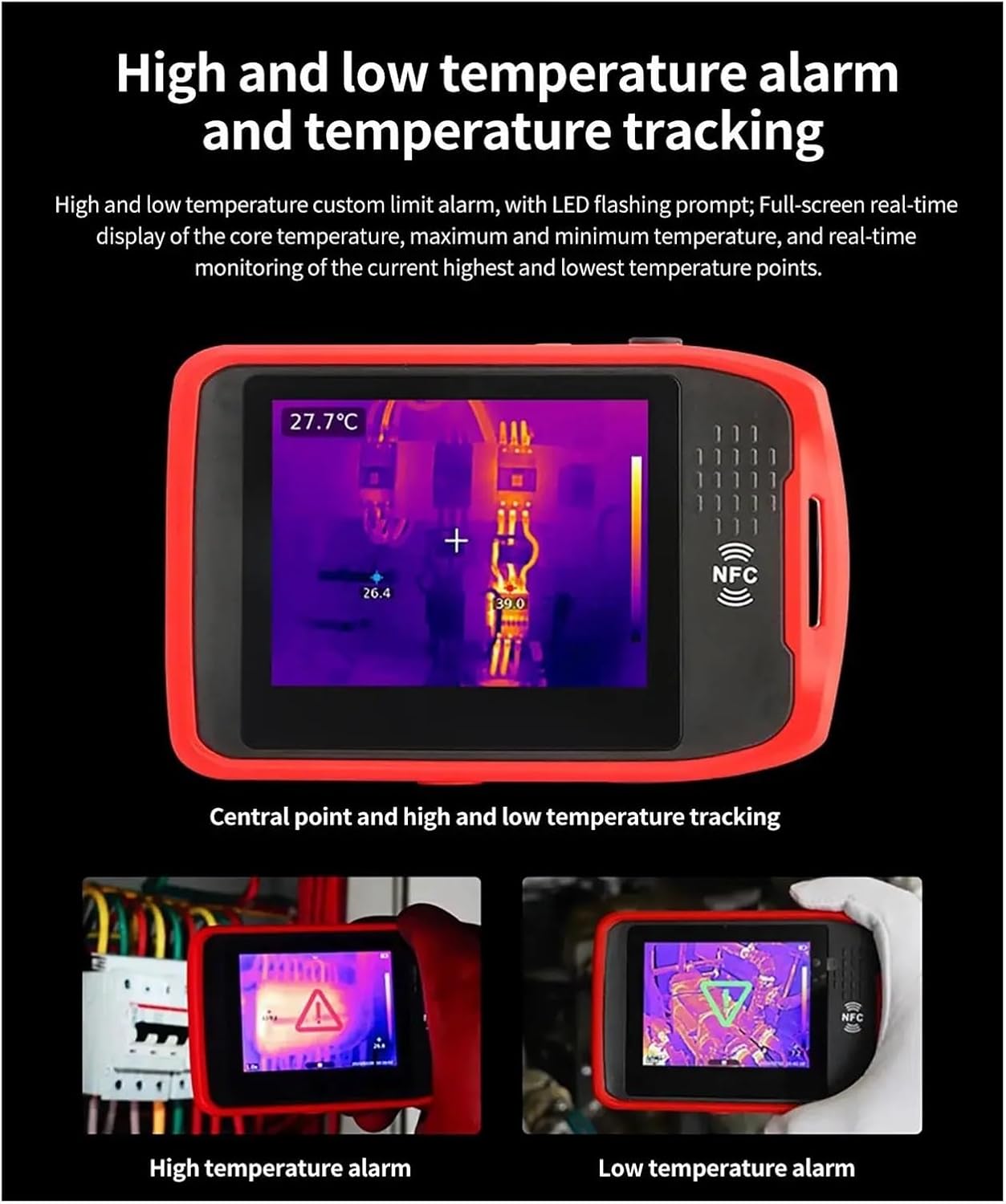
Figure 4.1: Visual indicators for high and low temperature alarms.
4.5 Digital Zoom
Use the digital zoom function to magnify the thermal image from 1x to 8x for closer inspection of specific areas. This can be adjusted via the touch screen interface.
4.6 Data Storage and Export
Thermal images are saved in JPG format. Connect the device to a computer via the Type-C USB interface to transfer images. Alternatively, use the mobile APP or PC analysis software to view, analyze, and export reports of captured thermal data.
5. Maintenance
5.1 Cleaning
- Device Body: Use a soft, damp cloth to wipe the exterior of the device. Do not use abrasive cleaners or solvents.
- Lens: Gently clean the infrared lens and visible light lens with a lens cleaning cloth or a soft, lint-free cloth. Avoid touching the lens directly with fingers.
5.2 Storage
Store the UTi260T in a cool, dry place away from direct sunlight, extreme temperatures, and high humidity. When not in use for extended periods, ensure the device is fully charged before storage and recharge it periodically to maintain battery health.
5.3 Battery Care
To prolong battery life, avoid fully discharging the device frequently. Charge the device using only the provided Type-C USB cable. If the device will not be used for a long time, charge it to about 50% before storing.
6. Troubleshooting
| Problem | Possible Cause | Solution |
|---|---|---|
| Device does not power on. | Low battery; device malfunction. | Charge the device for at least 30 minutes. If it still doesn't power on, contact customer support. |
| Thermal image appears blurry or unclear. | Dirty lens; incorrect focus (if applicable); extreme temperature differences. | Clean the infrared lens gently. Ensure the object is within the optimal measurement distance. |
| Bluetooth/NFC connection fails. | Bluetooth/NFC not enabled; device out of range; interference. | Ensure Bluetooth/NFC is enabled on both devices. Move closer to the device. Restart both devices. |
| Temperature readings seem inaccurate. | Incorrect emissivity setting; reflective surfaces; environmental factors. | Adjust emissivity based on the material. Avoid measuring highly reflective surfaces directly. Consider ambient temperature and distance. |
| Screen is unresponsive. | Software glitch; device frozen. | Perform a soft reset by holding the power button until the device restarts (if applicable) or let the battery drain and recharge. |
If the problem persists after attempting these solutions, please contact KKKMart customer support for further assistance.
7. Specifications
| Parameter | Value |
|---|---|
| Model | UTi260T |
| Detector Type | Uncooled Infrared Detector |
| Infrared Resolution | 256x192 pixels |
| Display Resolution | 640x480 pixels |
| Visible Light Resolution | 2 million pixels |
| Pixel Size | 12µm |
| Infrared Response Band | 8-14µm |
| Frame Rate | 25Hz |
| Thermal Sensitivity (NETD) | <50mK@25°C |
| Temperature Measurement Range | -20°C to 550°C (-4°F to 1022°F) |
| Image Modes | Thermal imaging, Visible light, T-Mix/dual light, Picture in picture |
| Color Palettes | 7 (Red hot, high contrast rainbow, rainbow, lava, iron red, black hot, white hot) |
| Digital Zoom | 1-8x continuous |
| Image Format | JPG |
| Data Interface | Type-C USB |
| Connectivity | Bluetooth, NFC |
| LED Lighting | Yes |
| Item Weight | 1.76 pounds (approx. 0.8 kg) |
8. Warranty and Support
KKKMart products are manufactured to high quality standards. For information regarding warranty coverage, please refer to the warranty card included with your product or visit the official KKKMart website.
For technical support, troubleshooting assistance, or service inquiries, please contact KKKMart customer service through their official channels. Please have your product model number (UTi260T) and purchase information ready when contacting support.
Online Resources:
- Official KKKMart Website (for product updates, FAQs, and support contact information)
- Mobile APP and PC analysis software downloads (available on the official website)