
1. Introduction
Thank you for choosing the SOBATTY 2.1 Channel Home Audio Amplifier. This amplifier is designed to provide high-quality stereo audio with a dedicated subwoofer output, Bluetooth 5.0 connectivity, USB playback, and multiple input options including RCA and Coaxial. It also features two microphone inputs with echo control, making it suitable for home entertainment, karaoke, and theater speaker systems. Please read this manual carefully before operation to ensure proper use and to maximize the performance of your device.
2. Safety Information
- Power Supply: Ensure the amplifier is connected to a power source matching the specified voltage (110V/60Hz).
- Ventilation: Do not block ventilation openings. Ensure adequate airflow around the unit to prevent overheating.
- Moisture: Keep the amplifier away from water, moisture, and high humidity environments.
- Heat Sources: Avoid placing the unit near heat sources such as radiators, heat registers, stoves, or other heat-producing appliances.
- Servicing: Do not attempt to service this product yourself. Refer all servicing to qualified service personnel.
- Speaker Impedance: Connect speakers with an impedance of 4-16 Ohms. Connecting speakers outside this range may damage the amplifier.
3. What's in the Box
- SOBATTY 2.1 Channel Home Audio Amplifier (x1)
- Remote Control (x1)
- Instruction Manual (x1)
Note: Wireless microphones and their receiver, if included with your specific package (e.g., '2.1CH +UHF MIC' variant), will be separate items. Please check your packaging contents.
4. Product Overview
4.1 Front Panel Controls
This image displays the front panel of the amplifier, highlighting the various knobs, buttons, and ports for user interaction. Key controls include master volume, microphone volume, music volume, input selection, and tone adjustments.
- MIC VOL: Adjusts the overall volume of the connected microphones.
- INPUT: Selects the audio input source (e.g., Bluetooth, USB, RCA, Coaxial).
- P/P (Play/Pause): Controls playback for USB or Bluetooth audio.
- PREV (Previous): Skips to the previous track for USB or Bluetooth audio.
- NEXT: Skips to the next track for USB or Bluetooth audio.
- MUSIC VOL: Adjusts the overall volume of the music playback.
- POWER: Main power switch for the amplifier.
- ECHO.VOL: Adjusts the echo effect level for microphones.
- MIC.BASS: Adjusts the bass level for microphones.
- MIC.TREBLE: Adjusts the treble level for microphones.
- MIC1 / MIC2: 6.35mm jack inputs for wired microphones.
- MUSIC.BASS: Adjusts the bass level for music playback.
- MUSIC.TREBLE: Adjusts the treble level for music playback.
- SUB.VOL: Adjusts the volume level of the subwoofer output.
- USB: USB port for playing audio files from a USB drive.
- Display Screen: Shows current input mode, track information, or Bluetooth status.
4.2 Rear Panel Connections

This image illustrates the rear panel of the amplifier, detailing the various audio input and output connections, speaker terminals, and power input. A wireless microphone receiver unit is also shown connected on top.
- COAXIAL: Digital audio input.
- INPUT (RCA): Analog audio input (Left/Right).
- OUTPUT (RCA): Analog audio output (Left/Right).
- Double Bass (RCA): Dedicated output for enhanced bass signal.
- Speaker Connect (4-16 Ohms): Screw terminals for connecting passive speakers (Left/Right).
- Sub-woofer OUT: RCA output for connecting an active subwoofer.
- POWER (~110V/60Hz): AC power input.
- Wireless Mic Receiver (ANT-A, ANT-B): Antenna connections for wireless microphones.
- Wireless Mic Receiver (MIC-A+B OUTPUT): Audio output from the wireless microphone receiver to the amplifier.
- Wireless Mic Receiver (POWER): DC power input for the wireless microphone receiver.
4.3 Remote Control

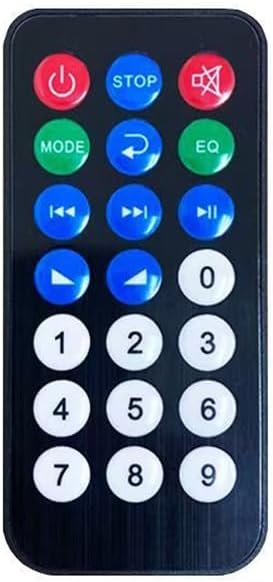
The remote control provides convenient access to various functions of the amplifier from a distance.
- Power Button: Turns the amplifier on or off.
- STOP: Stops playback.
- MUTE: Mutes or unmutes the audio output.
- MODE: Cycles through input sources.
- Return/EQ: Returns to previous menu or cycles through equalizer presets.
- Previous/Next: Skips tracks.
- Play/Pause: Plays or pauses audio.
- Volume Up/Down: Adjusts master volume.
- Number Pad (0-9): For direct track selection (if supported by media).
5. Setup Instructions
5.1 Connecting Speakers
- Ensure the amplifier is powered off.
- Connect your passive stereo speakers (4-16 Ohms impedance) to the "Speaker Connect" terminals on the rear panel.
- Match the positive (+) terminal of the amplifier to the positive (+) terminal of your speaker, and the negative (-) terminal of the amplifier to the negative (-) terminal of your speaker.
- Ensure all connections are secure to prevent short circuits.
5.2 Connecting a Subwoofer
- If you have an active subwoofer, connect its RCA input to the "Sub-woofer OUT" port on the amplifier's rear panel.
- Adjust the subwoofer's volume and crossover frequency directly on the subwoofer unit, and fine-tune its level using the "SUB.VOL" knob on the amplifier's front panel.
5.3 Connecting Audio Sources
- RCA Input: Connect devices like DVD players, CD players, or TVs using RCA cables to the "INPUT (RCA)" ports.
- Coaxial Input: Connect devices with a coaxial digital audio output (e.g., some TVs, Blu-ray players) to the "COAXIAL" port.
- USB Input: Insert a USB flash drive into the "USB" port on the front panel for direct audio playback.
5.4 Connecting Wireless Microphones (If Applicable)
- Connect the wireless microphone receiver's audio output (e.g., MIC-A+B OUTPUT) to one of the amplifier's RCA INPUT ports using an appropriate cable.
- Connect the power adapter to the wireless microphone receiver's power input.
- Ensure the antennas (ANT-A, ANT-B) are securely attached to the receiver for optimal signal reception.
5.5 Power Connection
- After all audio and speaker connections are made, connect the amplifier's power cord to a standard 110V/60Hz AC outlet.
- Turn on the amplifier using the "POWER" switch on the front panel.
6. Operating Instructions
6.1 Power On/Off
Press the "POWER" switch on the front panel to turn the amplifier on or off. The display screen will illuminate when the unit is powered on.
6.2 Input Selection
Press the "INPUT" button on the front panel or the "MODE" button on the remote control to cycle through available audio sources: Bluetooth, USB, RCA, Coaxial. The selected input will be shown on the display.
6.3 Bluetooth Pairing
- Select "Bluetooth" as the input source. The display will show "BLUE" and typically flash, indicating it's in pairing mode.
- On your mobile device (smartphone, tablet, etc.), enable Bluetooth and search for available devices.
- Select "SOBATTY" (or similar name) from the list of devices.
- Once paired, the display will show a steady "BLUE" indicator, and you can play audio from your device through the amplifier.
6.4 USB Playback
- Insert a USB flash drive containing audio files into the front "USB" port.
- Select "USB" as the input source. The amplifier will automatically begin playing audio files.
- Use the "P/P", "PREV", and "NEXT" buttons on the front panel or remote control to manage playback.
6.5 Volume and Tone Adjustment
- MUSIC VOL: Adjusts the main music volume.
- MIC VOL: Adjusts the microphone volume.
- SUB.VOL: Adjusts the subwoofer output volume.
- MUSIC.BASS / MUSIC.TREBLE: Adjusts the bass and treble frequencies for music playback.
- MIC.BASS / MIC.TREBLE: Adjusts the bass and treble frequencies for microphone input.
- ECHO.VOL: Controls the intensity of the echo effect for microphones.
6.6 Microphone Usage
Connect wired microphones to the MIC1 or MIC2 jacks on the front panel, or ensure your wireless microphone receiver is properly connected and powered on. Adjust "MIC VOL", "MIC.BASS", "MIC.TREBLE", and "ECHO.VOL" to achieve desired sound.
7. Maintenance
- Cleaning: Use a soft, dry cloth to clean the exterior of the amplifier. Do not use liquid cleaners or aerosols.
- Storage: When not in use for extended periods, disconnect the power cord and store the unit in a cool, dry place.
- Ventilation: Regularly check that the ventilation openings are clear of dust and debris.
8. Troubleshooting
| Problem | Possible Cause | Solution |
|---|---|---|
| No power | Power cord not connected; Power switch off; Outlet malfunction | Ensure power cord is securely plugged in; Turn on power switch; Test outlet with another device. |
| No sound output | Incorrect input selected; Volume too low; Speaker connections loose; Mute function active | Select correct input source; Increase MUSIC VOL; Check speaker wiring; Deactivate MUTE. |
| Distorted sound | Volume too high; Poor audio source quality; Speaker impedance mismatch | Reduce volume; Try a different audio source; Ensure speakers are 4-16 Ohms. |
| Weak Bluetooth signal or disconnections | Device too far; Obstructions; Interference | Move Bluetooth device closer to the amplifier; Remove obstructions; Avoid other wireless devices. |
| Microphone not working | Microphone not connected; MIC VOL too low; Wireless mic receiver off/unpaired | Ensure microphone is plugged in; Increase MIC VOL; Check wireless mic receiver power and pairing. |
9. Specifications
| Feature | Detail |
|---|---|
| Product Dimensions | 8.86"D x 13"W x 2.75"H (22.5 x 33 x 7 cm) |
| Item Weight | 6.38 pounds (2.89 kg) |
| Model Number | NS-21K-0TP8D |
| Brand | SOBATTY |
| Connectivity Technology | Bluetooth 5.0, USB |
| Controller Type | Remote Control |
| Special Feature | Built-In Bluetooth |
| Compatible Devices | Television, Personal Computer, Tablet, Smartphone |
| Connector Type | Coaxial, Optical (via adapter if needed), RCA, USB |
| Audio Output Mode | Stereo (2.1 Channel) |
| Surround Sound Channel Configuration | 3 (Implies 2.1 channel with subwoofer) |
| Power Supply | ~110V/60Hz |
| Rated Power Output | 100W (as per product image) |
10. Warranty and Support
For warranty information and technical support, please refer to the documentation provided with your purchase or contact SOBATTY customer service through the retailer where the product was purchased. Keep your proof of purchase for warranty claims.