Introduction
This manual provides instructions for the Generic Replacement Remote Control designed for various Mitsubishi Electric Air Conditioner models, including MSH-A18WV, MSH-A26WV, MSH-A24WV, and MSH-A30WV. This remote control is pre-programmed and requires no additional setup or pairing. Simply insert batteries, and it is ready for use.
Setup: Battery Installation
The remote control requires two AAA batteries (not included). Follow these steps to install the batteries:
- Locate the battery compartment on the back of the remote control.
- Slide the battery compartment cover downwards to open it.
- Insert two new AAA batteries, ensuring the positive (+) and negative (-) terminals align correctly with the markings inside the compartment.
- Slide the battery compartment cover back into place until it clicks securely.
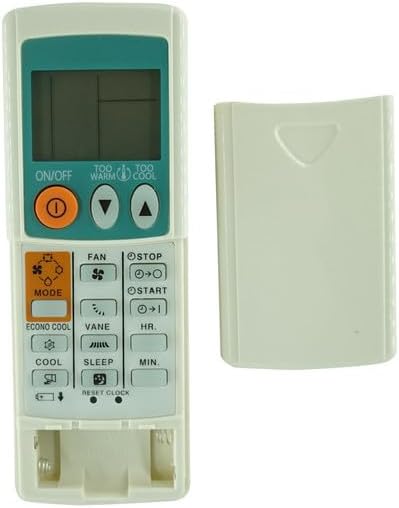
Image 1: Front view of the remote control with the battery compartment open, illustrating the correct orientation for AAA battery insertion. The remote features an LCD screen and various control buttons.

Image 2: Back view of the remote control, displaying the closed battery compartment cover. This is where the cover is slid to access the battery slots.
Once batteries are installed, the remote control is ready for immediate use with compatible Mitsubishi Electric Air Conditioners.
Operating Instructions
The remote control features an intuitive button layout for easy operation of your air conditioner. Below is a guide to the primary functions:
- ON/OFF Button: Press to turn the air conditioner unit on or off.
- Temperature Adjustment Buttons (TOO WARM / TOO COOL): Use the up (▲) and down (▼) arrows to increase or decrease the desired temperature setting.
- MODE Button: Press to cycle through available operating modes:
- COOL: For cooling the room.
- HEAT: For heating the room (if supported by your AC unit).
- FAN: Operates the fan only, without heating or cooling.
- DRY: For dehumidification.
- FAN Speed Button: Adjusts the fan speed (e.g., Low, Medium, High, Auto).
- VANE Button: Controls the direction of the airflow (swing function).
- TIMER Buttons (START / STOP, HR., MIN.): Set a timer for the air conditioner to turn on or off automatically. Use HR. (Hour) and MIN. (Minute) to adjust the time.
- SLEEP Button: Activates sleep mode, which adjusts temperature and fan speed for comfortable sleep and energy saving.
- ECONO COOL Button: Engages energy-saving cooling operation.
- RESET CLOCK Button: Resets the internal clock of the remote control.
Refer to your air conditioner's original manual for specific functions and their compatibility with your unit.
Maintenance
- Battery Replacement: Replace batteries when the remote control's display becomes dim or its response becomes sluggish. Always replace both batteries simultaneously with new AAA batteries.
- Cleaning: Wipe the remote control with a soft, dry cloth. Do not use liquid cleaners, sprays, or abrasive materials, as these can damage the remote.
- Storage: If the remote control will not be used for an extended period, remove the batteries to prevent leakage and potential damage.
Troubleshooting
- Remote Control Not Responding:
- Ensure batteries are correctly installed with the correct polarity (+/-).
- Replace old batteries with new AAA batteries.
- Check for any obstructions between the remote control and the air conditioner unit's receiver.
- Ensure you are within the effective range of the air conditioner's infrared receiver.
- Air Conditioner Not Responding to Specific Functions:
- Verify that your specific Mitsubishi Electric air conditioner model supports the function you are trying to use (e.g., HEAT mode, ECONO COOL).
- If you are unsure about compatibility, please contact customer support.
Specifications
| Brand | Generic |
| Compatible Devices | Mitsubishi Electric Air Conditioner (MSH-A18WV, MSH-A26WV, MSH-A24WV, MSH-A30WV) |
| Power Source | 2 x AAA Batteries (not included) |
| Special Feature | No additional programming required |
| Max Number of Supported Devices | 1 |
Support
For further assistance or inquiries regarding this replacement remote control, please contact your retailer or the manufacturer's customer support. When contacting support, please provide the model numbers of your air conditioner unit for accurate assistance.


